Need Many Identical VMs? Create a VM Scale Set
CloudTrips needs several identical web servers. An Azure Virtual Machine Scale Set manages VM instances from a common configuration and can add or remove instances as demand changes.
This trip creates two Ubuntu VMs behind a Standard Load Balancer. Cloud-init installs NGINX on every instance, and the load balancer exposes one public HTTP address for the complete group.
Choose an Orchestration Mode
| Flexible | Uniform |
|---|---|
| Recommended for new deployments | Traditional model for strictly identical fleets |
| Instances are standard Azure VMs | Instances are VMSS-specific child resources |
| More control over individual VMs, NICs, and disks | Instances are primarily managed as a group |
| Supports mixed VM sizes and up to 1,000 VMs with availability guarantees | Supports up to 3,000 identical instances |
Both modes support load balancing and autoscaling. This trip uses Flexible. The orchestration mode cannot be changed after creation.
Create the Resource Group
Open Resource groups > Create and enter:
Subscription: CloudTrips TEST
Resource group: rg-cloudtrips-vmss-test-weu
Region: West Europe
Select Review + create > Create.
Create the Virtual Network
Open Virtual networks > Create.
On Basics, configure:
Resource group: rg-cloudtrips-vmss-test-weu
Name: vnet-cloudtrips-vmss-test-weu
Region: West Europe
On IP addresses, configure:
IPv4 address space: 10.82.0.0/16
Subnet name: snet-web
Subnet range: 10.82.1.0/24
Select Review + create > Create.
Create the Network Security Group
Open Network security groups > Create:
Resource group: rg-cloudtrips-vmss-test-weu
Name: nsg-cloudtrips-vmss-test-weu
Region: West Europe
After deployment, open the NSG and select Inbound security rules > Add:
Source: Any
Source port ranges: *
Destination: Any
Service: HTTP
Destination port: 80
Protocol: TCP
Action: Allow
Priority: 1010
Name: Allow-HTTP
Open vnet-cloudtrips-vmss-test-weu > Subnets > snet-web. Associate
nsg-cloudtrips-vmss-test-weu and save.
Do not add a public SSH rule. Use Run Command, Bastion, VPN, or another approved private management path for administration.
Create the Public IP Address
Open Public IP addresses > Create:
Resource group: rg-cloudtrips-vmss-test-weu
Name: lb-cloudtrips-vmss-test-weu-publicip
Region: West Europe
IP version: IPv4
SKU: Standard
Availability zone: Zone-redundant, when available
Tier: Regional
IP address assignment: Static
Routing preference: Microsoft network
Select Review + create > Create.
Create the Load Balancer
Open Load balancers > Create. On Basics, configure:
Resource group: rg-cloudtrips-vmss-test-weu
Name: lb-cloudtrips-vmss-test-weu
Region: West Europe
SKU: Standard
Type: Public
Tier: Regional
On Frontend IP configuration, select Add a frontend IP configuration:
Name: fe-web
IP version: IPv4
IP type: IP address
Public IP address: lb-cloudtrips-vmss-test-weu-publicip
On Backend pools, add:
Name: bepool-web
Virtual network: vnet-cloudtrips-vmss-test-weu
Backend pool configuration: NIC
Leave the backend pool empty. The scale-set instances will be added later.
On Inbound rules, add a health probe:
Name: hp-http
Protocol: TCP
Port: 80
Interval: 5 seconds
Unhealthy threshold: 2
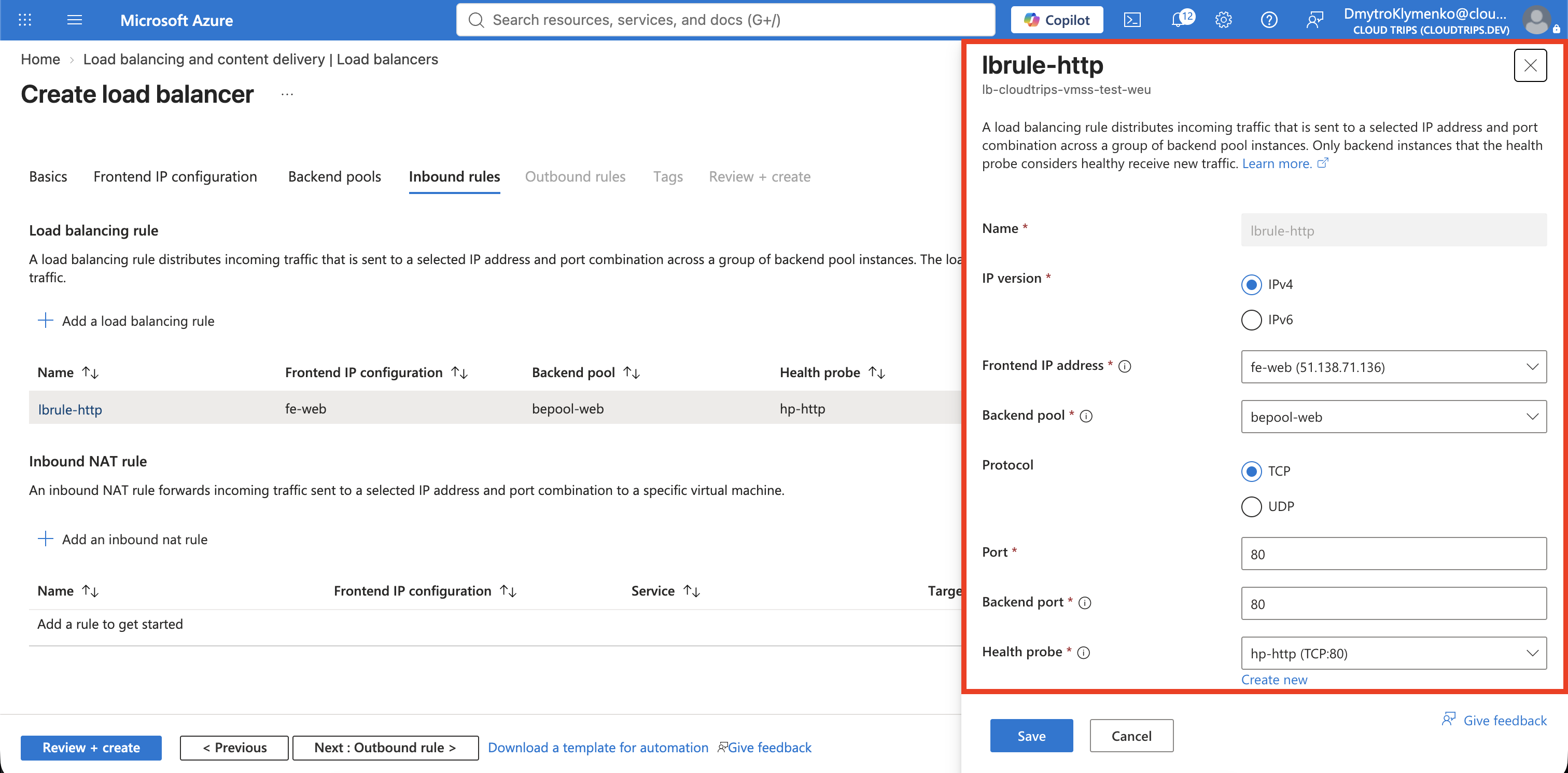
Add a load-balancing rule:
Name: lbrule-http
IP version: IPv4
Frontend IP address: fe-web
Backend pool: bepool-web
Protocol: TCP
Port: 80
Backend port: 80
Health probe: hp-http
Session persistence: None
Floating IP: Disabled
TCP reset: Enabled
The rule distributes public port 80 connections across healthy instances.
Add Explicit Outbound Access
Flexible scale-set instances do not receive default outbound connectivity. Without an explicit outbound path, cloud-init cannot download NGINX from the Ubuntu repositories.
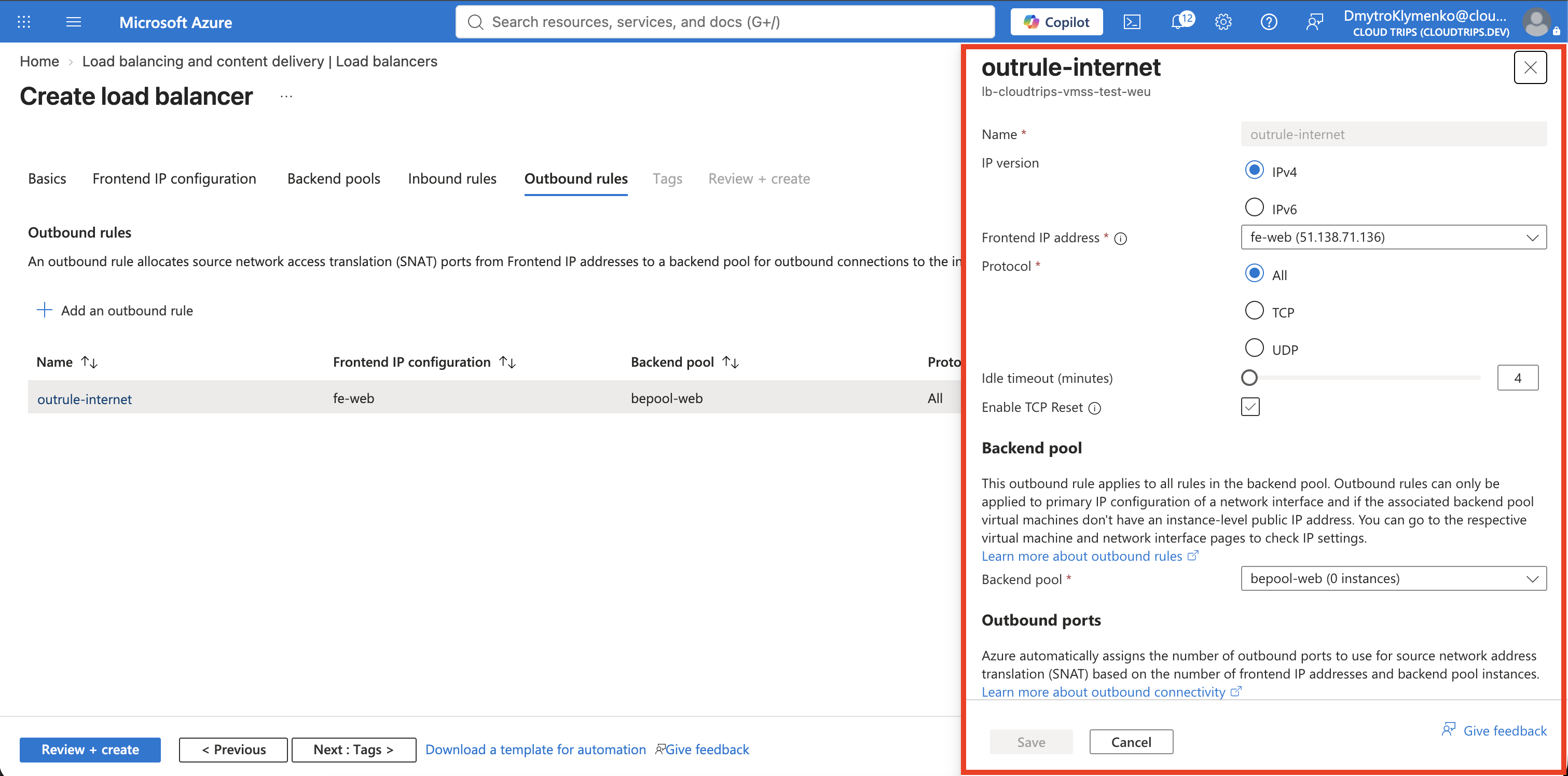
In the load balancer, open Outbound rules > Add:
Name: outrule-internet
IP version: IPv4
Frontend IP address: fe-web
Protocol: All
Backend pool: bepool-web
Port allocation: Manually choose number of outbound ports
Outbound ports: 1024
Idle timeout: 4 minutes
TCP reset: Enabled
This rule uses source NAT, or SNAT, for connections initiated by the VMs. It does not permit new inbound internet connections.
The related rule types have different purposes:
| Rule | Purpose |
|---|---|
| Load-balancing rule | Sends one public application port to all healthy backend instances |
| Inbound NAT rule | Maps a unique public port to one specific instance and port |
| Outbound rule | Gives backend instances SNAT-based outbound connectivity |
| NSG rule | Permits or denies traffic at the subnet or NIC boundary |
This lab does not need an inbound NAT rule. The NSG’s default
AllowAzureLoadBalancerInBound rule permits Azure health probes, while
Allow-HTTP permits client traffic on TCP 80.
Create the VM Scale Set
Open Virtual machine scale sets > Create.
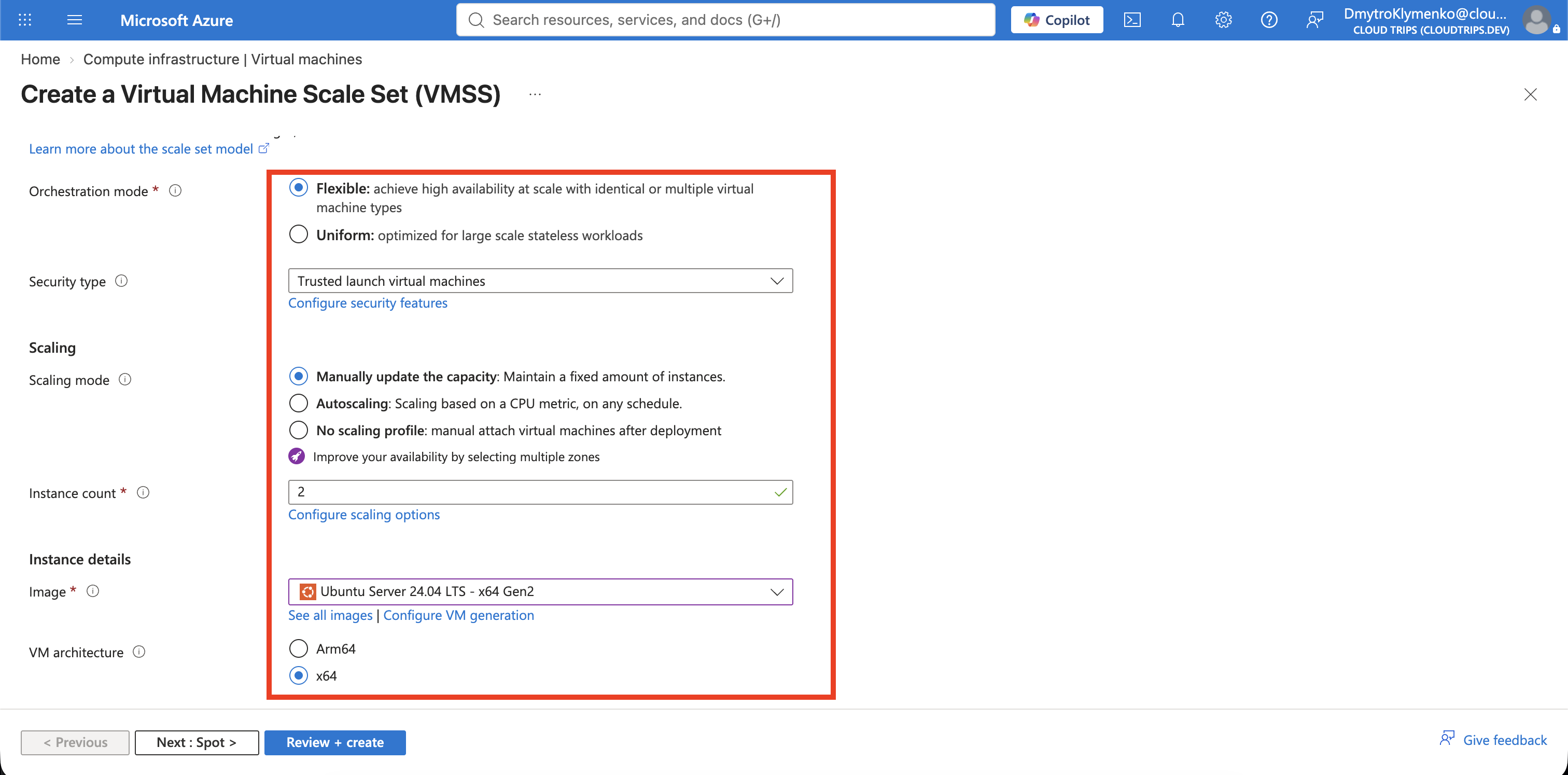
On Basics, configure:
Resource group: rg-cloudtrips-vmss-test-weu
Scale set name: vmss-cloudtrips-web-test-weu
Region: West Europe
Availability zone: None
Orchestration mode: Flexible
Security type: Trusted launch virtual machines
Image: Ubuntu Server 24.04 LTS - x64 Gen2
Size: Standard_D2als_v7
Authentication type: SSH public key
Username: azureuser
SSH public key source: Generate new key pair
Key pair name: sshkey-cloudtrips-vmss-test-weu
Scaling mode: Manual
Instance count: 2
Review the displayed price. Leave Spot instances disabled and select Standard SSD LRS for the OS disk.
Connect the Scale Set to the Network
On Networking, select:
Virtual network: vnet-cloudtrips-vmss-test-weu
Subnet: snet-web
Network security group: None at NIC level
Public IP address per VM instance: Disabled
Load balancing: Azure load balancer
Load balancer: lb-cloudtrips-vmss-test-weu
Backend pool: bepool-web
The subnet already has the NSG, so do not create a second NIC-level NSG. Do not
create another public IP or load balancer. The instances must not have their
own public IP addresses: Azure does not allow VMSS NICs with per-instance public
IPs to join a backend pool that has a load-balancer outbound rule. All inbound
and outbound internet traffic in this design uses
lb-cloudtrips-vmss-test-weu-publicip.
Install NGINX with Cloud-Init
NGINX is an open-source web server. It listens for HTTP requests on TCP port
80 and returns web content to the client. It is not required by a VM Scale
Set; this trip uses it as a small, realistic application that can run
identically on every instance.
Cloud-init installs and starts NGINX during initial provisioning. It then replaces the default page with a text response containing the VM hostname. This gives the exercise three useful checks:
- The TCP health probe confirms that NGINX is listening before the load balancer sends traffic to the instance.
- A request to the load balancer proves that the application is reachable.
- The hostname in the response identifies which instance handled the request and shows whether newly scaled-out VMs received the same configuration.
The request path is:
Client > Load balancer public IP:80 > Healthy VMSS instance:80 > NGINX pageOn Advanced, paste into Custom data and cloud init:
#cloud-config
package_update: true
packages:
  - nginx
write_files:
  - path: /usr/local/bin/cloudtrips-index.sh
    permissions: '0755'
    content: |
      #!/bin/sh
      printf 'CloudTrips VM Scale Set\nInstance: %s\n' "$(hostname)" > /var/www/html/index.html
runcmd:
  - /usr/local/bin/cloudtrips-index.sh
  - systemctl enable --now nginx
Do not place secrets in custom data. Add the usual CloudTrips TEST tags, select Review + create, and then Create. Download and protect the private key.
Verify Both Instances
Open the scale set > Instances. Wait until both VMs are running.
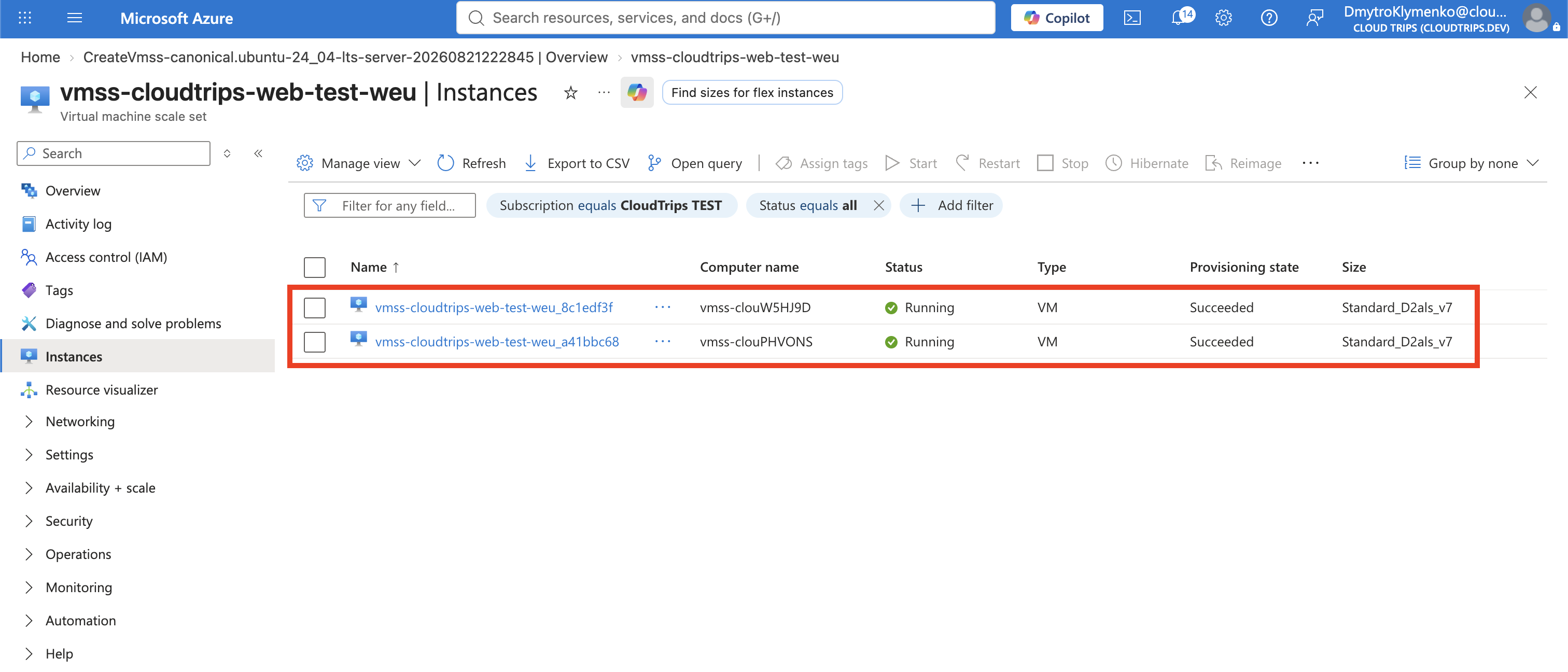
Open each instance > Run command > RunShellScript and run:
cloud-init status --long
systemctl is-active nginx
curl --fail http://localhost/
Expected output includes status: done, active, and the instance hostname.
If NGINX was not installed, inspect /var/log/cloud-init-output.log and confirm
that outrule-internet is associated with bepool-web. After correcting
outbound access, repair the instance with Run Command:
sudo apt-get update
sudo apt-get install -y nginx
printf 'CloudTrips VM Scale Set\nInstance: %s\n' "$(hostname)" |
  sudo tee /var/www/html/index.html
sudo systemctl enable --now nginx

systemctl is-active nginx
curl --fail http://localhost/
An active result and the CloudTrips page confirm that NGINX works. debconf
warnings about a missing interactive terminal are expected in Run Command and
do not indicate an installation failure. A manual repair does not validate
cloud-init; verify automatic provisioning by creating or scaling out a new
instance with the corrected custom data.
Test the Public Endpoint
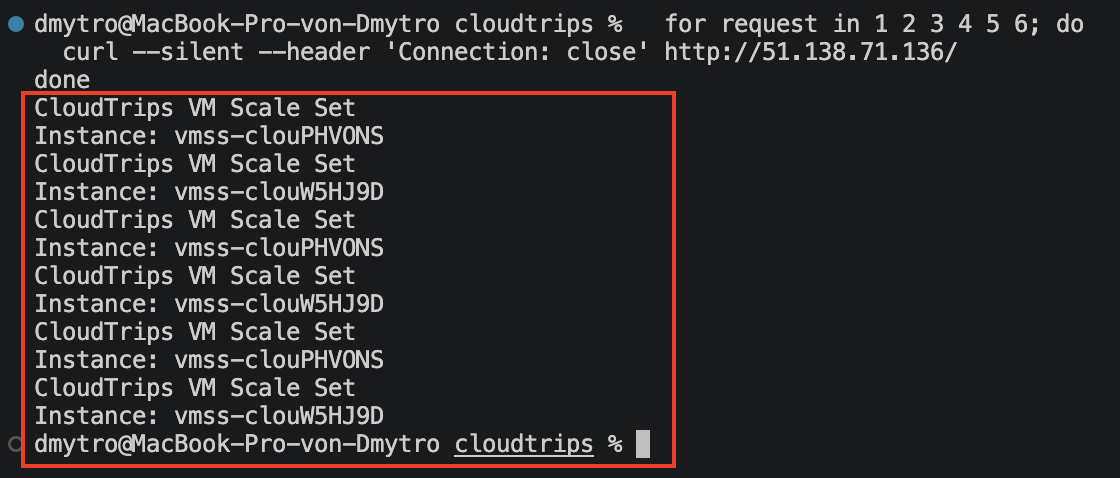
Copy the address from lb-cloudtrips-vmss-test-weu-publicip and run:
for request in 1 2 3 4 5 6; do
  curl --silent --header 'Connection: close' http://<PUBLIC-IP>/
done
Responses should show both instance hostnames. Load Balancer distribution is flow-based, so a short test might not alternate perfectly.
Scale from Two Instances to Three
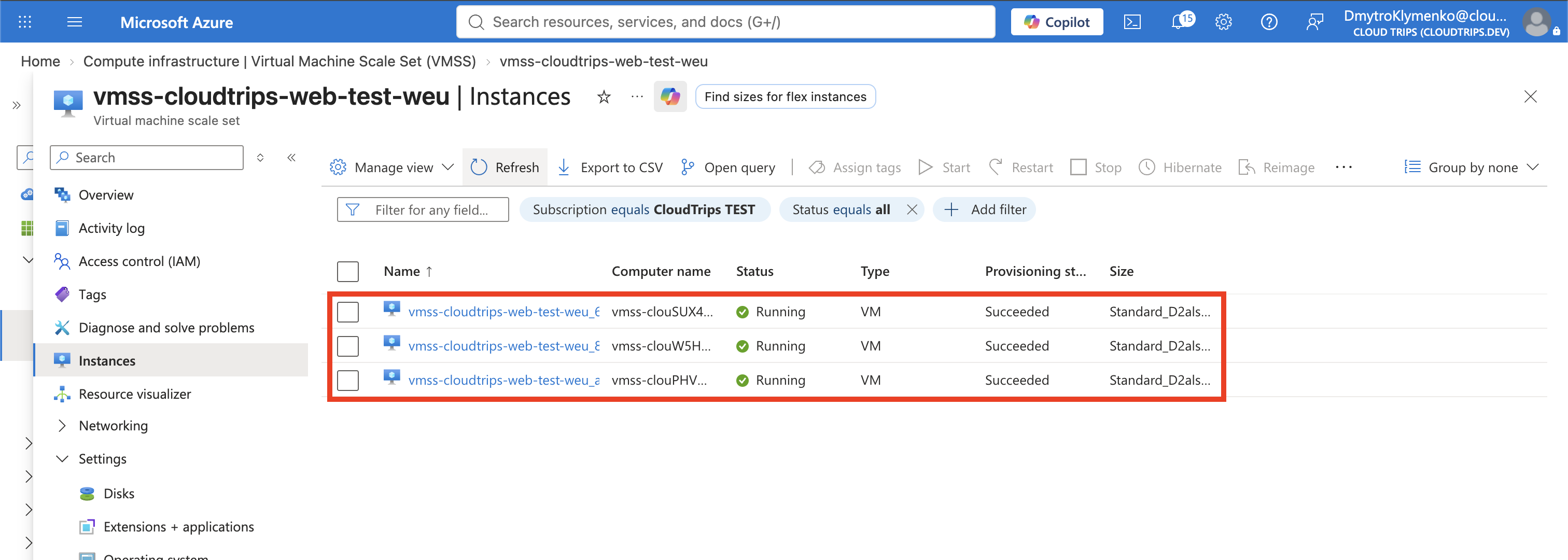
Open the scale set > Scaling. Change manual capacity from 2 to 3 and
select Save. Return to Instances and wait until the third VM is running.
Run the local verification on the new instance, then repeat the public HTTP test. Its hostname should appear in the responses.
Each instance and OS disk is billed separately. Load Balancer, public IP, and data-transfer charges can also apply.
Keep the Scale Set for Autoscaling
Return manual capacity from 3 to 2, but do not delete the resource group or
its resources. The next trip, VMs Must Scale Automatically? Configure VM
Autoscale, uses this scale set, load balancer, network, and two healthy NGINX
instances. Cleanup happens after that trip.