Web App Needs a Custom Domain? Map a Custom DNS Name
CloudTrips needs a recognizable address instead of the generated
azurewebsites.net hostname. A custom domain mapping tells App Service to
accept requests for a DNS name you own. DNS must also direct that name to the
web app.
This trip is independent of earlier App Service trips. Create:
Resource group: rg-cloudtrips-customdomain-test-weu
Web app: app-cloudtrips-domain-dmytro-test-weu
App Service plan: asp-cloudtrips-domain-test-weu
Pricing tier: Basic B1
DNS provider for cloudtrips.dev: Vercel
Custom hostname: appservice.cloudtrips.dev
Custom domains require a paid App Service tier. You must also be able to edit
the public DNS zone. If you do not control cloudtrips.dev, substitute a
subdomain of a domain you control throughout the trip.
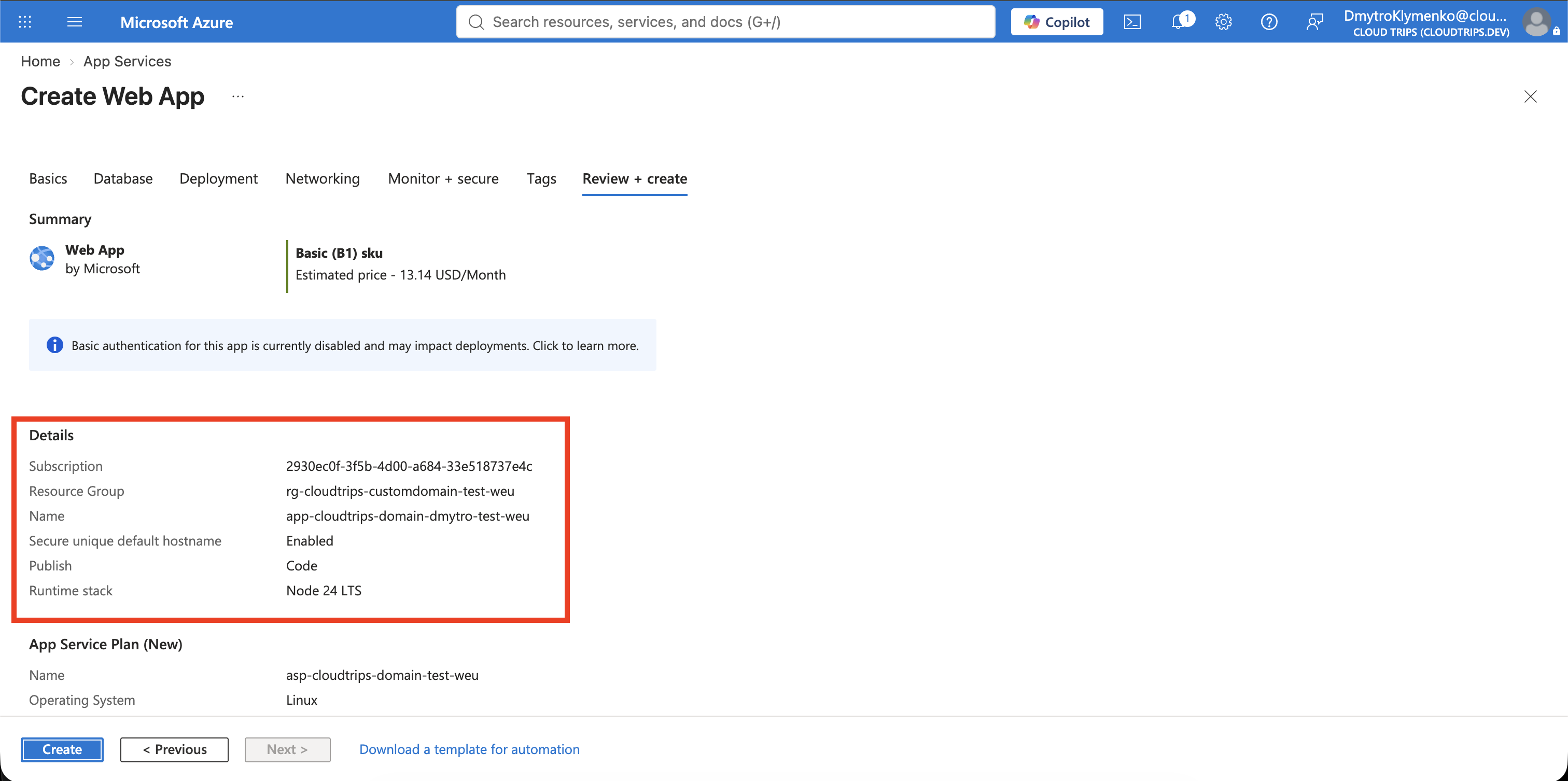
Create the Web App
Search for App Services, select Create > Web App, and enter:
Subscription: CloudTrips TEST
Resource group: rg-cloudtrips-customdomain-test-weu
Name: app-cloudtrips-domain-dmytro-test-weu
Publish: Code
Runtime stack: Node 24 LTS
Operating System: Linux
Region: West Europe
Linux Plan: Create new
Plan name: asp-cloudtrips-domain-test-weu
Pricing plan: Basic B1
Zone redundancy: Disabled
The web-app name must be globally unique. If it is unavailable, add a short suffix and use the resulting name consistently in the CNAME and commands. Select Review + create > Create.
Basic B1 is the lowest dedicated tier supported for this managed-certificate lab and is billable until deleted.
Deploy the Test Page
Create a local folder containing package.json:
{
  "name": "cloudtrips-custom-domain",
  "version": "1.0.0",
  "scripts": {
    "start": "node server.js"
  }
}
Add server.js:
const http = require('http');
const port = process.env.PORT || 8080;

http.createServer((request, response) => {
  response.writeHead(200, { 'Content-Type': 'text/html; charset=utf-8' });
  response.end('<h1>CloudTrips Custom Domain</h1>');
}).listen(port);
From that folder, package and deploy the files:
zip cloudtrips-domain.zip package.json server.js

az webapp deploy \
  --resource-group rg-cloudtrips-customdomain-test-weu \
  --name app-cloudtrips-domain-dmytro-test-weu \
  --src-path cloudtrips-domain.zip \
  --type zip
Confirm the default hostname works before changing DNS:
curl --fail \
  https://app-cloudtrips-domain-dmytro-test-weu-csf8bpczcqdmfngc.westeurope-01.azurewebsites.net
Azure generated this hostname for the app. Do not construct it from the app
name: newer App Service hostnames can contain a unique suffix and regional
label. Always copy Default domain from Overview or retrieve
defaultHostName with the command below.
Understand the Two DNS Records
The authoritative DNS provider is the service that stores the official
public DNS records for a domain. Internet DNS resolvers ask that provider for
the answer. For cloudtrips.dev, the authoritative provider is Vercel DNS,
so the following records must be created in Vercel—not in the App Service
resource:
CNAME: Routes appservice.cloudtrips.dev to the web app
TXT:   Proves to Azure that you control appservice.cloudtrips.dev
Browser requests appservice.cloudtrips.dev
↓
DNS asks Vercel for the official record
↓
Vercel returns the Azure App Service hostnameThe TXT record does not carry application traffic. It prevents another Azure customer from claiming your hostname merely by knowing its name.
Start the Custom Domain Mapping
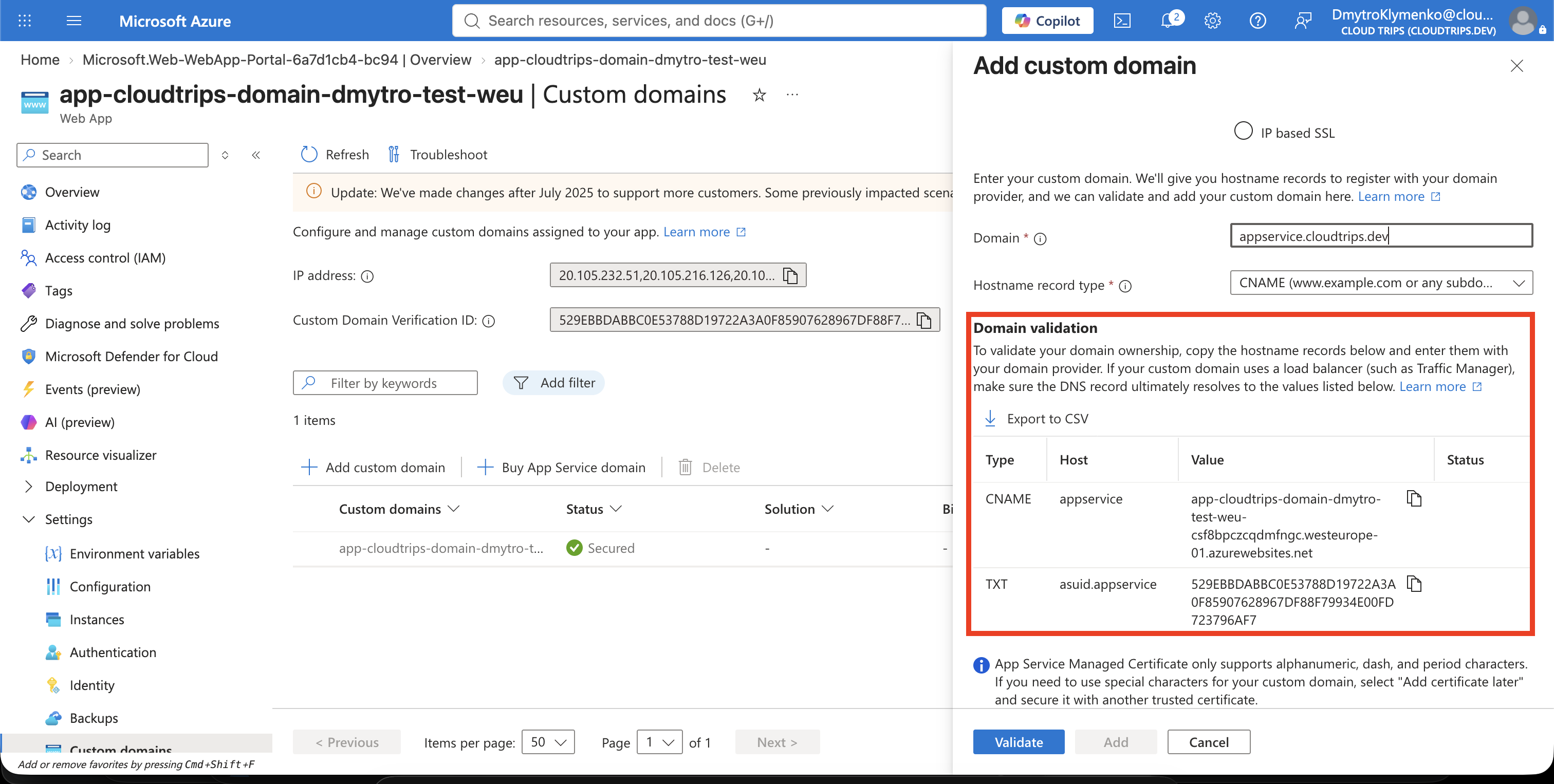
Open app-cloudtrips-domain-dmytro-test-weu, select Settings > Custom
domains, and choose Add custom domain:
Domain provider: All other domain services
TLS/SSL certificate: Add certificate later
Domain: appservice.cloudtrips.dev
Do not select Validate yet. Keep the pane open and note the DNS records it expects. Mapping the hostname before creating its certificate separates DNS validation from certificate issuance and makes failures easier to identify.
Create the Records in Vercel DNS
Retrieve the app hostname and its unique ownership-verification value:
az webapp show \
  --resource-group rg-cloudtrips-customdomain-test-weu \
  --name app-cloudtrips-domain-dmytro-test-weu \
  --query "{cname:defaultHostName,verificationId:customDomainVerificationId}" \
  --output yaml
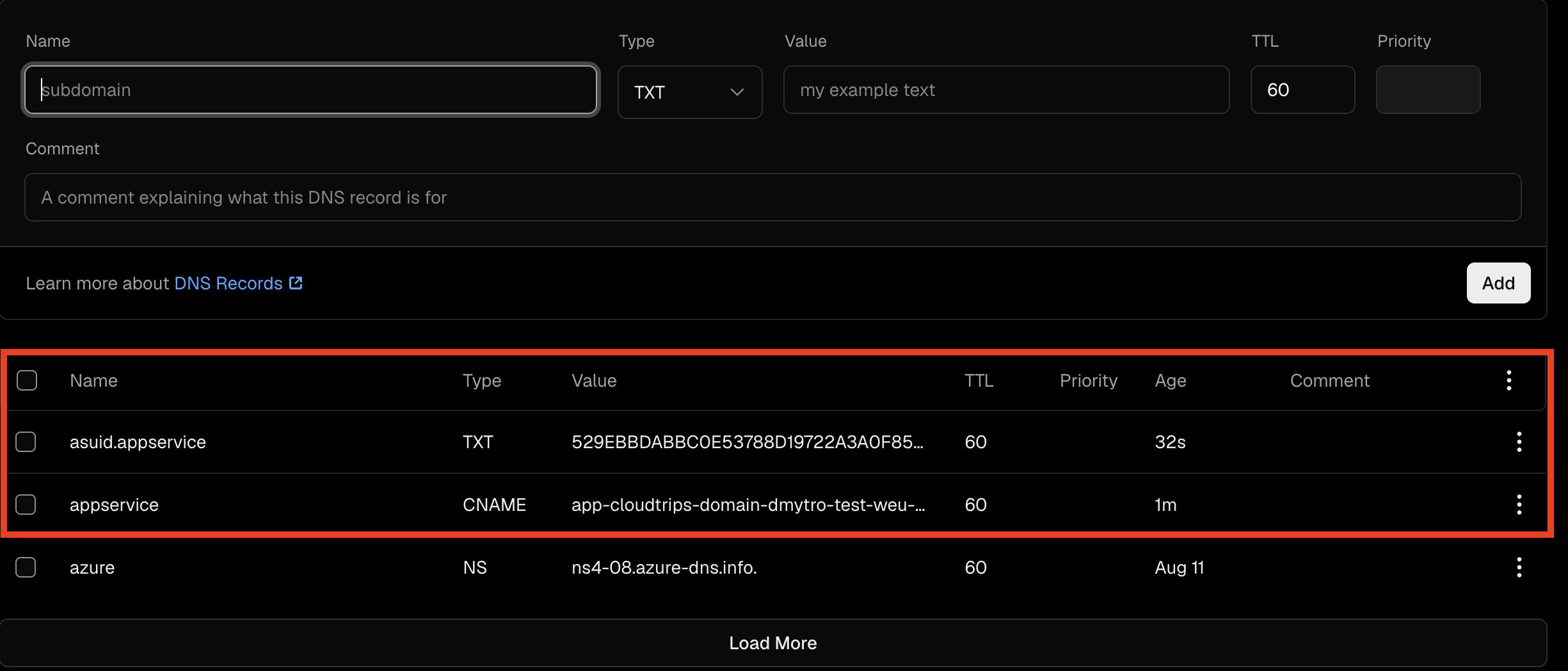
Open the Vercel team that manages cloudtrips.dev, open the domain’s DNS
records, and create:
Type: CNAME
Name: appservice
Value: app-cloudtrips-domain-dmytro-test-weu-csf8bpczcqdmfngc.westeurope-01.azurewebsites.net
TTL: Provider default

Type: TXT
Name: asuid.appservice
Value: Use the customDomainVerificationId returned by Azure
TTL: Provider default
Copy the verification ID exactly without quotes or spaces. Use the
defaultHostName returned by Azure as the CNAME value; do not substitute a
shorter hostname based on the app name. The CNAME must point directly to the
app’s azurewebsites.net hostname so managed-certificate issuance and renewal
can succeed.
Verify the public records from your Mac:
dig appservice.cloudtrips.dev CNAME +short
dig asuid.appservice.cloudtrips.dev TXT +short
The first command should return the web app hostname; the second should return the Azure verification ID. DNS propagation can take several minutes.
Validate and Add the Domain
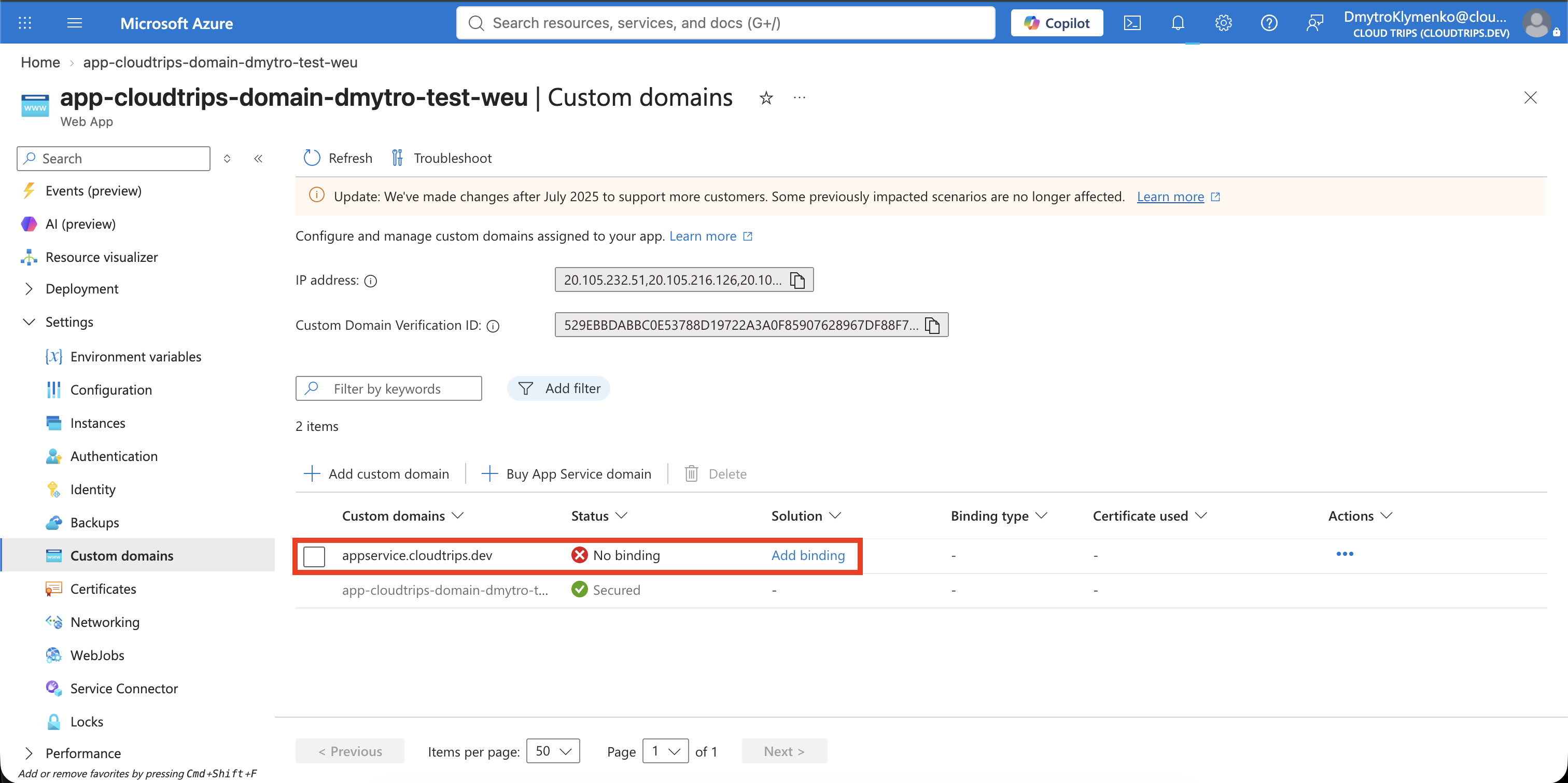
Return to the Add custom domain pane and select Validate. Continue only after Azure shows green checks for the required records, then select Add.
The hostname should now appear in Custom domains with No binding. This is expected: DNS and domain ownership work, but HTTPS has no certificate yet.
Allow DigiCert in CAA
Before requesting the certificate, check whether the parent domain already has CAA records:
dig cloudtrips.dev CAA +shortCAA means Certification Authority Authorization. These DNS records restrict which certificate authorities may issue certificates for the domain. If no CAA records exist, no issuer allowlist is applied. If at least one exists, the certificate authority used by App Service must be permitted explicitly.
cloudtrips.dev already allowed Let’s Encrypt, Google Trust Services, and
Sectigo, but not DigiCert. App Service Managed Certificates use DigiCert, so
Vercel DNS needs this additional record:
Name: @
Type: CAA
Value: 0 issue "digicert.com"
TTL: 60
Priority: Leave empty
Keep the existing CAA records. Here, 0 is the CAA flag, issue authorizes a
certificate authority to issue ordinary certificates, and digicert.com is
the authorized authority. A missing DigiCert authorization can make Azure show
a misleading ResourceNotFound error while creating the managed certificate.

Wait for DNS propagation and confirm that the public response includes DigiCert:
dig cloudtrips.dev CAA +shortCreate the Managed Certificate
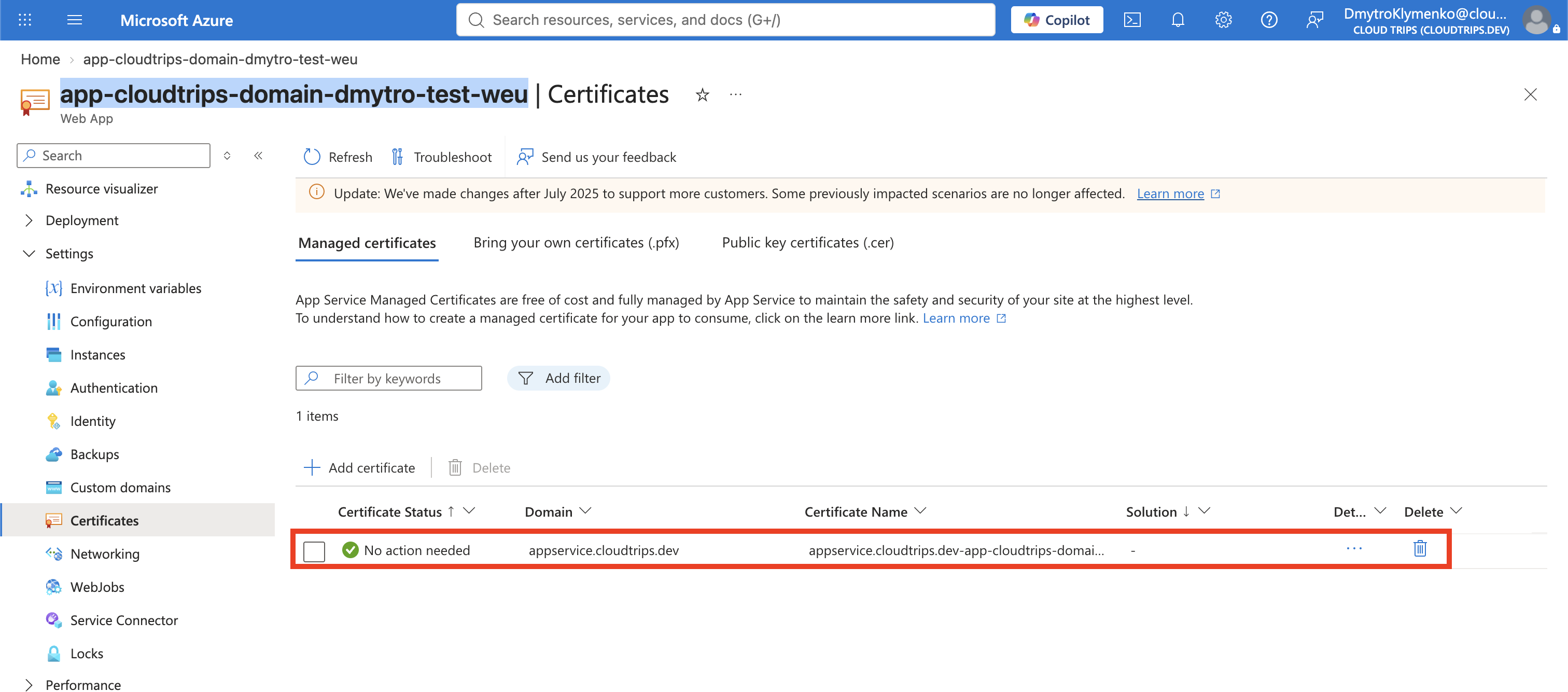
Open Settings > Certificates. On Managed certificates, select Add certificate:
Custom domain: appservice.cloudtrips.devSelect Validate, then Add. Domain mapping must exist before App Service can issue this certificate. The App Service managed certificate is free, renews automatically while its requirements remain satisfied, and cannot be exported for use outside App Service.
Certificate issuance is asynchronous and can take several minutes. Wait until the certificate appears in Managed certificates before creating the binding. If the combined certificate-and-binding action remains busy, do not submit it repeatedly; refresh the certificate page and check the activity log.
Add the SNI SSL Binding
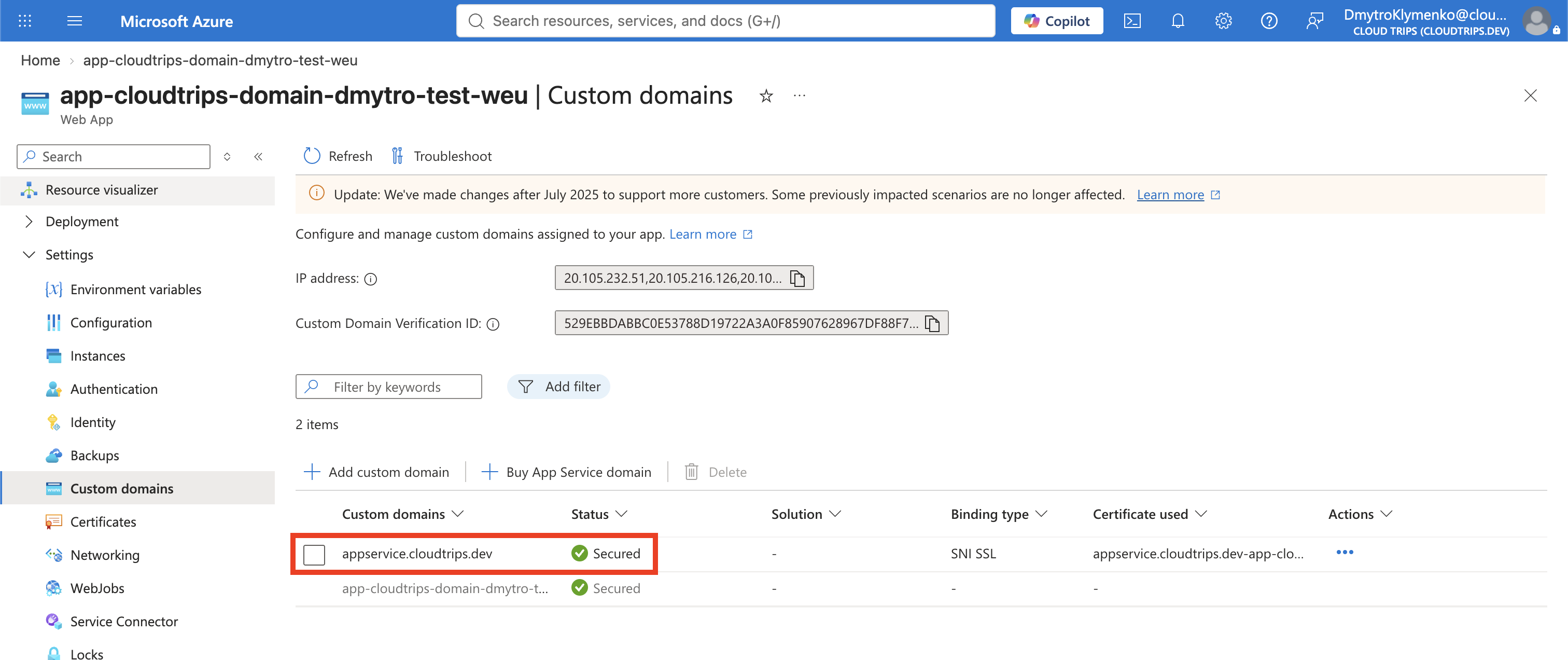
Return to Custom domains. Next to appservice.cloudtrips.dev, select Add
binding:
Certificate: Select the managed certificate for appservice.cloudtrips.dev
TLS/SSL type: SNI SSL
SNI means Server Name Indication. During the TLS connection, the browser sends the requested hostname so App Service can present the correct certificate. Modern clients support SNI.
SNI SSL:      Client sends the hostname; multiple HTTPS sites share one IP
IP-based SSL: Hostname receives a dedicated inbound IP address
IP-based SSL is mainly for legacy clients without SNI support or workloads that require a dedicated IP. It can cost more and requires Standard tier or higher, whereas this B1 app supports SNI SSL. Select Add, then wait until the domain shows Secured.
Verify HTTPS
Request the application through its custom name:
curl --fail --show-error \
  https://appservice.cloudtrips.dev
Expected content includes:
CloudTrips Custom DomainInspect the certificate presented for the hostname:
openssl s_client \
  -connect appservice.cloudtrips.dev:443 \
  -servername appservice.cloudtrips.dev \
  </dev/null 2>/dev/null \
  | openssl x509 -noout -subject -issuer -dates
Do not use curl -k; it disables the certificate validation this test is
intended to prove.

Clean Up Safely
First delete the appservice CNAME and asuid.appservice TXT records from
Vercel. Removing DNS before deleting the Azure app prevents a dangling CNAME
that could create a subdomain-takeover risk.
Then delete the isolated Azure resource group to stop B1 charges:
az group delete --name rg-cloudtrips-customdomain-test-weu --yesConfirm the cleanup:
az group exists --name rg-cloudtrips-customdomain-test-weu
dig appservice.cloudtrips.dev CNAME +short
The first command should return false; after DNS caches expire, the second
should return no CNAME.