Web App Needs More Power or Instances? Scale App Service Plan
CloudTrips needs more CPU, memory, and App Service features. Scale up means changing the pricing tier and size of the existing App Service plan. It does not create more instances and does not require another code deployment.
This trip continues from Simple Web App Needs Hosting? Create App Service:
Resource group: rg-cloudtrips-appservice-test-weu
Web app: app-cloudtrips-web-dmytro-test-weu
App Service plan: asp-cloudtrips-web-test-weu
Current tier: Free F1
Compare Scale Up and Scale Out
Scale up:  One instance receives more CPU, memory, storage, and features
Scale out: More instances run the same application
The pricing tier belongs to the plan. Scaling it affects every web app hosted by that plan. Standard S1 is billable; charges begin after the change and continue until you scale down or delete the plan.
Scale Up to Standard S1
Open the web app app-cloudtrips-web-dmytro-test-weu. In its left menu, expand
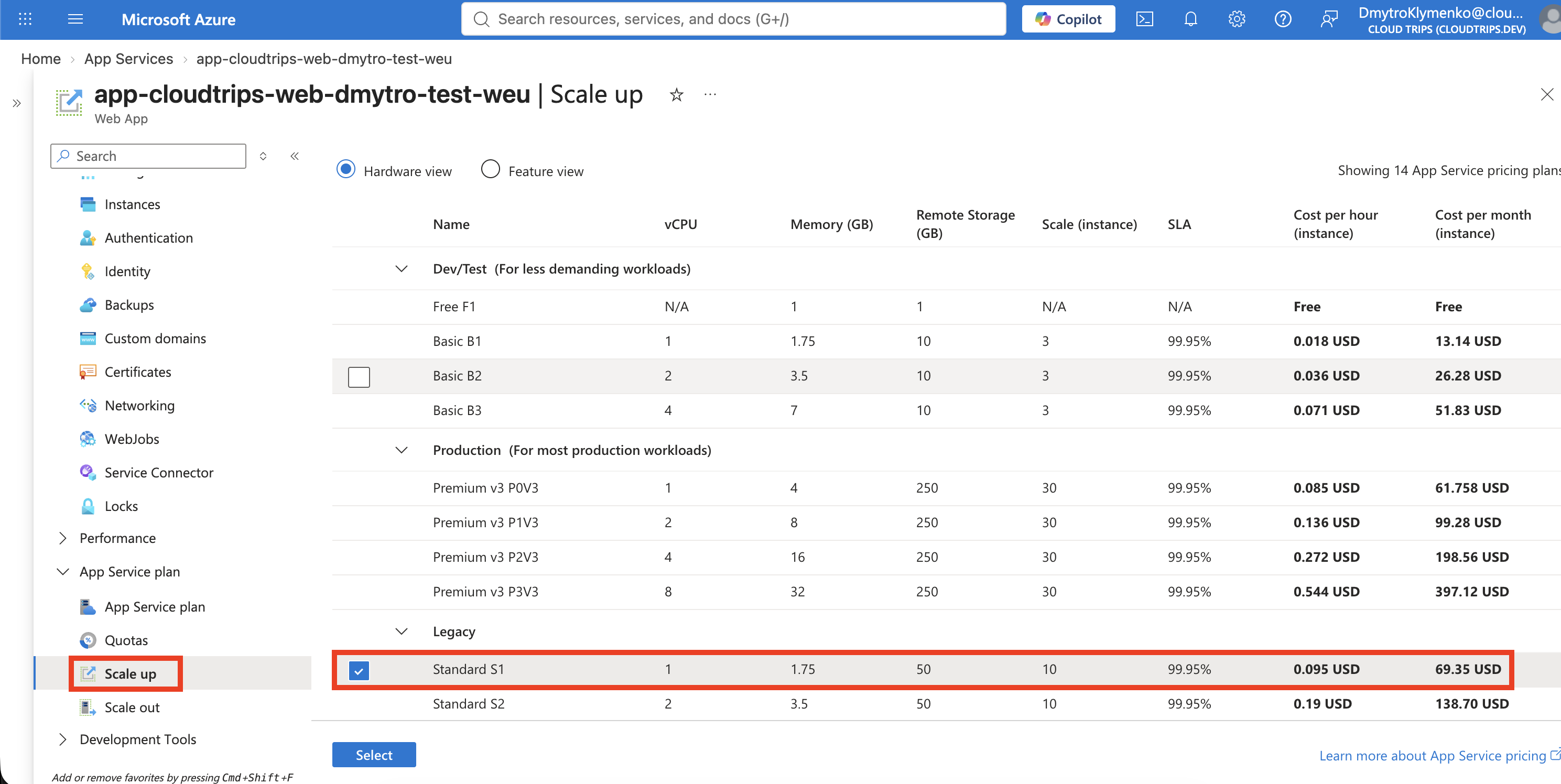
App Service plan and select Scale up. Under Legacy, select:
Pricing plan: Standard S1Review the displayed price for your subscription and select Select. If the subscription has a spending limit, Azure can block the change from Free to a paid tier until that limit is removed.
Verify the New Tier
Wait for the scaling notification to succeed. The app remains on the same hostname because only its underlying plan changed. Verify the plan:
az appservice plan show \
  --resource-group rg-cloudtrips-appservice-test-weu \
  --name asp-cloudtrips-web-test-weu \
  --query "{tier:sku.tier,sku:sku.name,instances:sku.capacity}" \
  --output table
Expected values include:
Tier: Standard
SKU: S1
Instances: 1
Test that the app still responds:
curl --fail https://app-cloudtrips-web-dmytro-test-weu.azurewebsites.net
Scale Out to Two Instances
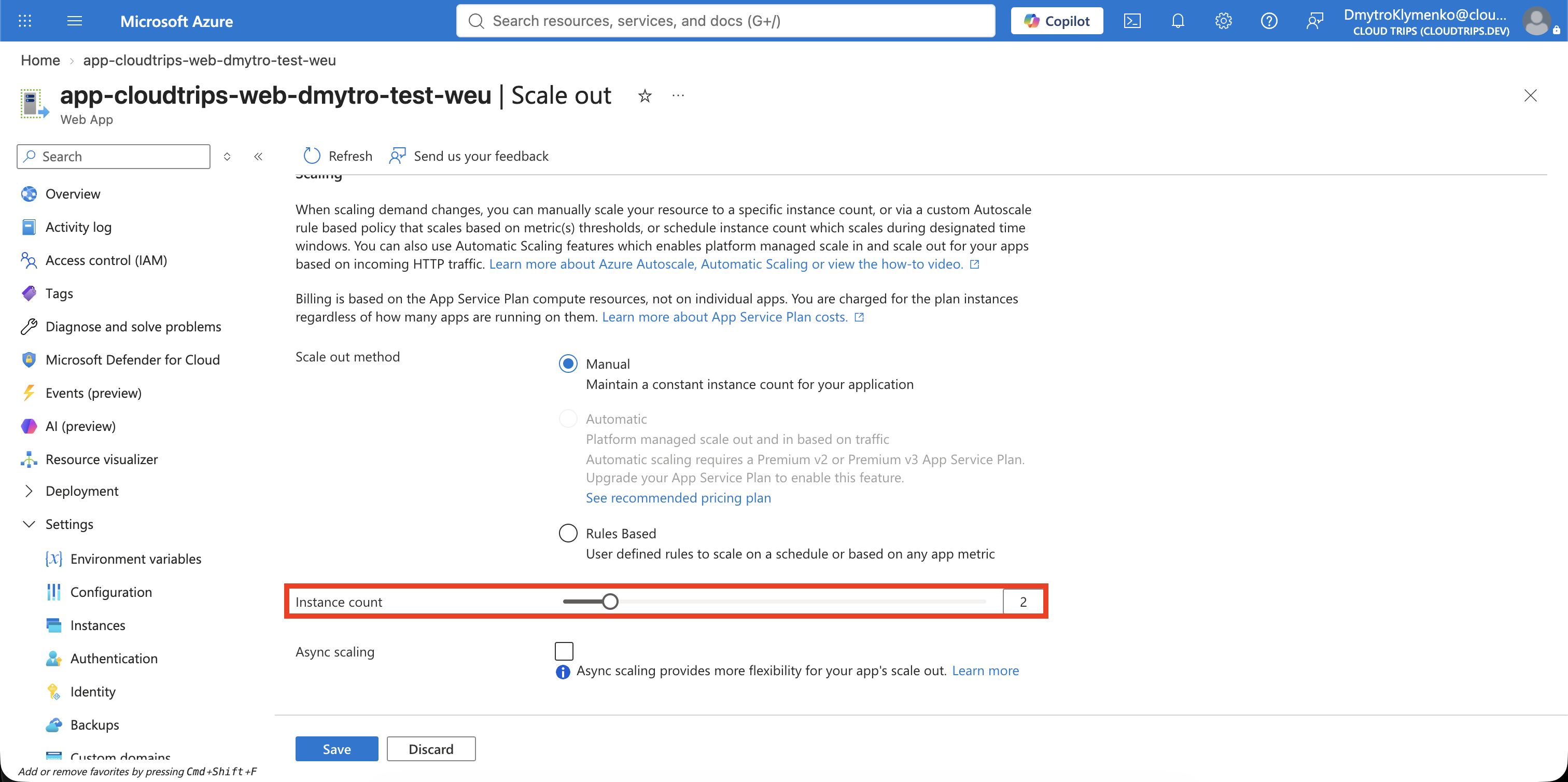
Return to the web app. Under App Service plan, select Scale out and set:
Scale mode: Manual
Instance count: 2
Select Save. Scale out keeps the S1 worker size but runs two copies of the application. App Service distributes incoming requests across them. Both instances are billable, and every app sharing the plan uses the same workers.
If Azure reports subscription throttling, stop retrying and wait for the restriction to expire. Portal and CLI requests use the same control plane, so CLI does not bypass the throttle.
Verify the new worker count:
az appservice plan show \
  --resource-group rg-cloudtrips-appservice-test-weu \
  --name asp-cloudtrips-web-test-weu \
  --query "{tier:sku.tier,sku:sku.name,instances:sku.capacity}" \
  --output table
Expected values include Standard, S1, and 2 instances. Manual scaling
keeps this fixed count; autoscale would change it using metric or schedule
rules.
Clean Up
Delete the isolated resource group promptly to stop S1 charges:
az group delete --name rg-cloudtrips-appservice-test-weu --yesConfirm that az group exists --name rg-cloudtrips-appservice-test-weu
returns false.