Kubernetes Package Needs Installation? Install and Configure a Helm Chart
An application can need several Kubernetes resources that should be installed and configured together. Helm is a package manager for Kubernetes: it combines resource templates with configuration values and manages the resulting installation.
| Term | Meaning in this trip |
|---|---|
| Chart | The package: cloudtrips-web, containing templates for an NGINX Deployment and a ClusterIP Service |
| Values | Settings supplied to the templates, such as the number of replicas |
| Release | One installation of a chart, named ct-helm-web here |
| Revision | A recorded installation, upgrade, or rollback step within that release |
The chart is not a container image. It describes Kubernetes resources; the Deployment still pulls nginx:stable-alpine to run the web server. A chart can come from a repository, an OCI registry, or a local archive. This lab uses a small prepared archive so you can focus on Helm itself.
Reuse aks-ctlab-weu in UK West and your Kubernetes administration access. Start the cluster if stopped. Remove ct-capacity-check from the previous trip if it still exists, so its large CPU requests do not occupy the lab capacity. The earlier ct-web application can remain.
Helm commands run in Azure Cloud Shell → Bash. The portal’s YAML editor applies manifests but does not create a Helm release. We use the portal to inspect the resources after installation. This chart creates no public IP or persistent disk, but the existing AKS nodes continue to incur costs.
Download the Chart and Connect
Download cloudtrips-web-0.1.0.tgz to your computer. Open Cloud Shell → Bash, use its Upload/Download files → Upload control, and upload the archive. Keep it compressed. The commands below assume the upload is at ~/cloudtrips-web-0.1.0.tgz; use the path shown by Cloud Shell if different.
Connect before running Helm so it uses the correct AKS cluster:
az account set --subscription "CloudTrips TEST"
az aks get-credentials \
  --resource-group rg-cloudtrips-aks-test-weu \
  --name aks-ctlab-weu \
  --overwrite-existing
kubelogin convert-kubeconfig -l azurecli
kubectl get nodes
helm version --short
Confirm that the nodes are Ready and Helm reports its version. These commands use your current Azure sign-in and user credentials; no cluster-admin credential download is needed. The lab uses chart API v2 and commands supported by Helm 3 and Helm 4.
Configure and Preview the Package
Run:
mkdir -p ~/cloudtrips-helm
cp ~/cloudtrips-web-0.1.0.tgz ~/cloudtrips-helm/
cd ~/cloudtrips-helm

helm show chart ./cloudtrips-web-0.1.0.tgz
helm show values ./cloudtrips-web-0.1.0.tgz

cat > lab-values.yaml <<'EOF'
replicaCount: 2
EOF

helm template ct-helm-web ./cloudtrips-web-0.1.0.tgz \
  --namespace ct-helm \
  --values lab-values.yaml
The chart’s default replica count is 1. Your lab-values.yaml overrides it with 2. Settings you do not override, including the image and resource requests, retain their chart defaults.
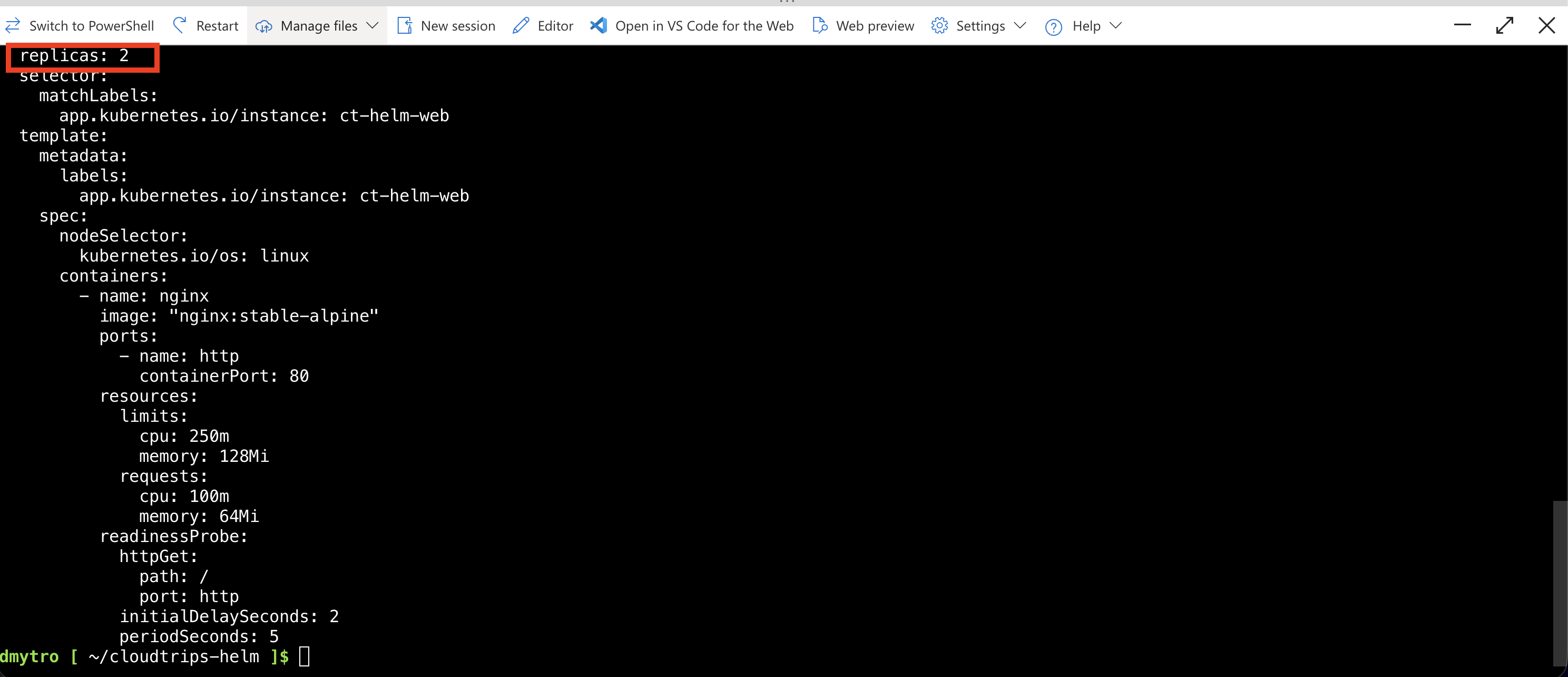
helm show chart displays package metadata. Chart version 0.1.0 identifies the package; appVersion stable-alpine describes the packaged application image tag. helm template prints the rendered Kubernetes YAML without installing it. Look for replicas: 2, a Deployment named ct-helm-web, and a ClusterIP Service with the same name.
Install the Release
helm install ct-helm-web ./cloudtrips-web-0.1.0.tgz \
  --namespace ct-helm \
  --create-namespace \
  --values lab-values.yaml \
  --wait --timeout 5m

helm list --namespace ct-helm
helm get values ct-helm-web --namespace ct-helm
kubectl get deployments,pods,services --namespace ct-helm
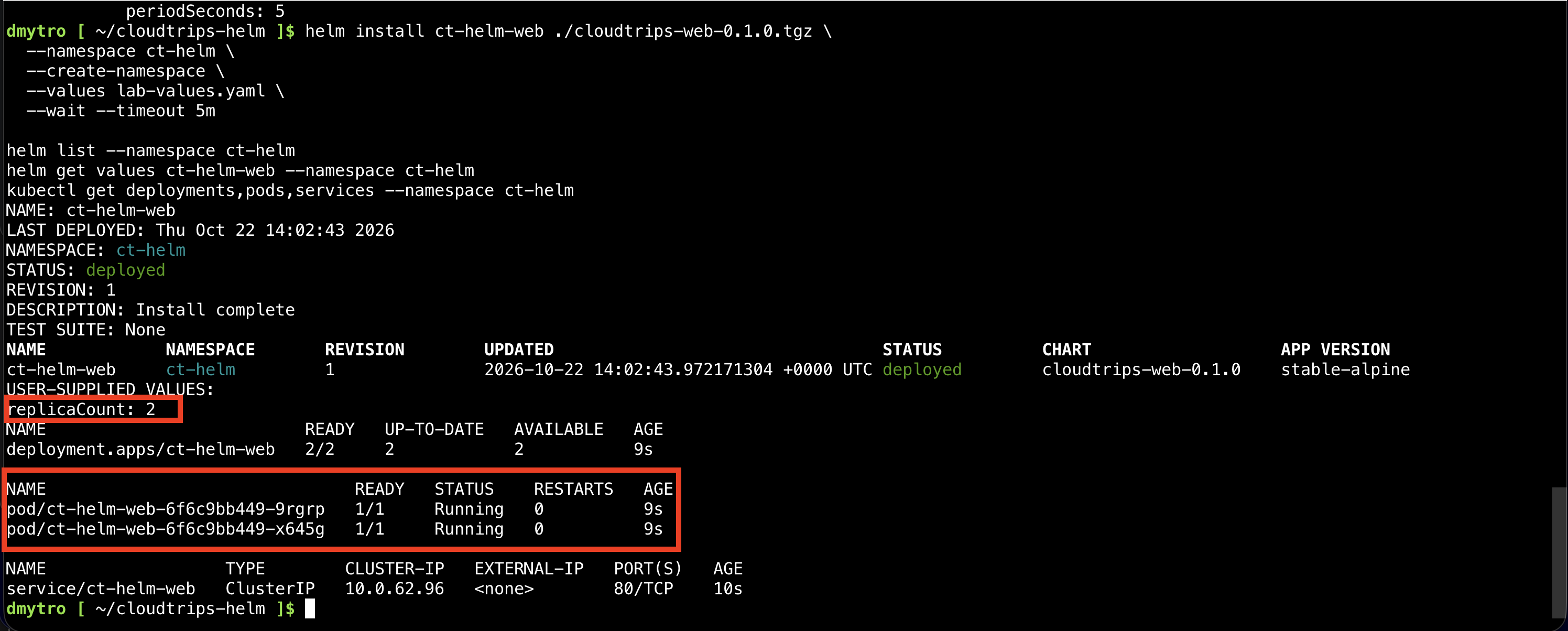
The first command installs release ct-helm-web into namespace ct-helm, creating that namespace if needed. --wait waits for the supported readiness conditions, with a five-minute timeout. Expect release status deployed, revision 1, and two ready application Pods.
If installation times out, inspect the Pods and their Events. A timeout does not automatically remove this release. Check helm status ct-helm-web -n ct-helm before retrying; use helm upgrade after fixing the cause, or uninstall the failed release before installing it again.
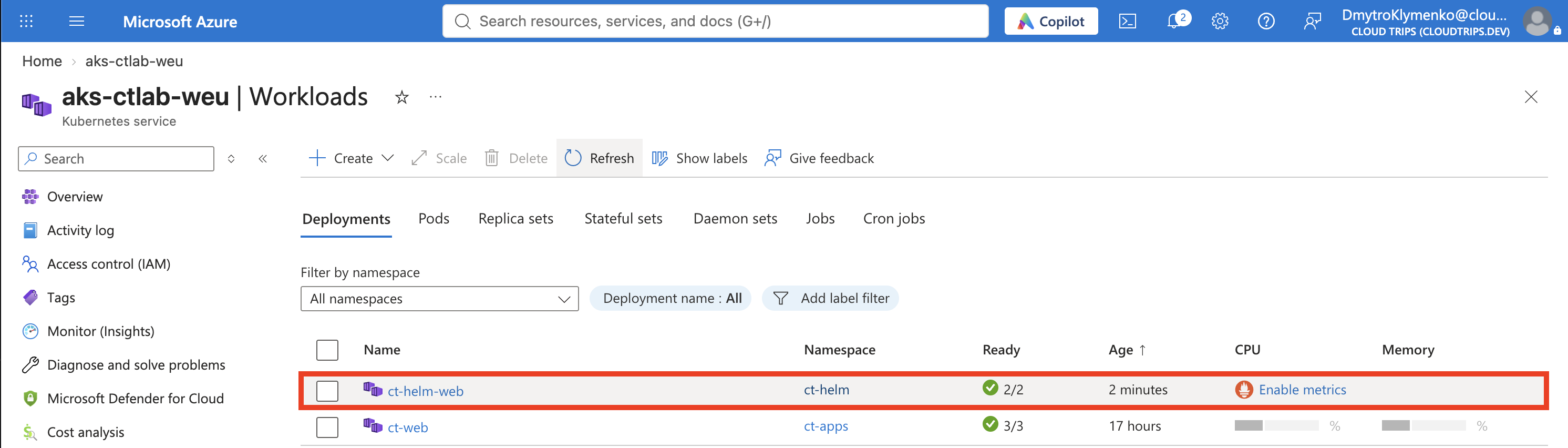
Open aks-ctlab-weu → Kubernetes resources → Workloads → Deployments in the portal. Filter to ct-helm and open ct-helm-web. Confirm two ready replicas. Under Services and ingresses, the ct-helm-web Service should have type ClusterIP and port 80.
Verify the Application
Run this small client inside the cluster to request the internal Service:
kubectl run ct-helm-check --namespace ct-helm \
  --image=busybox:1.37 --restart=Never \
  --command -- sh -c 'wget -S -O - -T 15 http://ct-helm-web'

kubectl wait --for=jsonpath='{.status.phase}'=Succeeded \
  pod/ct-helm-check --namespace ct-helm --timeout=120s
kubectl logs ct-helm-check --namespace ct-helm
kubectl delete pod ct-helm-check --namespace ct-helm
Expect HTTP/1.1 200 OK and HTML containing Welcome to nginx!. The test Pod completes after one request and is then deleted. It is separate from the Helm release. If the wait times out, read the test Pod’s logs and Events to see why the request failed. There is no public browser address for this ClusterIP Service.
Change the Configuration with Helm
Increase the replica count through your values file and upgrade the existing release:
cat > lab-values.yaml <<'EOF'
replicaCount: 3
EOF

helm upgrade ct-helm-web ./cloudtrips-web-0.1.0.tgz \
  --namespace ct-helm \
  --values lab-values.yaml \
  --wait --timeout 5m

helm history ct-helm-web --namespace ct-helm
kubectl get deployment ct-helm-web --namespace ct-helm
Expect 3 ready replicas and revision 2. We kept chart version 0.1.0: an upgrade can change configuration without changing the chart version. Kubernetes applies the resulting desired state.
For Helm-managed resources, make lasting configuration changes through the chart’s values and helm upgrade. A direct edit in the portal is not recorded in Helm’s configuration and can be overwritten by a later upgrade.
Roll Back to the Previous Configuration
If you followed the steps once, revision 1 contains the two-replica configuration. Check helm history first if you have performed additional upgrades, then roll back to the appropriate revision:
helm rollback ct-helm-web 1 --namespace ct-helm --wait --timeout 5m
helm history ct-helm-web --namespace ct-helm
kubectl get deployment ct-helm-web --namespace ct-helm

cat > lab-values.yaml <<'EOF'
replicaCount: 2
EOF
The Deployment returns to 2 replicas. Helm records the rollback as a new revision rather than erasing history. It does not rewrite your local values file, which is why the final command resets lab-values.yaml to two replicas as well. A Helm rollback restores release configuration; it is not a database or application-data restore.
Remove the Release
helm uninstall ct-helm-web --namespace ct-helm
kubectl get deployments,pods,services --namespace ct-helm
For this chart, uninstalling removes the Deployment, its Pods, and the Service. The ct-helm namespace remains because it was created by --create-namespace, not included as a chart resource. Delete that namespace through Kubernetes resources → Namespaces when it is empty and no longer needed. Your earlier resources in ct-apps are unaffected.
Keep the chart archive and values file if you want to repeat the exercise. Temporary Cloud Shell sessions may not preserve local files. Stop the cluster between sessions, or delete its lab resource group when finished with AKS; retained resources can still cost money while it is stopped.