SQL Needs Auditing? Configure SQL Auditing
An unexpected database change appears, and your team needs to investigate who connected, when, and what they executed. The current table contents tell you the result, but you also need a record of the activity that led to it. SQL auditing records selected database events with details such as time, identity, and SQL statement in a separate log destination.
Prepare the Database and Storage
Use sqldb-cloudtrips on sql-ctappweu from Create Azure SQL Database. This trip uses Azure SQL Database; Managed Instance has a separate auditing setup. If your database is currently primary in France Central, use that server instead.
Create a storage account:
Resource group: rg-cloudtrips-audit-test-weu
Storage account: stctauditweu (globally unique)
Region: West Europe
Performance: Standard
Redundancy: LRS
For this lab, allow public network access from all networks and keep Allow Blob anonymous access disabled. Requests still require authentication. Use your own account name if taken.
Enable Server Auditing
Server auditing covers all databases on the logical server. Database auditing covers only the selected database. Each has its own enable switch; enabling database auditing leaves the server policy unchanged. This lab configures and tests server auditing.
Open SQL servers → sql-ctappweu → Security → Auditing and enable auditing at the server level. Select a StorageV2 (general-purpose v2) storage account as the audit destination. Configure:
Destination: Storage
Storage account: stctauditweu
Storage authentication: Managed Identity
Advanced properties → Retention: 7 days
Select Save. Server auditing covers existing and future databases on that server. Keep a single server policy for this lab; enabling an additional database policy also produces its own records.
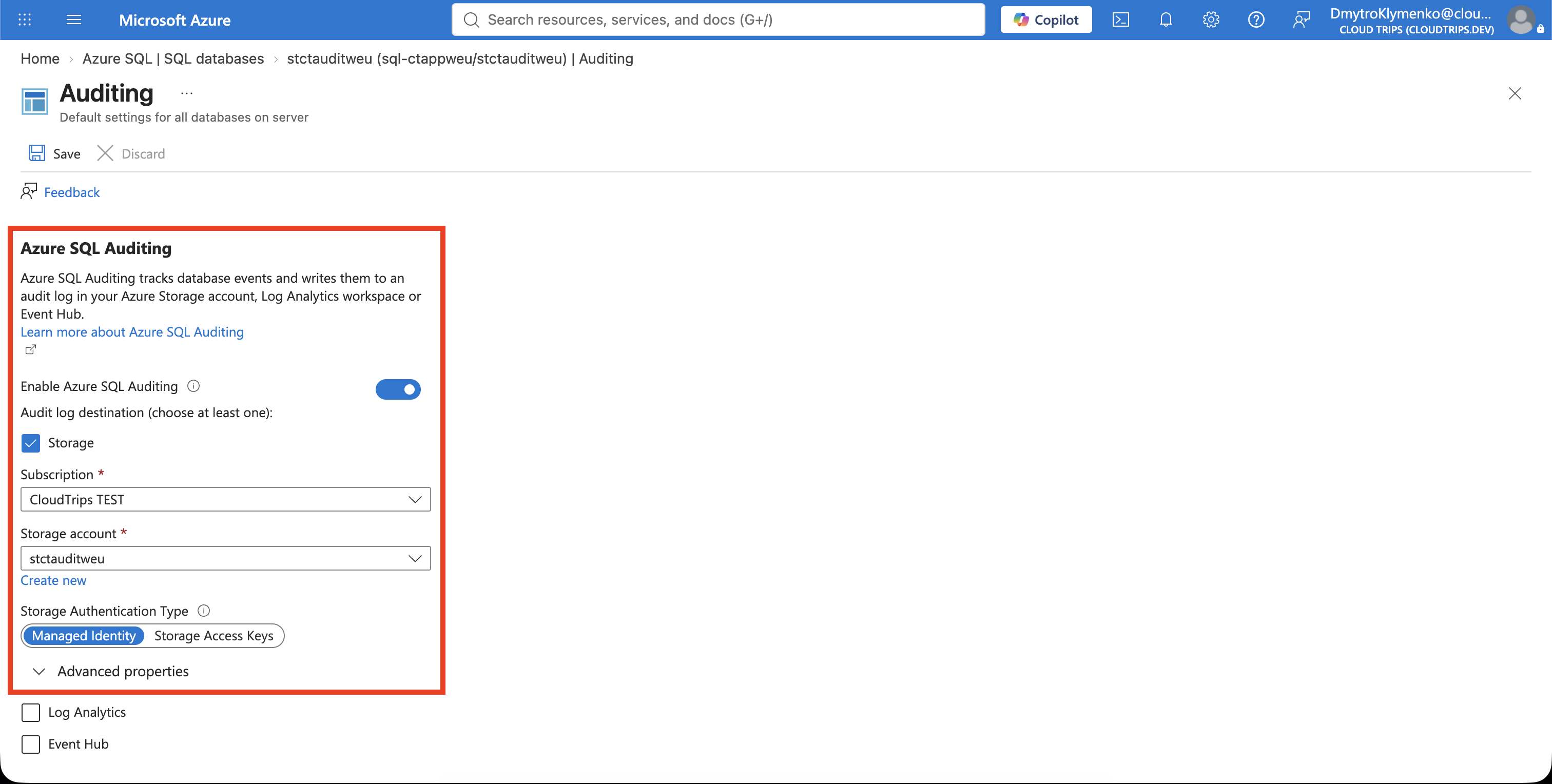
Check auditing is enabled and the destination is correct. The default policy records completed SQL batches and successful or failed SQL database authentication. The server identity needs Storage Blob Data Contributor on the storage account; the portal handles the role assignment when your permissions allow it. If saving fails on permissions, check that assignment under the storage account’s Access control (IAM).
For auditing across a failover pair, configure auditing and storage permissions on both logical servers.
Generate and Find an Event
After enabling and saving the server policy, connect to sqldb-cloudtrips (or your actual database, such as stctauditweu) through VS Code or Query editor (preview) and run the query below. Earlier activity is not recorded retroactively.
SELECT N'CloudTrips audit test' AS AuditMarker,
       DB_NAME() AS DatabaseName,
       SYSUTCDATETIME() AS TestTimeUtc;
Save the returned UTC time. This harmless query provides a distinctive statement to find in the log.
Open sqldb-cloudtrips → Security → Auditing → View audit logs. Select the storage destination if prompted, choose Server audit as the audit source, and set the end time after your test. The viewer samples records from the preceding hour. Allow several minutes for delivery, then refresh and open the record containing CloudTrips audit test.
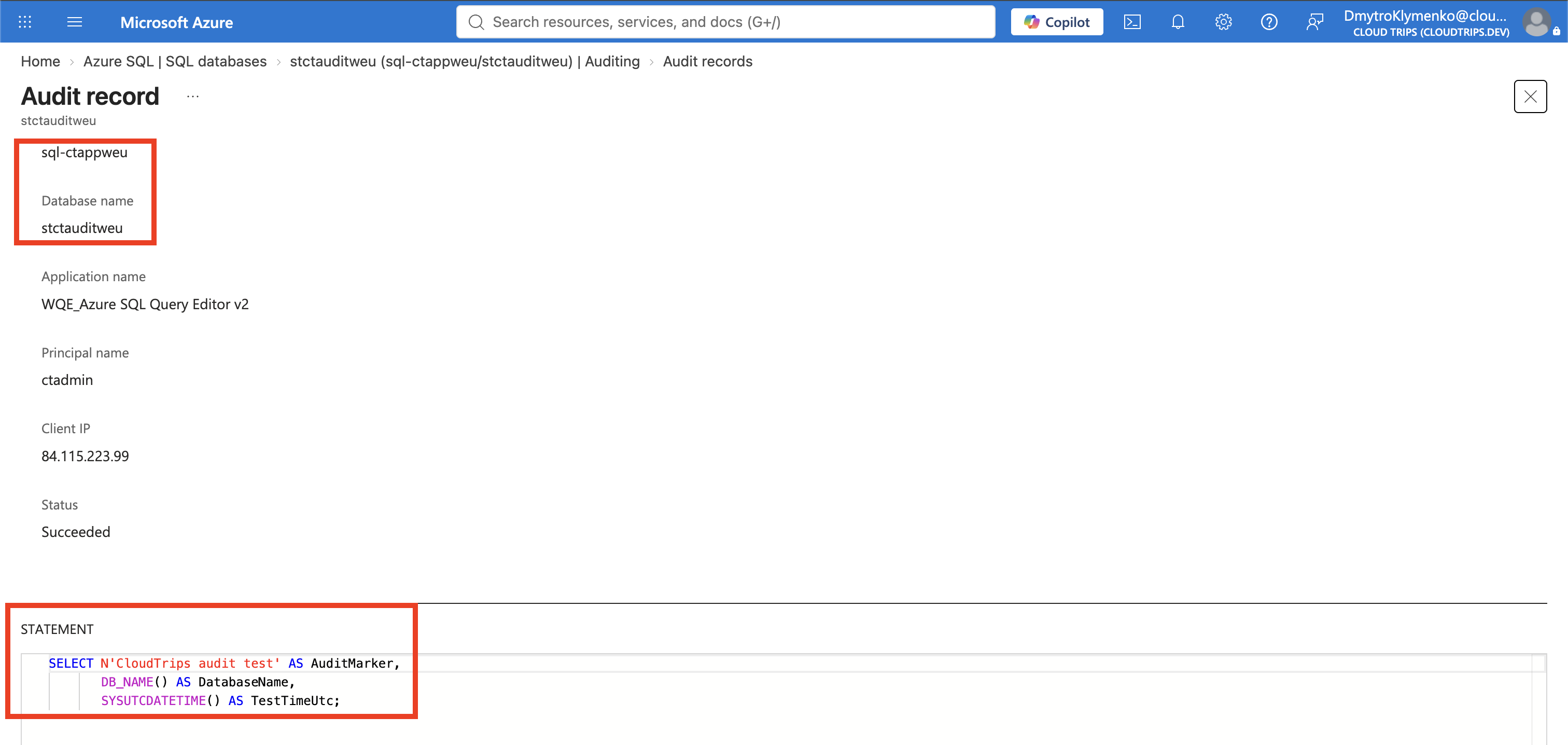
Compare the statement, database, identity, and event time with your test. The identity reflects the login used, such as ctadmin; timestamps vary. If storage access is denied, grant your viewing identity Storage Blob Data Reader on the account. This permission is separate from the server identity’s write permission.
Auditing records activity from when it is enabled. These records support investigation; automated alerts require additional monitoring configuration.
Clean Up
Disable and save the auditing policy created for this lab before deleting rg-cloudtrips-audit-test-weu. If you keep auditing, storage and transaction charges continue, and the seven-day retention removes older audit records.