Real-Time Analytics Needed? Create a Stream Analytics Job
A machine sends temperature readings throughout the day. Operators need to identify overheating as readings arrive; waiting for a nightly report delays their response. Azure Stream Analytics runs a continuous query over incoming events. Here, Event Hubs receives the readings and Stream Analytics saves temperatures above 30°C to storage.
Portal test events → Event Hubs → Stream Analytics → Blob storage
When to Use Data Factory or Stream Analytics
| Data Factory | Stream Analytics | |
|---|---|---|
| Typical input | Files, tables, database records | Events from sensors, applications, or devices |
| Execution | A pipeline runs when scheduled or triggered, then finishes | A running job keeps processing incoming events |
| Example | Every night, copy sales data and prepare a report | Continuously identify temperature readings above 30°C |
| Use when | You need data transfers, transformations, and coordinated processing steps | You need ongoing filtering or calculations over event streams |
Here, an event is a data record, such as a temperature reading or purchase. Stream Analytics can also read supported file storage and combine the stream with reference data, such as sensor locations.
Everything runs through Azure Portal.
Create Storage for the Results
Open Storage accounts → Create:
Resource group: rg-cloudtrips-stream-test-weu (new)
Storage account: stctstreamweu
Region: West Europe
Account kind: StorageV2 (general-purpose v2)
Performance: Standard
Redundancy: LRS
Public network access: Enabled from all networks
Allow Blob anonymous access: Disabled
Adjust the globally unique storage name if taken and use it throughout this trip. Review the cost and create the account. Under Containers, create temperature-results with private access.
Create the Event Stream and Job
Create an Event Hubs namespace:
Resource group: rg-cloudtrips-stream-test-weu
Namespace: evh-ctstreamweu
Region: West Europe
Pricing tier: Standard
Throughput units: 1
Auto-inflate: Disabled
Public network access: Enabled
Adjust the namespace name if taken. Inside it, open Entities → Event Hubs → + Event Hub, create temperatures with 1 partition, and keep Capture disabled. Under the event hub’s Consumer groups, add cg-stream so this job has its own reading position.
Create Stream Analytics jobs → Create:
Resource group: rg-cloudtrips-stream-test-weu
Job name: asa-cttemperatureweu
Region: West Europe
Hosting environment: Cloud
Streaming units: smallest available allocation
Review the displayed price. Streaming units provide the compute that runs the query. Create the job, then enable and save its Identity → System assigned identity.
Connect Input and Output
Assign these roles through each resource’s Access control (IAM):
| Resource | Role | Assigned to |
|---|---|---|
| Event Hubs namespace | Azure Event Hubs Data Receiver | Managed identity of asa-cttemperatureweu |
| Event Hubs namespace | Azure Event Hubs Data Sender | Your signed-in user |
| Storage account stctstreamweu | Storage Blob Data Contributor | Managed identity of asa-cttemperatureweu |
Allow a few minutes for permissions to propagate. In the job, open Job topology → Inputs → Add stream input → Event Hub. Set alias readings, select your namespace, event hub temperatures, consumer group cg-stream, Managed identity authentication, and JSON / UTF-8 format. Save and confirm the connection test succeeds.
Under Outputs → Add → Blob storage/ADLS Gen2, set alias hot-readings, account stctstreamweu, container temperature-results, and Managed identity authentication. Choose JSON, Line separated, and UTF-8; set path pattern hot/{date}/{time}. Keep the default date/time formats. Save and test.
Filter Incoming Readings
Open Query, replace the query, and save:
SELECT deviceId, temperature
INTO [hot-readings]
FROM readings
WHERE temperature > 30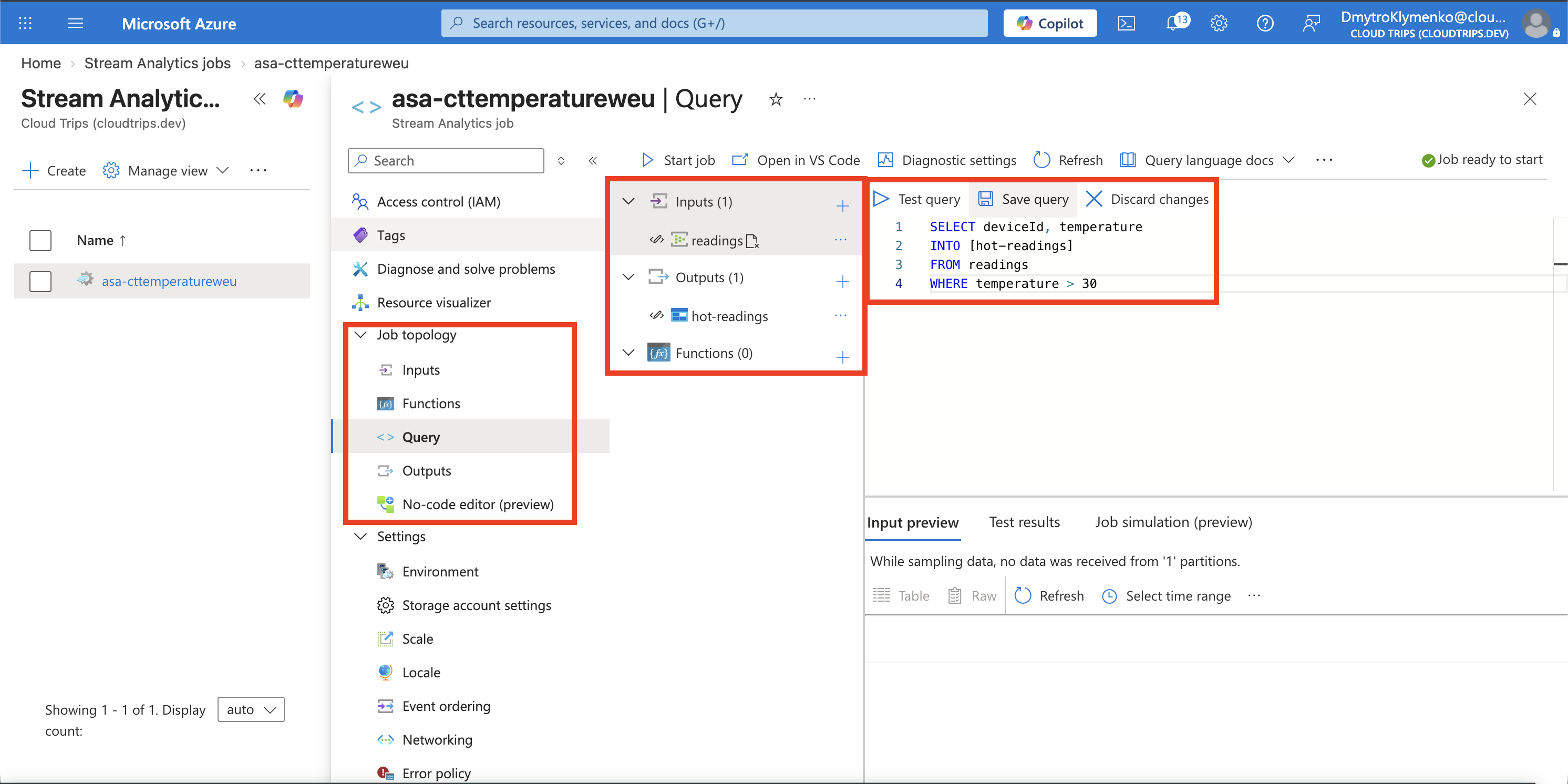
Check the aliases match your input and output. Each arriving event is evaluated; only temperatures greater than 30 are written.
Open Overview → Start, select output start time Now, and wait for Running.
Send Two Readings
Open temperatures → Data Explorer → Send events. Select Custom payload, content type JSON, and send this once:
{"deviceId":"sensor-1","temperature":22}Replace it with the following payload and send once again:
{"deviceId":"sensor-1","temperature":35}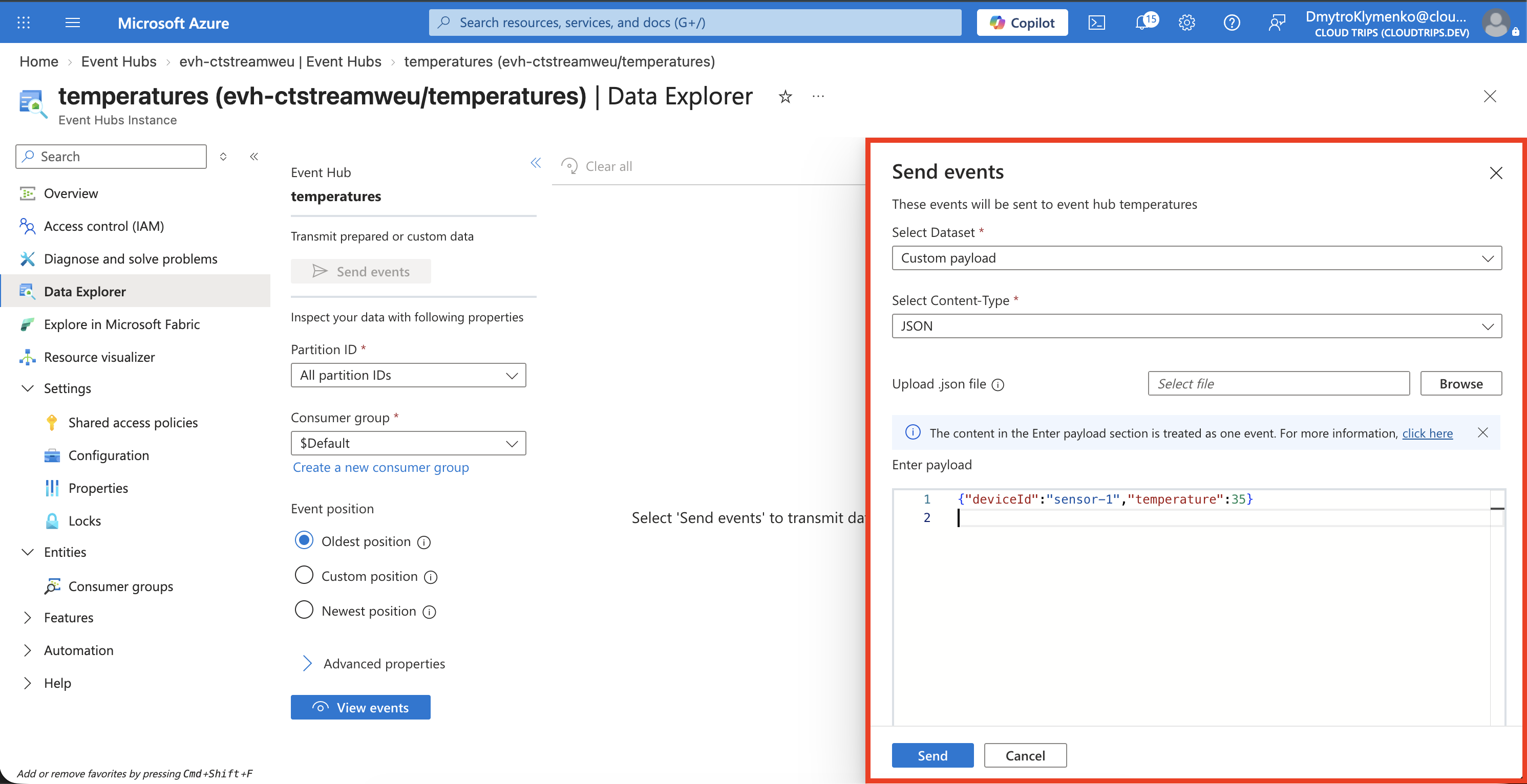
Check that sending succeeds. Both messages must be sent after the job reaches Running, because the job started reading from Now.
Check the Saved Result
Open stctstreamweu → Containers → temperature-results, refresh, and browse the hot folders. Allow several minutes for Blob output batching. Open or download the generated output file.
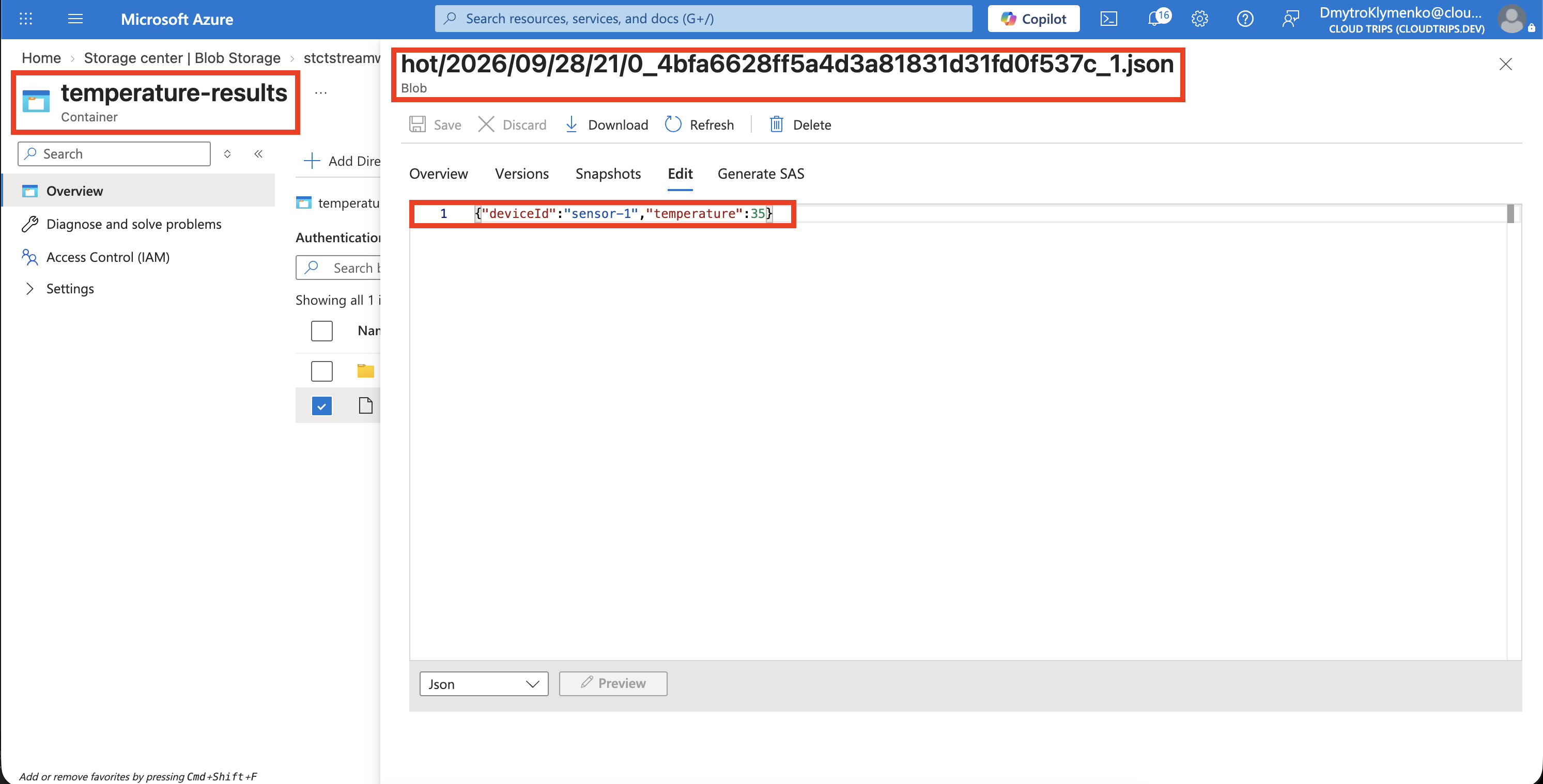
Expect the 35°C record. The 22°C event falls below the threshold and is filtered out. Generated filenames and folder timestamps vary; repeated sends can produce additional matching records.
Finish
Stop the Stream Analytics job after checking the result. Event Hubs capacity continues to incur charges until its namespace is deleted. Delete rg-cloudtrips-stream-test-weu when finished. This removes the job, Event Hubs namespace, and storage account, including the saved results.