Multiple Policies Must Apply Together? Create a Policy Initiative
CloudTrips needs multiple governance rules to apply together. Create an Azure Policy initiative that groups related policy definitions and can be assigned as one unit.
Use:
Initiative name: CloudTrips resource governance
Definition location: Azure subscription 1
Included policies:
- Allowed locations
- Require a tag on resources

Allowed locations: West Europe, Germany West Central
Required tag name: Department
Assignment name: CloudTrips - Resource governance
Understand Initiatives
A policy definition contains one rule. An initiative definition groups multiple policy definitions under a common governance objective. An assignment applies the policy or initiative to a scope.
The initiative simplifies assignment and compliance reporting, but each included policy still evaluates resources independently. A resource must satisfy both the regional restriction and the required-tag rule.
Creating an initiative does not automatically include existing assignments or remove them. The standalone CloudTrips - Allowed resource locations assignment from the previous trip remains active until it is removed explicitly.
Create the Initiative Definition
In the Azure portal, open:
Policy
> Authoring
> Definitions
> Initiative definition
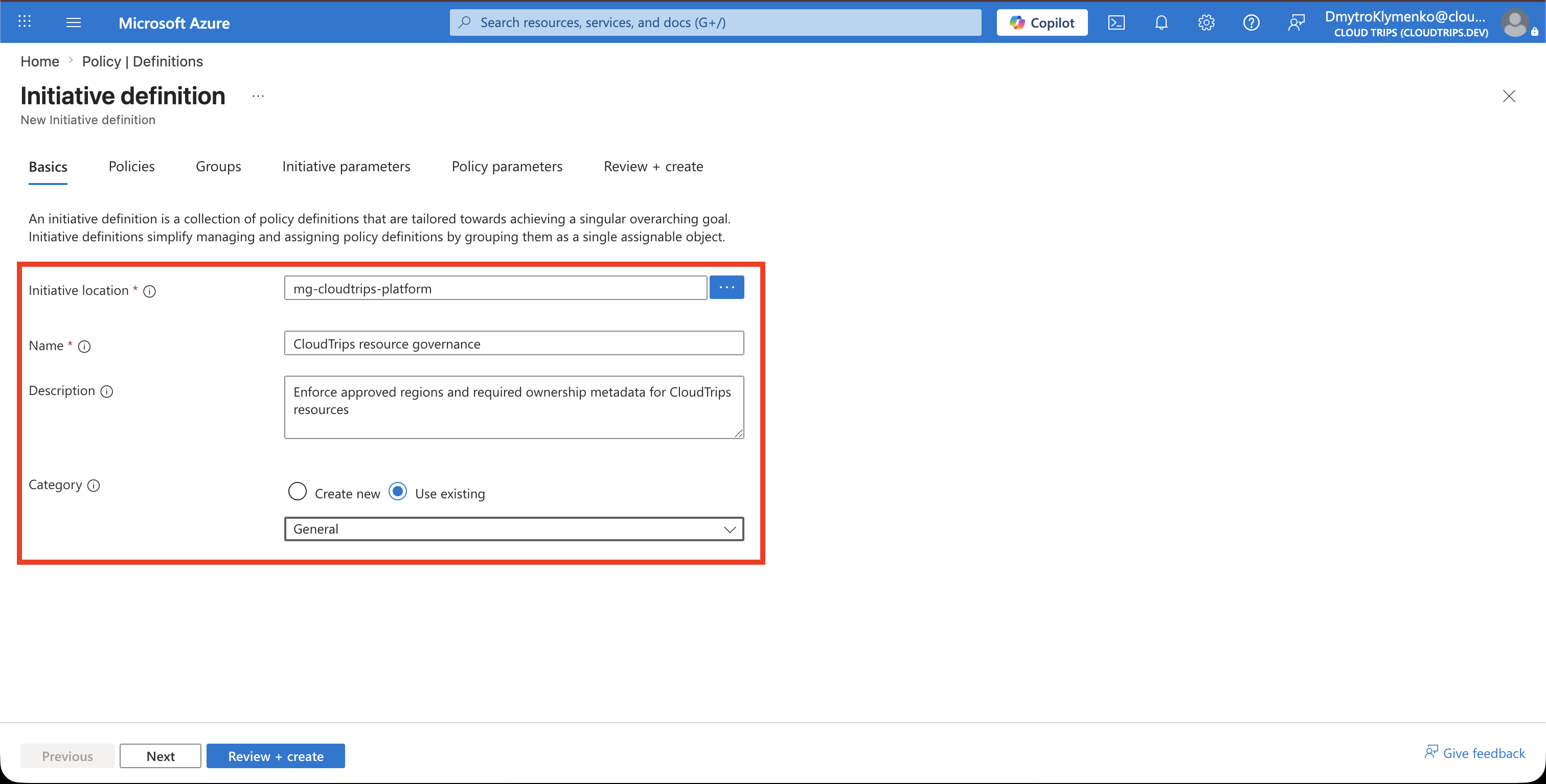
Configure:
Definition location: Azure subscription 1
Name: CloudTrips resource governance
Description: Enforce approved regions and required ownership metadata for CloudTrips resources
Category: General
The definition location controls where the initiative is available for assignment. A subscription-level definition can be assigned within Azure subscription 1. Use a management-group definition location later if the same initiative must govern multiple subscriptions.
Add the Policy Definitions
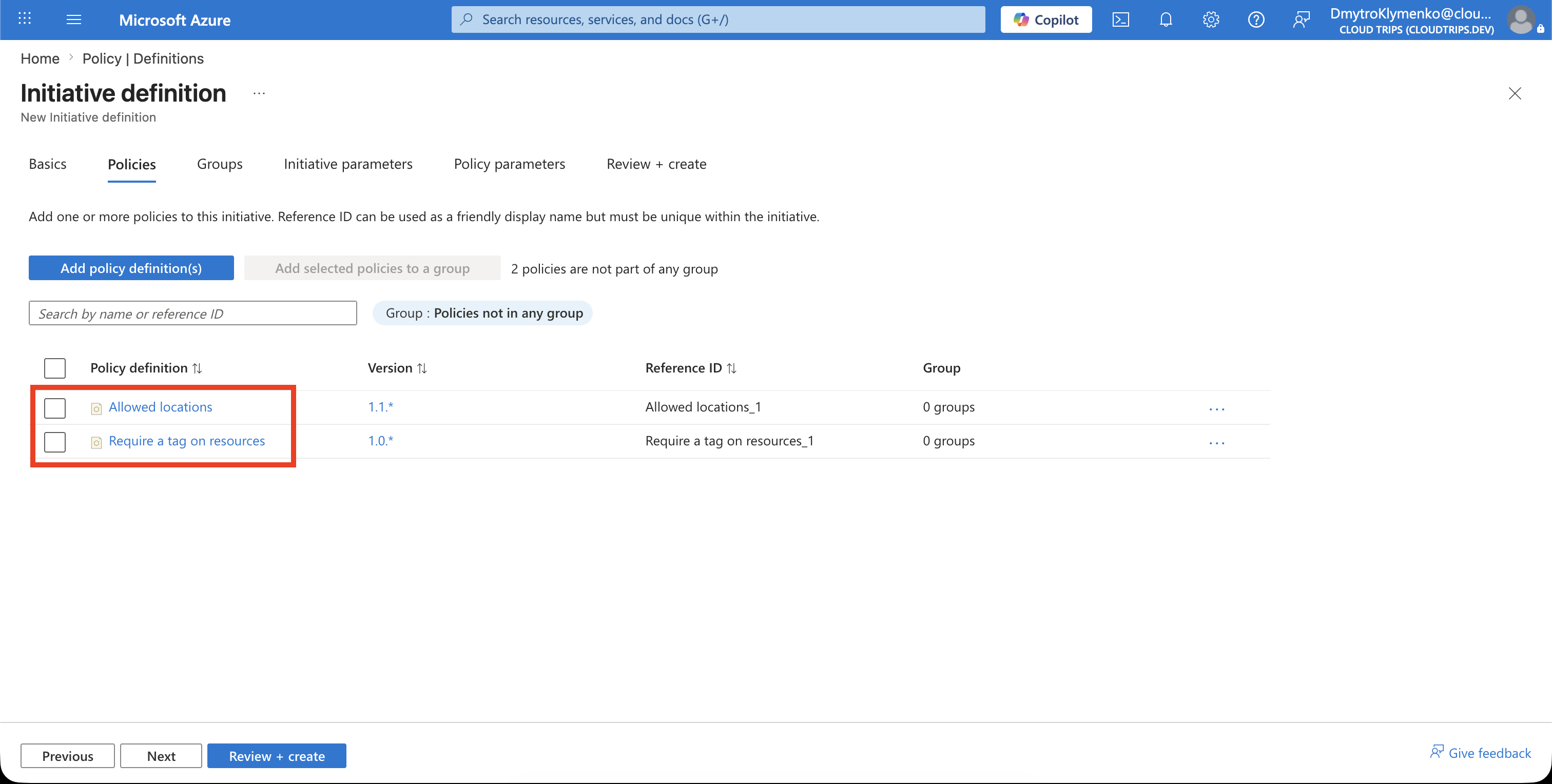
Under Policies, select Add policy definition and add these built-in definitions:
Allowed locations
Require a tag on resources
Choose Require a tag on resources, not a policy that automatically adds or inherits a tag. This initiative should deny a non-compliant deployment rather than modify it.
Configure Initiative Parameters
An initiative parameter is a reusable input for the whole initiative. It must be created first and then connected to the corresponding parameter of an included policy.
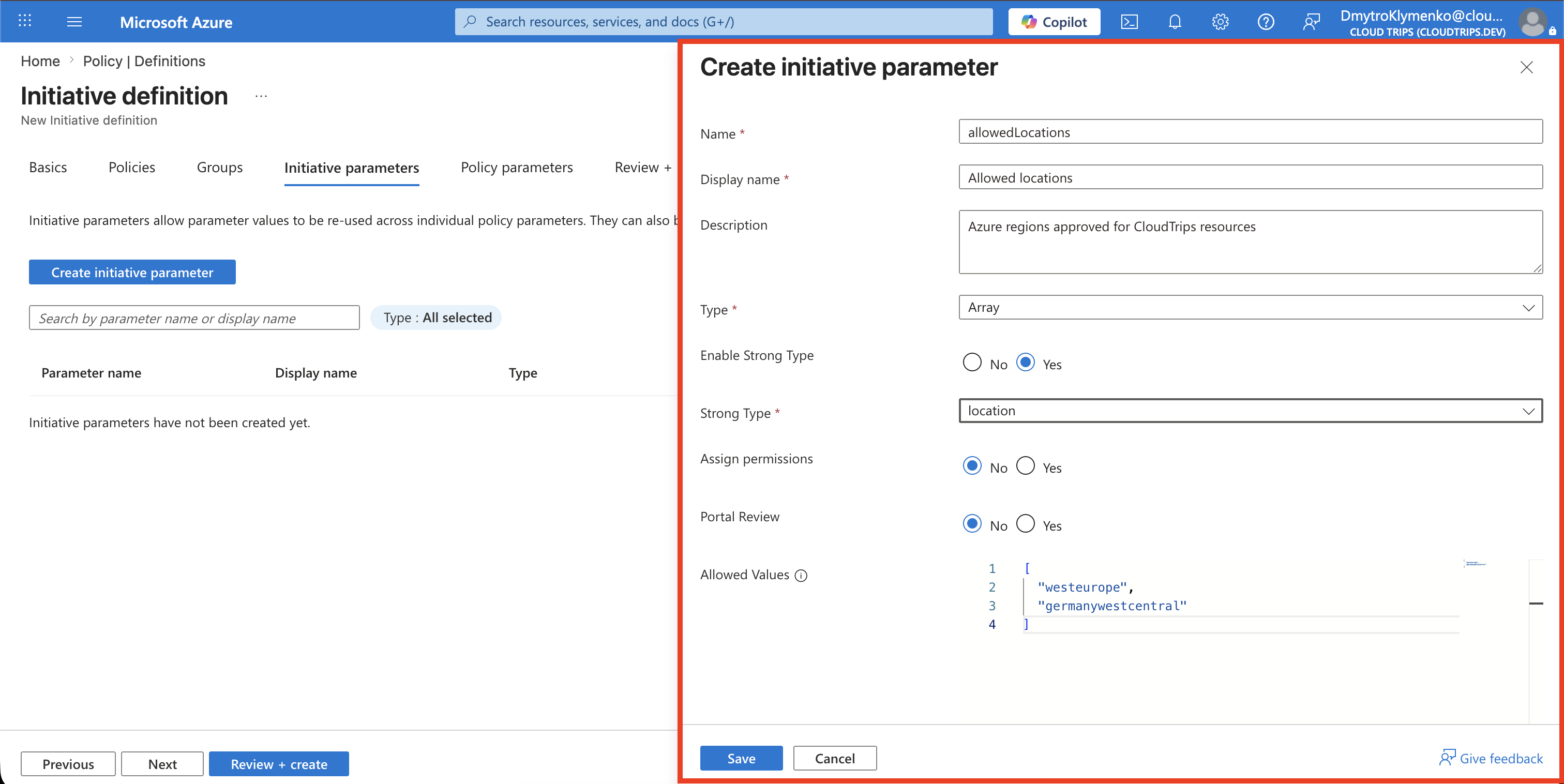
Under Initiative parameters, select Create initiative parameter. Create the locations parameter with:
Name: allowedLocations
Display name: Allowed locations
Description: Azure regions approved for CloudTrips resources
Type: Array
Allowed values: ["westeurope", "germanywestcentral"]
If the form offers Strong type, select Location. This makes the assignment page display an Azure-region picker. Enter Allowed values as a JSON array using Azure’s internal region names:
[
  "westeurope",
  "germanywestcentral"
]
Do not enter West Europe, Germany West Central as one comma-separated string. Select Save or Add in the parameter pane.
Leave Default value empty. The locations will be selected when the initiative is assigned.
Select Create initiative parameter again and create the tag parameter:
Name: requiredTagName
Display name: Required tag name
Description: Tag that every governed CloudTrips resource must contain
Type: String
Allowed values: ["Department"]
Default value: Department
Enter Department as both the only Allowed value and the Default value, and then select Save or Add. Here, Department is the value of the requiredTagName parameter—meaning the tag’s name—not the value stored in that tag. This locks every assignment of the initiative to the Department tag name. The tag value itself, such as Engineering, remains unrestricted.
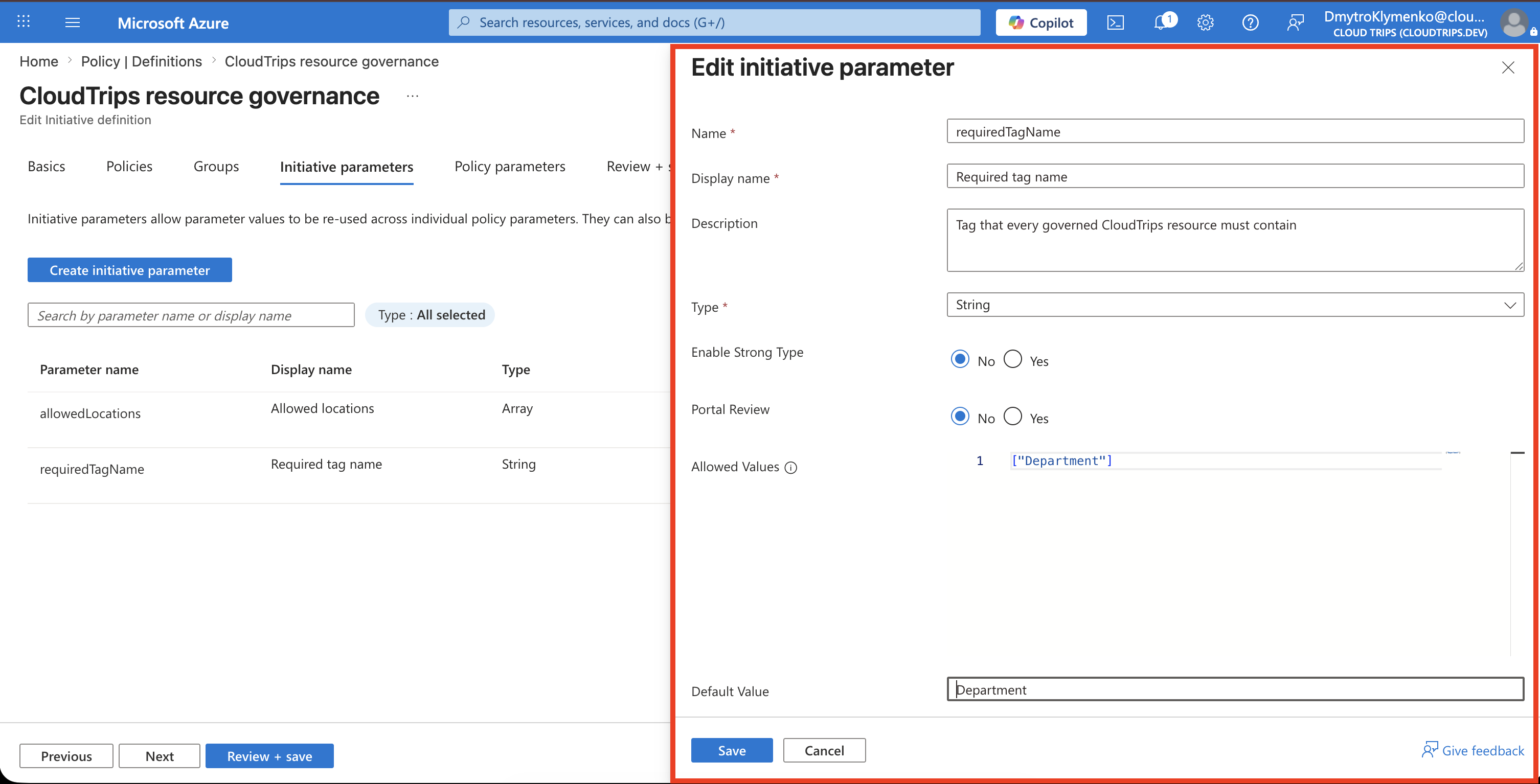
If the initiative already exists, open Policy > Definitions, select CloudTrips resource governance, and select Edit initiative. Under Initiative parameters, edit requiredTagName and add the allowed and default values above. Save the initiative, then verify that each existing assignment still has Tag name: Department; editing a definition does not replace parameter values already stored on an assignment.
Map the Parameters to the Included Policies
Creating the initiative parameters alone does not make the policies use them. Open the Policy parameters tab. Find the Allowed locations policy and, for its Allowed locations parameter, select Use initiative parameter, and then select allowedLocations.
Still in the Policy parameters tab, find Require a tag on resources. Map its Tag name policy parameter to requiredTagName in the same way.
Do not enter Department directly in the included policy. The policy parameter must reference requiredTagName, whose allowed and default values enforce the required tag name centrally.
Confirm the mapping:
| Included policy | Policy parameter | Initiative parameter |
|---|---|---|
| Allowed locations | Allowed locations | allowedLocations |
| Require a tag on resources | Tag name | requiredTagName |
Initiative parameters make the grouped definitions reusable. Locations are supplied for each assignment, while requiredTagName is constrained to Department.
Select Save to create the initiative definition.
Assign the Initiative
Open the new initiative and select Assign, or go to Policy > Assignments > Assign initiative.
Configure:
Scope: Azure subscription 1
Exclusions: None
Initiative definition: CloudTrips resource governance
Assignment name: CloudTrips - Resource governance
Policy enforcement: Enabled
Allowed locations: West Europe, Germany West Central
Tag name: Department
No managed identity or remediation task is required because these policies use Deny and do not modify existing resources.
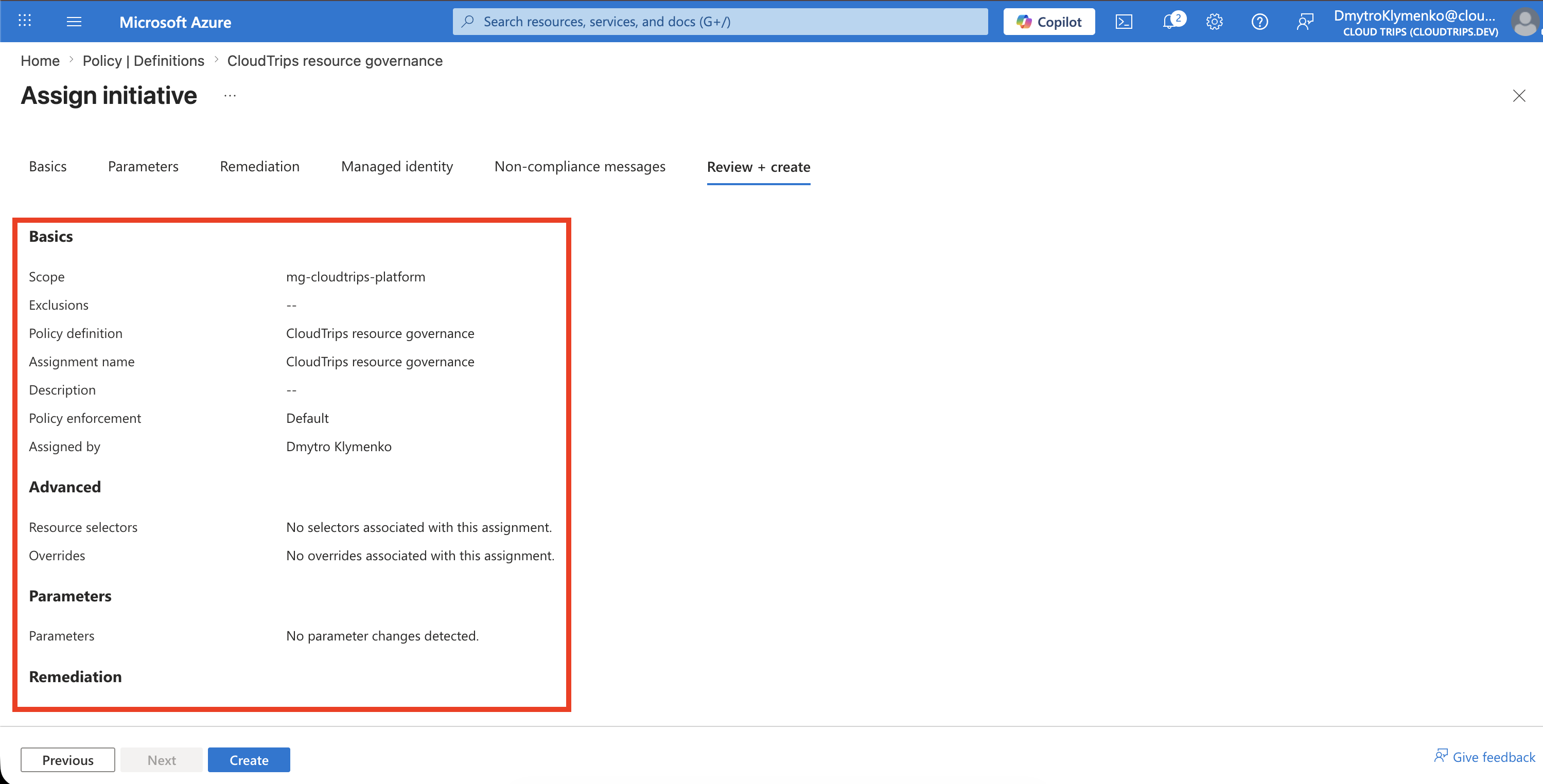
Select Review + create, verify both included policies and their parameters, and select Create.
Verify Compliance and Enforcement
After policy evaluation, open:
Policy
> Compliance
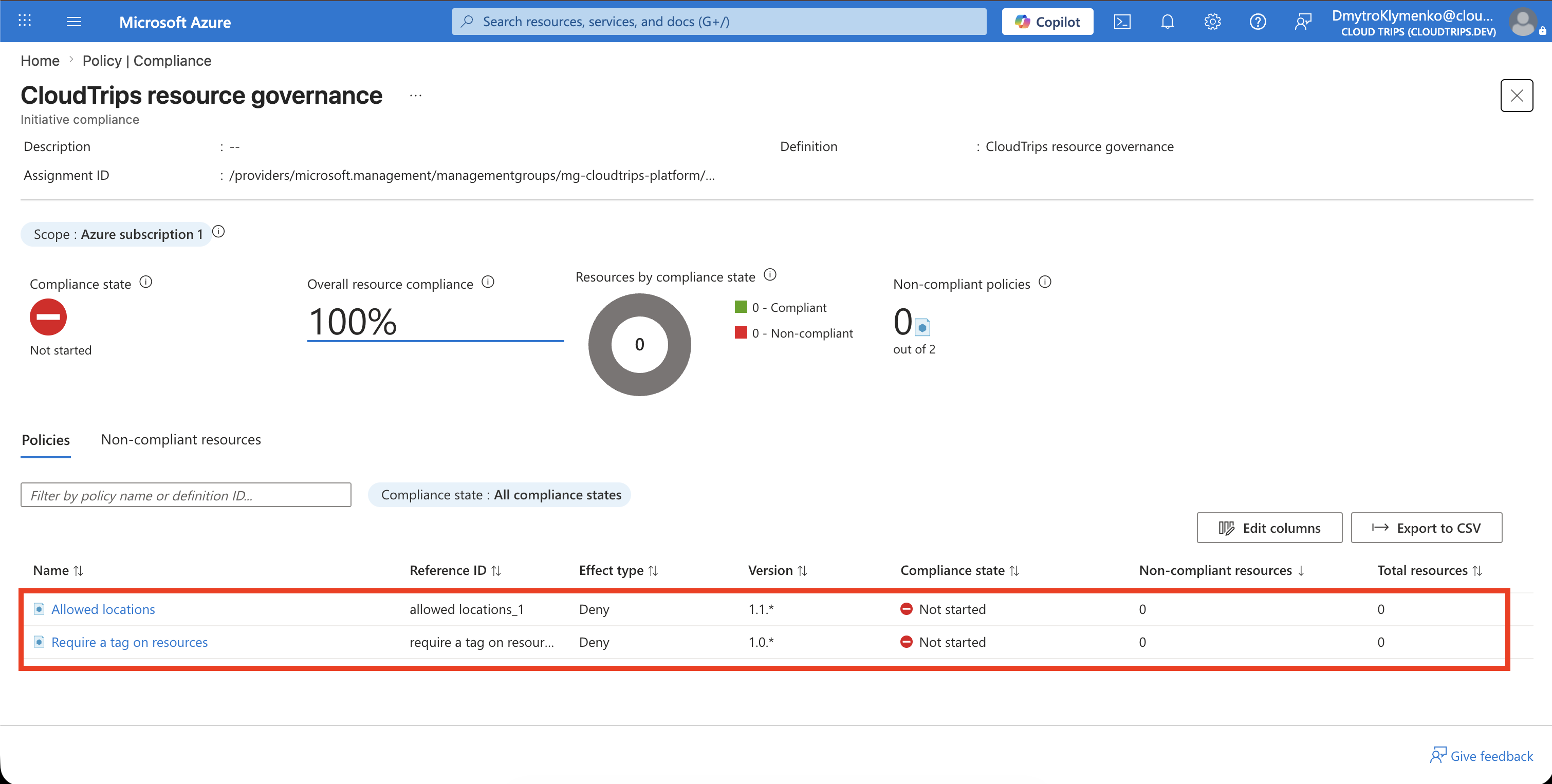
> CloudTrips - Resource governance
Expand the initiative to review compliance for each included definition. Existing non-compliant resources are reported but are not moved, tagged, or deleted automatically.
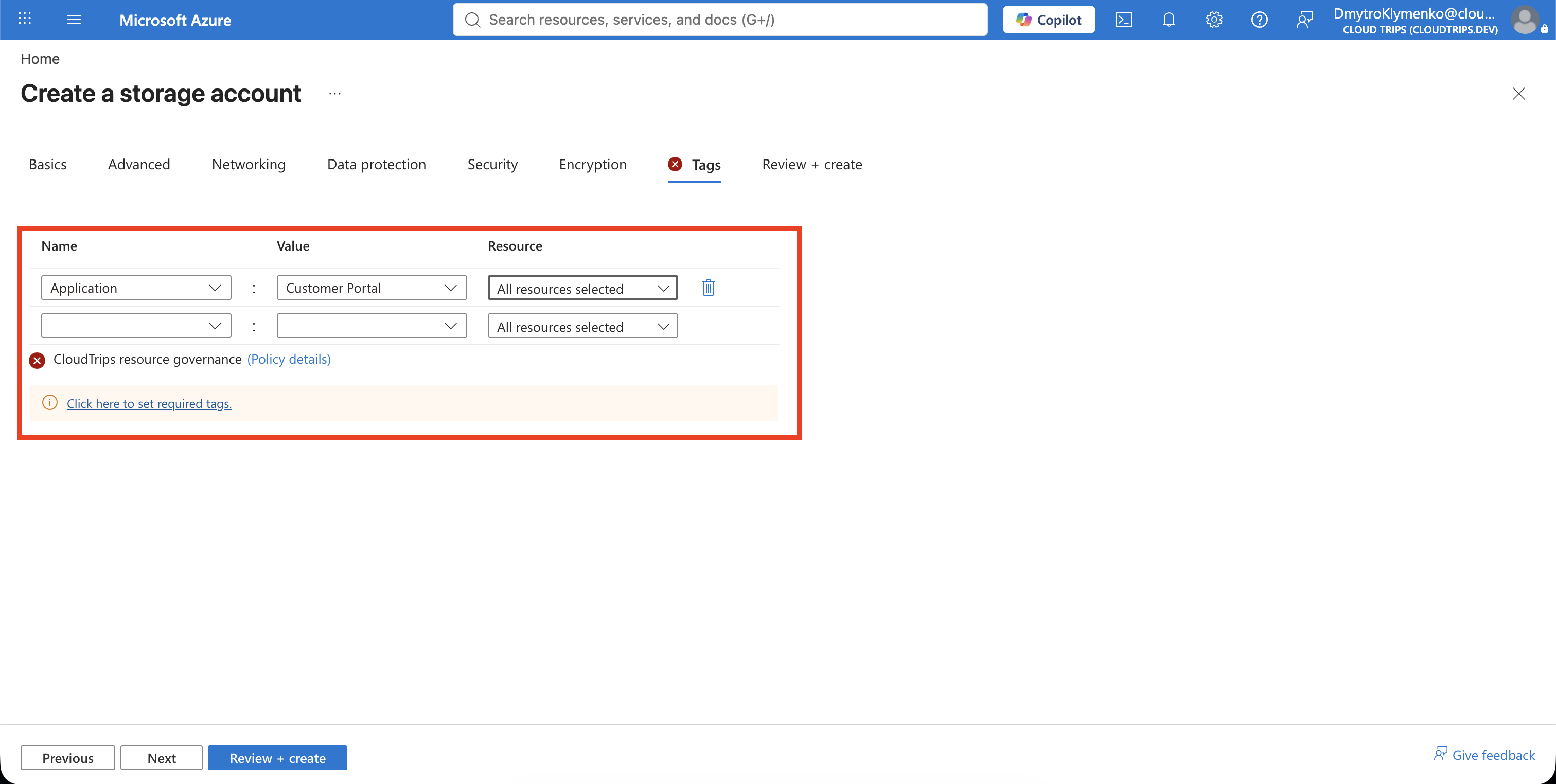
Test a temporary storage-account deployment with:
Location: West Europe
Department tag: omitted
The required-tag policy should deny it. Then add Department: Engineering; the initiative’s two rules should accept the location and tag. Stop before creation if no real storage account is needed.
Remove the Duplicate Standalone Assignment
Once the initiative assignment is active and verified, review the standalone CloudTrips - Allowed resource locations assignment from the previous trip. If it has the same scope, exclusions, approved regions, and enforcement mode, remove that assignment to avoid duplicate management and compliance results.
Do not remove it before the initiative is verified. Removing an assignment creates a governance gap if its replacement is not enforcing the expected rule.
Azure subscription 1 is now governed through one initiative assignment that requires approved locations and the Department tag.