CLI Tool Needs Login? Use Device Code Flow
Command-line tools often need to act for a signed-in user.
But a CLI usually cannot receive a normal browser redirect.
For this kind of app, the practical pattern is:
Device Code Flow.
This pattern is used when:
- a user is present
- the app runs in a terminal
- the app cannot safely store a client secret
- the app cannot rely on a local browser callback
- authentication is handled by Microsoft Entra ID
- the app needs delegated access to an API
In this example:
- CloudTrips CLI is the command-line client
- CloudTrips API is the protected resource
- Employee is the signed-in user
Authentication is done with OAuth 2.0 Device Code Flow. Authorization is controlled with delegated permissions.
How This Differs from the SPA PKCE Flow
The previous trip used Authorization Code Flow with PKCE for a browser-based SPA.
That SPA could redirect the same browser to Microsoft Entra ID and receive the authorization code at /auth/callback.
A CLI is different.
It runs in a terminal. It may be used over SSH, inside a container, on a server, or in an environment where opening and listening for a browser callback is awkward.
Instead of redirecting back to the app, Device Code Flow splits the sign-in across two places:
- the CLI requests a temporary device code from Microsoft Entra ID
- the CLI shows a short user code and verification URL
- the user opens the verification URL in any browser
- the user enters the code and signs in
- the CLI polls the token endpoint until sign-in completes
- Microsoft Entra ID returns delegated tokens to the CLI
The shape is:
CLI asks for device code -> user signs in in browser -> CLI polls -> CLI receives tokens -> CLI calls APIThe important idea is that the CLI never handles the user’s password.
Architecture
Employee -> CloudTrips CLI -> Microsoft Entra ID -> CloudTrips APIThe CLI starts the login.
The browser completes the login.
The CLI receives an access token for the API after Microsoft Entra ID confirms that the user completed the device code challenge.
No client secret is used.
Create CloudTrips API App
First, create the resource application.
Go to:
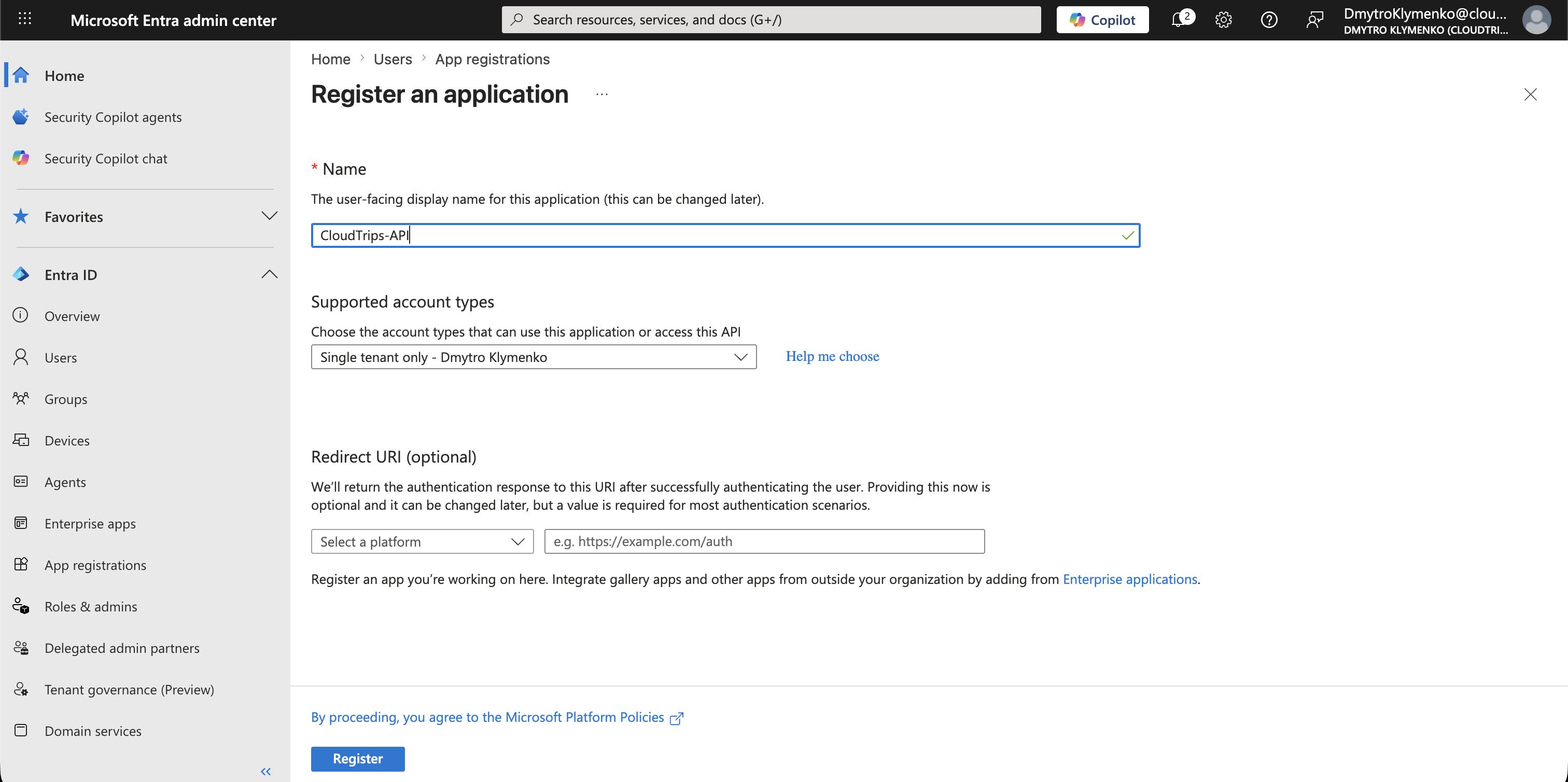
Entra ID > App registrations > New registrationCreate an application:
Name: CloudTrips-APIThis app registration represents the API that will receive and validate access tokens.
Expose API
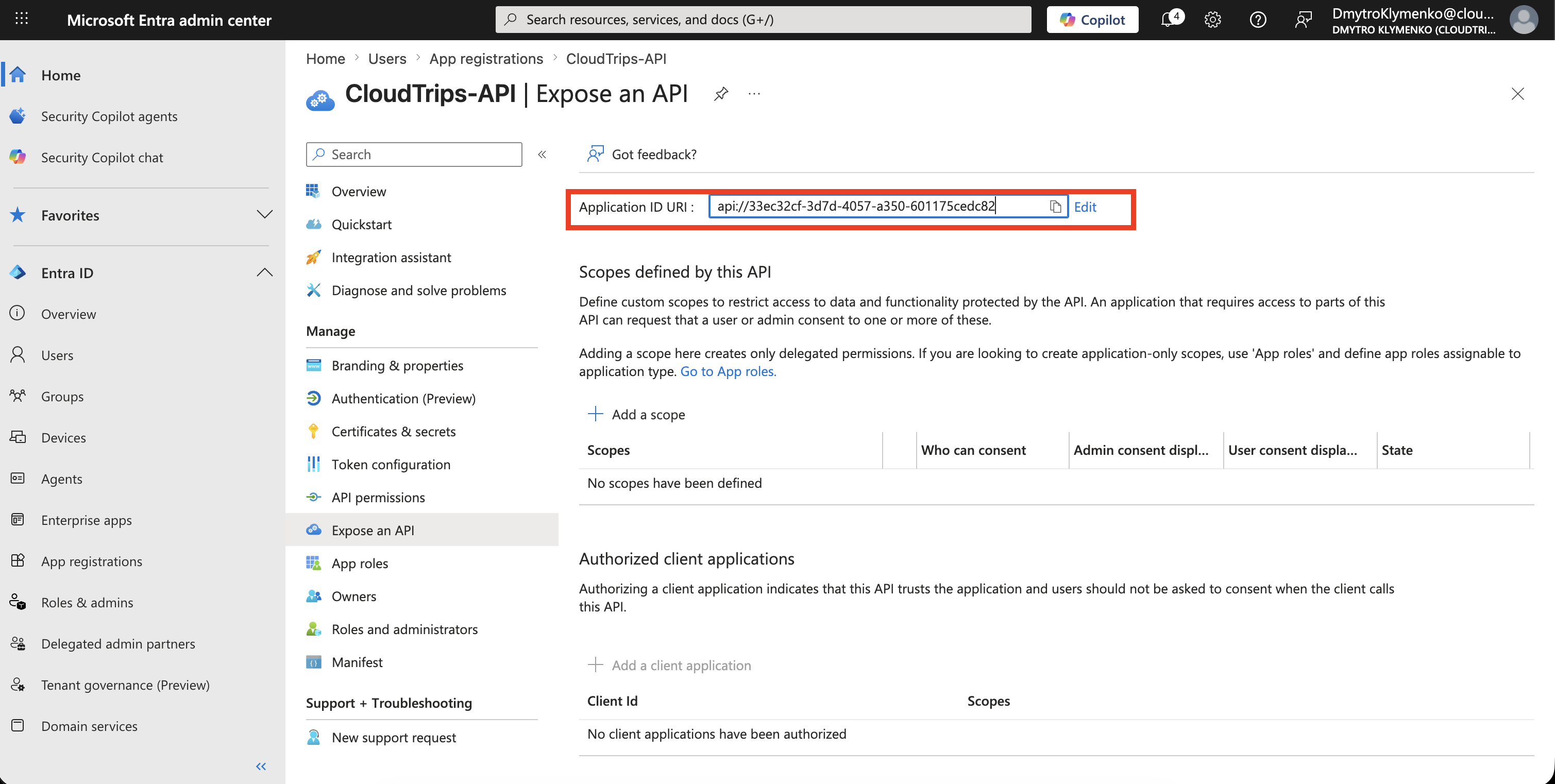
Inside CloudTrips-API, open:
Expose an APISet the Application ID URI:
api://<cloudtrips-api-application-id>This identifier becomes the audience for access tokens issued to the CloudTrips API.
Create Delegated Scope
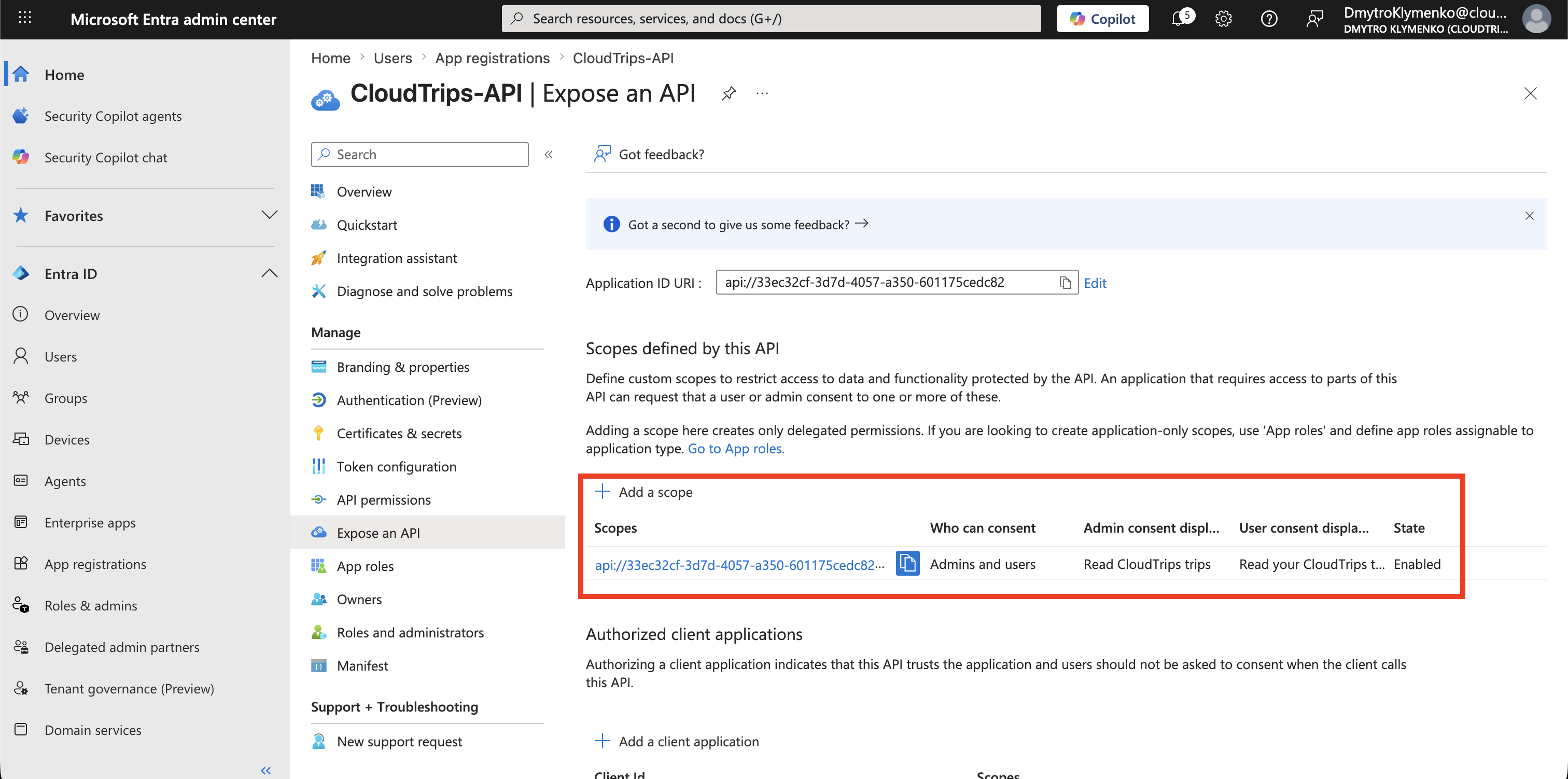
Inside CloudTrips-API, add a delegated scope:
Expose an API > Add a scopeExample:
Scope name: Trips.Read
Who can consent: Admins and users
Admin consent display name: Read CloudTrips trips
User consent display name: Read your CloudTrips trips
State: Enabled
The CloudTrips API can later check whether the incoming token contains this scope.
Create CloudTrips CLI App
Now create the public client application.
Go to:
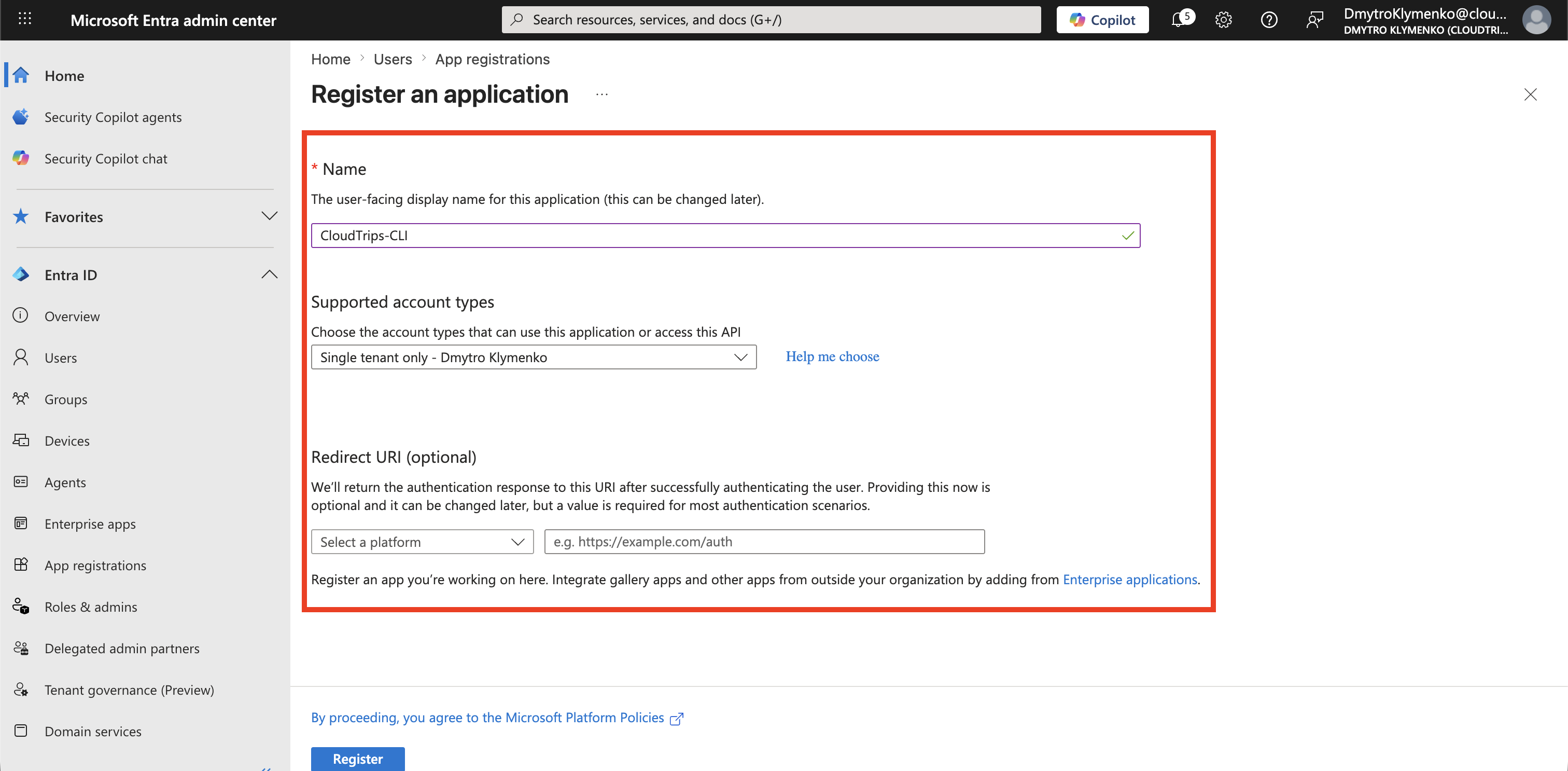
Entra ID > App registrations > New registrationCreate an application:
Name: CloudTrips-CLI
Supported account types: Single tenant
Redirect URI: leave empty
The CLI does not need a web redirect URI for Device Code Flow.
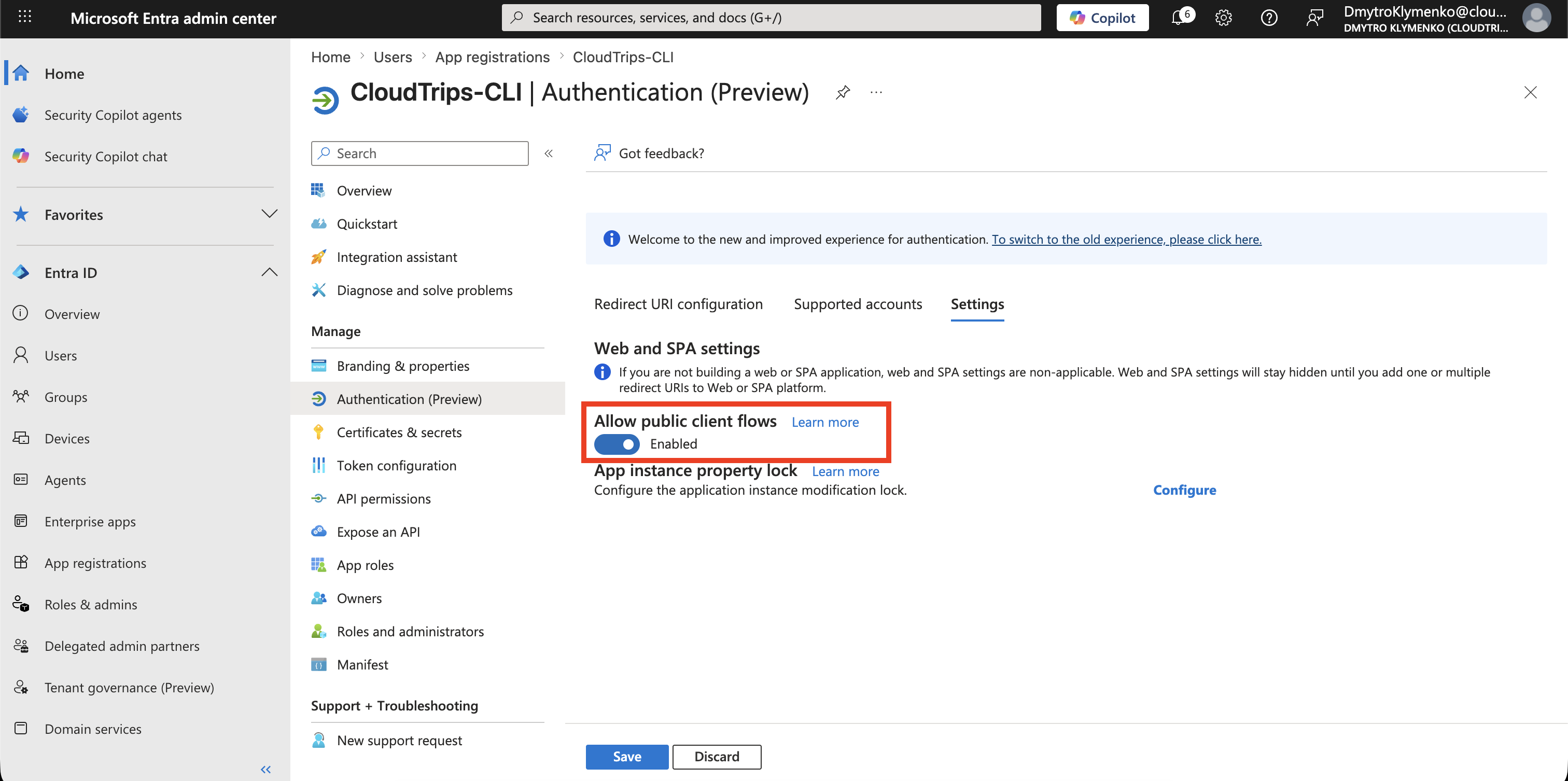
Enable Public Client Flow
Inside CloudTrips-CLI, open:
AuthenticationFind:
Advanced settings > Allow public client flowsSet it to:
YesDo not create a client secret for the CLI.
A CLI using Device Code Flow is a public client. A secret shipped with a local tool can be copied.
Add API Permission
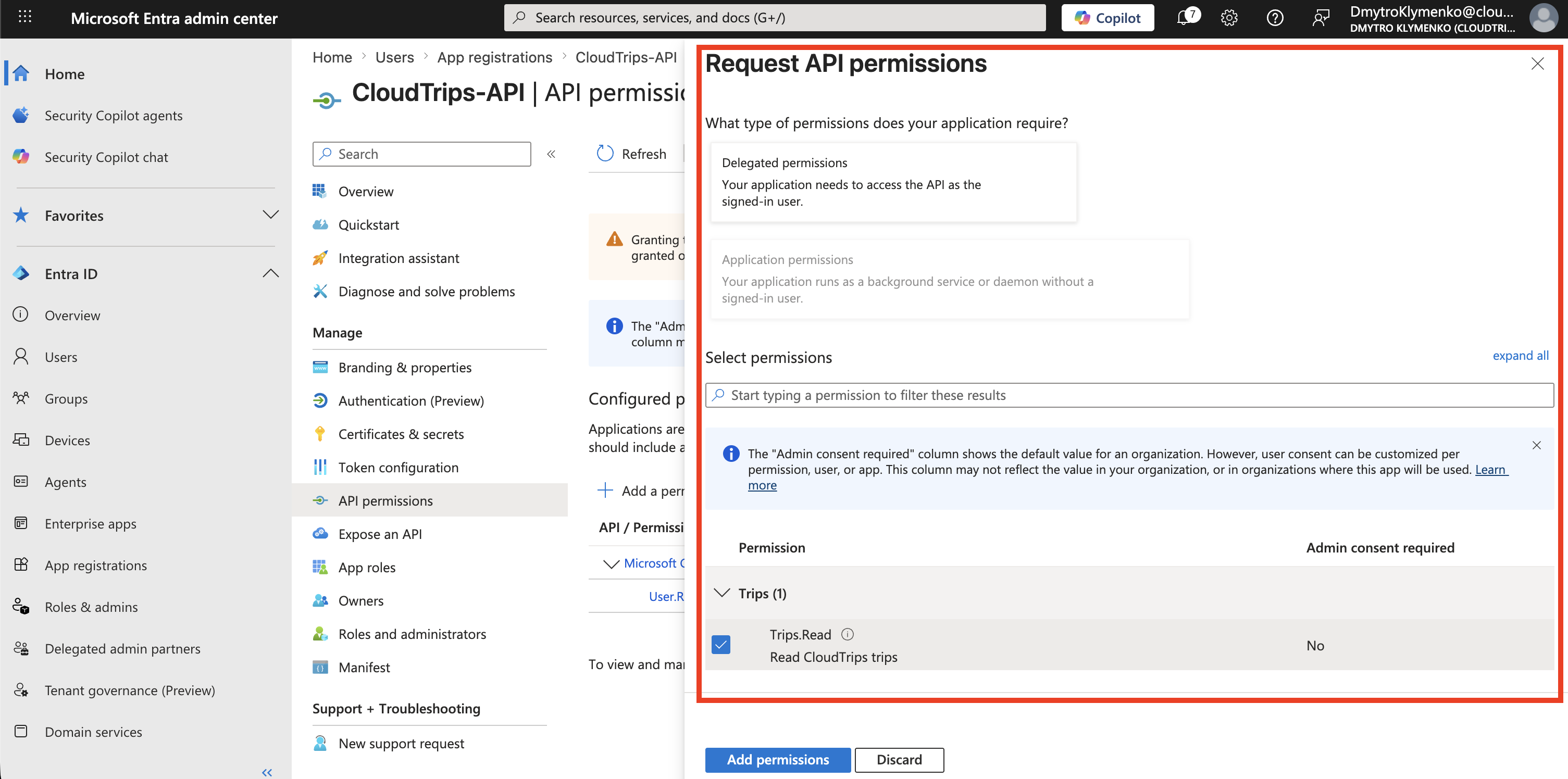
Go to:
App registrations > CloudTrips-CLI > API permissionsThen select:
Add a permissionChoose:
My APIs > CloudTrips-API > Delegated permissions > Trips.ReadThis allows the CLI to request an access token for the CloudTrips API on behalf of the signed-in user.
If your tenant requires administrator approval, click:
Grant admin consent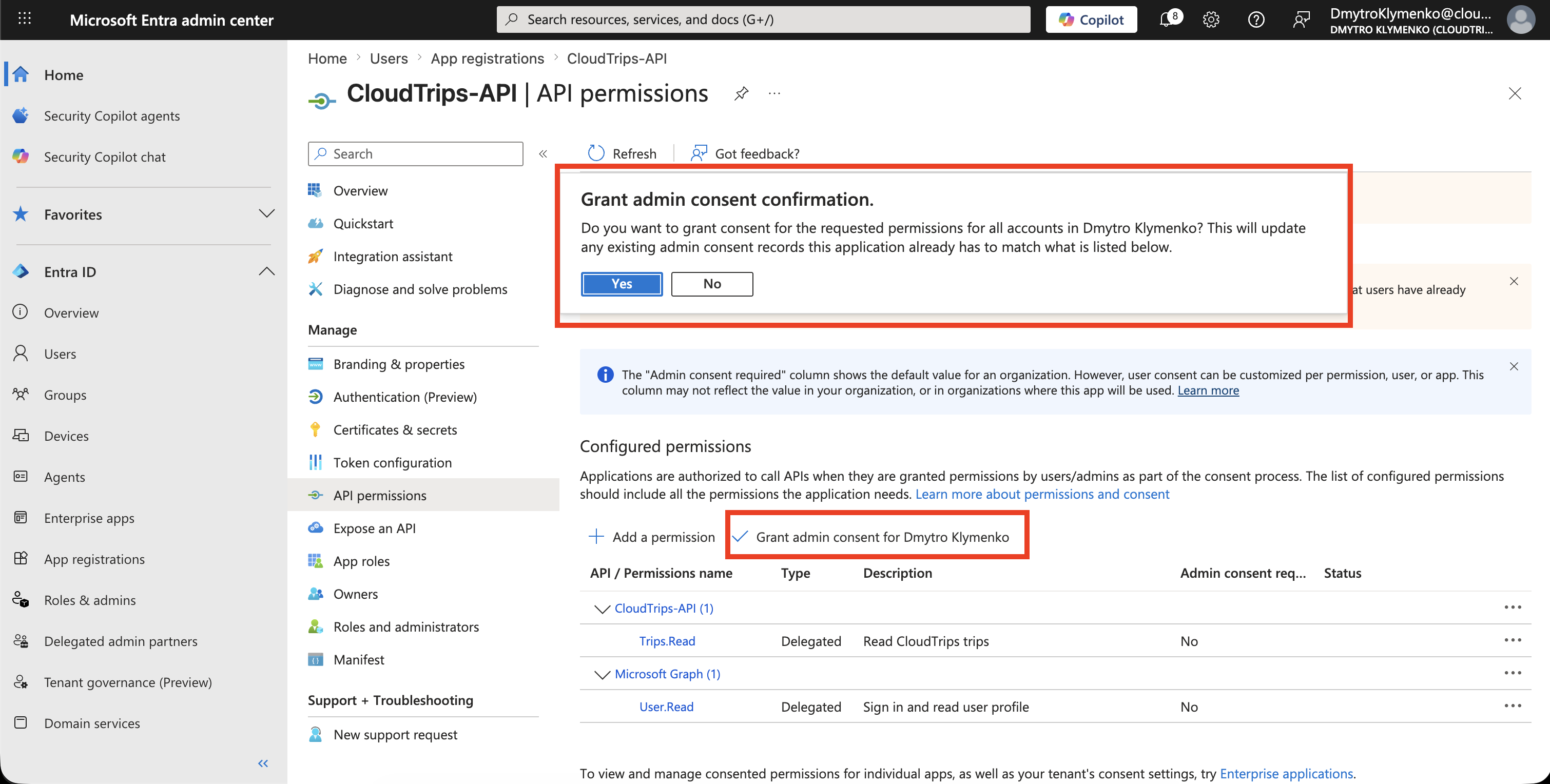
Request a Device Code
At runtime, the CLI calls the device code endpoint:
POST https://login.microsoftonline.com/<tenant-id>/oauth2/v2.0/devicecodeRequest body:
client_id=CLOUDTRIPS_CLI_CLIENT_ID
scope=openid profile offline_access api://<cloudtrips-api-application-id>/Trips.Read
Microsoft Entra ID returns values like:
{
  "user_code": "ABCD-EFGH",
  "device_code": "long-device-code-for-the-cli",
  "verification_uri": "https://microsoft.com/devicelogin",
  "expires_in": 900,
  "interval": 5,
  "message": "To sign in, use a web browser to open..."
}
The CLI shows the user_code and verification_uri to the user.
The CLI keeps the device_code for polling.
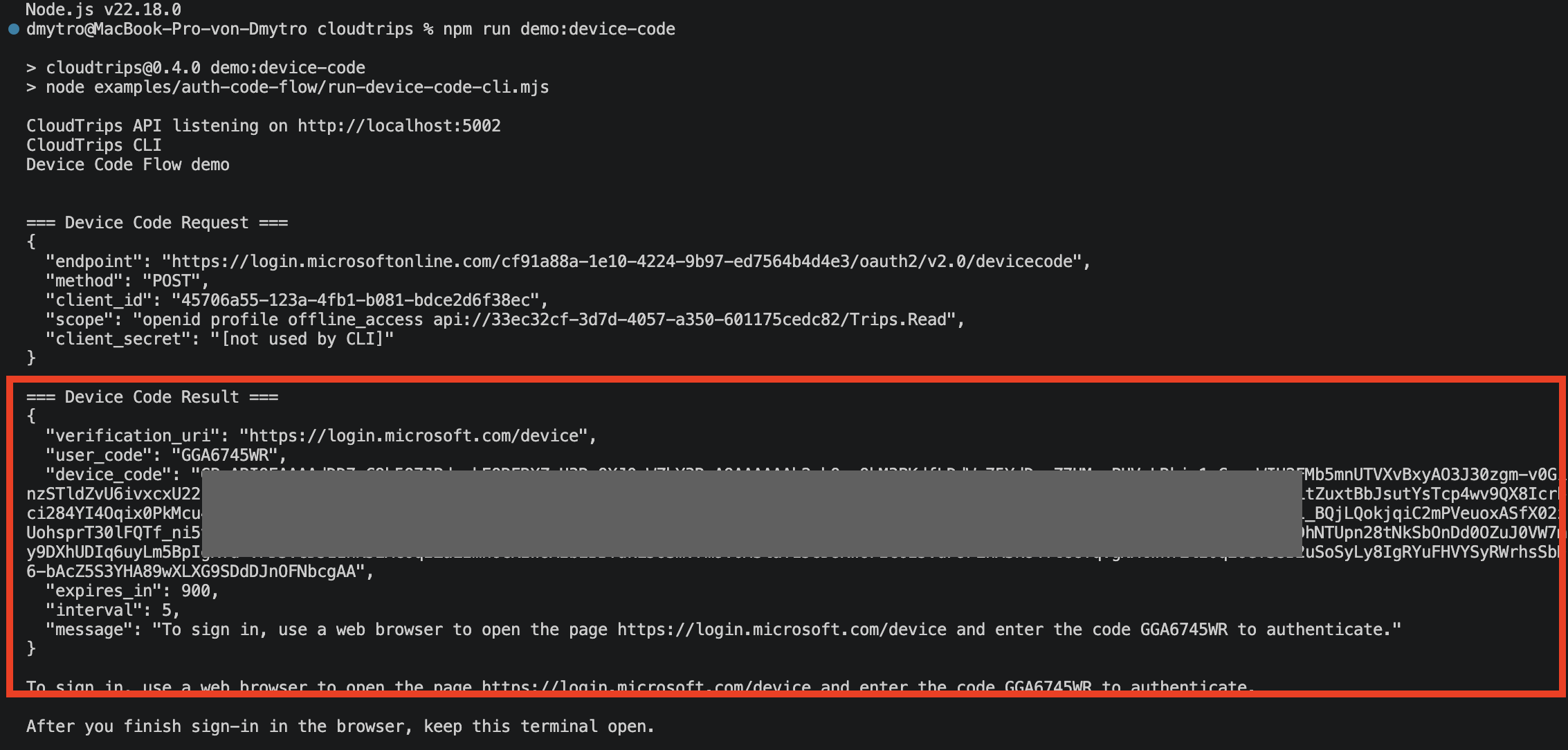
The user opens:
https://microsoft.com/deviceloginThen the user enters the short code shown by the CLI.
After entering the code, the user signs in with Microsoft Entra ID.
If consent is required, the user or administrator approves the delegated permission.
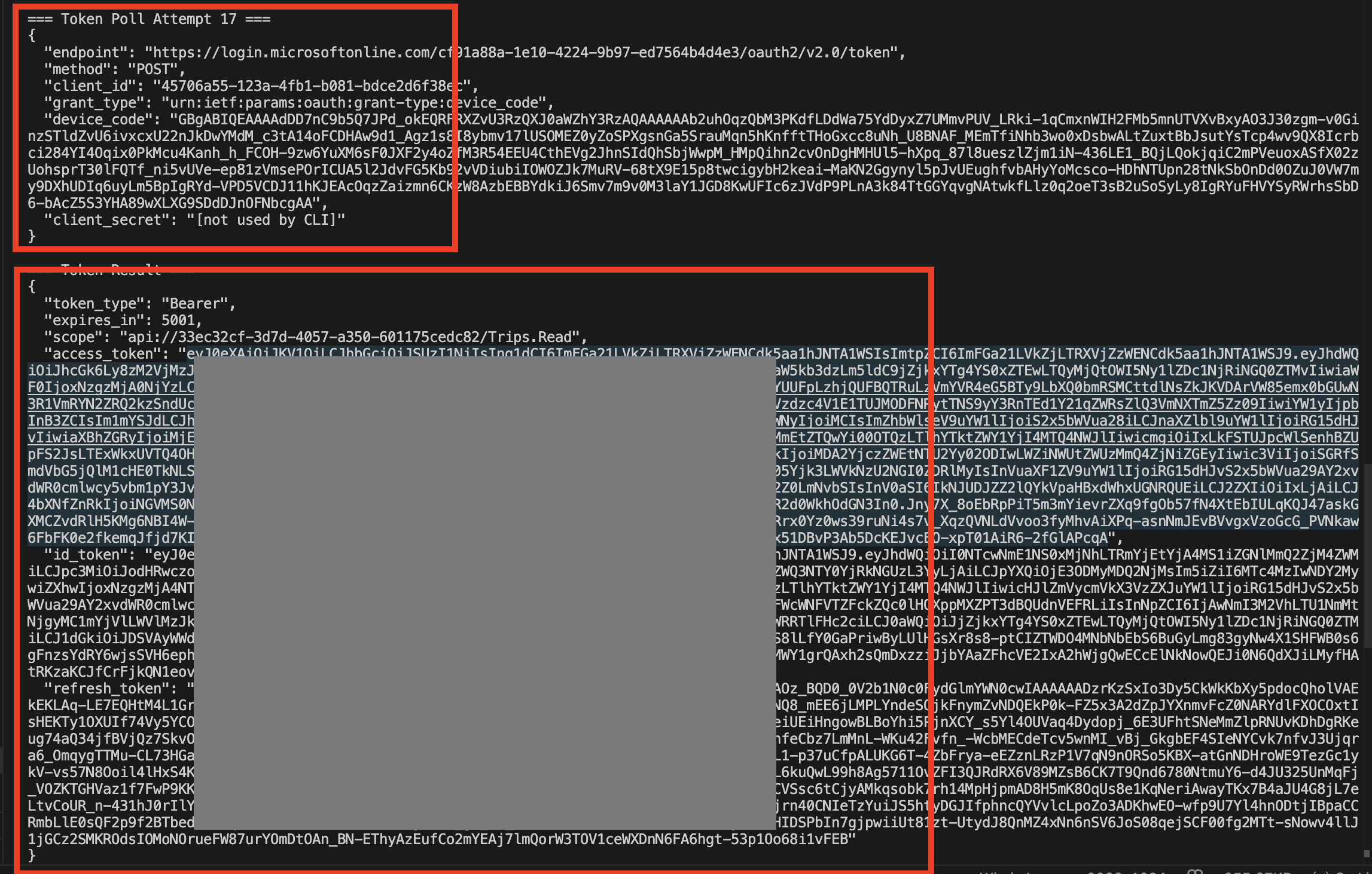
CLI Polls the Token Endpoint
While the user signs in, the CLI polls the token endpoint:
POST https://login.microsoftonline.com/<tenant-id>/oauth2/v2.0/tokenRequest body:
client_id=CLOUDTRIPS_CLI_CLIENT_ID
grant_type=urn:ietf:params:oauth:grant-type:device_code
device_code=DEVICE_CODE_FROM_DEVICECODE_RESPONSE
The CLI should wait between polling attempts using the interval value from the device code response.
Before the user finishes sign-in, Microsoft Entra ID can return:
{
  "error": "authorization_pending"
}
That is normal.
After the user completes sign-in, Microsoft Entra ID returns tokens.
Access Token Claims
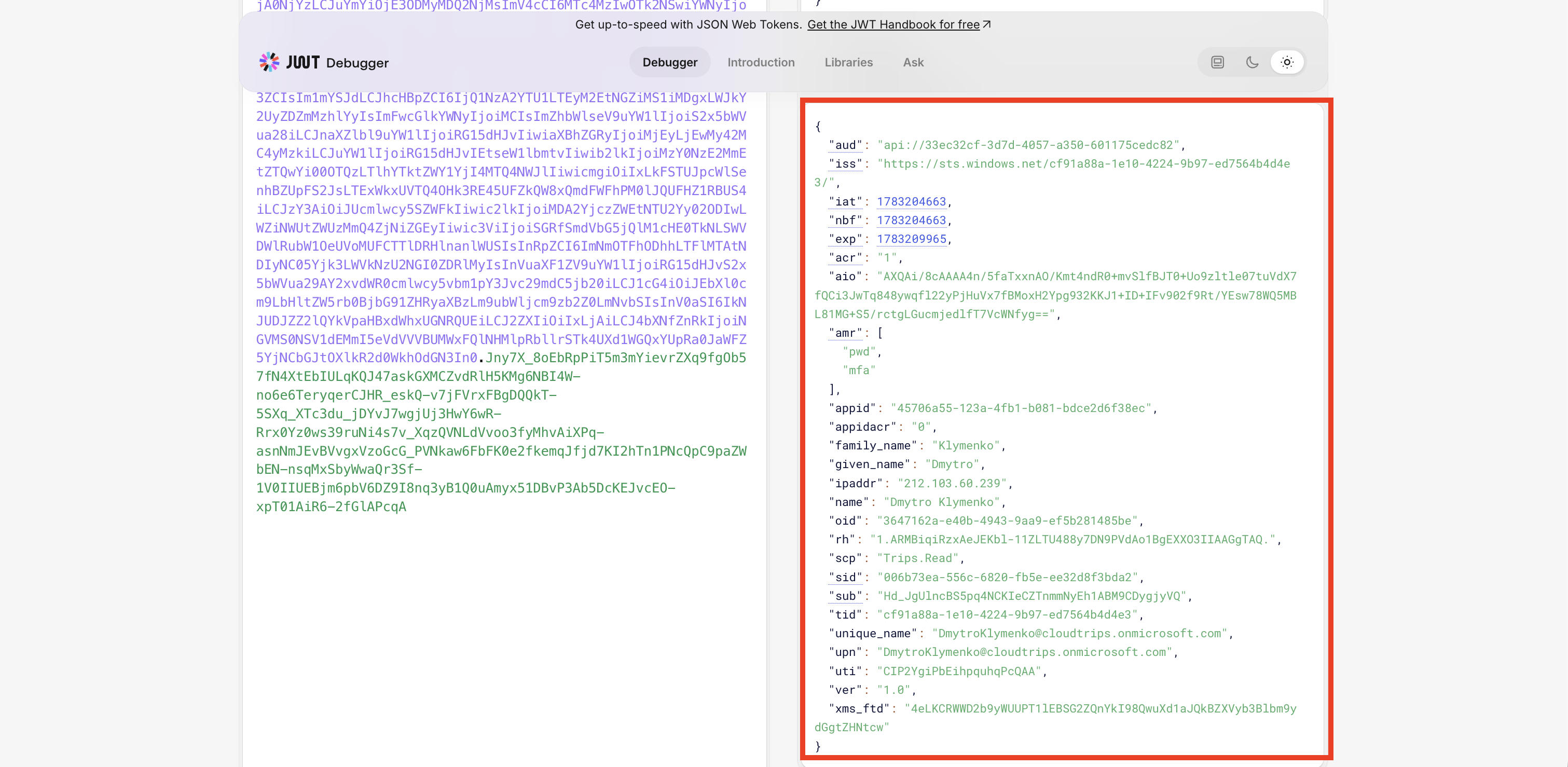
The CLI receives an access token for the CloudTrips API.
Decode the access token.
Important claims:
| Claim | Meaning |
|---|---|
aud |
API that should accept the token |
scp |
Delegated permissions granted to the CLI |
sub |
Stable user identifier for this app |
tid |
Tenant ID |
iss |
Token issuer |
For this trip, the important proof is:
{
  "aud": "api://<cloudtrips-api-application-id>",
  "scp": "Trips.Read"
}
Call the Protected API
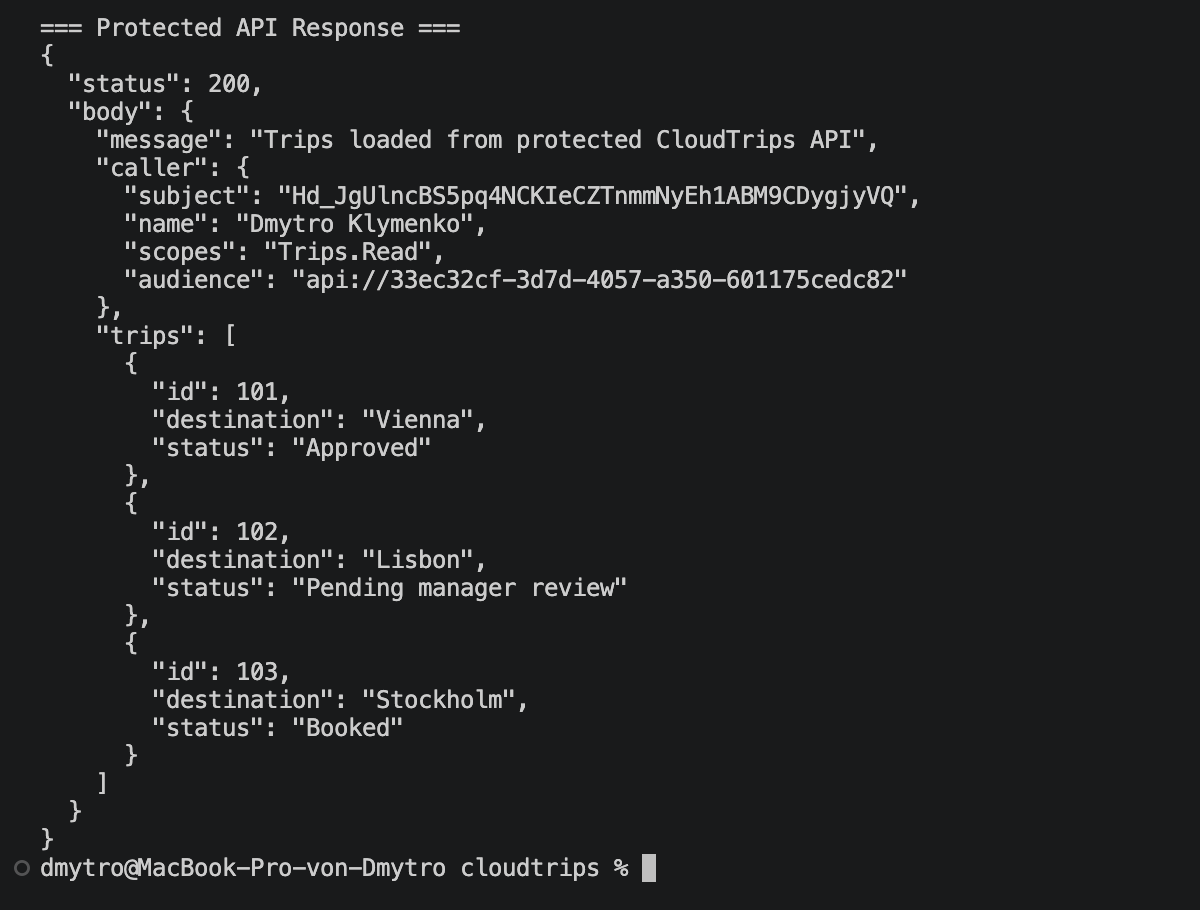
The CLI sends the access token to the CloudTrips API:
GET https://api.cloudtrips.example/trips
Authorization: Bearer ACCESS_TOKEN
The API validates:
- token signature
- issuer
- audience
- expiration
- delegated scope
If the token contains scp=Trips.Read, the API returns the trips.
Key Difference from Other Flows
| Topic | Server-side web app | SPA with PKCE | CLI with Device Code |
|---|---|---|---|
| Client type | Confidential | Public | Public |
| Client secret | Yes | No | No |
| User interaction | Browser redirect | Browser redirect | Separate browser code entry |
| Token exchange | Server side | Browser/public client | CLI polling |
| Protection | Client secret | PKCE verifier | Device code plus user completion |
| Common use | Web apps | Browser apps | CLI tools, devices, SSH sessions |
Enterprise Note
Device Code Flow is convenient, but it is still interactive user sign-in.
It is not a replacement for workload identity.
Use it for tools where a human operator is present.
For unattended automation, use managed identity, workload identity federation, certificate credentials, or client credentials flow instead.
In enterprise environments, consider Conditional Access impact. Some tenants restrict or monitor device code sign-in because it can be abused in phishing scenarios.
Use separate app registrations per environment when API audiences, permissions, or Conditional Access boundaries differ.
Example:
CloudTrips-CLI-DEV
CloudTrips-CLI-TEST
CloudTrips-CLI-PROD

CloudTrips-API-DEV
CloudTrips-API-TEST
CloudTrips-API-PROD
This provides:
- clearer consent boundaries
- safer production access
- independent troubleshooting
- cleaner audit logs
- no accidental cross-environment token use