CloudTrips Needs a Complete Repeatable Environment? Build It with Bicep
CloudTrips can deploy a storage workload, but a usable application foundation also needs a secure place for secrets and a shared monitoring destination. Creating those resources manually would give DEV, TEST, and PROD different names, tags, settings, and deployment histories.
Build the complete foundation from one subscription-level Bicep entry point. For this learning path, “complete environment” means:
- a resource group
- a storage account and the environment-specific containers
- a Key Vault that uses Azure RBAC
- a Log Analytics workspace
- a workspace-based Application Insights resource
- consistent ownership, cost, environment, and management tags
Application compute and networking are outside this lab. They can be added as later modules without changing the structure established here.
This capstone builds on: Use Deployment Scopes and Use Azure Verified Modules. Complete those trips first because this lab extends their subscription entry point, parameter files, modular workload, and storage wrapper. The Deployment Stacks trip is a separate lifecycle lab and is not required.
Add the Key Vault Module
Create cloudtrips-bicep/modules/key-vault.bicep. The name is deterministic but
globally unique because it combines the environment with a hash of the resource
group ID:
param environment string
param location string
param tags object

var keyVaultName = 'kvct${toLower(environment)}${uniqueString(resourceGroup().id)}'

resource keyVault 'Microsoft.KeyVault/vaults@2026-02-01' = {
  name: keyVaultName
  location: location
  tags: tags
  properties: {
    accessPolicies: []
    enablePurgeProtection: true
    enableRbacAuthorization: true
    enableSoftDelete: true
    enabledForDeployment: false
    enabledForDiskEncryption: false
    enabledForTemplateDeployment: false
    networkAcls: {
      bypass: 'AzureServices'
      defaultAction: 'Allow'
      ipRules: []
      virtualNetworkRules: []
    }
    publicNetworkAccess: 'Enabled'
    sku: {
      family: 'A'
      name: 'standard'
    }
    softDeleteRetentionInDays: 7
    tenantId: tenant().tenantId
  }
}

output keyVaultName string = keyVault.name
output keyVaultId string = keyVault.id
output keyVaultUri string = keyVault.properties.vaultUri
The module creates the vault boundary but no secrets. Secret values must not be
written into the repository. enableRbacAuthorization: true means access will
be granted with Azure roles rather than legacy Key Vault access policies.
Purge protection is enabled and cannot later be disabled. Public network access keeps the learning deployment usable without creating a virtual network. A production design can also place the vault behind a private endpoint.
Add the Monitoring Module
Create cloudtrips-bicep/modules/monitoring.bicep. It deploys the Log Analytics
workspace first and connects Application Insights to it:
param environment string
param location string
param tags object

var resourceSuffix = uniqueString(resourceGroup().id)
var logAnalyticsWorkspaceName = 'log-ct-${toLower(environment)}-${resourceSuffix}'
var applicationInsightsName = 'appi-ct-${toLower(environment)}-${resourceSuffix}'

resource logAnalyticsWorkspace 'Microsoft.OperationalInsights/workspaces@2025-07-01' = {
  name: logAnalyticsWorkspaceName
  location: location
  tags: tags
  properties: {
    features: {
      disableLocalAuth: false
      enableLogAccessUsingOnlyResourcePermissions: true
    }
    publicNetworkAccessForIngestion: 'Enabled'
    publicNetworkAccessForQuery: 'Enabled'
    retentionInDays: 30
    sku: {
      name: 'PerGB2018'
    }
    workspaceCapping: {
      dailyQuotaGb: 1
    }
  }
}

resource applicationInsights 'Microsoft.Insights/components@2020-02-02' = {
  name: applicationInsightsName
  location: location
  tags: tags
  kind: 'web'
  properties: {
    Application_Type: 'web'
    DisableIpMasking: false
    DisableLocalAuth: false
    Flow_Type: 'Bluefield'
    IngestionMode: 'LogAnalytics'
    RetentionInDays: 90
    SamplingPercentage: 100
    WorkspaceResourceId: logAnalyticsWorkspace.id
    publicNetworkAccessForIngestion: 'Enabled'
    publicNetworkAccessForQuery: 'Enabled'
  }
}

output logAnalyticsWorkspaceName string = logAnalyticsWorkspace.name
output logAnalyticsWorkspaceId string = logAnalyticsWorkspace.id
output applicationInsightsName string = applicationInsights.name
output applicationInsightsId string = applicationInsights.id
WorkspaceResourceId: logAnalyticsWorkspace.id is a symbolic reference. Bicep
uses it to infer that Application Insights must wait for the workspace.
The one-gigabyte daily workspace cap limits accidental learning-environment ingestion, but monitoring resources can still create Azure cost.
Turn the Entry Point into the Environment Orchestrator
Keep the existing parameters in cloudtrips-bicep/main.bicep. Add one shared
tag object so every new module receives the same business metadata:
var commonTags = {
  Application: applicationName
  CostCenter: costCenter
  Environment: toUpper(environment)
  ManagedBy: 'Bicep'
  Owner: owner
}
Keep the existing storage module and add:
module keyVault './modules/key-vault.bicep' = {
  name: '${deployment().name}-key-vault'
  params: {
    environment: environment
    location: location
    tags: commonTags
  }
}

module monitoring './modules/monitoring.bicep' = {
  name: '${deployment().name}-monitoring'
  params: {
    environment: environment
    location: location
    tags: commonTags
  }
}
Expose the important module results and a compact deployment summary:
output keyVaultName string = keyVault.outputs.keyVaultName
output keyVaultId string = keyVault.outputs.keyVaultId
output keyVaultUri string = keyVault.outputs.keyVaultUri
output logAnalyticsWorkspaceName string = monitoring.outputs.logAnalyticsWorkspaceName
output logAnalyticsWorkspaceId string = monitoring.outputs.logAnalyticsWorkspaceId
output applicationInsightsName string = monitoring.outputs.applicationInsightsName
output applicationInsightsId string = monitoring.outputs.applicationInsightsId
output environmentSummary object = {
  applicationInsightsName: monitoring.outputs.applicationInsightsName
  keyVaultName: keyVault.outputs.keyVaultName
  logAnalyticsWorkspaceName: monitoring.outputs.logAnalyticsWorkspaceName
  resourceGroupName: resourceGroup().name
  storageAccountName: storage.outputs.storageAccountName
}
Pass those outputs through subscription.bicep. This remains the single command
entry point that creates the resource group and then runs main.bicep inside
it.
Complete the Environment Parameter Files
The existing resource-group parameter files still work because the input contract did not change. Add subscription-level files for DEV and PROD beside the existing TEST file:
environments/dev.subscription.bicepparamenvironments/test.subscription.bicepparamenvironments/prod.subscription.bicepparam
Each file points to subscription.bicep and supplies its own resource-group
name, redundancy, cost center, container list, and audit-container decision.
For example, PROD uses Standard_ZRS, three application containers, and the
audit container, while DEV stays on Standard_LRS with only uploads.
Validate the Complete Solution
From the repository root, lint every entry point and new module:
az bicep lint \
  --file cloudtrips-bicep/modules/key-vault.bicep

az bicep lint \
  --file cloudtrips-bicep/modules/monitoring.bicep

az bicep lint \
  --file cloudtrips-bicep/main.bicep

az bicep lint \
  --file cloudtrips-bicep/subscription.bicep
Compile all three environment contracts:
az bicep build-params \
  --file cloudtrips-bicep/environments/dev.subscription.bicepparam \
  --stdout > /dev/null

az bicep build-params \
  --file cloudtrips-bicep/environments/test.subscription.bicepparam \
  --stdout > /dev/null

az bicep build-params \
  --file cloudtrips-bicep/environments/prod.subscription.bicepparam \
  --stdout > /dev/null
Continue when every command completes without diagnostics.
The approved TEST snapshot must now change because Key Vault and monitoring are intentional additions. Review the compiled change, then capture and validate the new baseline with the same deterministic context used earlier:
"$HOME/.azure/bin/bicep" snapshot cloudtrips-bicep/environments/test.bicepparam \
  --mode overwrite \
  --subscription-id 00000000-0000-0000-0000-000000000000 \
  --resource-group rg-cloudtrips-bicep-test-weu \
  --location westeurope \
  --deployment-name deploy-cloudtrips-storage-test

"$HOME/.azure/bin/bicep" snapshot cloudtrips-bicep/environments/test.bicepparam \
  --mode validate \
  --subscription-id 00000000-0000-0000-0000-000000000000 \
  --resource-group rg-cloudtrips-bicep-test-weu \
  --location westeurope \
  --deployment-name deploy-cloudtrips-storage-test
Preview the Complete TEST Environment
Select the TEST subscription and run Azure preflight validation:
az account set \
  --subscription "<CloudTrips TEST subscription name or ID>"

az deployment sub validate \
  --name validate-cloudtrips-complete-test \
  --location westeurope \
  --parameters cloudtrips-bicep/environments/test.subscription.bicepparam \
  --validation-level Provider \
  --query "properties.provisioningState" \
  --output tsv
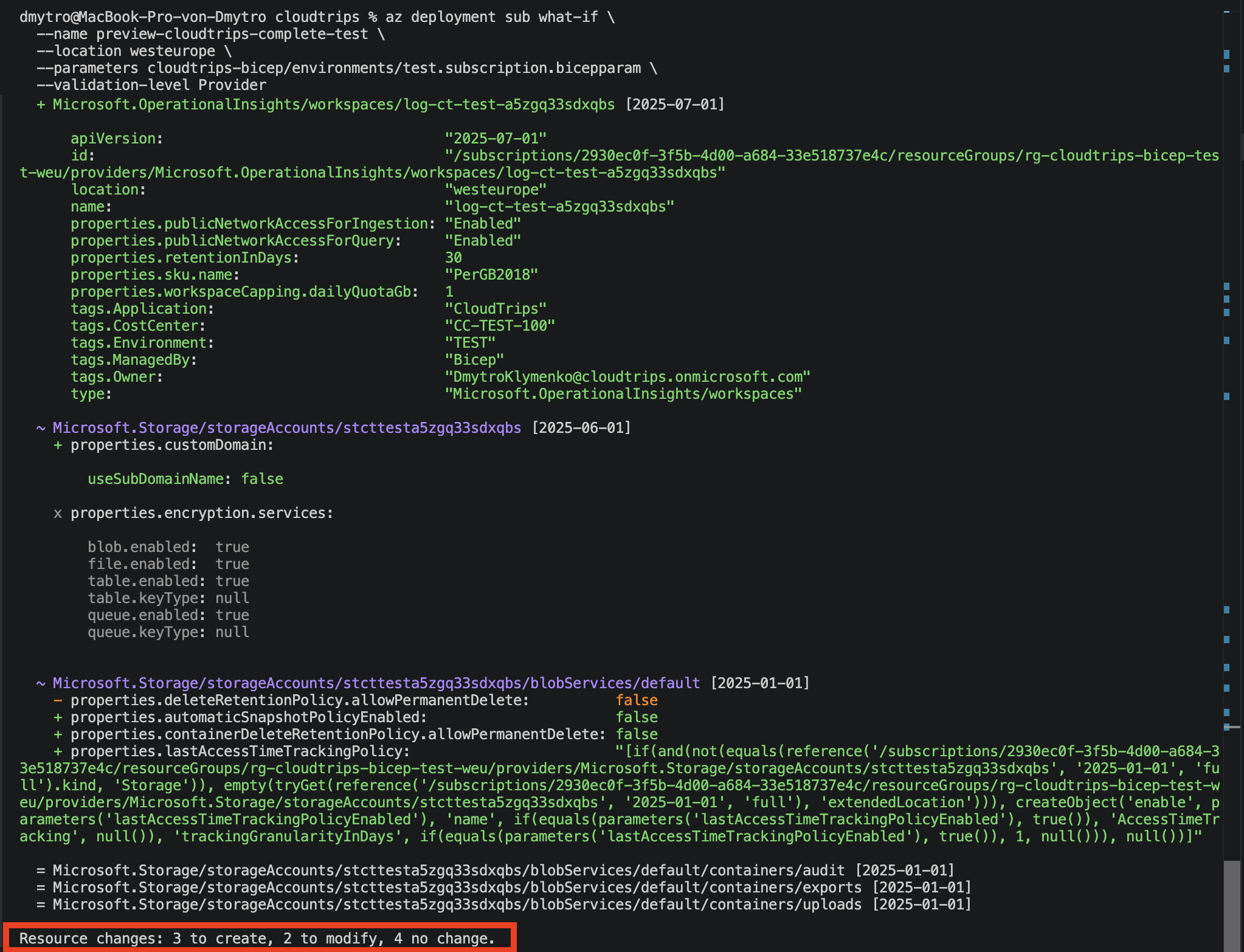
The result should be Succeeded. Now review the live change:
az deployment sub what-if \
  --name preview-cloudtrips-complete-test \
  --location westeurope \
  --parameters cloudtrips-bicep/environments/test.subscription.bicepparam \
  --validation-level Provider
The preview should create the Key Vault, Log Analytics workspace, Application
Insights resource, and their module deployment records. It must not recreate
the existing storage account or containers. Previously identified provider
defaults can still appear as Modify noise.
Deploy and Verify the Environment
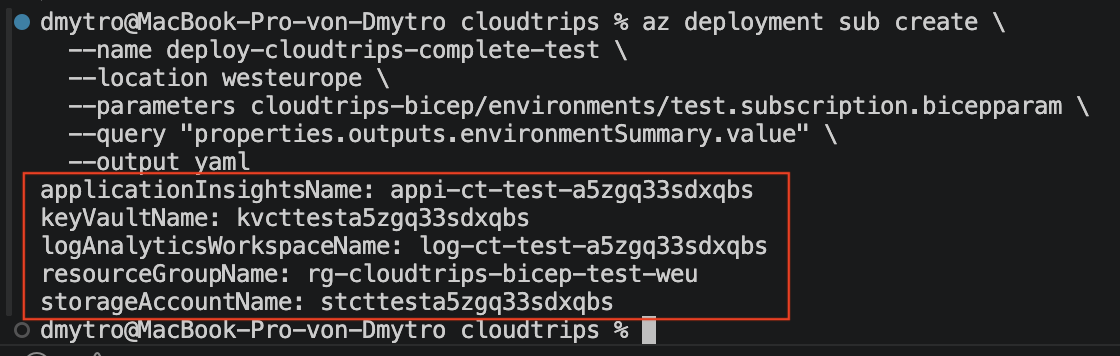
Deploy the complete TEST foundation:
az deployment sub create \
  --name deploy-cloudtrips-complete-test \
  --location westeurope \
  --parameters cloudtrips-bicep/environments/test.subscription.bicepparam \
  --query "properties.outputs.environmentSummary.value" \
  --output yaml
The summary should contain the TEST resource group and deterministic names for the storage account, Key Vault, Log Analytics workspace, and Application Insights.
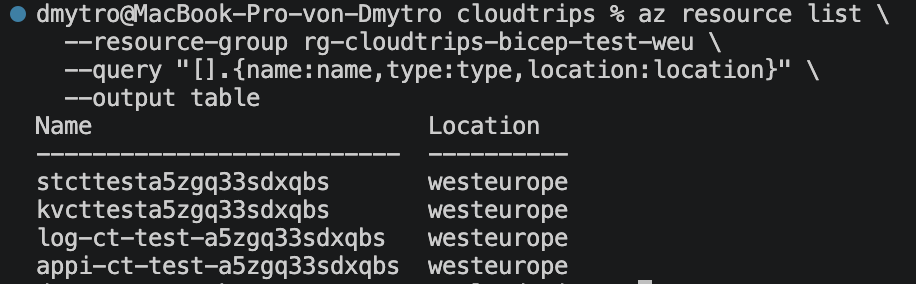
List the deployed top-level resources:
az resource list \
  --resource-group rg-cloudtrips-bicep-test-weu \
  --query "[].{name:name,type:type,location:location}" \
  --output table
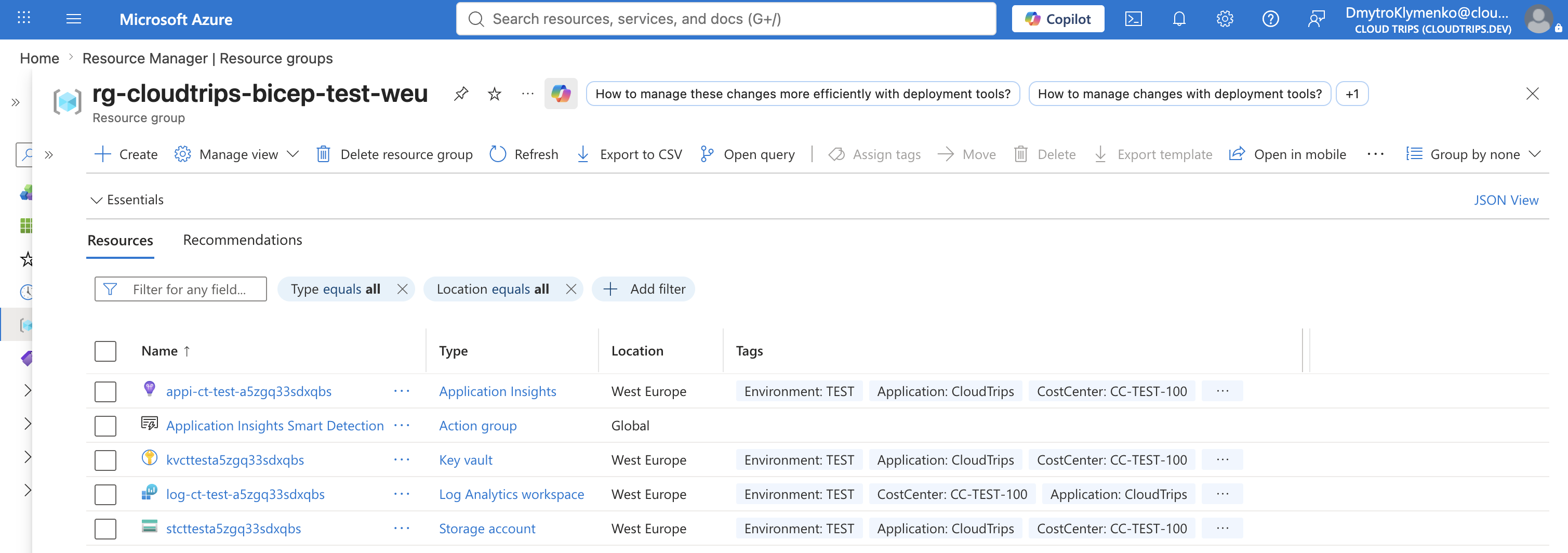
Confirm that the resource group contains the storage account, Key Vault, Log Analytics workspace, and Application Insights resource. Open the resource group in the Azure portal and verify that the common tags have the expected TEST, owner, and cost-center values.
Prove That the Deployment Is Repeatable
Run the same subscription what-if command again after deployment. There must be
no new resource names, replacements, or unexpected deletions. Azure provider
defaults can still appear as Modify, but the four top-level resources must
remain the same.
The result is repeatable because environment differences live in parameter files, naming is deterministic, services are isolated in modules, dependencies come from symbolic references, and the subscription entry point owns the scope transition. CloudTrips can now review and recreate the same application foundation consistently instead of rebuilding it manually.