Manual Bicep Deployment Does Not Scale? Deploy with GitHub Actions
Running every Bicep command manually from one computer makes deployment depend on one person’s tools, Azure session, and memory. A skipped validation step or an uncommitted local file can produce a different result.
Move the tested commands into GitHub Actions. Pull requests will lint the Bicep
files and validate the committed snapshot locally without signing in to Azure.
Azure preflight validation, what-if, and deployment run only after the code
reaches main or the workflow is started manually. That job authenticates with
OpenID Connect (OIDC), checks the live TEST environment, deploys it, and
verifies the storage account.
GitHub Actions is the automation platform. The YAML workflow is the pipeline, comparable to an Azure DevOps YAML pipeline; jobs contain the steps that run on hosted agents called runners.
This trip builds on: Validate and Test Bicep. Complete it first because the pipeline automates the snapshot, preflight, what-if, deployment, and verification steps established there.
Understand the Workflow
| GitHub event | Result |
|---|---|
| Pull request | Lint both entry points and validate the committed TEST snapshot |
Push to main |
Validate, sign in to Azure, run preflight and what-if, deploy TEST, and verify it |
| Manual run | Run the same validated TEST deployment on demand |
The deployment targets the existing rg-cloudtrips-bicep-test-weu resource
group. It does not need subscription-level permission to create a resource
group.
Prepare the Azure Identity
Create a dedicated Microsoft Entra app registration for this workflow. This keeps the Bicep deployment identity and its resource-group permissions separate from every other automation identity.
In the Azure portal, open:
Microsoft Entra ID > App registrations > New registration
Enter CloudTrips Bicep TEST GitHub as the name, select Accounts in this
organizational directory only, leave Redirect URI empty, and select
Register.
On Overview, copy the Application (client) ID and Directory (tenant) ID. Then open Certificates & secrets > Federated credentials > Add credential.
Configure a GitHub Actions environment credential with:
- Organization: your GitHub repository owner
- Organization ID: the repository-owner ID returned by GitHub
- Repository:
cloudtrips - Repository ID: the repository ID returned by GitHub
- Entity type: Environment
- Environment:
cloudtrips-bicep-test - Credential name:
github-cloudtrips-bicep-test
Entra labels the repository-owner field Organization, even when the owner
is a personal GitHub account. To retrieve the IDs, replace
YOUR_GITHUB_OWNER and run these commands in a terminal after gh auth login:
gh api users/YOUR_GITHUB_OWNER \
  --jq .id

gh api repos/YOUR_GITHUB_OWNER/cloudtrips \
  --jq .id
For an immutable GitHub OIDC subject, the generated identifier follows this format:
repo:YOUR_GITHUB_OWNER@YOUR_OWNER_ID/cloudtrips@YOUR_REPOSITORY_ID:environment:cloudtrips-bicep-testThe @ values are expected because this repository uses GitHub’s immutable
OIDC subject format. Confirm the setting with:
gh api repos/YOUR_GITHUB_OWNER/cloudtrips/actions/oidc/customization/subThe result should include "use_immutable_subject": true. Keep the generated
subject unchanged. The issuer must be
https://token.actions.githubusercontent.com and the audience must be
api://AzureADTokenExchange.
Entra stores the expected GitHub identity under Subject identifier. When
the deployment job starts, GitHub automatically generates an OIDC token whose
sub claim identifies the repository and the cloudtrips-bicep-test
environment. Entra compares that generated sub with the stored Subject
identifier. They must match exactly for Azure login to succeed.
Choose the Correct Entity Type
The entity type determines which GitHub context is written into the OIDC token’s subject:
| Entity type | Subject is restricted to | Typical use |
|---|---|---|
| Environment | environment:<name> |
Deployments using environment secrets, branch restrictions, or approvals |
| Branch | ref:refs/heads/<branch> |
A branch job that does not declare a GitHub environment |
| Pull request | pull_request |
A job that needs Azure access while validating a pull request |
| Tag | ref:refs/tags/<tag> |
Deployments started from a release tag |
Select Environment here because the deployment job contains:
environment: cloudtrips-bicep-testGitHub uses the job’s environment—not the branch that started the workflow—to
identify this deployment job in the OIDC token. Its sub therefore ends with:
:environment:cloudtrips-bicep-testThis remains true when a push to main starts the workflow. If the Entra
credential used Branch and main, Entra would instead expect a sub ending
with :ref:refs/heads/main. The two values would not match, so Azure would
reject the login. Choose Environment and enter
cloudtrips-bicep-test so Entra expects the value that GitHub actually sends.
The pull-request job performs only local checks. It does not run
azure/login, request an Azure token, or require its own federated credential.
Grant Only the Required Azure Access
Open rg-cloudtrips-bicep-test-weu, and then select Access control (IAM) >
Check access. Search for the new CloudTrips Bicep TEST GitHub enterprise
application, which Microsoft Entra created for the app registration.
If it does not already inherit sufficient access, add the Contributor role at this resource-group scope. Select the enterprise application by name as the member.
The role belongs to the service principal represented by the enterprise application. GitHub still signs in with the app registration’s Application (client) ID, not its object ID.
Create the GitHub Environment
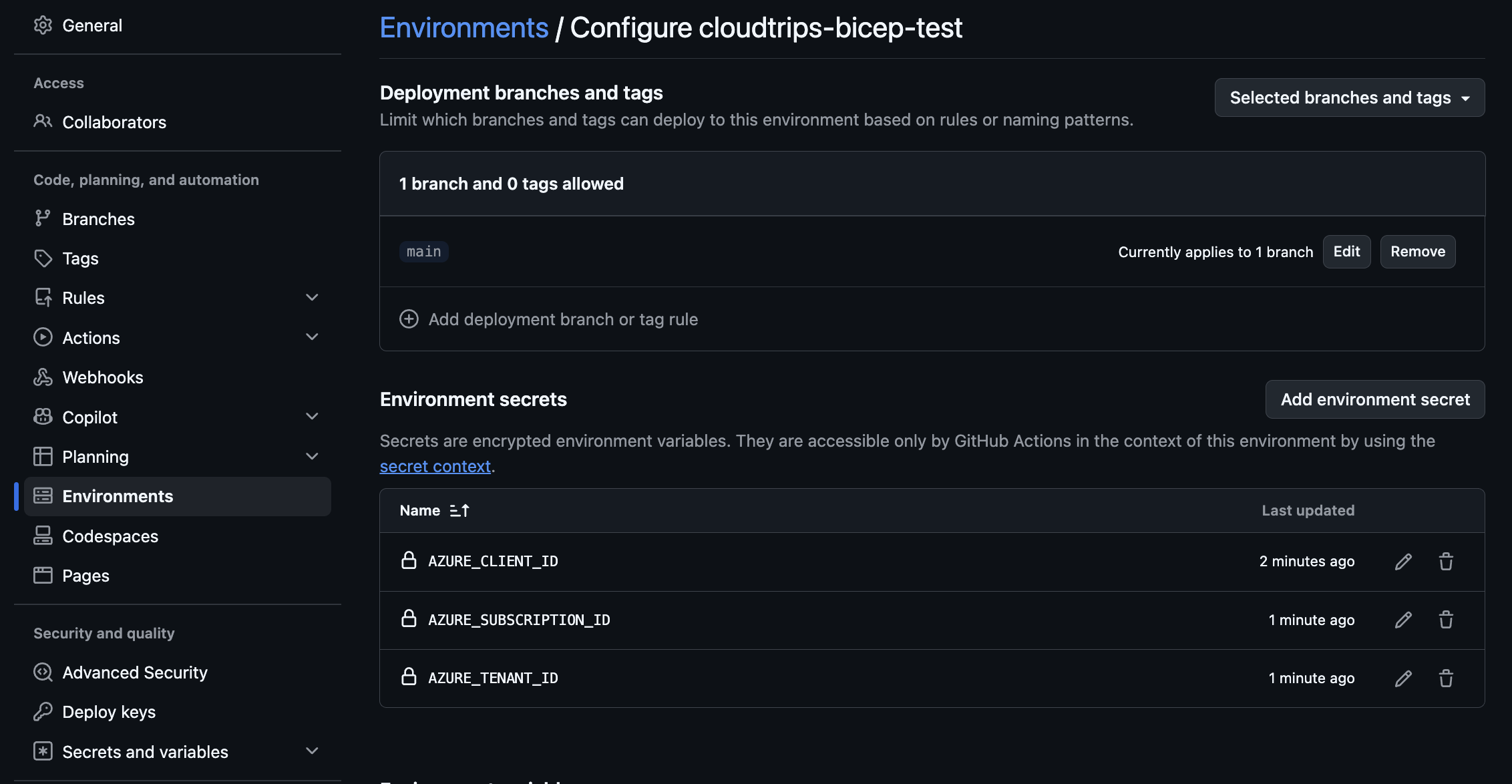
In GitHub, open the cloudtrips repository and select Settings >
Environments > New environment. Name it:
cloudtrips-bicep-testUnder Deployment branches and tags, change No restriction to Selected
branches and tags. Select Add deployment branch or tag rule, choose
Branch, enter main, and add the rule. Only workflow runs whose
GITHUB_REF matches the main branch can now use this environment.
A required reviewer is optional for TEST; if configured, every deployment waits for that approval.
For a private repository, deployment-branch restrictions require GitHub Pro, Team, or Enterprise. If the section is missing, check the repository’s plan.
Add these environment secrets:
| Secret | Value |
|---|---|
AZURE_CLIENT_ID |
Application (client) ID from the app registration |
AZURE_TENANT_ID |
Directory (tenant) ID |
AZURE_SUBSCRIPTION_ID |
Subscription ID of CloudTrips TEST |
No client secret is required. The workflow’s environment name, federated credential subject, and GitHub environment must match exactly.
Create the Workflow
Create .github/workflows/deploy-cloudtrips-bicep.yml:
name: Validate and deploy CloudTrips Bicep

on:
  pull_request:
    paths:
      - 'cloudtrips-bicep/**'
      - '.github/workflows/deploy-cloudtrips-bicep.yml'
  push:
    branches:
      - main
    paths:
      - 'cloudtrips-bicep/**'
      - '.github/workflows/deploy-cloudtrips-bicep.yml'
  workflow_dispatch:

concurrency:
  group: cloudtrips-bicep-test
  cancel-in-progress: false

jobs:
  validate:
    runs-on: ubuntu-latest
    permissions:
      contents: read
    steps:
      - name: Check out repository
        uses: actions/checkout@v4

      - name: Install current Bicep CLI
        shell: bash
        run: |
          set -euo pipefail
          az bicep upgrade
          "$HOME/.azure/bin/bicep" --version

      - name: Lint Bicep entry points
        shell: bash
        run: |
          set -euo pipefail
          az bicep lint --file cloudtrips-bicep/main.bicep
          az bicep lint --file cloudtrips-bicep/subscription.bicep

      - name: Validate TEST snapshot
        shell: bash
        run: |
          set -euo pipefail
          "$HOME/.azure/bin/bicep" snapshot cloudtrips-bicep/environments/test.bicepparam \
            --mode validate \
            --subscription-id 00000000-0000-0000-0000-000000000000 \
            --resource-group rg-cloudtrips-bicep-test-weu \
            --location westeurope \
            --deployment-name deploy-cloudtrips-storage-test

  deploy:
    if: github.event_name == 'push' || github.event_name == 'workflow_dispatch'
    needs: validate
    runs-on: ubuntu-latest
    environment: cloudtrips-bicep-test
    permissions:
      contents: read
      id-token: write
    steps:
      - name: Check out repository
        uses: actions/checkout@v4

      - name: Sign in to Azure with OIDC
        uses: azure/login@v3
        with:
          client-id: ${{ secrets.AZURE_CLIENT_ID }}
          tenant-id: ${{ secrets.AZURE_TENANT_ID }}
          subscription-id: ${{ secrets.AZURE_SUBSCRIPTION_ID }}

      - name: Run Azure preflight validation
        shell: bash
        run: |
          set -euo pipefail
          az deployment group validate \
            --name validate-cloudtrips-storage-test \
            --resource-group rg-cloudtrips-bicep-test-weu \
            --parameters cloudtrips-bicep/environments/test.bicepparam \
            --validation-level Provider \
            --query "properties.provisioningState" \
            --output tsv

      - name: Preview Azure changes
        shell: bash
        run: |
          set -euo pipefail
          az deployment group what-if \
            --resource-group rg-cloudtrips-bicep-test-weu \
            --parameters cloudtrips-bicep/environments/test.bicepparam \
            --validation-level Provider

      - name: Deploy CloudTrips TEST
        id: deploy
        shell: bash
        run: |
          set -euo pipefail
          deployment_name="deploy-cloudtrips-storage-test-${GITHUB_RUN_NUMBER}"
          az deployment group create \
            --name "$deployment_name" \
            --resource-group rg-cloudtrips-bicep-test-weu \
            --parameters cloudtrips-bicep/environments/test.bicepparam \
            --query "properties.{state:provisioningState,outputs:outputs}" \
            --output yaml
          echo "deployment-name=$deployment_name" >> "$GITHUB_OUTPUT"

      - name: Verify the deployed storage account
        shell: bash
        run: |
          set -euo pipefail
          storage_account_name="$(az deployment group show \
            --name "${{ steps.deploy.outputs.deployment-name }}" \
            --resource-group rg-cloudtrips-bicep-test-weu \
            --query "properties.outputs.storageAccountName.value" \
            --output tsv)"
          az storage account show \
            --name "$storage_account_name" \
            --resource-group rg-cloudtrips-bicep-test-weu \
            --query "{name:name,state:provisioningState,sku:sku.name}" \
            --output table
Only the deploy job receives id-token: write and the environment secrets.
Pull-request validation therefore cannot sign in to Azure. concurrency
prevents two TEST deployments from running simultaneously.
Test the Pull-Request Pipeline
Commit the workflow, Bicep files, parameter files, and snapshot to a feature
branch. Open a pull request into main.
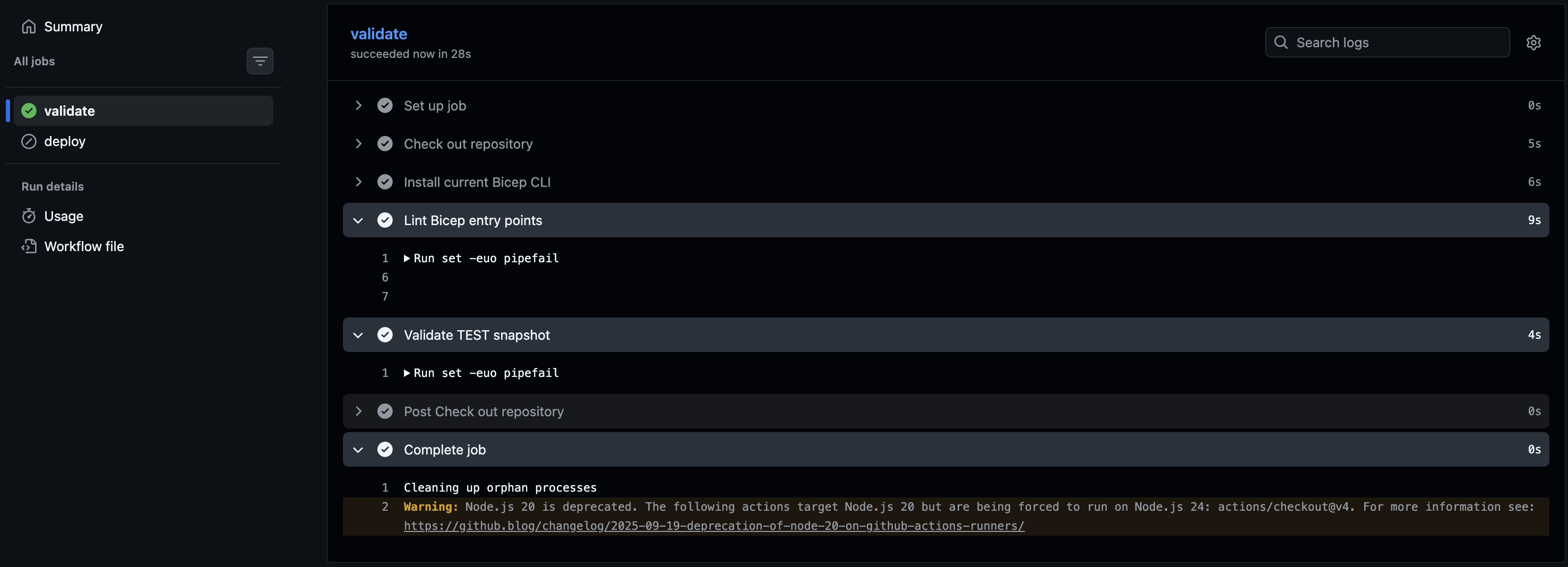
Open the pull request’s Checks section. The validate job should lint the
Bicep entry points and confirm that test.snapshot.json still matches. The
deploy job is skipped because pull requests must not change TEST.
Deploy from main
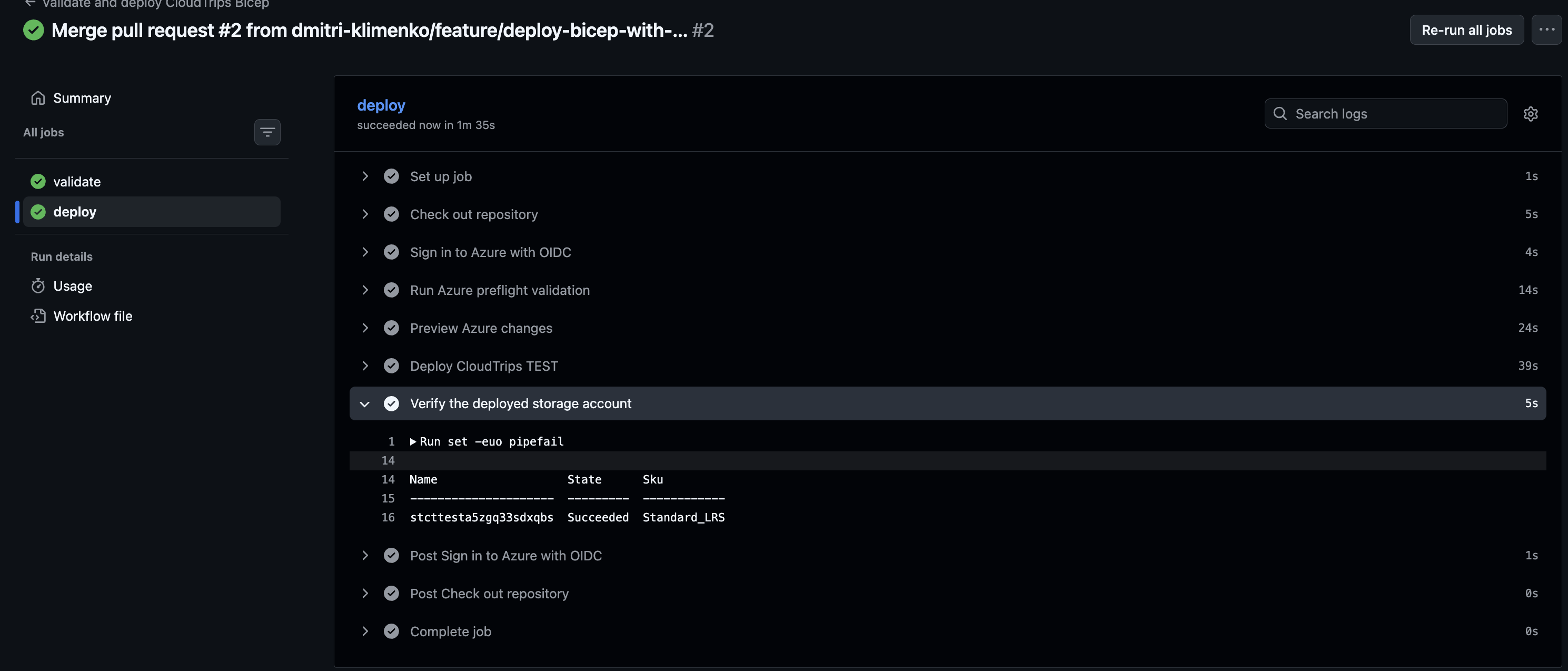
Merge the approved pull request. Open Actions > Validate and deploy
CloudTrips Bicep, and then open the run triggered by the push to main.
The workflow should:
- complete
validate - obtain a short-lived Azure token through OIDC
- return
Succeededfrom preflight - show the what-if result
- deploy with a name ending in the GitHub run number
- display the storage account’s name, state, and SKU
If the GitHub environment has a required reviewer, select Review
deployments, choose cloudtrips-bicep-test, and approve it.
What Is the Azure DevOps Equivalent?
Azure DevOps can implement the same validation and deployment flow instead of GitHub Actions. Bicep works with either platform; the following table maps the equivalent components.
| GitHub Actions | Azure DevOps equivalent |
|---|---|
Workflow in .github/workflows |
YAML pipeline |
runs-on: ubuntu-latest |
Microsoft-hosted agent in pool |
| GitHub environment | Azure DevOps environment |
Environment secrets and azure/login |
Azure Resource Manager service connection and AzureCLI@2 |
| Environment deployment-branch rule | Branch control check |
GITHUB_RUN_NUMBER |
Build.BuildId |
The Bicep files and Azure CLI commands do not change. Authentication and pipeline syntax change.
Create the Azure DevOps Connection
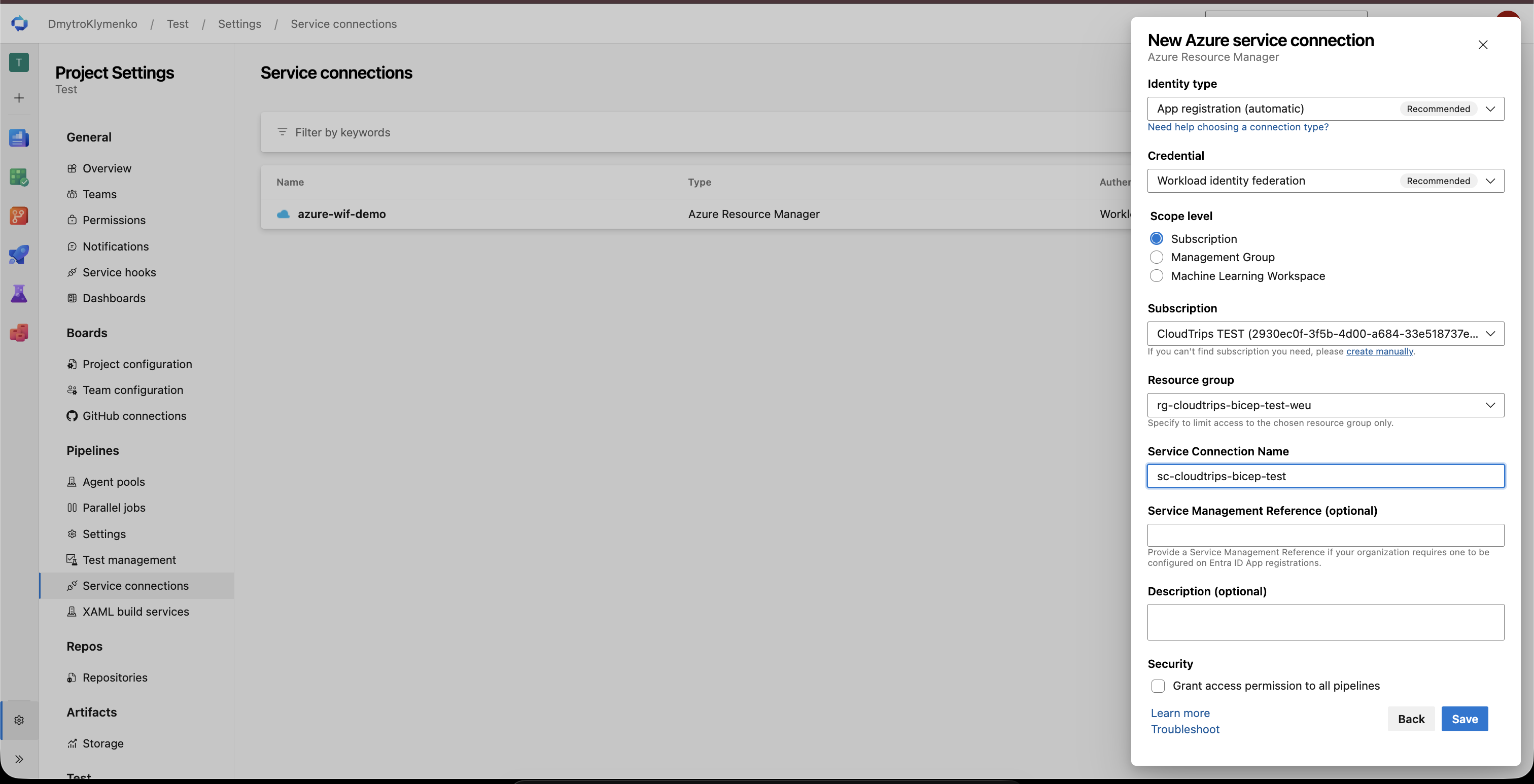
In an Azure DevOps project, open Project settings > Service connections
New service connection > Azure Resource Manager.
Select App registration (automatic) with Workload identity federation, then configure:
- Scope level: Subscription
- Subscription: CloudTrips TEST
- Resource group:
rg-cloudtrips-bicep-test-weu - Service connection name:
sc-cloudtrips-bicep-test
Leave Grant access permission to all pipelines cleared. This limits the
connection to explicitly authorized pipelines. The resource-group selection
also limits the generated identity’s Azure access to the deployment target.
No client secret and no AZURE_CLIENT_ID, AZURE_TENANT_ID, or
AZURE_SUBSCRIPTION_ID pipeline variables are needed.
In Pipelines > Environments, create
cloudtrips-bicep-test. Open Approvals and checks, add Branch control,
and allow refs/heads/main. An approval check is optional for TEST.
Add the Equivalent Pipeline
Create azure-pipelines.yml in the repository. It contains the same two-stage
design:
Validateruns on pull requests andmain, lints both entry points, and validates the committed TEST snapshot.Deployruns only fromrefs/heads/main, consumes the protectedcloudtrips-bicep-testenvironment, and usesAzureCLI@2with the service connection to run preflight, what-if, deployment, and verification.
Create the complete azure-pipelines.yml file:
name: cloudtrips-bicep-$(Date:yyyyMMdd).$(Rev:r)

trigger:
  batch: true
  branches:
    include:
      - main
  paths:
    include:
      - cloudtrips-bicep/**
      - azure-pipelines.yml

pr:
  autoCancel: true
  branches:
    include:
      - main
  paths:
    include:
      - cloudtrips-bicep/**
      - azure-pipelines.yml

variables:
  azureServiceConnection: sc-cloudtrips-bicep-test
  resourceGroupName: rg-cloudtrips-bicep-test-weu

stages:
  - stage: Validate
    displayName: Validate Bicep
    jobs:
      - job: Validate
        pool:
          vmImage: ubuntu-latest
        steps:
          - checkout: self

          - bash: |
              set -euo pipefail
              az bicep upgrade
              "$HOME/.azure/bin/bicep" --version
            displayName: Install current Bicep CLI

          - bash: |
              set -euo pipefail
              az bicep lint --file cloudtrips-bicep/main.bicep
              az bicep lint --file cloudtrips-bicep/subscription.bicep
            displayName: Lint Bicep entry points

          - bash: |
              set -euo pipefail
              "$HOME/.azure/bin/bicep" snapshot cloudtrips-bicep/environments/test.bicepparam \
                --mode validate \
                --subscription-id 00000000-0000-0000-0000-000000000000 \
                --resource-group "$(resourceGroupName)" \
                --location westeurope \
                --deployment-name deploy-cloudtrips-storage-test
            displayName: Validate TEST snapshot

  - stage: Deploy
    displayName: Deploy CloudTrips TEST
    dependsOn: Validate
    condition: and(succeeded(), eq(variables['Build.SourceBranch'], 'refs/heads/main'))
    jobs:
      - deployment: DeployTest
        displayName: Preview, deploy, and verify
        pool:
          vmImage: ubuntu-latest
        environment: cloudtrips-bicep-test
        strategy:
          runOnce:
            deploy:
              steps:
                - checkout: self

                - task: AzureCLI@2
                  displayName: Deploy with workload identity federation
                  inputs:
                    azureSubscription: $(azureServiceConnection)
                    scriptType: bash
                    scriptLocation: inlineScript
                    inlineScript: |
                      set -euo pipefail
                      az bicep upgrade

                      az deployment group validate \
                        --name validate-cloudtrips-storage-test \
                        --resource-group "$(resourceGroupName)" \
                        --parameters cloudtrips-bicep/environments/test.bicepparam \
                        --validation-level Provider \
                        --query "properties.provisioningState" \
                        --output tsv

                      az deployment group what-if \
                        --resource-group "$(resourceGroupName)" \
                        --parameters cloudtrips-bicep/environments/test.bicepparam \
                        --validation-level Provider

                      deployment_name="deploy-cloudtrips-storage-test-$(Build.BuildId)"
                      az deployment group create \
                        --name "$deployment_name" \
                        --resource-group "$(resourceGroupName)" \
                        --parameters cloudtrips-bicep/environments/test.bicepparam \
                        --query "properties.{state:provisioningState,outputs:outputs}" \
                        --output yaml

                      storage_account_name="$(az deployment group show \
                        --name "$deployment_name" \
                        --resource-group "$(resourceGroupName)" \
                        --query "properties.outputs.storageAccountName.value" \
                        --output tsv)"
                      az storage account show \
                        --name "$storage_account_name" \
                        --resource-group "$(resourceGroupName)" \
                        --query "{name:name,state:provisioningState,sku:sku.name}" \
                        --output table
AzureCLI@2 signs in through the workload-identity service connection before
running the script. It is the Azure DevOps equivalent of azure/login; the
inline Azure CLI commands remain the same.
In Azure DevOps, select Pipelines > New pipeline > GitHub, choose
the cloudtrips repository, select Existing Azure Pipelines YAML file, and
choose /azure-pipelines.yml.
On the first run, Azure DevOps can report that the pipeline needs permission to
use sc-cloudtrips-bicep-test. Select View > Permit to authorize only
this pipeline.
For this GitHub repository, the YAML pr trigger validates pull requests and
the deployment stage is skipped. After the change reaches main, the
deployment stage can use the protected environment and service connection. If
the code is later moved to Azure Repos, configure Repos > Branches >
main > Branch policies > Build validation because Azure Repos does
not use the YAML pr trigger.
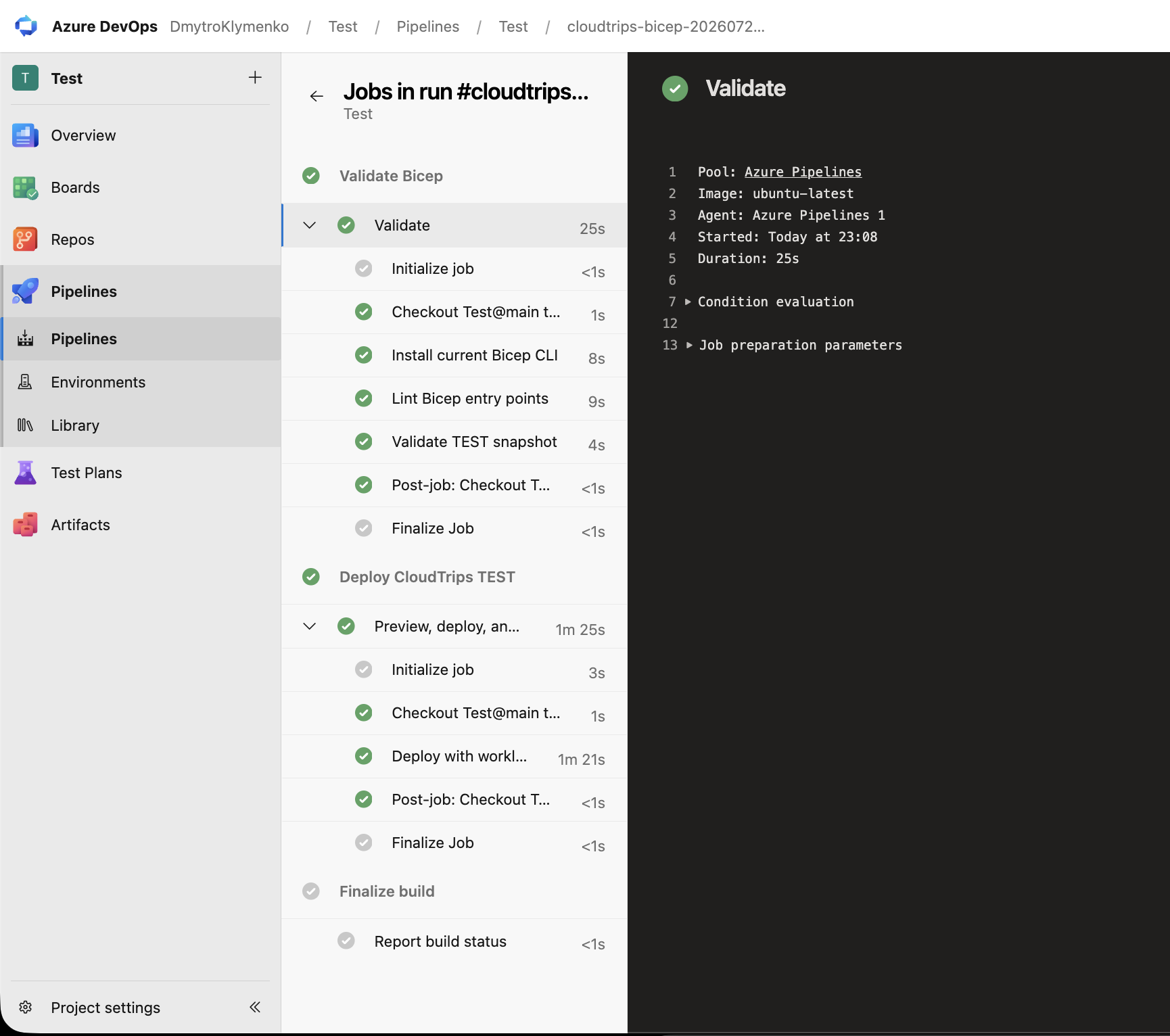
CloudTrips TEST is now deployed from reviewed repository state instead of one
developer’s workstation. Pull requests provide continuous integration, while
the protected main deployment provides continuous delivery without storing
an Azure password in GitHub or Azure DevOps.