DEV, TEST, and PROD Need Different Values? Use Bicep Parameter Files
The reusable template accepts environment, SKU, owner, and application values, but entering them manually in every Azure CLI command is error-prone. A TEST deployment could accidentally receive a PROD SKU or the wrong cost-center tag.
Keep the resource definition in main.bicep and store each environment’s
non-secret values in a Bicep parameter file. In this trip, add DEV, TEST, and
PROD configurations and use the TEST file to update the existing storage
account.
This trip builds on: Use Parameters, Variables, and Outputs. Complete it first because these parameter files supply values to the reusable
main.bicepcreated there.
Add the Cost-Center Parameter
Add this parameter after owner in main.bicep:
@description('Cost allocation identifier applied as a tag.')
param costCenter string
Add CostCenter to commonTags:
var commonTags = {
  Application: applicationName
  CostCenter: costCenter
  Environment: toUpper(normalizedEnvironment)
  ManagedBy: 'Bicep'
  Owner: owner
}
The template defines where the value is used. The parameter files will decide which value each environment receives.
Create the DEV Values
Create environments/dev.bicepparam:
using '../main.bicep'

param environment = 'dev'
param storageSku = 'Standard_LRS'
param owner = '<your email>'
param costCenter = 'CC-DEV-100'
Create the TEST Values
Create environments/test.bicepparam:
using '../main.bicep'

param environment = 'test'
param storageSku = 'Standard_LRS'
param owner = '<your email>'
param costCenter = 'CC-TEST-100'
Create the PROD Values
Create environments/prod.bicepparam:
using '../main.bicep'

param environment = 'prod'
param storageSku = 'Standard_ZRS'
param owner = '<your email>'
param costCenter = 'CC-PROD-100'
using '../main.bicep' links each parameter file to the template. Bicep can
therefore detect a missing parameter, an unknown parameter name, an invalid
type, or a value rejected by @allowed.
The deliberate differences are:
DEV:  Standard_LRS, CC-DEV-100
TEST: Standard_LRS, CC-TEST-100
PROD: Standard_ZRS, CC-PROD-100
Parameter files are plain text and belong in source control only when their values are non-sensitive. Do not place passwords, access keys, client secrets, or certificates in these files.
Validate All Three Files
Build each parameter file without saving generated JSON:
az bicep build-params \
  --file environments/dev.bicepparam \
  --stdout > /dev/null

az bicep build-params \
  --file environments/test.bicepparam \
  --stdout > /dev/null

az bicep build-params \
  --file environments/prod.bicepparam \
  --stdout > /dev/null
No output means all three parameter files compiled successfully with
main.bicep. Fix any diagnostic before deploying.
Preview the TEST Update
Select the CloudTrips TEST subscription:
az account set \
  --subscription "<CloudTrips TEST subscription name or ID>"
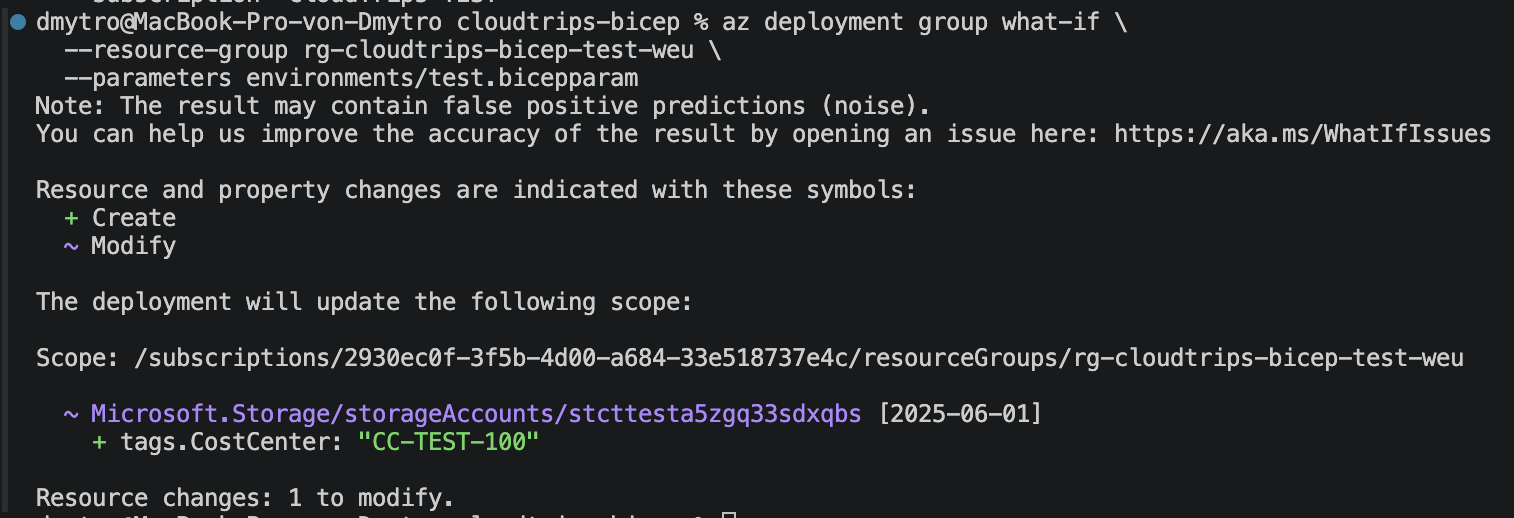
Preview the deployment using only the TEST parameter file:
az deployment group what-if \
  --resource-group rg-cloudtrips-bicep-test-weu \
  --parameters environments/test.bicepparam
The command does not need --template-file. The using statement already
identifies main.bicep.
Confirm that what-if targets the existing TEST storage account and proposes adding:
CostCenter: CC-TEST-100It must not change the environment to DEV or PROD and must not change the SKU
to Standard_ZRS.
Deploy with the TEST Parameter File
Apply the reviewed change:
az deployment group create \
  --name deploy-cloudtrips-storage-test-params \
  --resource-group rg-cloudtrips-bicep-test-weu \
  --parameters environments/test.bicepparam \
  --query "properties.{state:provisioningState,outputs:outputs}" \
  --output yaml
Confirm that the state is Succeeded. Copy the returned
storageAccountName, then verify the environment-specific configuration:
storage_account_name="<storageAccountName output>"

az storage account show \
  --resource-group rg-cloudtrips-bicep-test-weu \
  --name "$storage_account_name" \
  --query "{name:name,sku:sku.name,environment:tags.Environment,costCenter:tags.CostCenter,owner:tags.Owner}" \
  --output table
The result must show:
SKU: Standard_LRS
Environment: TEST
CostCenter: CC-TEST-100
Owner: <your email>
One resource template now supports all three environments without repeated
inline values. Selecting an environment means selecting its reviewed
.bicepparam file; it does not require copying or editing main.bicep.