Repeated Resource Definitions Create Duplication? Use Conditions and Loops
CloudTrips now needs several private containers. Repeating the complete
container resource block for uploads, exports, and receipts would make
every security change a multi-block edit.
The lightweight DEV environment also does not need the audit container that TEST and PROD require.
Use a loop to create the application containers and a condition to deploy the audit container only where it is enabled.
This trip builds on: Use References and Dependencies. Complete it first because this lab replaces the single container resource created there.
Replace the Single Container Parameter
Remove the existing containerName parameter from main.bicep and add:
@description('Private blob containers required by the application.')
@minLength(1)
param containerNames array = [
  'uploads'
]

@description('Deploy the optional audit container.')
param deployAuditContainer bool = false
containerNames is an array because one deployment can now request several
containers. deployAuditContainer is Boolean, so it accepts only true or
false.
Create Containers with a Loop
Replace the single uploadsContainer resource with:
resource appContainers 'Microsoft.Storage/storageAccounts/blobServices/containers@2025-06-01' = [
  for containerName in containerNames: {
    parent: blobService
    name: containerName
    properties: {
      publicAccess: 'None'
    }
  }
]
The expression runs the same resource declaration once for every value in
containerNames. Each value must be unique because Azure resource names must
be unique under the same Blob service.
Add the Conditional Container
Add the audit container:
resource auditContainer 'Microsoft.Storage/storageAccounts/blobServices/containers@2025-06-01' = if (deployAuditContainer) {
  parent: blobService
  name: 'audit'
  properties: {
    publicAccess: 'None'
  }
}
When deployAuditContainer is true, Bicep includes the resource. When it is
false, Bicep skips it.
The default incremental deployment mode does not delete an audit container that was created by an earlier deployment. The condition controls whether the current deployment includes the resource; it is not a cleanup instruction.
Return the Created Resource IDs
Replace the old containerId output with:
output containerIds array = [
  for i in range(0, length(containerNames)): appContainers[i].id
]
output auditContainerId string? = deployAuditContainer ? auditContainer.id : null
The first output follows the loop and returns one ID for every application
container. The audit output returns its resource ID when enabled and null
when skipped.
Configure Each Environment
Add these values to environments/dev.bicepparam:
param containerNames = [
  'uploads'
]
param deployAuditContainer = false
Add these values to environments/test.bicepparam:
param containerNames = [
  'uploads'
  'exports'
]
param deployAuditContainer = true
Add these values to environments/prod.bicepparam:
param containerNames = [
  'uploads'
  'exports'
  'receipts'
]
param deployAuditContainer = true
The same resource declarations now produce:
- DEV:
uploads - TEST:
uploads,exports, and conditionalaudit - PROD:
uploads,exports,receipts, and conditionalaudit
Do not add audit to containerNames; the conditional resource already owns
that name.
Preview the TEST Containers
Select the CloudTrips TEST subscription and run what-if:
az account set \
  --subscription "<CloudTrips TEST subscription name or ID>"

az deployment group what-if \
  --resource-group rg-cloudtrips-bicep-test-weu \
  --parameters environments/test.bicepparam
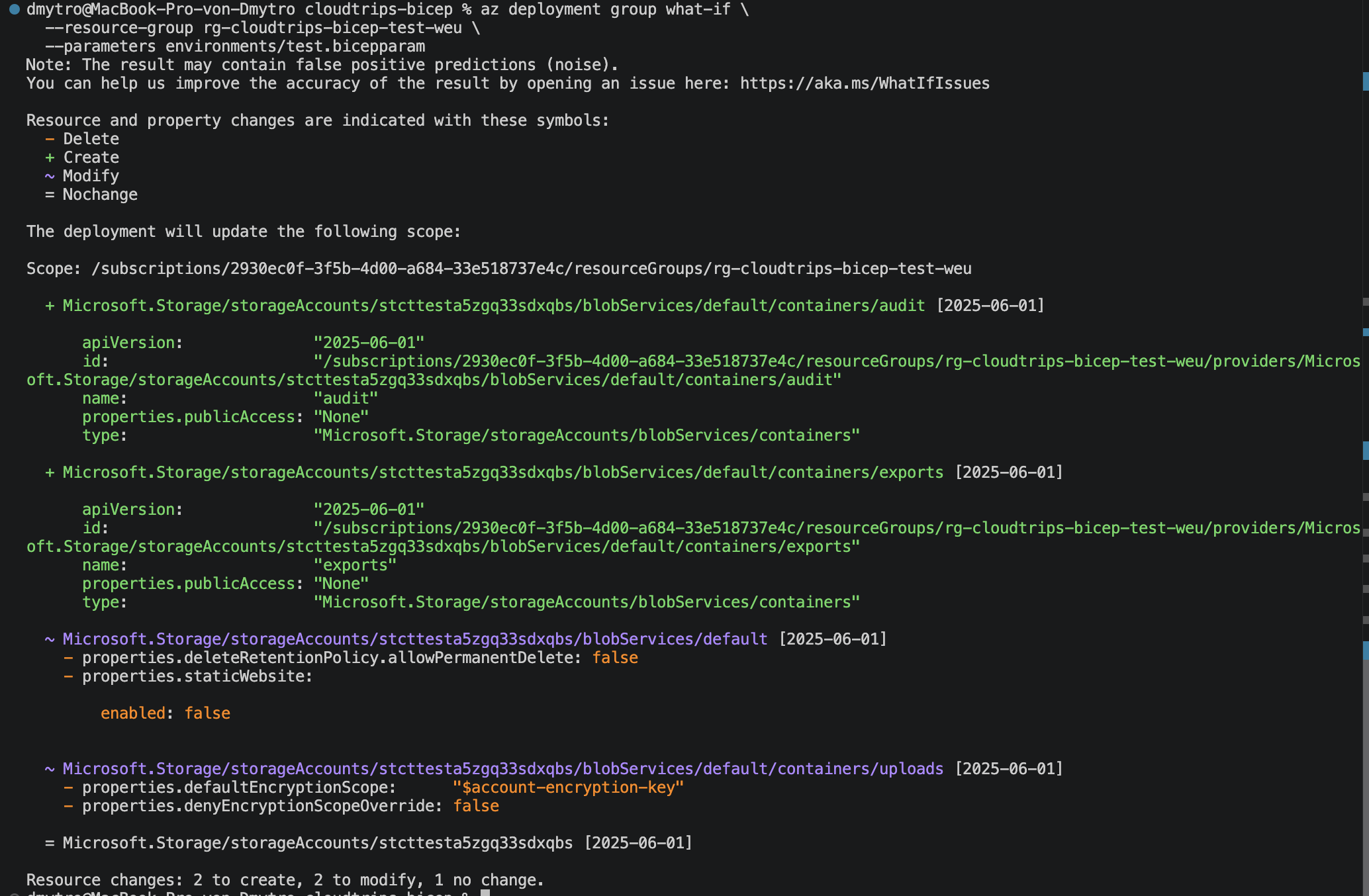
The existing uploads container should remain. Confirm that Azure proposes
creating exports from the loop and audit from the condition. Both must use
publicAccess: None.
Deploy the TEST Configuration
Apply the reviewed changes:
az deployment group create \
  --name deploy-cloudtrips-storage-test-loops \
  --resource-group rg-cloudtrips-bicep-test-weu \
  --parameters environments/test.bicepparam \
  --query "properties.{state:provisioningState,outputs:outputs}" \
  --output yaml
Confirm that the deployment state is Succeeded. The containerIds output
should contain IDs for uploads and exports; auditContainerId should
contain the separate audit resource ID.
Verify the Result
In the Azure portal, open the TEST storage account and go to:
Data storage > ContainersVerify that these private containers exist:
uploadsexportsaudit
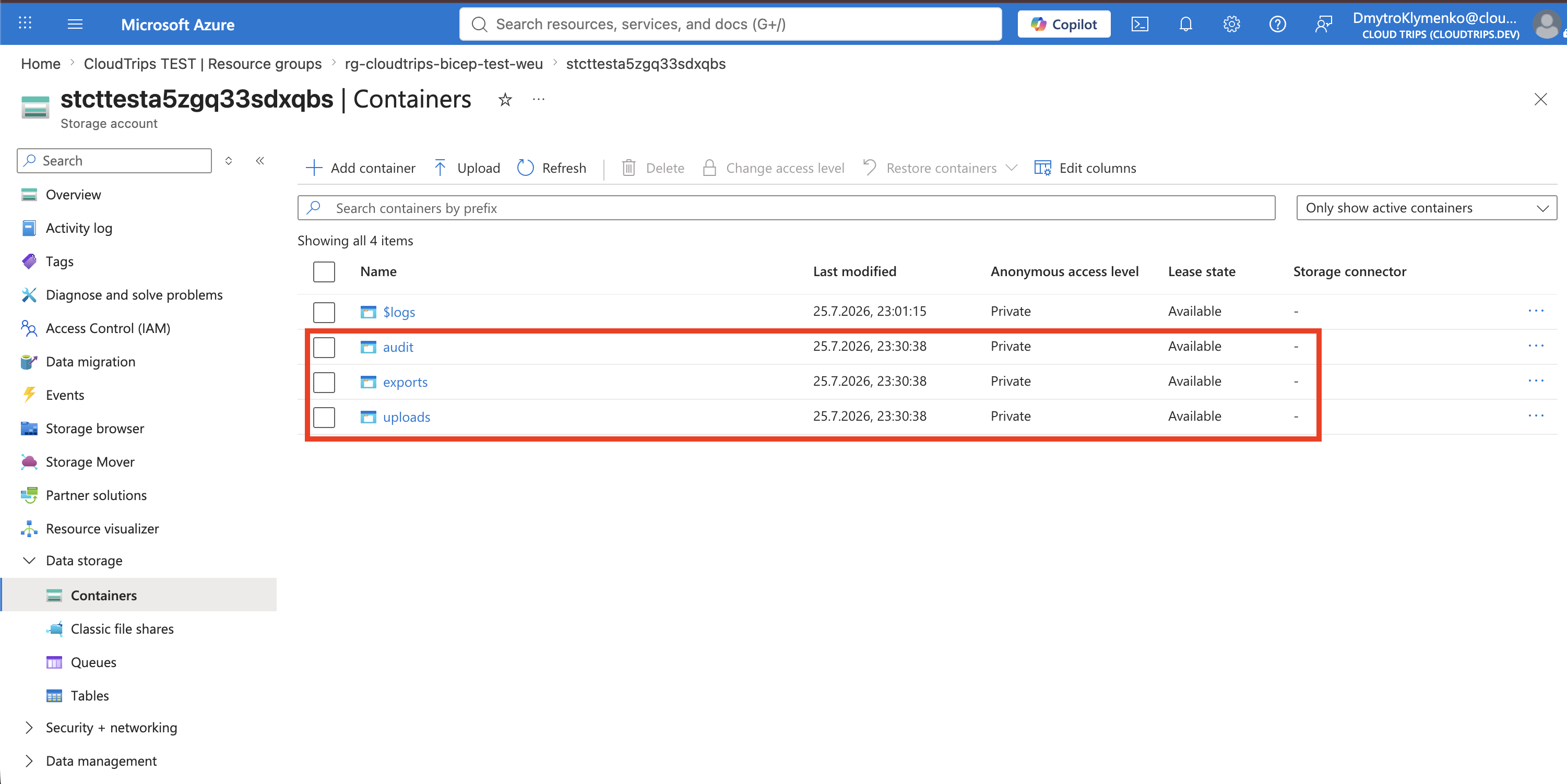
The application containers now share one resource declaration, and the audit container is controlled by an environment value. Adding another standard container requires one array entry rather than another copied resource block.