API Access Needs OAuth Protection? Validate Tokens in API Management
An API key is a shared secret; an OAuth access token is issued by an identity provider for a particular API and expires. APIM can check that the token comes from the expected tenant, targets this API, identifies an allowed caller, and contains the required permission.
This lab uses client credentials: an application calls the API as itself, without a signed-in user. It is suitable for a background job or service-to-service call. A client secret authenticates the caller to Microsoft Entra ID; the resulting access token is sent to APIM. The client secret is not sent to APIM.
Caller + client secret → Entra ID → access token
Caller + access token → APIM validates token and permission → Petstore
Reuse apim-ctgateway-weu → CloudTrips Petstore → v2 on Consumption. Finish the previous policy lab’s cleanup so the operation has only inherited policies. This trip protects v2 only. Original and v1 retain their existing access rules, and the public Petstore backend remains directly accessible.
You need permission to create Entra app registrations and grant admin consent for a custom API’s application permission. An appropriate Entra administrator, such as a Cloud Application Administrator, can grant that consent. Being an Azure subscription Owner alone does not provide these directory permissions. No new hosting resource is required.
Register the API Identity
In the Azure portal, open Microsoft Entra ID → App registrations → New registration:
Name: ct-apim-api
Supported account types: Accounts in this organizational directory only
Redirect URI: leave empty
Register it. From Overview, record Application (client) ID as API_APP_ID and Directory (tenant) ID as TENANT_ID. Use the application ID, not Object ID.
This registration represents your protected gateway API. It does not deploy an API or register the public Petstore service in your tenant.
Open Expose an API → Application ID URI → Add / Edit. Save the suggested value:
api://API_APP_IDReplace API_APP_ID with the actual GUID. You do not need to add a delegated scope for this app-to-app lab.
Open Manifest. Find requestedAccessTokenVersion inside the existing api object and change its value to 2. Save; preserve the rest of the manifest. This requests v2-format access tokens for the API. The token’s audience will then be the API’s application ID GUID.
Open App roles → Create app role:
Display name: Invoke CloudTrips API
Allowed member types: Applications
Value: Api.Invoke
Description: Allows an application to invoke the CloudTrips API.
Do you want to enable this app role?: Yes
Apply/save. This is an application permission, not an Azure IAM role or a delegated user permission.
Register and Authorize the Caller
Create another app registration in the same tenant:
Name: ct-apim-client
Supported account types: Accounts in this organizational directory only
Redirect URI: leave empty
Record its Application (client) ID as CLIENT_APP_ID. The API and caller must have different application IDs.
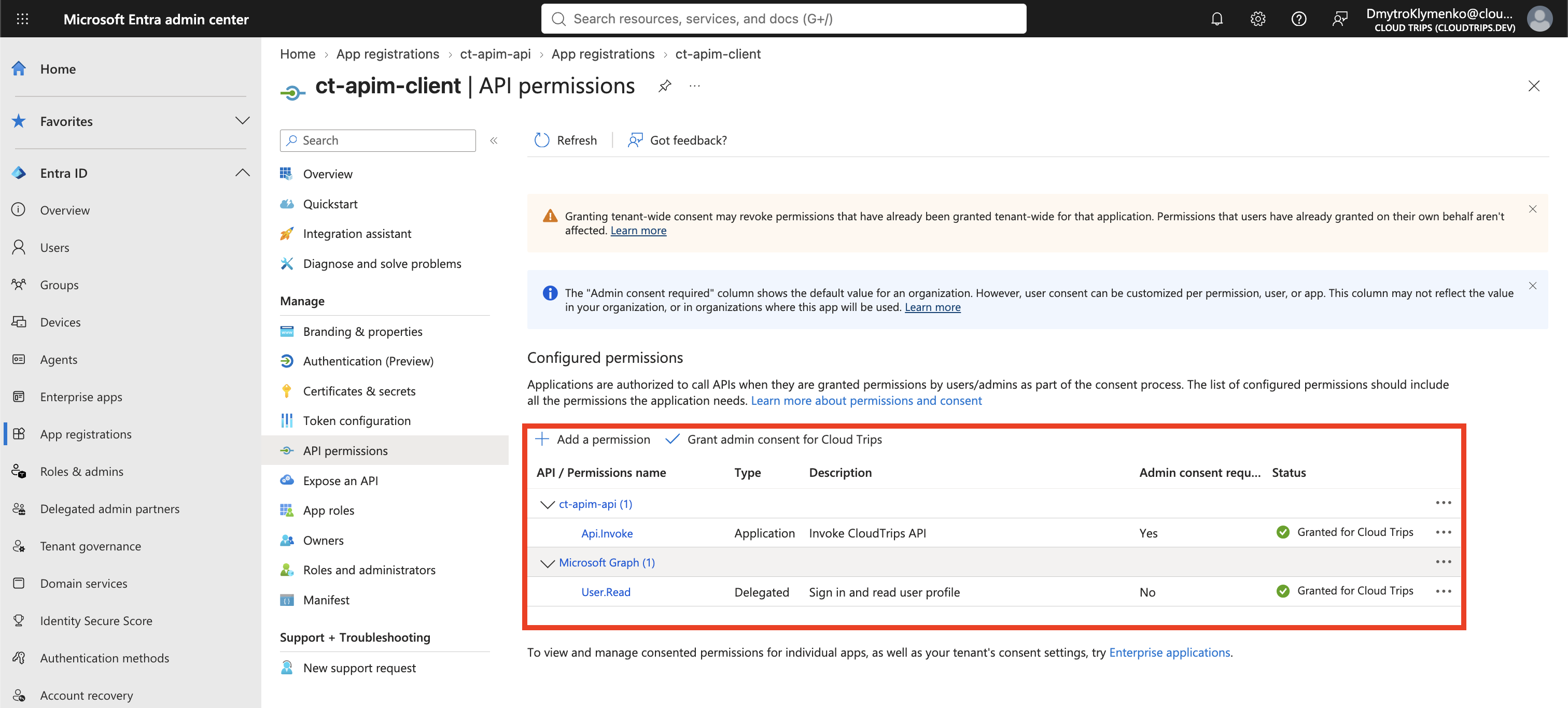
In ct-apim-client, open API permissions → Add a permission → My APIs → ct-apim-api → Application permissions. Select Api.Invoke → Add permissions. If the API is not listed under My APIs, use APIs my organization uses and search by API_APP_ID.
Select Grant admin consent for your tenant. Verify that Api.Invoke shows Granted. If you cannot grant consent, have the tenant administrator complete this step before testing.
Under the caller app’s Certificates & secrets → Client secrets → New client secret, use description cloudtrips-lab, choose a short expiration suitable for the lab, and add it. Copy the secret Value, not Secret ID. Keep it temporarily in a secure place; the full value is shown only when created. Do not include it in screenshots.
Enforce Token Validation on v2
Open API Management → apim-ctgateway-weu → APIs → APIs → CloudTrips Petstore → v2 → Design → All operations → policy code editor.
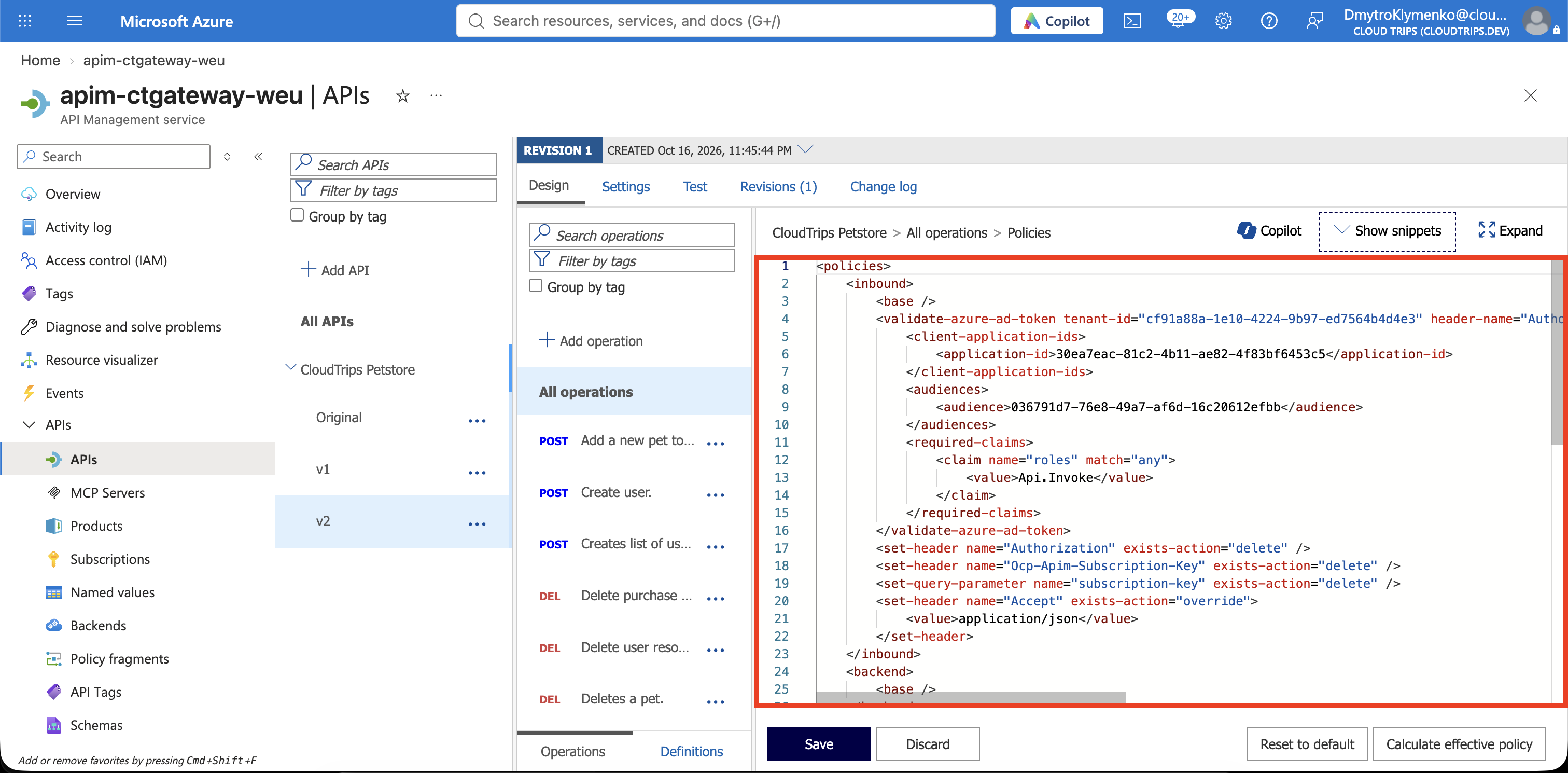
Replace the v2 lab policy with the following, substituting all three placeholders with your actual GUIDs:
| Placeholder | Value from |
|---|---|
| TENANT_ID | Directory (tenant) ID |
| API_APP_ID | ct-apim-api → Application (client) ID |
| CLIENT_APP_ID | ct-apim-client → Application (client) ID |
<policies>
  <inbound>
    <base />
    <validate-azure-ad-token tenant-id="TENANT_ID"
                            header-name="Authorization"
                            failed-validation-httpcode="401"
                            failed-validation-error-message="A valid token with Api.Invoke permission is required.">
      <client-application-ids>
        <application-id>CLIENT_APP_ID</application-id>
      </client-application-ids>
      <audiences>
        <audience>API_APP_ID</audience>
      </audiences>
      <required-claims>
        <claim name="roles" match="any">
          <value>Api.Invoke</value>
        </claim>
      </required-claims>
    </validate-azure-ad-token>
    <set-header name="Authorization" exists-action="delete" />
    <set-header name="Ocp-Apim-Subscription-Key" exists-action="delete" />
    <set-query-parameter name="subscription-key" exists-action="delete" />
    <set-header name="Accept" exists-action="override">
      <value>application/json</value>
    </set-header>
  </inbound>
  <backend>
    <base />
  </backend>
  <outbound>
    <base />
    <set-header name="X-CloudTrips-API-Version" exists-action="override">
      <value>v2</value>
    </set-header>
  </outbound>
  <on-error>
    <base />
  </on-error>
</policies>
Save. The validation policy checks the token’s signature, expiry, tenant, audience, caller, and Api.Invoke role. For the v2-format token configured above, use the plain API_APP_ID GUID as the audience, not api://... and not the gateway URL.
After validation, the policy removes Authorization before forwarding to the public Petstore backend. The token is for our gateway API; Petstore does not need it. A real private backend would need its own appropriate access protection.
Now open v2 → Settings, turn Subscription required Off, and save. Do this after saving token validation. For this version, OAuth is the access check; the client will not also need an APIM subscription key. Original and v1 can keep their key requirements.
You do not need to configure APIM’s OAuth 2.0 authorization servers page for this test. That configuration helps test consoles obtain tokens; it does not replace the gateway’s validation policy.
Run the Three Access Tests
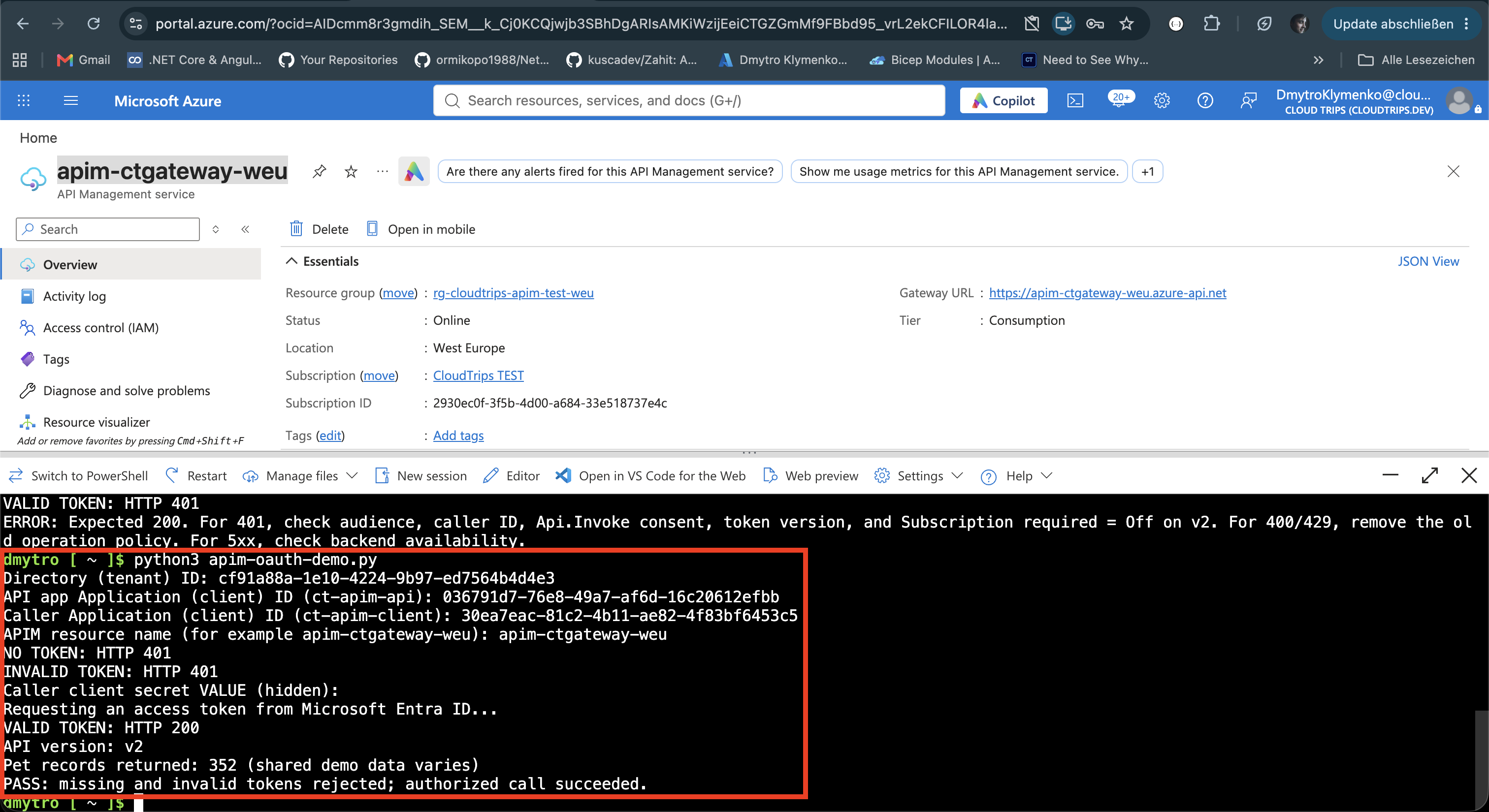
Download apim-oauth-demo.py. Open Azure Cloud Shell → Bash, upload the file with Manage files → Upload, then run:
python3 apim-oauth-demo.pyNo packages or az login are needed by this script. At its prompts, enter:
- TENANT_ID.
- API_APP_ID for ct-apim-api.
- CLIENT_APP_ID for ct-apim-client.
- Your APIM resource name, such as apim-ctgateway-weu.
- The caller’s client secret Value, when prompted. Its input is hidden.
The script calls /petstore/v2/pet/findByStatus?status=available without a token, with an invalid token, and then with a real token. It requests that token from your tenant using the client credentials grant and scope api://API_APP_ID/.default. Here .default requests the API’s application permissions already granted to the caller; it does not grant permissions itself.
Expect:
NO TOKEN: HTTP 401
INVALID TOKEN: HTTP 401
Requesting an access token from Microsoft Entra ID...
VALID TOKEN: HTTP 200
API version: v2
Pet records returned: ... (shared demo data varies)
PASS: missing and invalid tokens rejected; authorized call succeeded.
The token and client secret are not printed or saved by the script. The record count can vary, including zero. Missing or invalid tokens should be rejected before reaching the backend; the authorized call should receive Petstore data through APIM.
If Access Still Fails
- Token request fails: check tenant and caller IDs, the client secret Value and expiration, the API’s Application ID URI, and admin consent. Allow configuration changes time to propagate, then rerun.
- Valid token gets 401: verify the policy’s three GUIDs, Api.Invoke spelling, and
requestedAccessTokenVersion: 2on the API registration. Confirm Subscription required is Off on v2. Rerun to obtain a fresh token after corrections. - 400 or 429: remove the earlier policy lab’s operation-level rules from v2; keep
<base />in each section so the API-level OAuth policy is inherited. - No token gets 200: stop and check the exact v2 policy and URL. The route is not protected as intended.
- 5xx: check the public backend’s availability; a backend failure does not prove token validation failed.
Finish
Keep the validation policy if retaining this protected v2 endpoint. Before removing it, turn Subscription required back On so removing OAuth does not leave the gateway version anonymously accessible.
When finished, delete ct-apim-client and ct-apim-api from Entra ID → App registrations and remove any securely stored copy of the lab secret. These registrations are directory objects; deleting the Azure resource group does not remove them. If finished with APIM too, delete rg-cloudtrips-apim-test-weu.