Many Applications Need Separate Event Channels? Configure an Event Grid Domain
Use a domain when you need many related event channels under one publishing endpoint. For example, an orders application and a billing application publish different events. Each gets its own domain topic and event subscriptions. An Event Grid domain is a container for these topics, not an internet domain name.
In the previous trip, a standalone topic had its own endpoint. Here, both channels share the domain endpoint. The sender sets the event’s top-level topic field to select the channel. Each channel then routes events to its own Storage queue.
Yes, the topics are still separate. The domain gives them one shared address for publishing events:
                    One domain endpoint
                             |
                    Event's topic field
                       /           \
               app-orders       app-billing
                   |                 |
Orders queue Billing queue| What stays separate | What is shared |
|---|---|
| Each topic’s event subscriptions, filters, and destinations | The publishing endpoint, domain-level configuration, and—in this lab—the publishing key |
The sender always calls the same address. It includes "topic": "app-orders" or "topic": "app-billing" in the event to select the channel.
Reuse rg-cloudtrips-eventgrid-test-weu, stcteventsweu, and your Storage Queue Data Contributor role from the previous trip. Use your actual Storage account name throughout. The standalone topic can remain, but it is not part of this route. No Service Bus resources are needed.
Create the Domain and Queues
In the Azure portal, search for Event Grid Domains → Create:
Subscription: CloudTrips TEST
Resource group: rg-cloudtrips-eventgrid-test-weu
Name: egd-ctappsweu
Region: West Europe
Input schema: Event Grid Schema
Keep public network access and key authentication enabled for this lab. Add a suffix if the name is unavailable. Keep the default automatic domain-topic creation behavior: creating the first event subscription for a channel will create its domain topic.
Open your Storage account → Data storage → Queues, and create two queues: app-orders and app-billing. Keep them separate from the previous trip’s order-events queue.
On egd-ctappsweu → Identity → System assigned, turn the identity On and save. On the Storage account → Access control (IAM), assign Storage Queue Data Message Sender to the managed identity of egd-ctappsweu. The earlier standalone topic’s identity does not grant access to this new domain. Allow a few minutes for the role assignment to propagate.
Create Two Domain-Topic Subscriptions
Open Cloud Shell → Bash. Run the block below after changing ct_storage and ct_domain if needed. If login is required, run az login --use-device-code and follow its instructions first.
The two subscriptions use different source resource IDs ending in /topics/app-orders and /topics/app-billing. This creates two domain topics and routes each to its matching queue. Do not create a domain-wide subscription for this exercise; that would receive events from all its topics.
az account show --output table
az account set --subscription 'CloudTrips TEST'

ct_rg='rg-cloudtrips-eventgrid-test-weu'
ct_domain='egd-ctappsweu'
ct_storage='stcteventsweu'

ct_domain_id=$(az eventgrid domain show   --resource-group "$ct_rg" --name "$ct_domain" --query id --output tsv)
ct_storage_id=$(az storage account show   --resource-group "$ct_rg" --name "$ct_storage" --query id --output tsv)

for ct_channel in app-orders app-billing; do
  az eventgrid event-subscription create     --name "es-$ct_channel-to-queue"     --source-resource-id "$ct_domain_id/topics/$ct_channel"     --event-delivery-schema EventGridSchema     --delivery-identity systemassigned     --delivery-identity-endpoint-type storagequeue     --delivery-identity-endpoint "$ct_storage_id/queueServices/default/queues/$ct_channel"     --output table || break
done

az eventgrid domain topic list   --resource-group "$ct_rg" --domain-name "$ct_domain" --output table
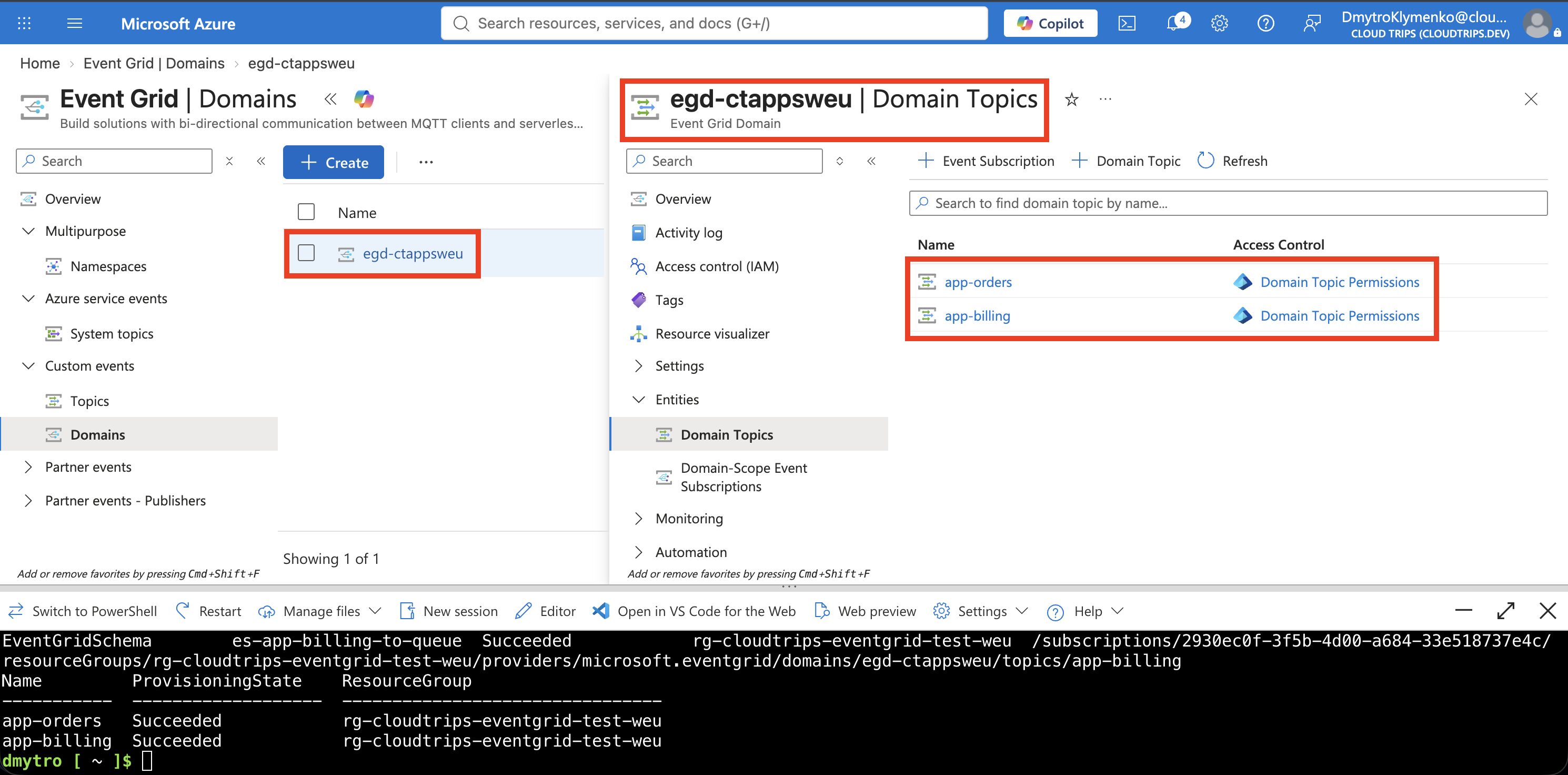
If a command fails, fix the reported error and rerun the block. Confirm both topics are listed before continuing. In the portal, open egd-ctappsweu → Event Grid Topics (or Topics, depending on the portal view) and refresh.
Screenshot 1: The domain’s topic list showing app-orders and app-billing.
Publish to Both Channels
In the same Cloud Shell session, run this block. Change domain_name if needed. It uses built-in Python libraries and retrieves the domain key without printing it; no packages or connection strings are required. Your lab Owner account can retrieve the key.
python3 - <<'PYTHON'
import json
import subprocess
import uuid
from datetime import datetime, timezone
from urllib.request import Request, urlopen

resource_group = "rg-cloudtrips-eventgrid-test-weu"
domain_name = "egd-ctappsweu"

def az_value(*args):
    return subprocess.check_output(
        ["az", *args, "--output", "tsv"], text=True
    ).strip()

endpoint = az_value(
    "eventgrid", "domain", "show", "--resource-group", resource_group,
    "--name", domain_name, "--query", "endpoint"
)
key = az_value(
    "eventgrid", "domain", "key", "list", "--resource-group", resource_group,
    "--name", domain_name, "--query", "key1"
)
events = []
for channel, event_type, subject, data in [
    ("app-orders", "CloudTrips.OrderCreated", "orders/CT-6001",
     {"orderId": "CT-6001", "product": "Notebook"}),
    ("app-billing", "CloudTrips.InvoiceCreated", "invoices/INV-6001",
     {"invoiceId": "INV-6001", "amount": 12.50})
]:
    events.append({
        "topic": channel,
        "id": str(uuid.uuid4()),
        "eventType": event_type,
        "subject": subject,
        "eventTime": datetime.now(timezone.utc).isoformat(),
        "dataVersion": "1.0",
        "data": data
    })
request = Request(
    endpoint, data=json.dumps(events).encode("utf-8"),
    headers={"Content-Type": "application/json", "aeg-sas-key": key},
    method="POST"
)
with urlopen(request, timeout=30) as response:
    print(f"Accepted: HTTP {response.status}")
for event in events:
    print(f"{event['topic']}: {event['subject']} — ID {event['id']}")
PYTHON
Both events are published in one HTTP request to the same endpoint. The field topic, not subject or eventType, selects the domain topic. The script prints the IDs so you can match the resulting queue messages to this run.
Verify Separate Delivery
Open each queue in Storage account → Data storage → Queues, refresh, and inspect the message text using your Microsoft Entra identity:
| Destination queue | Expected event | Must not receive from this test |
|---|---|---|
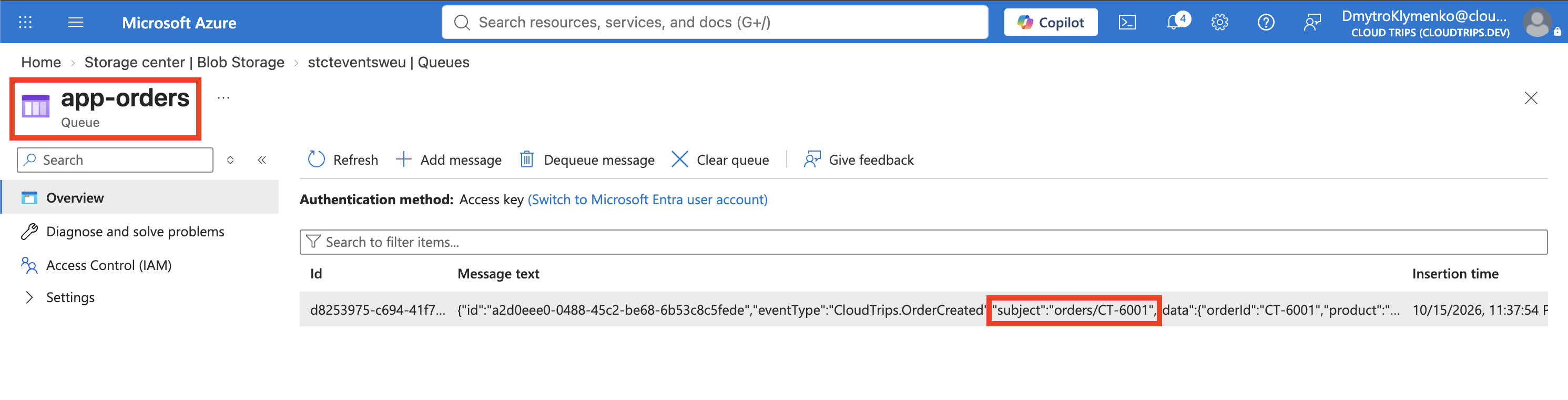
| app-orders | CloudTrips.OrderCreated; CT-6001 | INV-6001 |
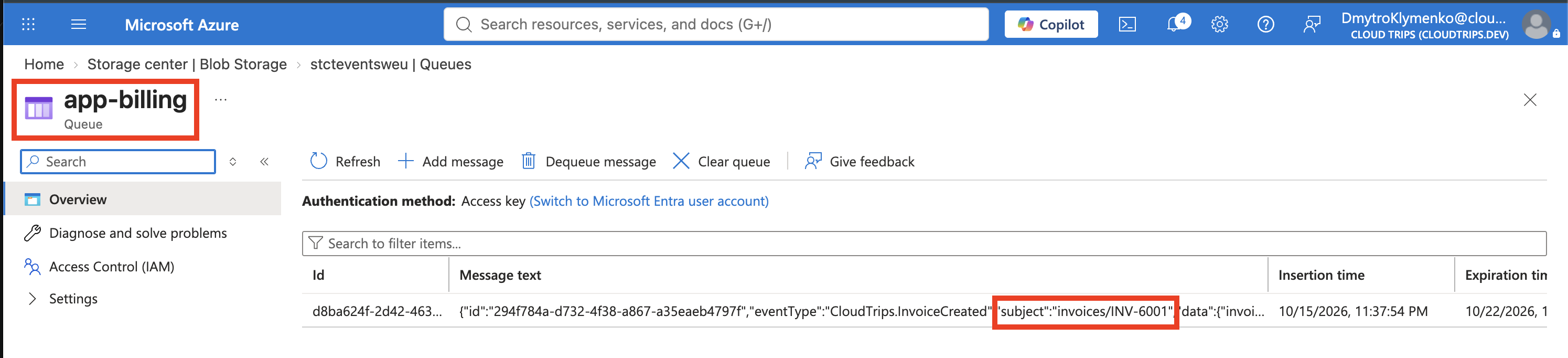
| app-billing | CloudTrips.InvoiceCreated; INV-6001 | CT-6001 |
Match the event IDs to Cloud Shell. If the viewer offers Base64 decoding, use it only when the text is encoded. Event Grid may deliver duplicates; check the event contents and IDs rather than requiring exactly one row.
Screenshot 2: The app-orders queue showing the CT-6001 event.
Screenshot 3: The app-billing queue showing the INV-6001 event.
If one queue remains empty, check that its subscription was created successfully and targets the correct queue. If both remain empty, check the domain’s delivery identity and role assignment. Wait for propagation and delivery retries before sending more test events.
What the Separation Means
The domain organizes event channels and lets you scope subscription-management permissions to individual domain topics. Separate topics alone do not isolate publishers: the domain key used here can publish to any topic in the domain. Do not give that shared key to applications that must be prevented from publishing to each other’s channels. This lab demonstrates routing, not separate application identities or tenant security boundaries.
A few unrelated channels may be simpler as standalone topics. A domain becomes useful when managing many related channels centrally. Delivery still follows Event Grid’s retry behavior, may contain duplicates, and has no ordering guarantee.
Finish
Keep the resources if you want to explore more Event Grid scenarios. Otherwise delete egd-ctappsweu and the two new Storage queues. Delete the whole lab resource group only when you also no longer need the previous topic and its queue. Event Grid operations and Storage usage can incur charges.