Messages Need Ordered Processing? Configure Service Bus Sessions
A session is a group of related messages inside one queue. For example, your shop has two orders, A and B. Each order moves through Created → Paid → Shipped, but their updates arrive mixed together:
| Arrival | Message | SessionId |
|---|---|---|
| 1 | Order A — Created | A |
| 2 | Order B — Created | B |
| 3 | Order A — Paid | A |
| 4 | Order B — Paid | B |
| 5 | Order A — Shipped | A |
The sender sets SessionId = A on every message about order A and SessionId = B on every message about order B. Service Bus uses this message property to group them; it does not automatically read an order ID from the JSON body.
The sender does not create or lock the session separately. It sets the same SessionId on each message for an order and sends the updates in the intended order. For example:
sender.send_messages(ServiceBusMessage("Created", session_id="order-123"))
sender.send_messages(ServiceBusMessage("Paid", session_id="order-123"))
sender.send_messages(ServiceBusMessage("Shipped", session_id="order-123"))
For another order, use a different ID, such as order-456. Service Bus groups the messages automatically; the receiver takes the session lock when it accepts that session. The prepared script below already sets session_id when constructing each message.
One queue, two sessions:
Session A: Created → Paid → Shipped
Session B: Created → Paid
The lock covers the whole session, not just one message. When Worker 1 takes session A, only that worker can receive A’s messages while its session lock remains valid. It processes and completes Created, then Paid, then Shipped, one at a time. Worker 2 can process session B at the same time.
Completing a message removes that individual message; it does not release the whole session. When the worker releases the session or its lock expires, another worker can take over the remaining messages.
Without sessions, different workers could receive updates for the same order and finish them out of order. Sessions give one worker exclusive access to that order’s message stream. The worker must still process its messages sequentially.
Ordering applies within each session, not across all orders. Sessions preserve arrival order; they do not sort the JSON field step. If the sender sends Shipped before Paid, sessions will not correct that mistake.
Reuse your Standard namespace sb-ctmessagingweu and your Azure Service Bus Data Owner assignment from the queue trip. Use your actual namespace name if different. Keep public network access enabled for this lab.
The portal’s Service Bus Explorer does not support session processing. We will create the queue in the portal, then run a prepared Python file in Azure Cloud Shell. No VM, local installation, connection string, or application coding is required.
Create a Queue with Sessions Enabled
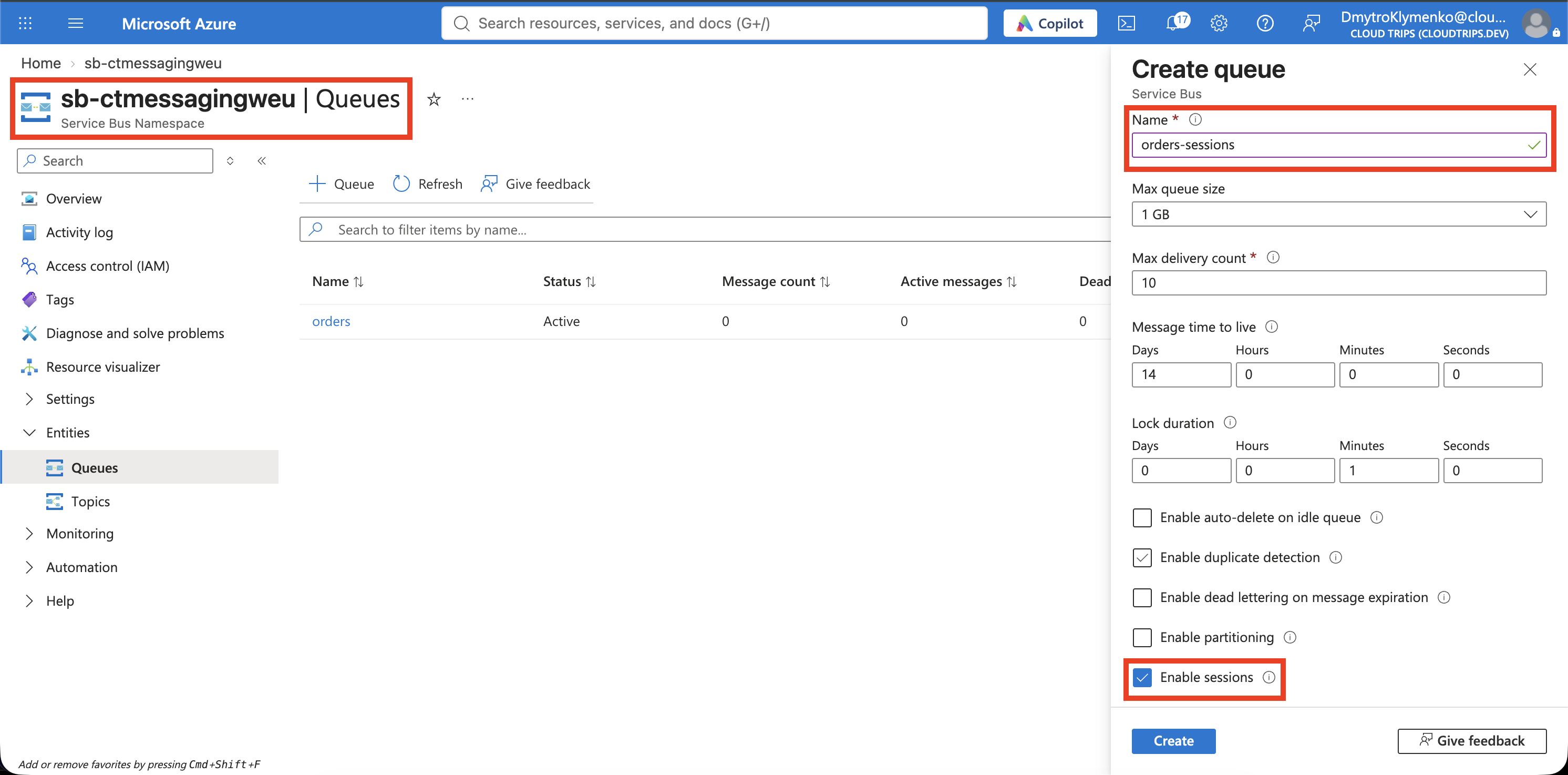
Open the namespace → Entities → Queues → + Queue:
Name: orders-sessions
Enable sessions: Enabled
Keep the other defaults and create the queue. Sessions must be enabled during creation; you cannot switch your existing orders queue to sessions afterward. Use this separate queue for the experiment.
Screenshot 1: The orders-sessions creation form with Enable sessions selected, before creating it.
Run the Prepared Example in Cloud Shell
Download the sessions example. In the Azure portal, open Cloud Shell from the top toolbar and select Bash. If prompted for first-time setup, choose your lab subscription; a session without a storage account is sufficient.
Use Cloud Shell’s Upload/Download files → Upload to upload service-bus-sessions.py. In the terminal, run:
cd "$HOME"
az account set --subscription 'CloudTrips TEST'
python3 -m venv /tmp/ct-servicebus-sessions
source /tmp/ct-servicebus-sessions/bin/activate
python -m pip install 'azure-servicebus>=7.14,<8' 'azure-identity>=1.17,<2' 'websocket-client>=1.6,<2'
python service-bus-sessions.py --namespace sb-ctmessagingweu
Replace sb-ctmessagingweu if you chose a different namespace name. The script uses your Cloud Shell Azure CLI sign-in and sends six messages over an encrypted WebSocket connection. It installs its libraries only in the temporary Cloud Shell environment.
The send order is deliberately interleaved:
SENT CT-3001 1 Created
SENT CT-3002 1 Created
SENT CT-3001 2 Paid
SENT CT-3002 2 Paid
SENT CT-3001 3 Shipped
SENT CT-3002 3 Shipped
Each order has its own SessionId. A fresh run prefix keeps repeated runs separate. The script then accepts the CT-3002 session first, receives one message at a time, checks its order and contents, and completes it before receiving the next. It repeats this for CT-3001.
Verify Actual Processing Order
Expect this processing output after the SENT lines:
PROCESSED CT-3002 1 Created
PROCESSED CT-3002 2 Paid
PROCESSED CT-3002 3 Shipped
PASS CT-3002: 1 -> 2 -> 3
PROCESSED CT-3001 1 Created
PROCESSED CT-3001 2 Paid
PROCESSED CT-3001 3 Shipped
PASS CT-3001: 1 -> 2 -> 3
PASS: both sessions processed in order; six messages completed.
The program checks the received message bodies; it does not sort them before displaying them. A missing or unexpected step raises an error instead of printing a successful result.
Screenshot 2: Cloud Shell showing both orders processed as 1 → 2 → 3 and the final PASS result.
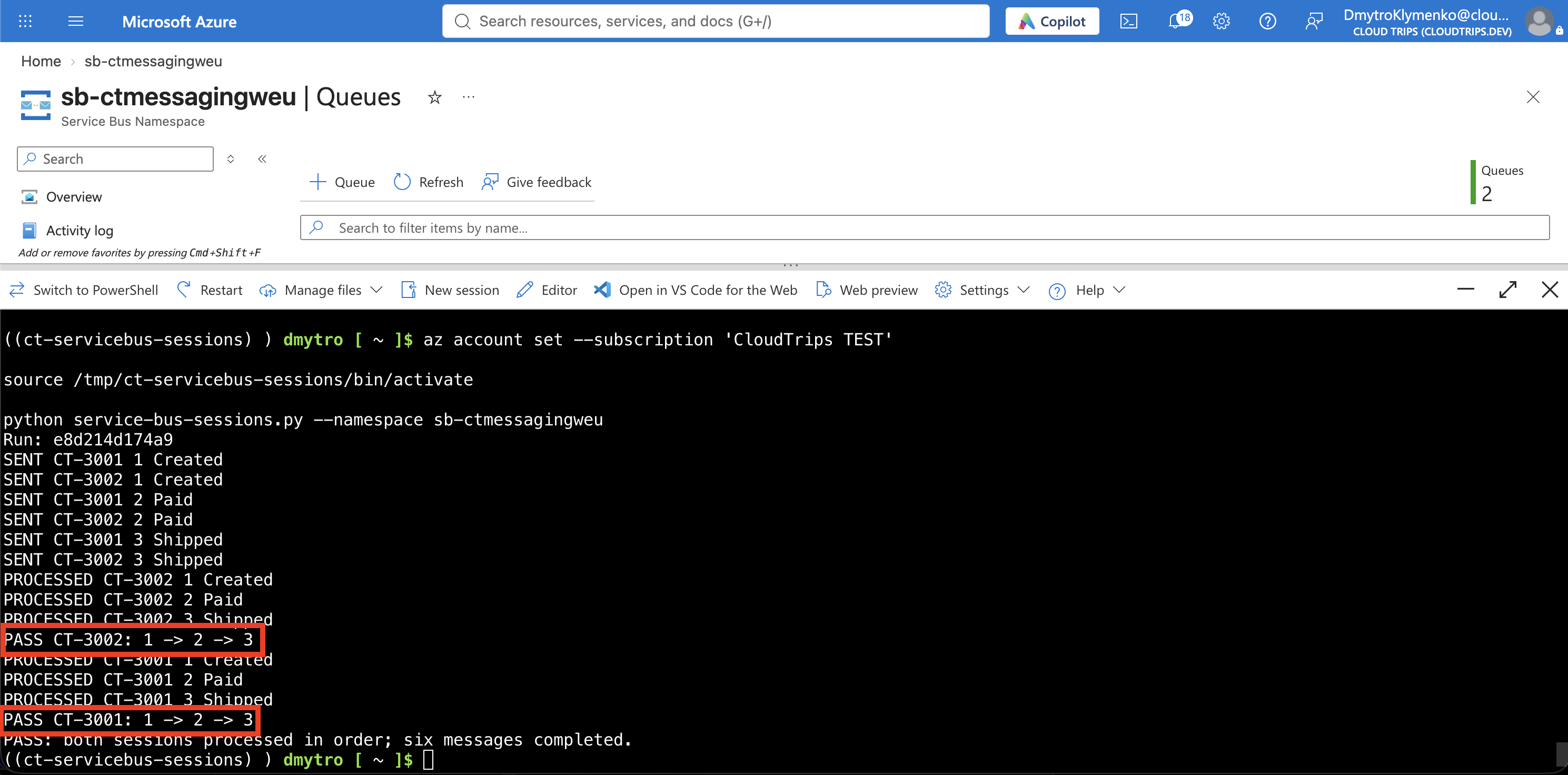
CT-3002 finishes first because the script explicitly chooses that session first. This demonstrates that the two orders have independent sequences. This small example runs one receiver at a time; a real service can process different sessions concurrently.
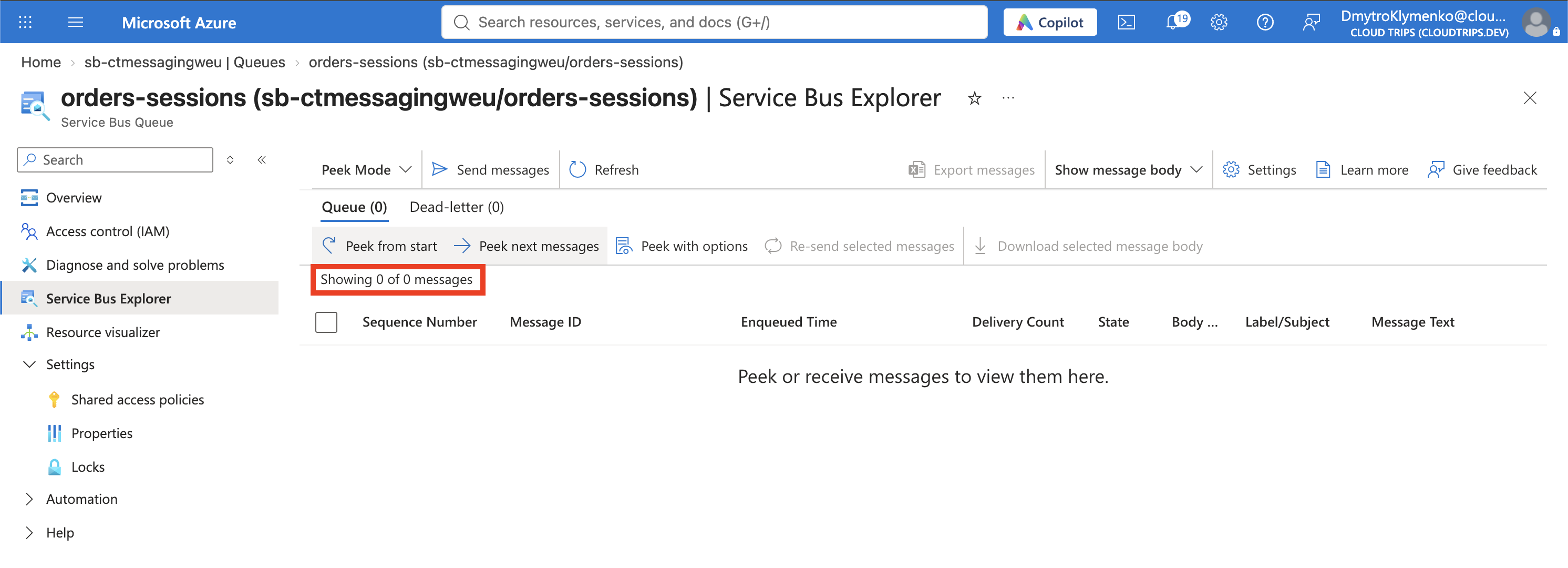
Return to orders-sessions → Overview and refresh. After a successful run on a fresh queue, Active messages should return to 0; the counter can take a little time to update.
Screenshot 3: The orders-sessions queue overview showing zero active messages after the successful run.
If the Example Fails
- Access denied: confirm Azure Service Bus Data Owner is assigned to the Cloud Shell user at namespace scope. A recent assignment may need a few minutes to propagate.
- Queue or session error: check the namespace name, that orders-sessions exists, and that you enabled sessions when creating it.
- Lock expired or interrupted run: the demo does not renew locks for long processing. Run it again for a fresh session pair. Messages left by a failed run remain in their earlier sessions, so the total queue count may stay above zero. Delete and recreate only the dedicated orders-sessions lab queue if you want a clean retry.
Sessions do not guarantee exactly-once business actions. A failure can cause redelivery; a production worker still needs duplicate handling, session-lock renewal for long tasks, and a policy for failed steps before allowing later business steps to proceed.
Finish
Keep the namespace for later messaging trips. You can delete orders-sessions after capturing the results. Close Cloud Shell when finished; its temporary environment can be discarded. Delete the lab resource group when you no longer need the Standard namespace, which continues to incur base charges while empty.