Headers and URLs Need Modification? Configure Application Gateway Rewrite Rules
CloudTrips clients should call a stable URL such as /api/health, even when
the backend stores the response at /internal/status.json. The response should
also identify that it passed through Application Gateway without requiring a
change in the application code.
Configure one rewrite set containing two rules: one changes the path sent to the backend, and the other adds a response header to API responses:
Client requests:  /api/health
Gateway sends:    /internal/status.json to the API backend pool
Client receives:  X-CloudTrips-Gateway: ApplicationGateway
The browser or client continues to show /api/health. This is a rewrite, not a
redirect: Application Gateway changes its backend request instead of asking
the client to make a second request to another URL.
This trip depends on URLs Need Different Backend Pools? Configure Path-Based Routing. Keep the existing Application Gateway,
rule-cloudtrips-paths, the/api/*path rule,be-cloudtrips-api-test-weu, and both web VMs.
URL and header rewrites require an Application Gateway v2 SKU. The existing
agw-cloudtrips-web-test-weuuses Standard_v2 and already meets this requirement. No new billable Azure resource is created in this trip.
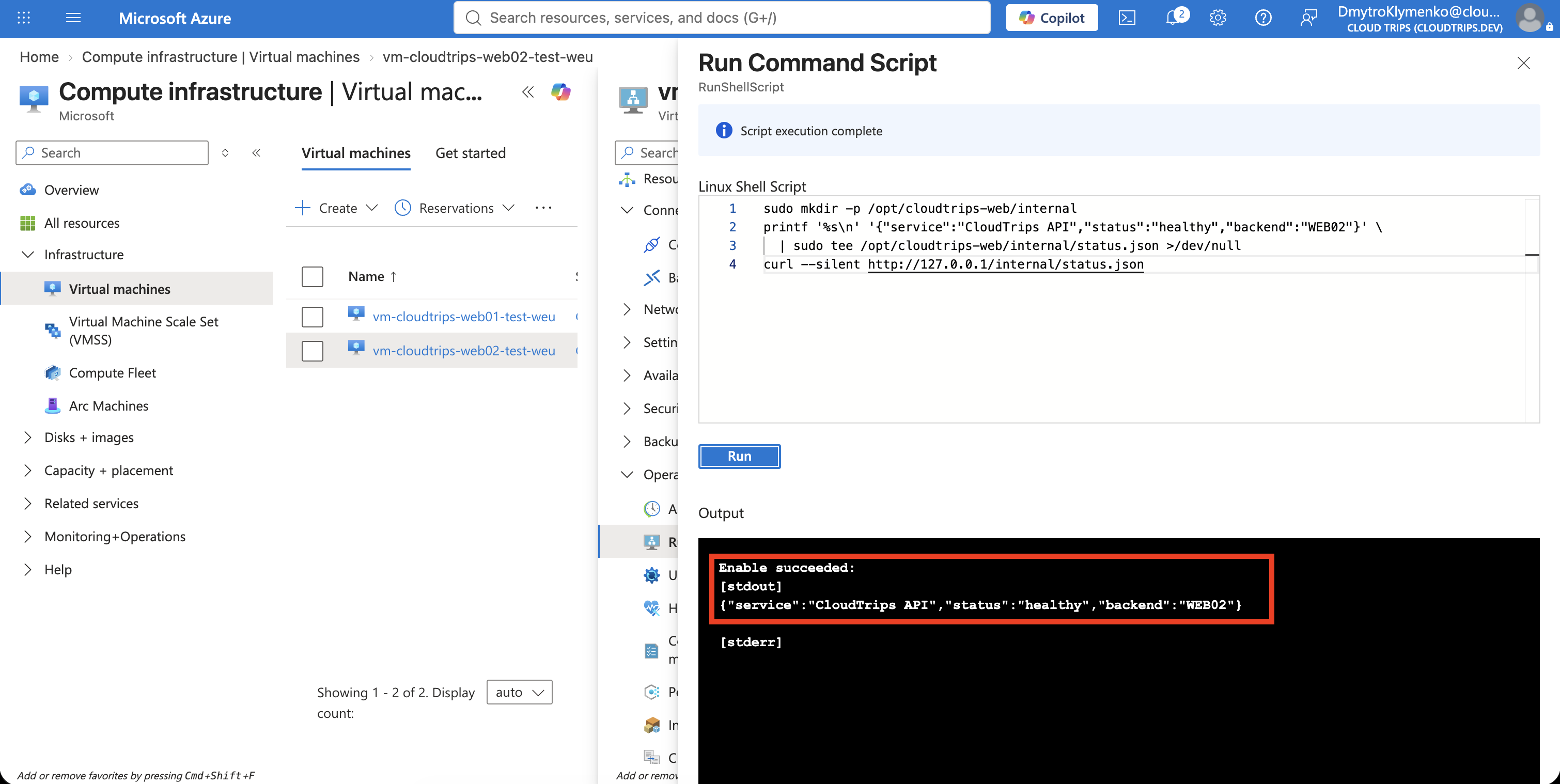
Create the Internal Backend Path
Open vm-cloudtrips-web02-test-weu, select Operations > Run command >
RunShellScript, and run:
sudo mkdir -p /opt/cloudtrips-web/internal
printf '%s\n' '{"service":"CloudTrips API","status":"healthy","backend":"WEB02"}' \
  | sudo tee /opt/cloudtrips-web/internal/status.json >/dev/null
curl --silent http://127.0.0.1/internal/status.json
The final command should return:
{"service":"CloudTrips API","status":"healthy","backend":"WEB02"}The file exists only at the backend path. Application Gateway will give it the
clean public path /api/health.
Create the Rewrite Set
Open agw-cloudtrips-web-test-weu, select Settings > Rewrites, and
select Rewrite set. Enter:
Name: rewrite-cloudtrips-api-health
Routing rule: rule-cloudtrips-paths
Path rule: route-api (/api/*)
The portal may show the path association after the routing rule is selected.
Associate the set with route-api, not with the path map’s default backend.
Only requests that first match /api/* should use this rewrite set.
Match Only the Public Health URL
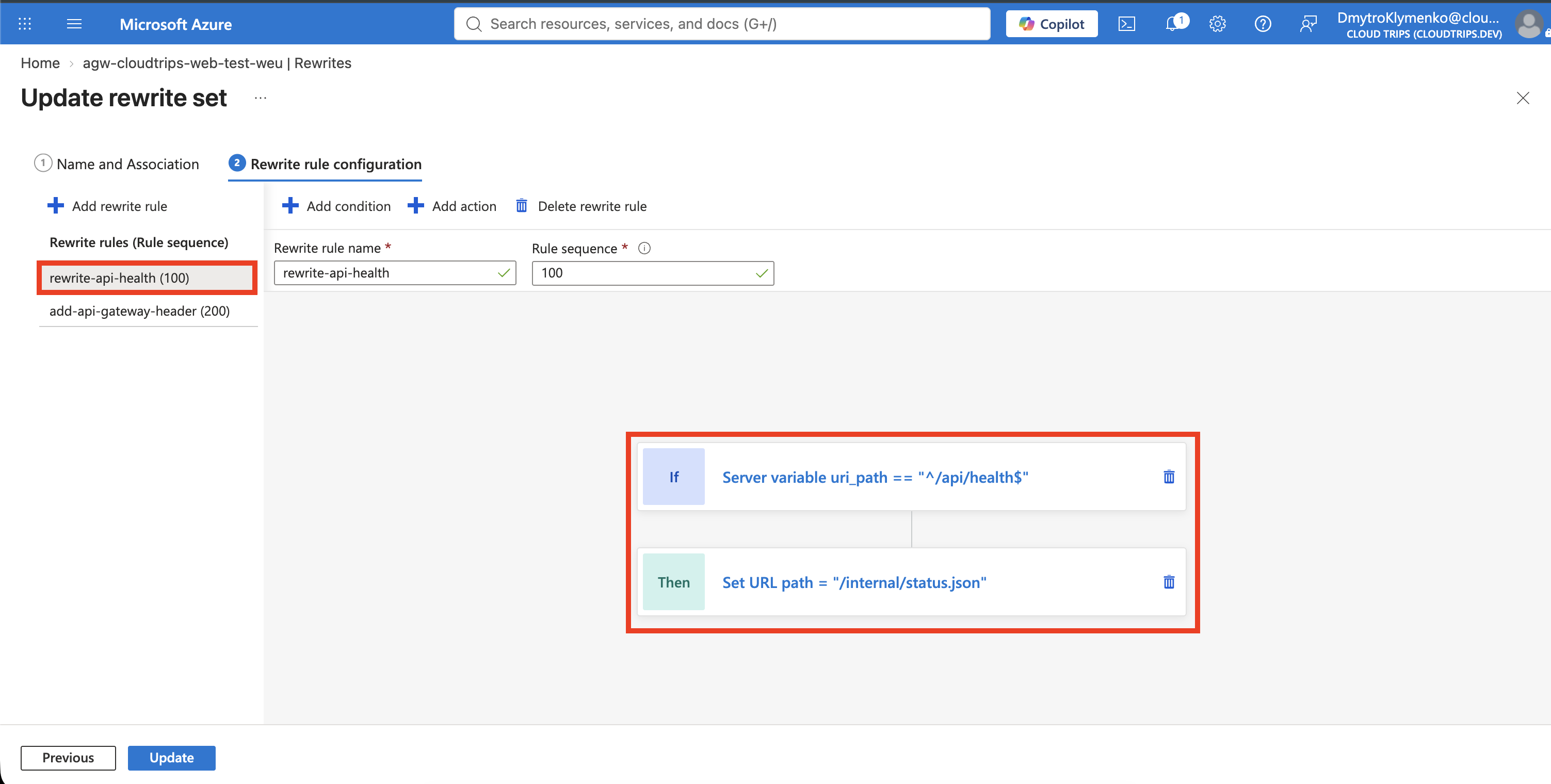
Add a rewrite rule to the set:
Rewrite rule name: rewrite-api-health
Rule sequence: 100
Under Conditions, select Add and configure:
Type of variable to check: Server variable
Server variable: uri_path
Case-sensitive: No
Operator: equal (=)
Pattern: ^/api/health$
uri_path contains only the request path. The ^ and $ anchors mean that
the complete path must be /api/health; a URL such as /api/health/details
does not match.
Rewrite the URL
Under Actions, add a URL action:
Rewrite type: URL
Action type: Set
URL path: /internal/status.json
Re-evaluate path map: No
Leave the query string unchanged. Keeping Re-evaluate path map disabled is
intentional: Application Gateway retains the API pool selected from the
original /api/* path and sends the rewritten path to WEB02. If the path map
were evaluated again, /internal/status.json would no longer match
/api/* and could be sent to the default web pool.
Add the Header as a Separate Rule
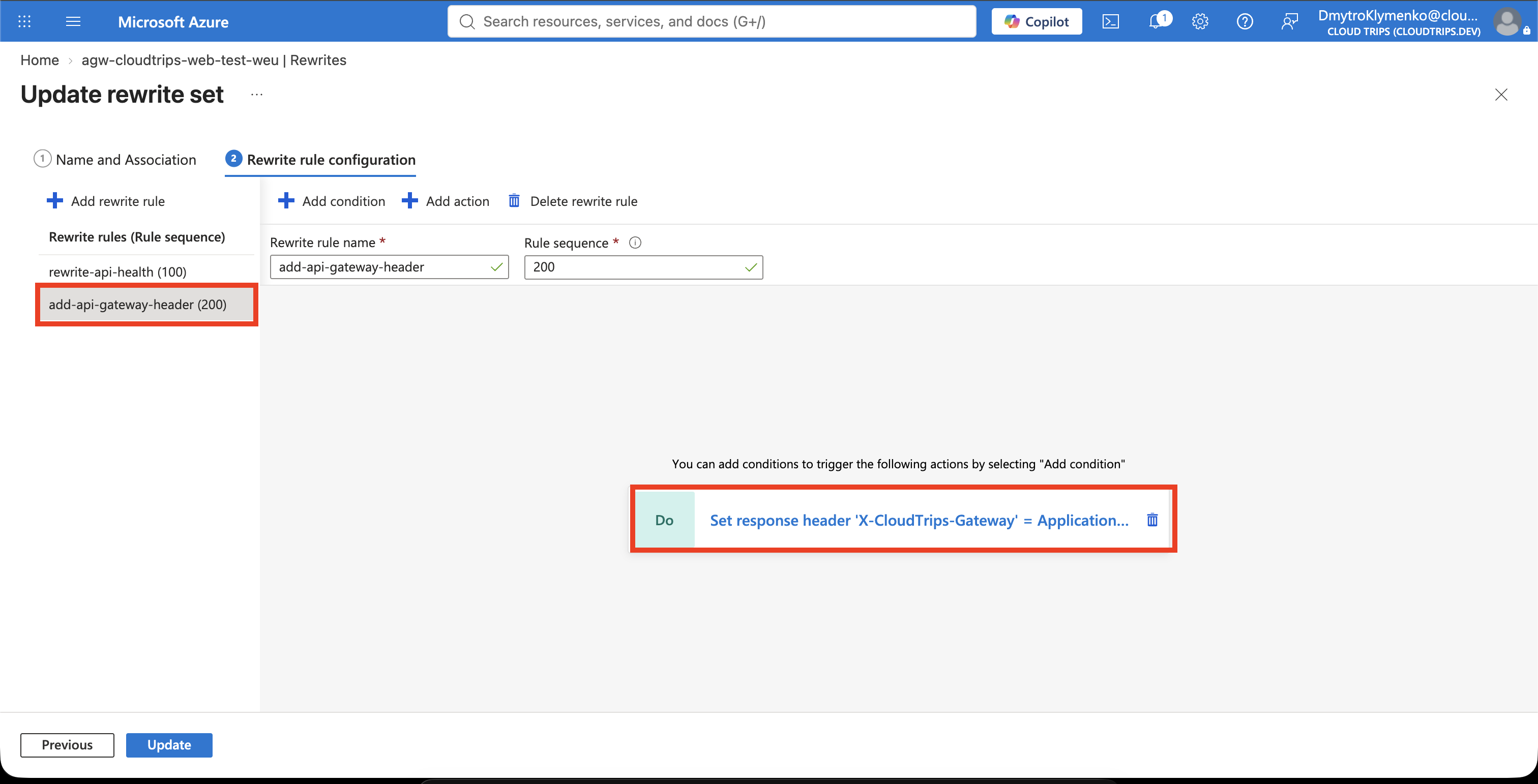
Keep rewrite-api-health limited to the condition and URL action above. In
the same rewrite set, select Add rewrite rule and configure:
Rewrite rule name: add-api-gateway-header
Rule sequence: 200
Conditions: None
Under Actions, add:
Rewrite type: Response header
Action type: Set
Header name type: Custom header
Header name: X-CloudTrips-Gateway
Header value: ApplicationGateway
The header is added on the response that Application Gateway returns to the
client. No additional condition is required because the rewrite set is already
associated only with route-api (/api/*). The header therefore appears on API
responses but not on the image path or the default web path.
Keep the URL and response-header actions in separate rules. In this tested configuration, placing both actions in the conditional URL rule rewrote the backend path but did not add the response header. The second rule makes the response action execute independently for the associated API path.
Select Create or Save, and wait until the Application Gateway update finishes successfully.
Test the Rewrite
Run the following request against the existing Application Gateway public IP:
curl --http1.1 --verbose \
  http://<application-gateway-public-ip>/api/health
Response headers are the lines beginning with < in the verbose output. The
response should contain both the custom header and the JSON file served by
WEB02:
< HTTP/1.1 200 OK
< X-CloudTrips-Gateway: ApplicationGateway

{"service":"CloudTrips API","status":"healthy","backend":"WEB02"}
Now verify the scope of the header:
curl --silent --show-error --dump-header - --output /dev/null \
  http://<application-gateway-public-ip>/api/status.json
curl --silent --show-error --dump-header - --output /dev/null \
  http://<application-gateway-public-ip>/images/test.txt
curl --silent --show-error --dump-header - --output /dev/null \
  http://<application-gateway-public-ip>/
X-CloudTrips-Gateway should appear for /api/status.json because it also
uses route-api. It should not appear for /images/test.txt or /, which use
the image path rule and default backend respectively.
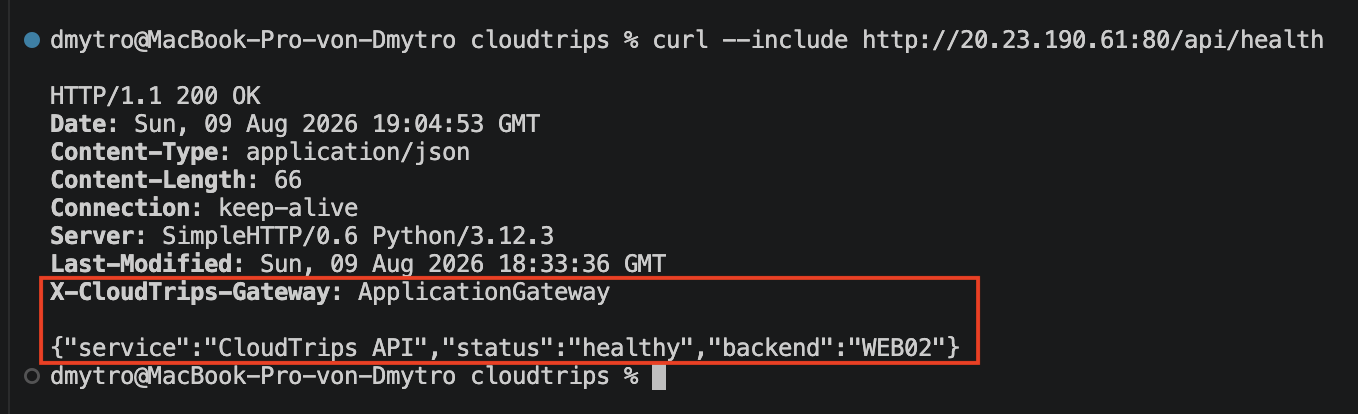
The client requested /api/health; it never requested or saw a redirect to
/internal/status.json. The original /api/* route selected the API backend,
the first rewrite rule changed the path used on the backend connection, and
the second rule added the header on the return path.
A rewrite is not an authorization boundary. Use authentication, NSGs, private endpoints, and application authorization when a path must actually be protected.
Keep the Application Gateway, its listener and path-based rule, the backend pools, and both VMs for the following Application Gateway trips.