Hybrid DNS Needs a Resolver? Configure Azure DNS Private Resolver
Azure Private DNS zones answer queries from linked virtual networks, but an on-premises DNS server cannot query Azure-provided DNS directly. Azure workloads also need a controlled way to send queries for private on-premises names to an on-premises DNS server.
Deploy Azure DNS Private Resolver in the CloudTrips hub. It is a managed DNS proxy: no DNS server virtual machines need to be installed or patched.
On-premises DNS --conditional forwarder--> inbound endpoint
                                              |
                                              v
                                  Azure Private DNS zones

Azure VNet --forwarding-ruleset--> outbound endpoint --> on-premises DNS
The two directions use different components:
- The inbound endpoint receives DNS queries entering Azure.
- The outbound endpoint sends matching Azure queries toward external DNS servers through a forwarding ruleset.
This lab deploys only the inbound direction. The outbound direction is explained later but is not configured because CloudTrips has no on-premises DNS server to receive forwarded queries.
This trip depends on Build a Hub-and-Spoke Network and Private Service Needs a Private Name? Create a Private DNS Zone. Keep the hub-to-application peering,
internal.cloudtrips.dev, and WEB02.
Plan the Resolver
Use this design:
Resource group: rg-cloudtrips-network-test-weu
Region: West Europe
Hub VNet: vnet-cloudtrips-hub-test-weu (10.60.0.0/16)
Resolver: dnspr-cloudtrips-test-weu
Inbound subnet: snet-dnspr-inbound (10.60.2.0/28)
Inbound endpoint: in-dnspr-cloudtrips-test-weu
The inbound endpoint needs a dedicated subnet delegated to
Microsoft.Network/dnsResolvers. A /28 is sufficient for this lab. Do not
place VMs, private endpoints, or other services in this subnet.
Azure DNS Private Resolver endpoints are billable while deployed. Complete the cleanup section if you do not need the hybrid DNS lab afterward.
Confirm that the proposed ranges are free:
az network vnet subnet list \
  --resource-group rg-cloudtrips-network-test-weu \
  --vnet-name vnet-cloudtrips-hub-test-weu \
  --query '[].{name:name,prefix:addressPrefix}' \
  --output table
If the range overlaps an existing subnet, stop and choose another free /28
range inside 10.60.0.0/16.
Create the Dedicated Subnet
Open Virtual networks > vnet-cloudtrips-hub-test-weu > Subnets and
create the inbound subnet:
Name: snet-dnspr-inbound
Address range: 10.60.2.0/28
Subnet delegation: Microsoft.Network/dnsResolvers
The equivalent CLI command is:
az network vnet subnet create \
  --resource-group rg-cloudtrips-network-test-weu \
  --vnet-name vnet-cloudtrips-hub-test-weu \
  --name snet-dnspr-inbound \
  --address-prefixes 10.60.2.0/28 \
  --delegations Microsoft.Network/dnsResolvers
Use either the portal or CLI creation steps, not both.
Create the Private Resolver
Search for DNS private resolvers, select + Create, and configure:
Subscription: CloudTrips TEST
Resource group: rg-cloudtrips-network-test-weu
Name: dnspr-cloudtrips-test-weu
Region: West Europe
Virtual network: vnet-cloudtrips-hub-test-weu
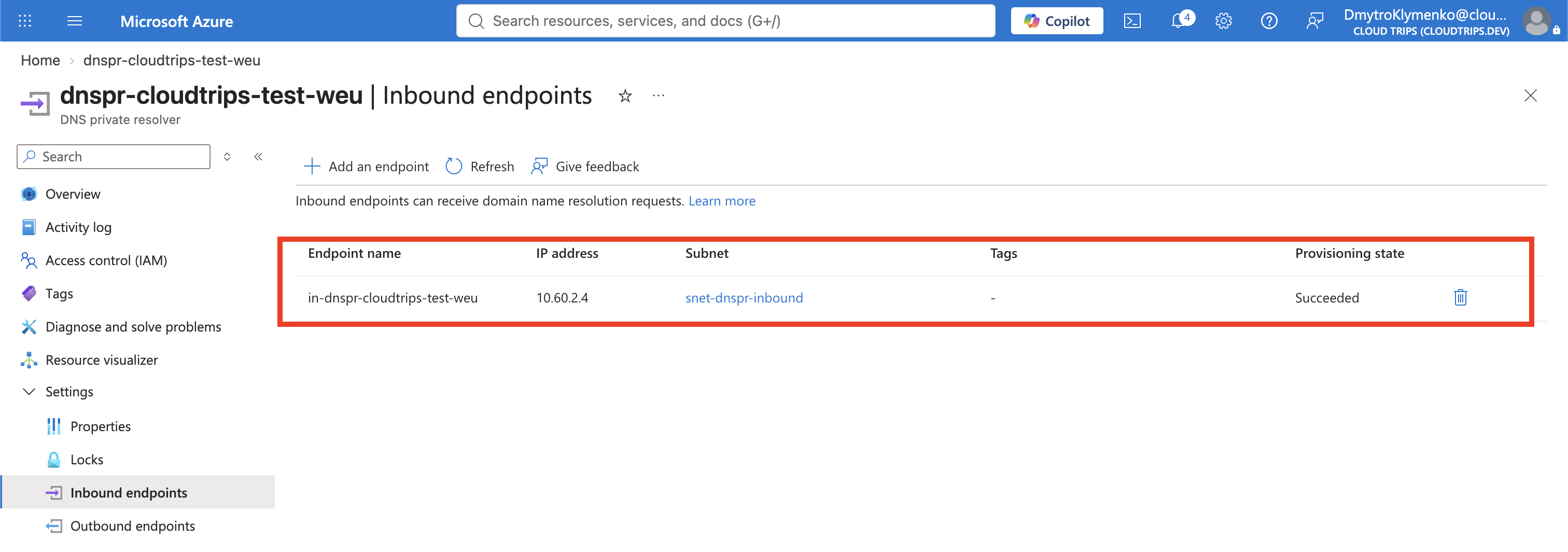
On Inbound endpoints, add:
Endpoint name: in-dnspr-cloudtrips-test-weu
Subnet: snet-dnspr-inbound
IP allocation: Dynamic
Leave Outbound endpoints and Ruleset empty. They are not used in this lab because there is no external DNS server.
Select Review + create > Create. Deployment can take several minutes.
Link the Private Zone to the Resolver VNet
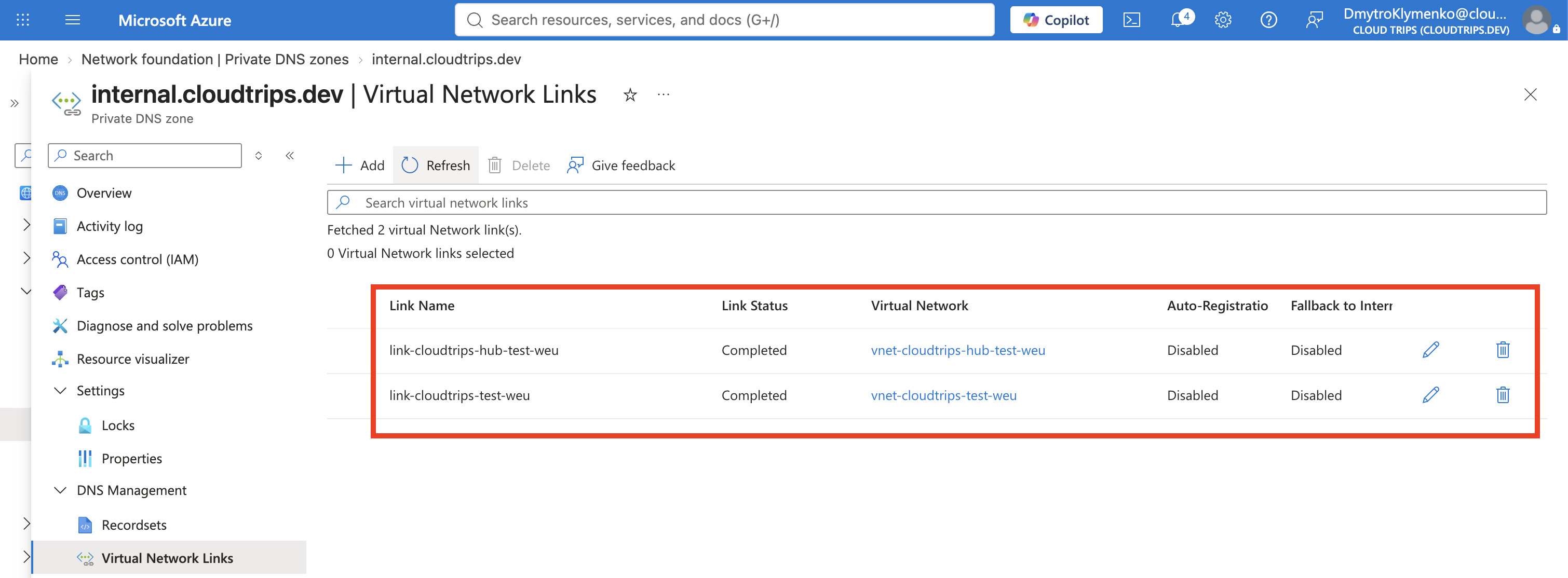
The inbound endpoint can resolve a private zone only when that zone is linked
to the VNet containing the resolver. The previous trip linked
internal.cloudtrips.dev to the application VNet; add a second link to the hub.
Open Private DNS zones > internal.cloudtrips.dev > Virtual network
links > + Add:
Link name: link-cloudtrips-hub-test-weu
Virtual network: vnet-cloudtrips-hub-test-weu
Enable auto registration: Cleared
This does not duplicate the DNS records. Both linked VNets receive answers from the same private zone.
Test the Inbound Endpoint
Read the dynamically allocated inbound IP:
The az dns-resolver commands are supplied by an Azure CLI extension. Install
or update it before running the query:
az extension add --name dns-resolver --upgradeINBOUND_DNS_IP=$(az dns-resolver inbound-endpoint show \
--resource-group rg-cloudtrips-network-test-weu \
--dns-resolver-name dnspr-cloudtrips-test-weu \
--name in-dnspr-cloudtrips-test-weu \
--query 'ipConfigurations[0].privateIpAddress' \
--output tsv)
if [ -n "$INBOUND_DNS_IP" ]; then
printf 'Resolver inbound IP: %s\n' "$INBOUND_DNS_IP"
else
printf 'No inbound IP returned. Do not continue with the DNS test.\n' >&2
fiContinue only when the command prints a private IP such as 10.60.2.4.
Test from WEB02. Although WEB02 can already resolve the zone through the
application VNet’s Private DNS link, supplying $INBOUND_DNS_IP to nslookup
forces this particular query to use the resolver endpoint instead. WEB02
therefore represents a DNS client that can route to the hub over VNet peering:
if [ -n "$INBOUND_DNS_IP" ]; then
  az vm run-command invoke \
    --resource-group rg-cloudtrips-network-test-weu \
    --name vm-cloudtrips-web02-test-weu \
    --command-id RunShellScript \
    --scripts "nslookup web.internal.cloudtrips.dev $INBOUND_DNS_IP"
else
  printf 'Inbound DNS IP is empty; test not started.\n' >&2
fi
The response’s Server or first Address must be $INBOUND_DNS_IP, and the
DNS answer must contain WEB01’s private IP. This proves the inbound path:
WEB02 -> resolver inbound IP -> linked Private DNS zone -> WEB01 private IP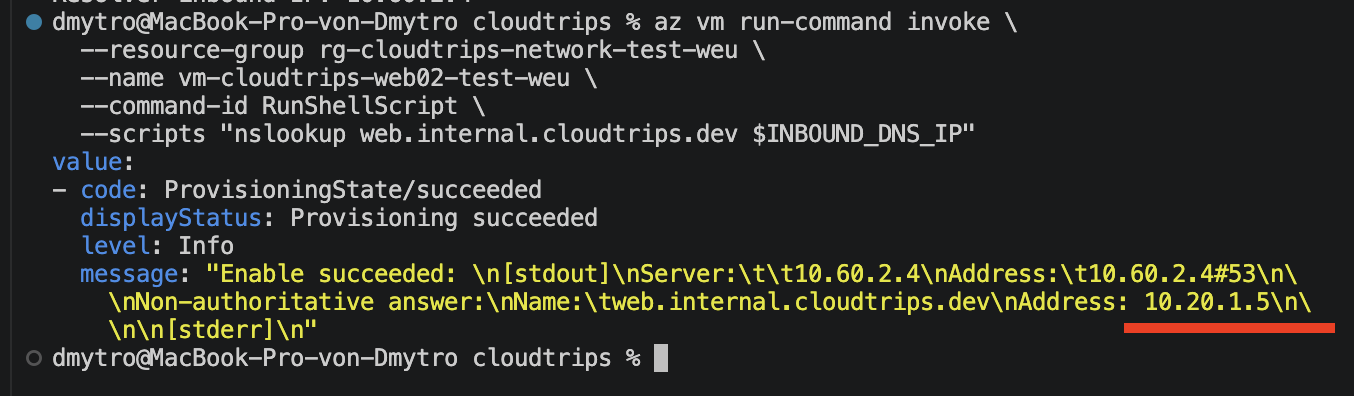
In a real hybrid network, configure the on-premises DNS server with a
conditional forwarder for internal.cloudtrips.dev pointing to
INBOUND_DNS_IP. VPN or ExpressRoute routing and security rules must allow
UDP and TCP port 53 to that private address. Do not publish the inbound IP in
public DNS.
Understand the Optional Outbound Direction
This environment has no on-premises DNS server, so do not create an outbound endpoint, outbound subnet, forwarding ruleset, or forwarding rule. They would add cost without providing a destination that can answer queries.
Add those components later only when Azure must resolve a namespace hosted by a real DNS server, for example:
Rule name: forward-corp
Domain: corp.cloudtrips.dev.
Target DNS server: <real on-premises DNS private IP>
Port: 53
State: Enabled
In that future design, the ruleset is linked to the VNet containing the DNS
clients. Queries matching corp.cloudtrips.dev. leave Azure through the
outbound endpoint and go to the specified server on port 53. The target must
be reachable across VPN or ExpressRoute. Do not use 168.63.129.16, a public
resolver, or the resolver’s own inbound IP as a substitute.
Azure client query for *.corp.cloudtrips.dev
  -> linked forwarding ruleset
  -> outbound endpoint
  -> real on-premises DNS server:53
Keep or Remove the Resolver Lab
Keep the resolver only if later hybrid DNS trips need it. Otherwise remove the inbound endpoint, resolver, hub private-zone link, and then the dedicated inbound subnet. Keep the application VNet link and the private zone from the previous trip.
If you followed an earlier version of this trip, you might also have an
outbound ruleset, out-dnspr-cloudtrips-test-weu, and
snet-dnspr-outbound. They are unused in the current lab. Remove any
forwarding rules and ruleset VNet links first, then the ruleset, outbound
endpoint, and outbound subnet. Only then remove the inbound endpoint,
resolver, hub private-zone link, and inbound subnet.
The portal prevents deleting a subnet while an endpoint still uses it. This dependency order protects the VNet configuration from accidental removal.