Front Door Needs Routing Logic? Configure Rules Engine
CloudTrips now uses origin priorities for automatic failover. That design reacts to origin health, but sometimes routing must depend on the request itself. A release engineer might need to preview a maintenance page without disabling the primary application for everyone.
Create an Azure Front Door rule set that looks for this request header:
X-CloudTrips-Mode: maintenanceMatching requests go to a dedicated Storage-only origin group. Requests without the header continue through the route’s default Application Gateway origin group.
                         no matching header
Client -> Front Door --------------------------> og-cloudtrips-weu
             |
             | X-CloudTrips-Mode: maintenance
             `---------------------------------> og-cloudtrips-maintenance-neu
The header does not place the whole site into maintenance mode. It changes only the request that contains it, which makes the rule safe to demonstrate without interrupting other users.
This trip depends on Front Door Needs Multiple Origins? Configure an Origin Group. Keep
afd-cloudtrips-test,route-cloudtrips-all,og-cloudtrips-weu,origin-appgw-weu, the maintenance Storage account, and its static website. Restoreorigin-appgw-weuto Enabled before continuing.
Understand the Front Door Objects
Several Front Door objects participate in one request. In the current CloudTrips configuration, they relate like this:
Front Door profile: afd-cloudtrips-test
|
|-- Endpoint: <generated AFD endpoint name>
|   `-- Default domain: cloudtrips-edge-...z03.azurefd.net
|
|-- Route: route-cloudtrips-all
|   |-- Domain: the default azurefd.net domain
|   |-- URL pattern: /*
|   |-- Default origin group: og-cloudtrips-weu
|   `-- Rule set: rsCloudTripsRouting
|
|-- Rule set: rsCloudTripsRouting
|   `-- Matching maintenance header
|       `-- Override: og-cloudtrips-maintenance-neu
|
`-- Origin groups
    |-- og-cloudtrips-weu
    |   |-- Application Gateway, priority 1
    |   `-- Storage, priority 2
    |
    `-- og-cloudtrips-maintenance-neu
        `-- Storage, priority 1
The profile is the main Azure Front Door resource that contains the other
configuration objects. The endpoint is the public edge entry point. Azure
assigns it a default azurefd.net domain, and custom domains can be added
later.
The domain is the hostname in the client’s URL. Front Door uses it to find
the endpoint and an eligible route. The route then matches a URL pattern,
such as /*, and defines the default origin group, accepted protocols,
forwarding protocol, caching, and associated rule sets.
A rule set adds conditional logic to a route. It does not replace the route itself. If no rule matches, the route keeps its default origin group. If the maintenance rule matches, it overrides that group for only the current request:
Without header:
domain -> endpoint -> route -> og-cloudtrips-weu

With X-CloudTrips-Mode: maintenance:
domain -> endpoint -> route -> rule match -> og-cloudtrips-maintenance-neu
In short: the domain identifies the request, the endpoint receives it, the route matches it, and the rule set can conditionally change where it goes.
Confirm the Starting State
Open afd-cloudtrips-test, select Front Door manager, and open
route-cloudtrips-all. Confirm:
Origin group: og-cloudtrips-weu
Forwarding protocol: HTTP only
Caching: Disabled
Rules: None
Open Settings > Origin groups > og-cloudtrips-weu and confirm:
origin-appgw-weu: Enabled, priority 1
origin-maintenance-neu: Enabled, priority 2
Health probe protocol: HTTP
The Storage account must still have Require secure transfer disabled. This keeps both origins compatible with the route’s HTTP origin connection. Client requests to the Front Door endpoint continue to use HTTPS.
Retrieve the endpoint and Storage hostnames:
AFD_HOST=$(az afd endpoint list \
  --resource-group rg-cloudtrips-network-test-weu \
  --profile-name afd-cloudtrips-test \
  --query '[0].hostName' \
  --output tsv)

FALLBACK_STORAGE="stctfd$(az account show \
  --query id \
  --output tsv | tr -d '-' | cut -c1-8)"

STORAGE_HOST=$(az storage account show \
  --resource-group rg-cloudtrips-network-test-weu \
  --name "$FALLBACK_STORAGE" \
  --query 'primaryEndpoints.web' \
  --output tsv | sed -E 's#^https?://##; s#/$##')

printf 'Front Door: %s\nStorage website: %s\n' \
  "$AFD_HOST" "$STORAGE_HOST"
Create a Dedicated Maintenance Origin Group
A rule overrides an origin group, not one origin inside the route’s
existing group. Reusing og-cloudtrips-weu would not force the maintenance
page because its healthy priority-1 Application Gateway would still win.
Keep origin-maintenance-neu in the existing og-cloudtrips-weu group. It is
still required for automatic priority-based failover. The new group gets a
second Front Door origin object that points to the same Storage static
website; it does not require another Storage account or another copy of the
maintenance page.
The completed configuration will contain:
og-cloudtrips-weu
|-- origin-appgw-weu                 Priority 1: normal application
`-- origin-maintenance-neu           Priority 2: automatic failover

og-cloudtrips-maintenance-neu
`-- origin-rules-maintenance-neu     Priority 1: Rules Engine override

Both maintenance origins -> the same Storage static-website endpoint
In afd-cloudtrips-test, select Settings > Origin groups > + Add
and configure:
Name: og-cloudtrips-maintenance-neu
Session affinity: Disabled
Health probe status: Enabled
Path: /
Protocol: HTTP
Request type: GET
Interval: 30 seconds
Select + Add an origin and configure:
Name: origin-rules-maintenance-neu
Origin type: Storage (Static website)
Host name: Select the existing maintenance Storage account
Origin host header: Keep the generated static-website hostname
HTTP port: 80
HTTPS port: 443
Priority: 1
Weight: 1000
Status: Enabled
Private Link: Disabled
Select Add, then save the origin group. Wait until its deployment status is Succeeded and the origin is healthy. The same Storage endpoint can be represented by origins in two different origin groups; each origin is a separate Front Door configuration object.
Do not move or delete origin-maintenance-neu from og-cloudtrips-weu after
creating the new group. Removing it would disable the automatic failover built
in the previous trip.
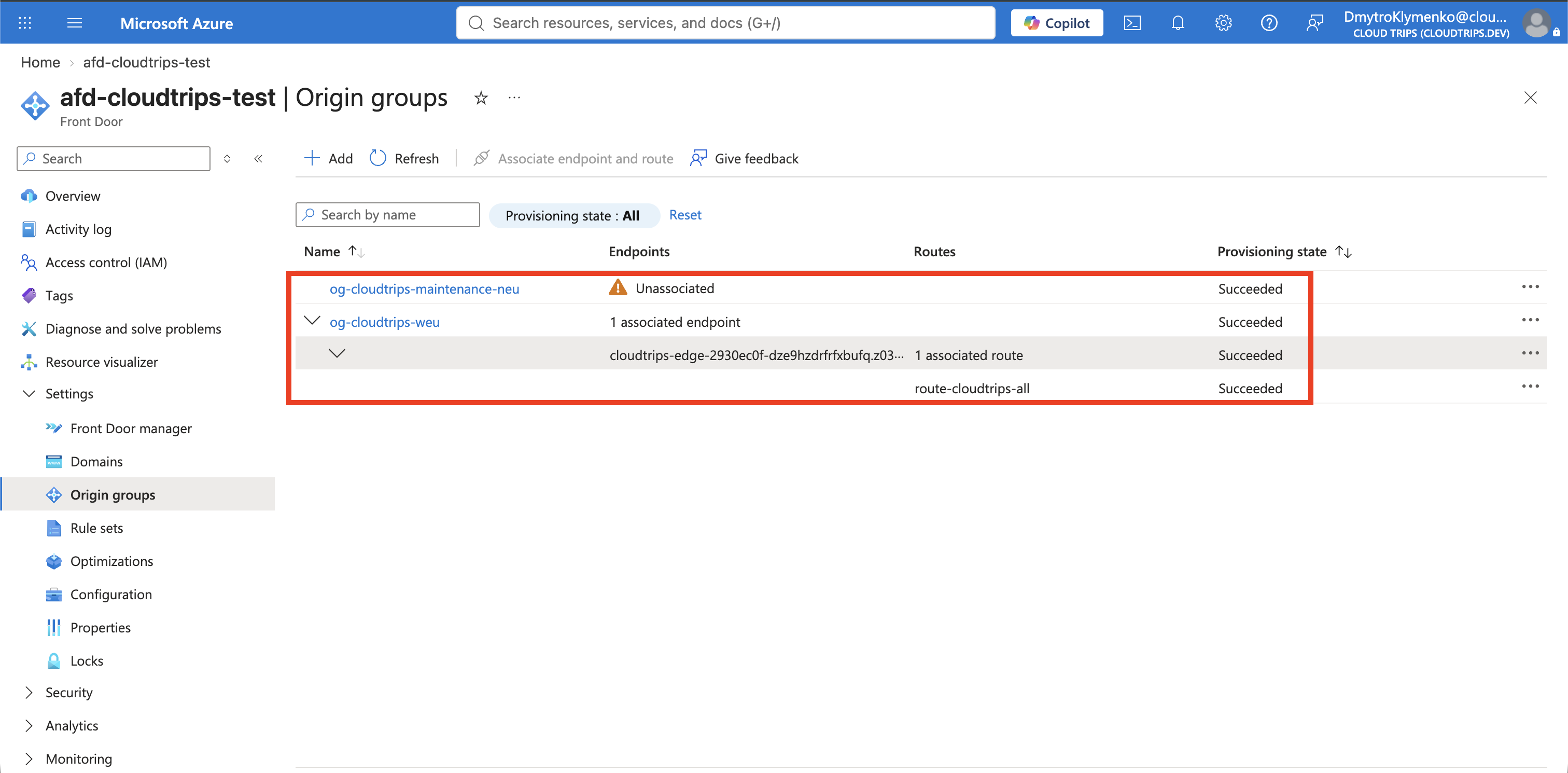
The Origin groups page can show og-cloudtrips-maintenance-neu as
Unassociated at this point. That is expected. This label counts direct
endpoint-and-route associations, and the existing route must remain directly
associated with og-cloudtrips-weu as its default group.
Do not select Associate endpoint and route for the maintenance-only group. The Rules Engine action created below will reference it as a conditional override:
Direct route association: route-cloudtrips-all -> og-cloudtrips-weu
Conditional rule reference: matching header -> og-cloudtrips-maintenance-neu
The portal might continue to display Unassociated for the maintenance group even after the rule is deployed because a rule reference is not a direct route association.
Create the Rule Set
In the Front Door profile, select Settings > Rule sets > + Add. Use this name:
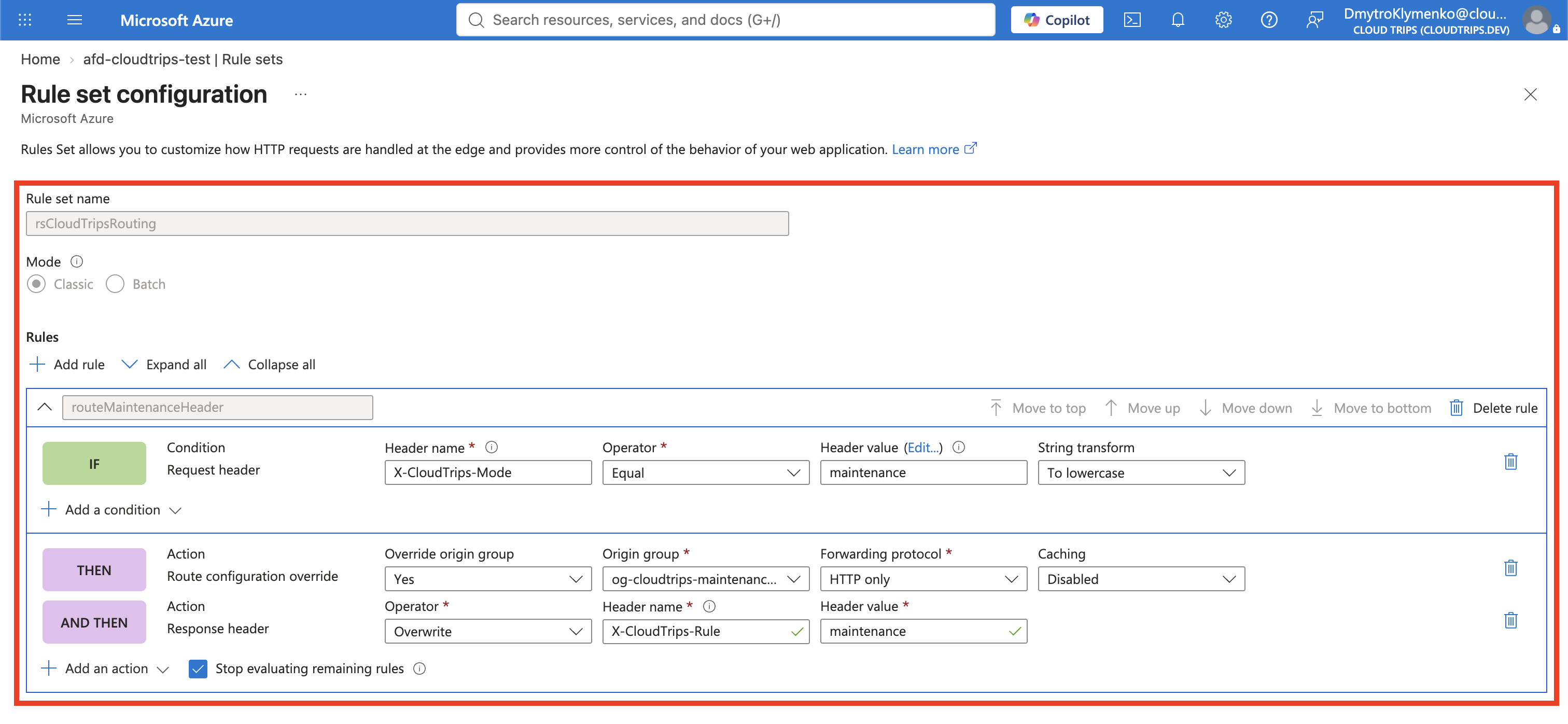
rsCloudTripsRoutingOpen the new rule set and select + Add rule. Configure the rule name and evaluation behavior:
Rule name: routeMaintenanceHeader
Order: 1
Stop evaluating remaining rules: Enabled
Stopping evaluation is not essential while this is the only rule, but it makes the intended precedence explicit when more routing rules are added later.
Under Conditions, select + Add condition and configure:
Condition: Request header
Header name: X-CloudTrips-Mode
Operator: Equal
Value: maintenance
Case transform: Lowercase
The lowercase transform makes values such as Maintenance and MAINTENANCE
match the lowercase comparison value. Header names themselves are
case-insensitive under HTTP.
Override the Route for Matching Requests
Under Actions, select + Add action and configure the routing action:
Action: Route configuration override
Origin group override: og-cloudtrips-maintenance-neu
Forwarding protocol: HTTP only
Caching: Disabled
Add a second action so the result is visible in the response headers:
Action: Modify response header
Operator: Overwrite
Header name: X-CloudTrips-Rule
Header value: maintenance
Select Save. The route-configuration override changes the origin group for matching requests. It does not modify the route’s default origin group.
Associate the Rule Set with the Route
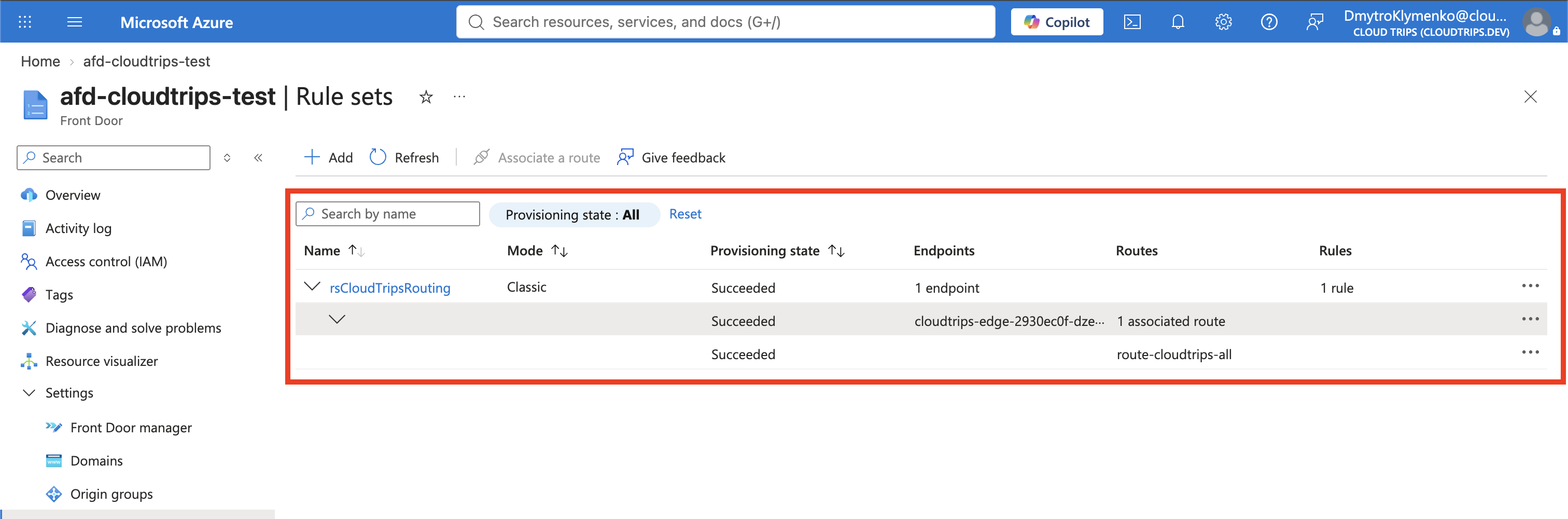
A rule set does nothing until a route references it. Return to Front Door
manager, open route-cloudtrips-all, and under Rules select:
rsCloudTripsRoutingSave the route and wait until the Front Door deployment is Succeeded. Configuration propagation across edge locations can take several minutes.
Test the Default Route
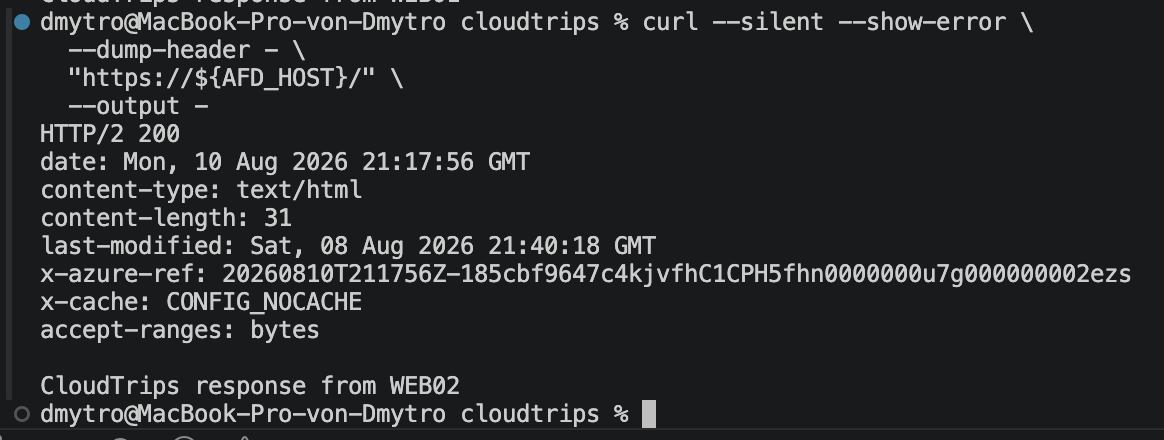
Send a normal request without the condition header:
curl --silent --show-error \
  --dump-header - \
  "https://${AFD_HOST}/" \
  --output -
The body should come from WEB01 or WEB02, and the headers must not contain
X-CloudTrips-Rule:
CloudTrips response from WEB01This proves that a nonmatching request still uses the default
og-cloudtrips-weu origin group.
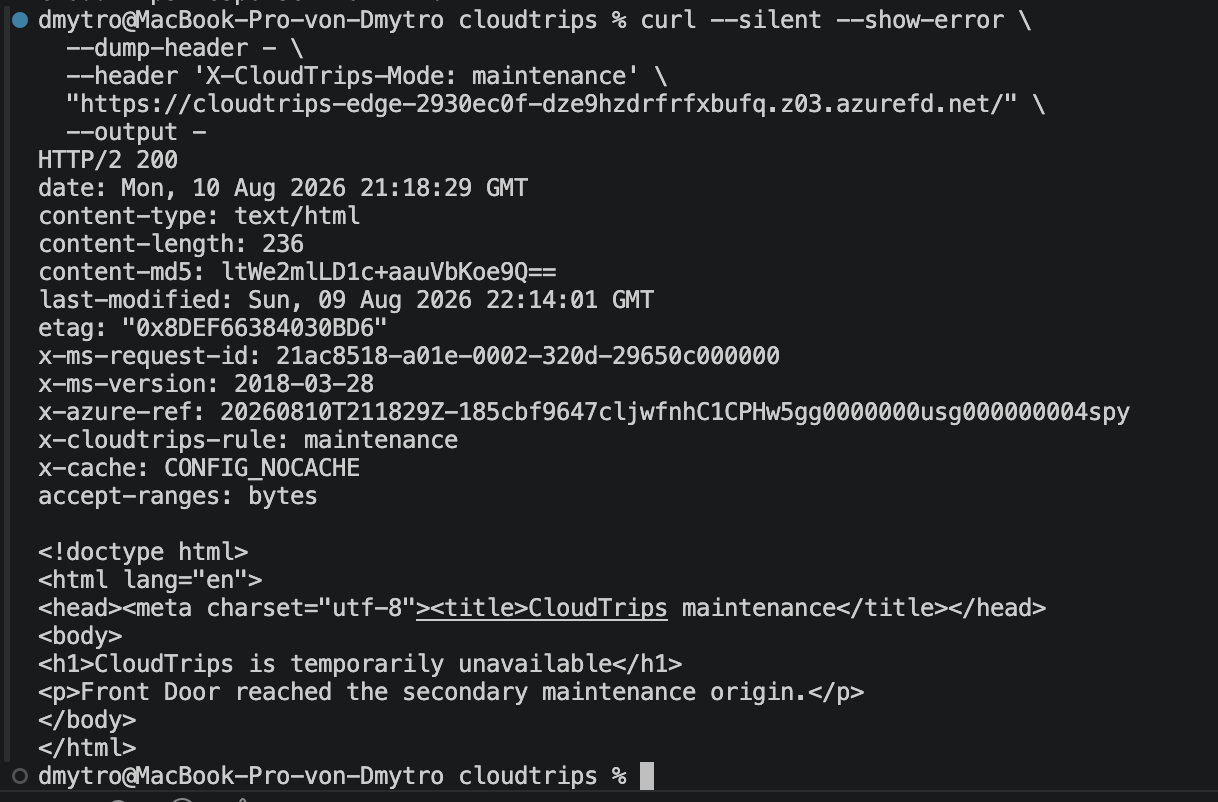
Test the Maintenance Override
Send the same request with the matching header:
curl --silent --show-error \
  --dump-header - \
  --header 'X-CloudTrips-Mode: maintenance' \
  "https://${AFD_HOST}/" \
  --output -
The response headers should include:
x-cloudtrips-rule: maintenanceThe body should contain:
CloudTrips is temporarily unavailable
Front Door reached the secondary maintenance origin.
The diagnostic response header proves that the rule matched. The maintenance body proves that its origin-group override replaced the route’s default group for this request.
Test a different value:
curl --silent --show-error \
  --header 'X-CloudTrips-Mode: normal' \
  "https://${AFD_HOST}/"
The request should return WEB01 or WEB02 because the condition does not match.
Understand the Processing Order
Front Door first matches the endpoint domain and route. It then evaluates the rule sets associated with that route in order. If no rule matches, the route’s default origin group remains in effect. If this rule matches, Front Door overrides that group before selecting an origin.
WAF -> route match -> rule-set evaluation -> origin-group selection -> originThe custom header is a routing signal, not authentication or authorization. Any client can send it, but doing so affects only that client’s request. Never use a request-header rule by itself to protect sensitive content.
Keep or Remove the Rule
Keep the rule set attached if later Front Door trips will build on it. Normal requests remain unchanged unless they include the opt-in header.
If you want to remove the lab configuration, first edit
route-cloudtrips-all and remove rsCloudTripsRouting from Rules. After
the route deployment succeeds, delete the rule set and then delete
og-cloudtrips-maintenance-neu. Keep the original og-cloudtrips-weu and its
two origins for automatic priority-based failover.
If you continue, keep the Front Door endpoint for DNS Name Must Point to the App? Create an Azure DNS Zone.