Many VNets Need Central Governance? Configure Network Manager
CloudTrips now has the application VNet, hub VNet, services VNet, and the
optional North Europe VNet vnet-cloudtrips-dr-test-neu created in the global
peering trip. That secondary-region VNet is labeled dr for a future
disaster-recovery design; creating it did not by itself implement application
replication or failover. Managing one independent security baseline in every
VNet does not scale: a new VNet can be missed, and workload teams can implement
the same requirement differently.
Configure Azure Virtual Network Manager to govern the subscription’s VNets
from one control plane. Create a network group, add the existing CloudTrips
VNets, and deploy a security admin rule that denies inbound RDP on TCP 3389
from the Internet in both West Europe and North Europe.
Azure Virtual Network Manager
       |
       | security admin configuration
       v
CloudTrips network group
   |          |          |          |
App VNet   Hub VNet   Services VNet   DR VNet
This trip uses
vnet-cloudtrips-test-weu,vnet-cloudtrips-hub-test-weu,vnet-cloudtrips-services-test-weu, andvnet-cloudtrips-dr-test-neufrom earlier networking trips. If one of the optional VNets was removed, add the remaining VNets and continue with at least two members.
Azure Virtual Network Manager can incur charges for managed resources and deployed configurations. Complete the verification and cleanup promptly.
Separate Central Rules from Workload Rules
A security admin rule is evaluated before subnet and NIC NSG rules. Central network administrators use it to enforce requirements across every targeted VNet, while workload teams continue to manage application-specific NSG rules.
Security admin actions behave differently:
| Action | Result |
|---|---|
Allow |
Allows evaluation to continue to NSGs |
Always Allow |
Allows traffic and stops later NSG evaluation |
Deny |
Blocks traffic and stops later NSG evaluation |
Use Deny for the RDP baseline. The existing CloudTrips servers are Linux VMs
and use HTTP on port 80, so blocking Windows RDP on 3389 does not interrupt
the lab application. This rule is still meaningful: an NSG owner cannot add a
later allow rule that overrides the central deny.
Create the Network Manager
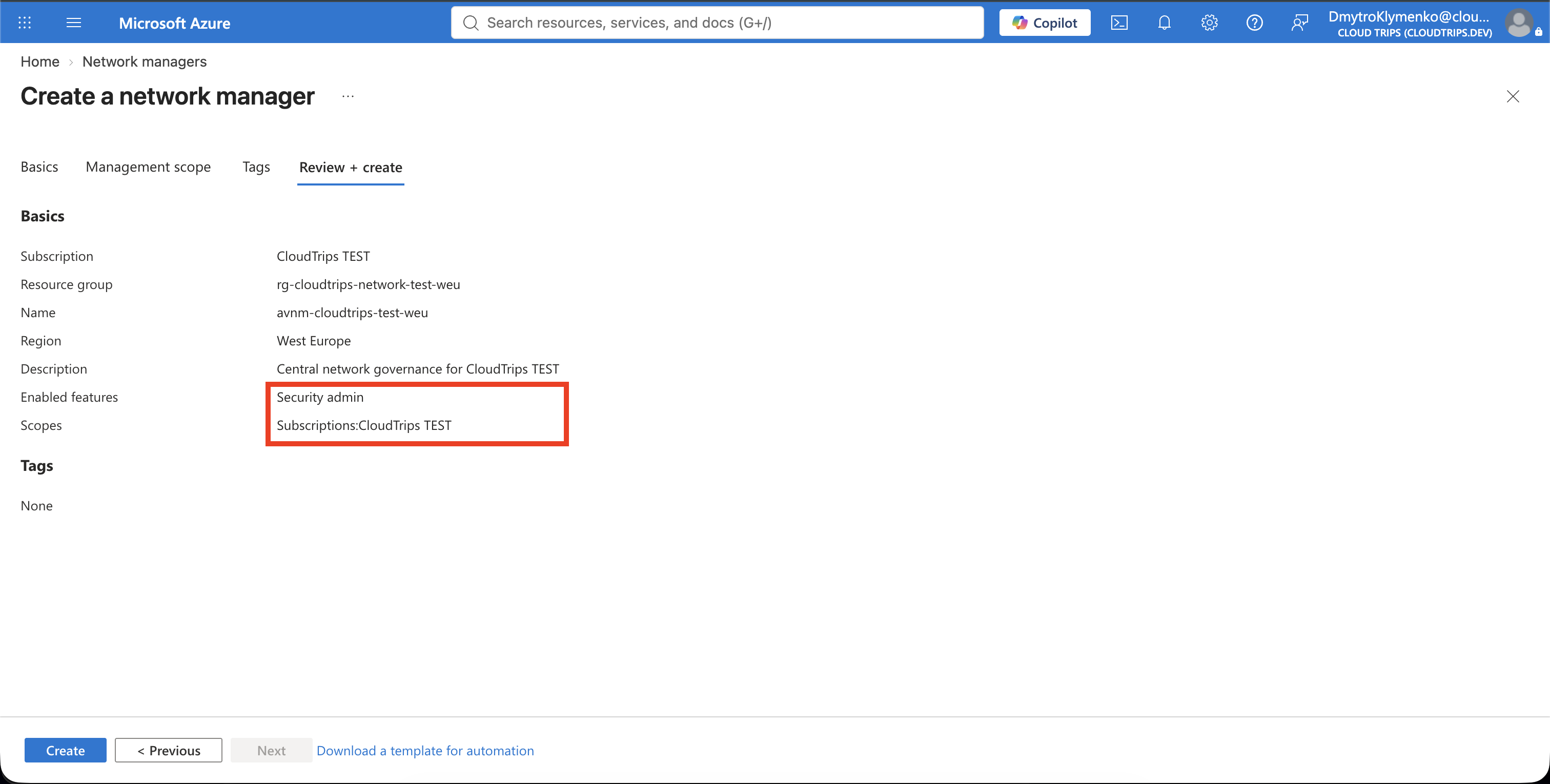
Search for Network managers and select Create. On Basics, configure:
Subscription: CloudTrips TEST
Resource group: rg-cloudtrips-network-test-weu
Name: avnm-cloudtrips-test-weu
Region: West Europe
Description: Central network governance for CloudTrips TEST
The manager’s region stores the management resource. Configurations are deployed separately to every region containing governed VNets.
On Scope, add the CloudTrips TEST subscription. The scope defines the
resources the manager is authorized to see and configure; it does not
automatically apply a configuration to every VNet.
On Features, select:
Scope access: Security adminConnectivity is not required because the earlier trips already created the peerings. Select Review + create > Create.
Group the CloudTrips VNets
Open avnm-cloudtrips-test-weu and select Settings > Network groups >
Create. Enter:
Name: ng-cloudtrips-test
Description: CloudTrips TEST virtual networks governed by the central baseline
Member type: Virtual network
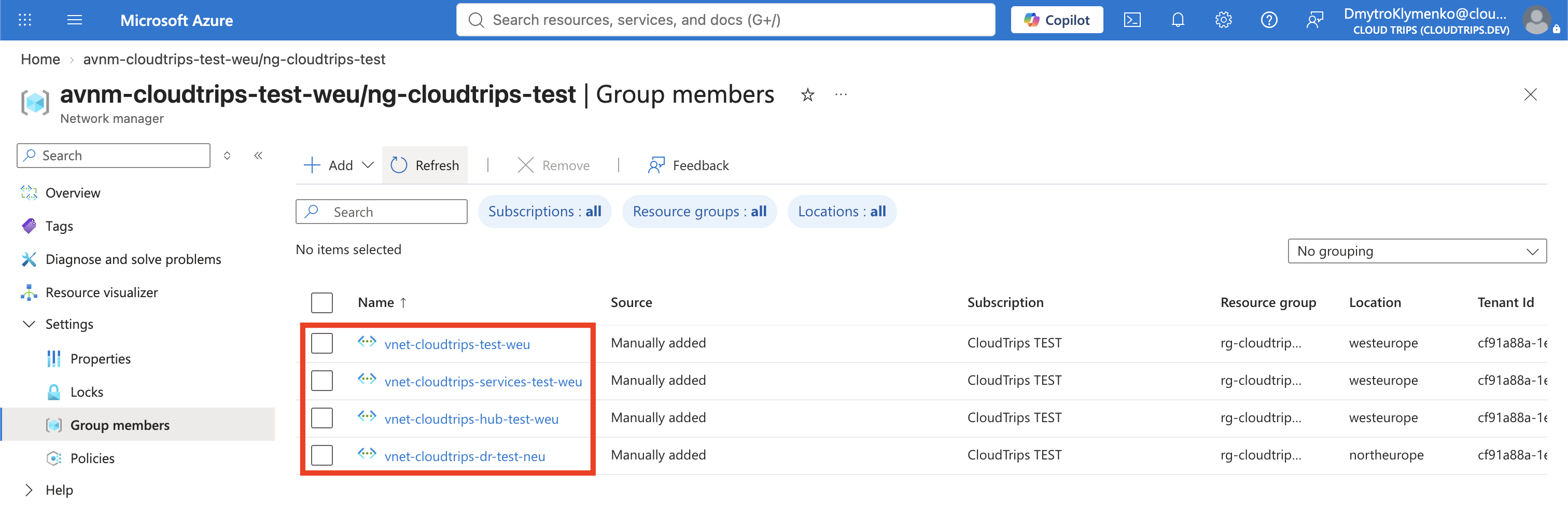
Open the group, select Add under Static membership, and add the existing CloudTrips VNets:
vnet-cloudtrips-test-weu
vnet-cloudtrips-hub-test-weu
vnet-cloudtrips-services-test-weu
vnet-cloudtrips-dr-test-neu
Static membership makes this lab’s scope explicit. Production environments can use dynamic membership so Azure Policy adds VNets based on subscription, resource-group, name, or tags. Preview dynamic results before deployment; incorrect conditions can govern more networks than intended.
Create the Security Admin Baseline
Select Settings > Configurations > Create > Security configuration and enter:
Name: secadmin-cloudtrips-baseline
Description: Central high-risk-port baseline for CloudTrips TEST
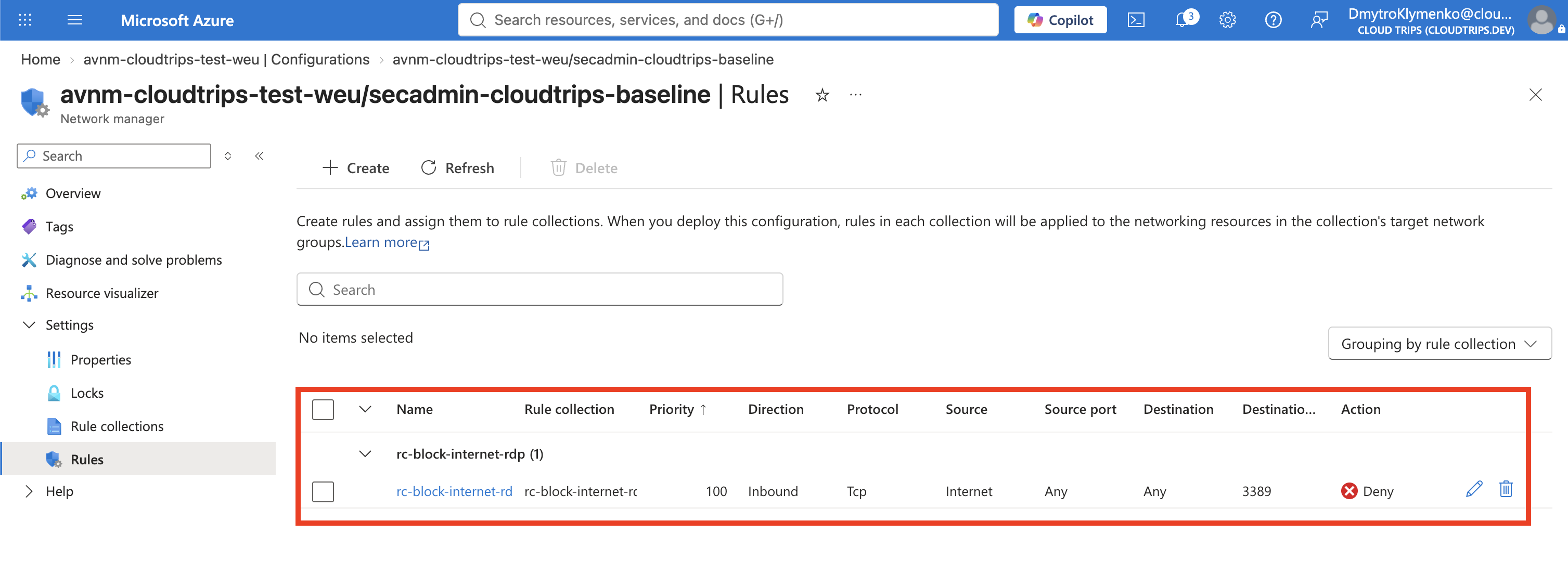
Add a rule collection:
Name: rc-block-internet-rdp
Target network groups: ng-cloudtrips-test
Add one security admin rule:
Name: Deny-Internet-RDP
Description: Centrally deny inbound RDP from the Internet
Priority: 100
Action: Deny
Direction: Inbound
Protocol: TCP
Source type: Service tag
Source service tag: Internet
Source port: Any
Destination type: IP address
Destination: 0.0.0.0/0
Destination port: 3389
The Internet service tag limits the source to addresses outside the virtual
network that are reachable from the public Internet. The destination represents
resources in the targeted VNets, while the rule collection determines where
the rule is installed. Review the network group carefully and select Add,
then Save.
Creating a configuration does not enforce it. Virtual Network Manager separates authoring from deployment so a central team can review the goal state before committing it to regions.
Deploy to Both Regions
Select Settings > Deployments > Deploy configuration. Configure:
Security configuration: secadmin-cloudtrips-baseline
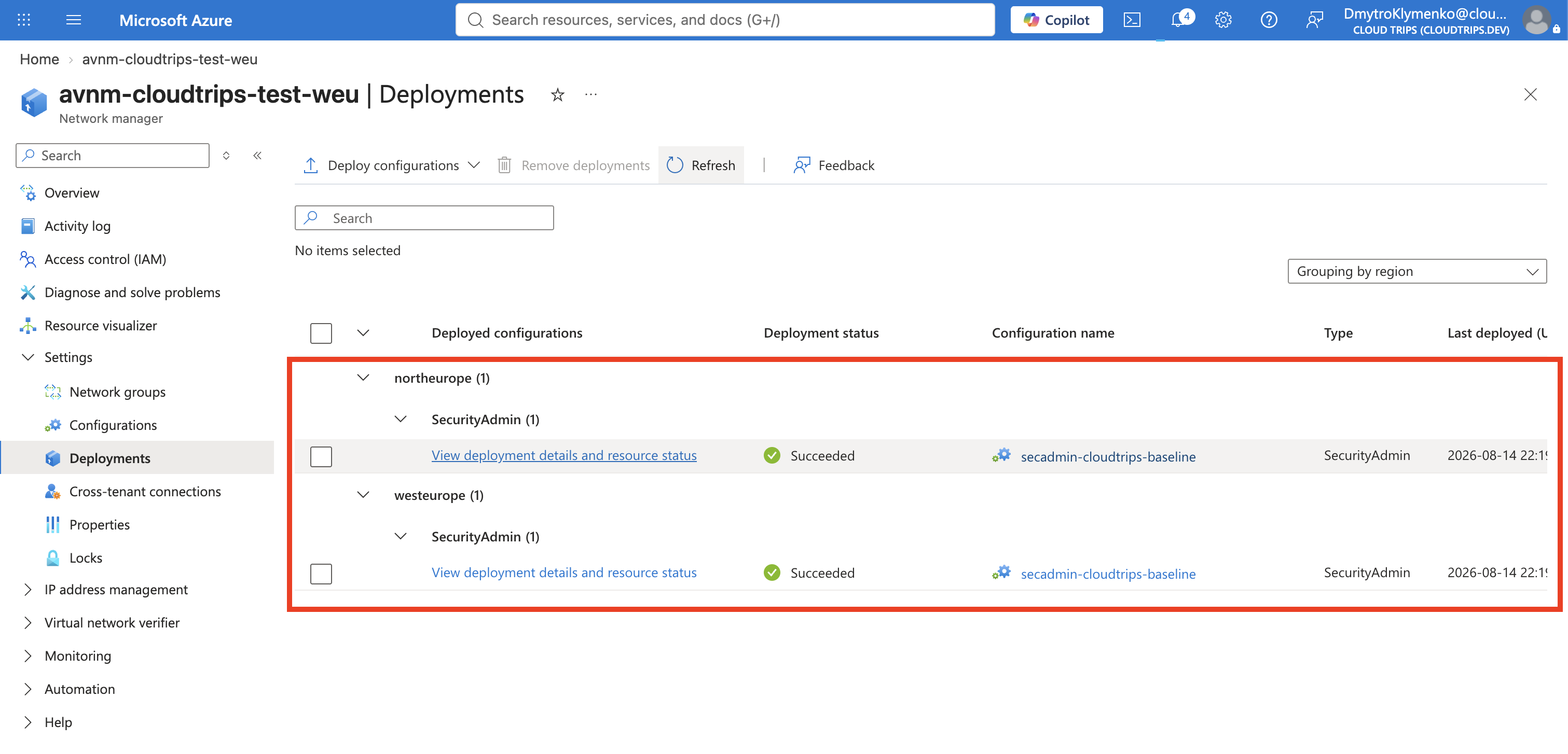
Target regions: West Europe, North Europe
West Europe contains the application, hub, and services VNets. North Europe contains the DR VNet. A configuration is effective only in regions where it is deployed, even when the manager’s scope includes VNets elsewhere.
Select Next > Deploy. Wait for both regional deployment states to show Succeeded. Azure applies security admin rules with eventual consistency, so effective rules can take a short time to appear.
Verify Central Enforcement
Open vnet-cloudtrips-test-weu and select Settings > Network Manager.
Open the deployed security admin configuration and its rule collection.
Confirm that Deny-Internet-RDP appears as an inbound Deny rule for TCP
3389. This VNet-level page shows which Virtual Network Manager configuration
is applied and the central rules it contributes.
Do not add an NSG allow rule to test an override. A deployed security admin
Deny is terminal and is evaluated before NSGs, so the effective result
remains denied. Verify instead that the existing application still works:
LB_IP=$(az network public-ip show \
  --resource-group rg-cloudtrips-network-test-weu \
  --name pip-cloudtrips-lb-test-weu \
  --query ipAddress \
  --output tsv)

curl --silent --show-error --connect-timeout 5 "http://${LB_IP}/"
The request should still return a WEB01 or WEB02 response because the central
rule affects only TCP 3389, not HTTP 80.
Remove the Governance Lab
Remove the regional deployments before deleting their definitions. Open
Deployments, select the security admin deployments for West Europe and
North Europe, and select Remove deployments. Confirm the removal when
prompted. Wait until both regional deployments are gone and verify that
Deny-Internet-RDP no longer appears under the VNet’s Network Manager page.
Then delete, in order:
secadmin-cloudtrips-baseline- The static members and
ng-cloudtrips-test avnm-cloudtrips-test-weu
Keep the VNets, peerings, NSGs, and application resources. Removing the network manager lab should remove only centralized governance, not the networks it managed.
The next trip places a network boundary around a PaaS resource that does not live inside a VNet.