URLs Need Different Backend Pools? Configure Path-Based Routing
The CloudTrips Application Gateway currently sends every URL to the same backend pool. That prevents the web, image, and API components from scaling or being maintained independently.
Configure path-based routing so Application Gateway selects a backend pool from the path in each HTTP request:
/images/*  ──► WEB01 image pool
/api/*     ──► WEB02 API pool
everything else ──► original web pool
The public IP remains the same. Use port 8080 only while creating the second
listener and path-based rule. After that rule exists, remove the old Basic rule
and move the new listener to the normal HTTP port 80.
This trip depends on An HTTP App Needs Layer 7 Routing? Create an Application Gateway. Keep
agw-cloudtrips-web-test-weu, both private web VMs, the HTTP listener, backend settings, andAllow-HTTP-ApplicationGatewayNSG rule.
Application Gateway and the two running VMs incur charges. Complete this and the following Application Gateway trips together.
Give Each Backend a Distinct URL
Open vm-cloudtrips-web01-test-weu, select Operations > Run command >
RunShellScript, and run:
sudo mkdir -p /opt/cloudtrips-web/images
printf '%s\n' 'CloudTrips image service from WEB01' \
  | sudo tee /opt/cloudtrips-web/images/test.txt >/dev/null
curl --silent http://127.0.0.1/images/test.txt
The final command should return:
CloudTrips image service from WEB01On vm-cloudtrips-web02-test-weu, run:
sudo mkdir -p /opt/cloudtrips-web/api
printf '%s\n' '{"service":"CloudTrips API","backend":"WEB02"}' \
  | sudo tee /opt/cloudtrips-web/api/status.json >/dev/null
curl --silent http://127.0.0.1/api/status.json
It should return:
{"service":"CloudTrips API","backend":"WEB02"}The existing Python services already serve files below
/opt/cloudtrips-web, so no new process or inbound port is required.
Create the Image Backend Pool
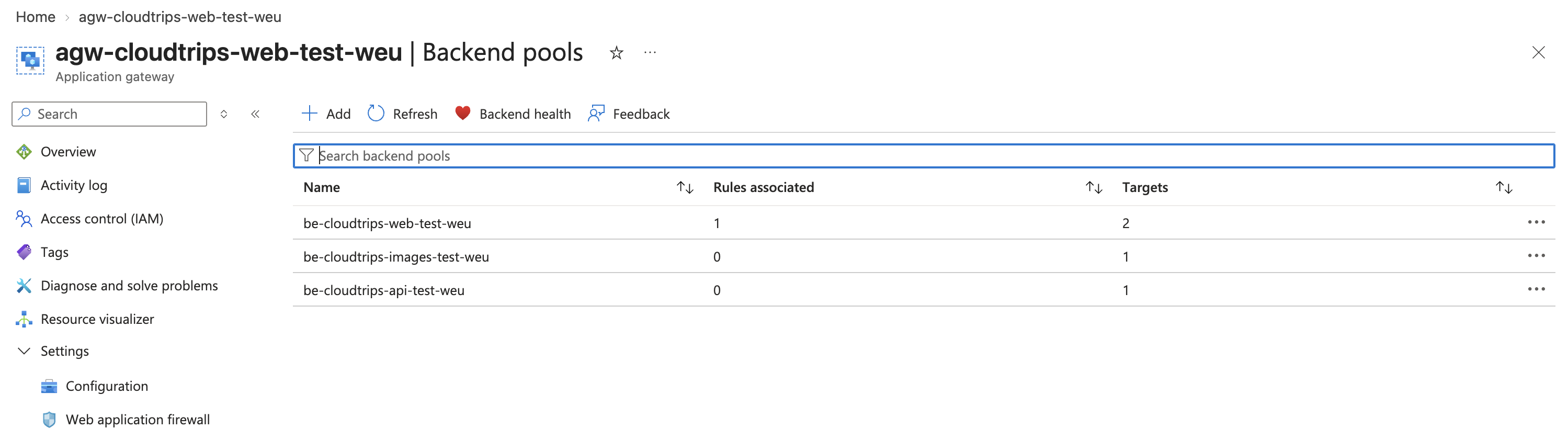
Open agw-cloudtrips-web-test-weu, select Settings > Backend pools, and
select Add. Configure:
Name: be-cloudtrips-images-test-weu
Add backend pool without targets: No
Target type: Virtual machine
Target: vm-cloudtrips-web01-test-weu
NIC: the NIC of vm-cloudtrips-web01-test-weu
Select Save and wait until the Application Gateway provisioning state is Succeeded.
Create the API Backend Pool
Add another pool:
Name: be-cloudtrips-api-test-weu
Add backend pool without targets: No
Target type: Virtual machine
Target: vm-cloudtrips-web02-test-weu
NIC: the NIC of vm-cloudtrips-web02-test-weu
Select Save and again wait for Succeeded.
The same NIC can belong to the original web pool and one specialized Application Gateway pool. Adding the pools separately prevents simultaneous NIC updates like the conflict encountered in the previous trip.
Create a Second Listener
The existing Basic rule cannot be changed to path-based in the portal, and
Application Gateway must always have at least one rule. Keep
rule-cloudtrips-http.
Select Settings > Listeners > Add listener. Configure:
Listener name: listener-cloudtrips-paths
Frontend IP: Public IPv4
Protocol: HTTP
Frontend port: Add new
Frontend port name: port-cloudtrips-paths-8080
Port: 8080
Listener type: Basic
Associated routing rule: Not associated
Port 80 is already occupied by listener-cloudtrips-http, so this second
listener must temporarily use port 8080. After adding the new path-based rule,
you will remove the old rule and listener and change this listener back to
port 80. Application Gateway connects to both VMs on backend port 80 throughout
the procedure through settings-cloudtrips-http.
Select Add and wait until the Application Gateway update succeeds.
At this point, the listener only waits on the public IP and port 8080. It does
not forward requests anywhere yet because it has no routing rule. The next
step creates rule-cloudtrips-paths and associates this listener with it.
Create the Path-Based Rule
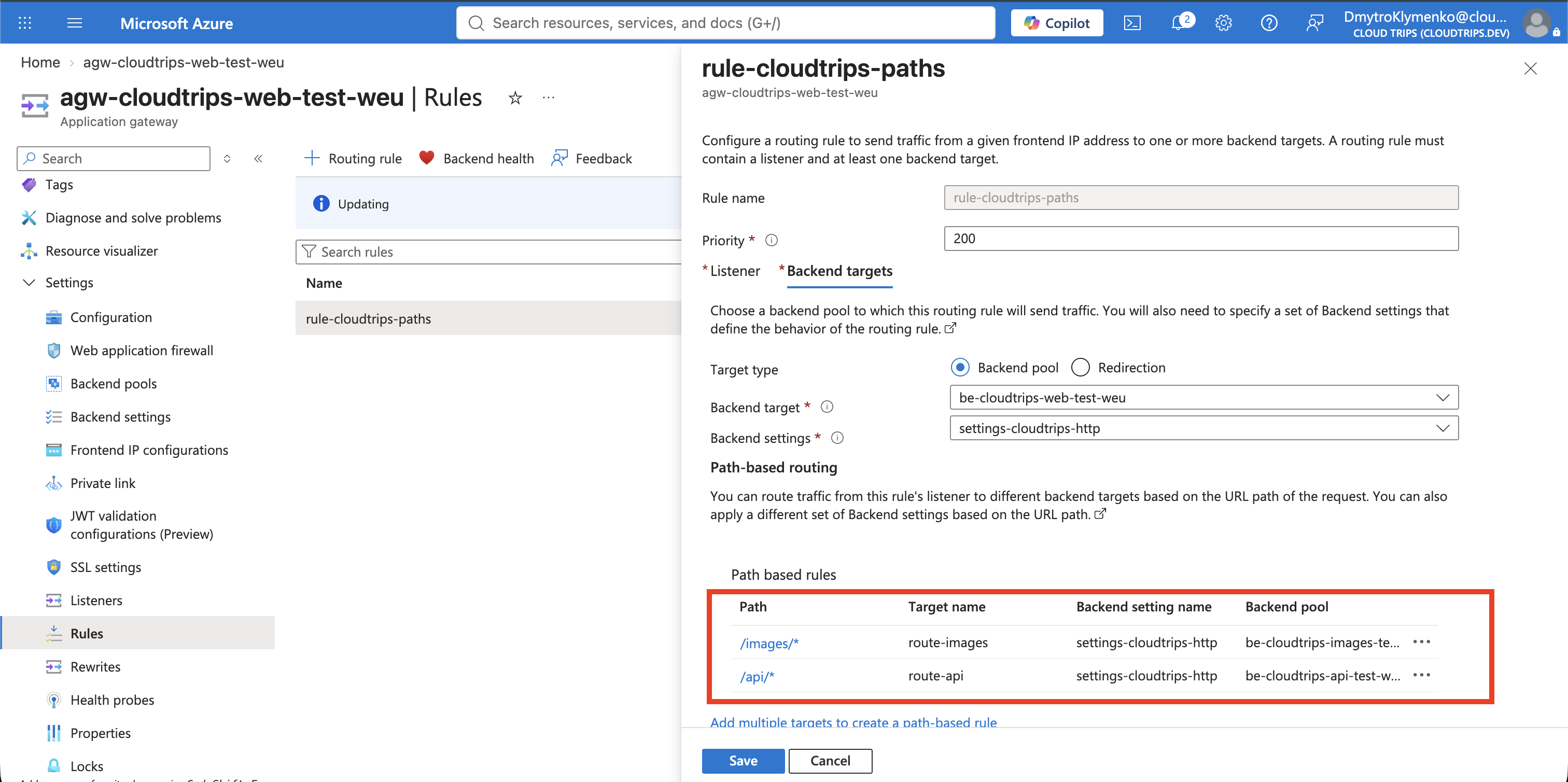
Select Settings > Rules > Add routing rule and configure:
Rule name: rule-cloudtrips-paths
Priority: 200
Listener: listener-cloudtrips-paths
On Backend targets, select the default destination:
Backend target: be-cloudtrips-web-test-weu
Backend settings: settings-cloudtrips-http
This default pool handles requests such as / that do not match a configured
path. Select Add multiple targets to create a path-based rule and add:
Path: /images/*
Target name: route-images
Backend settings: settings-cloudtrips-http
Backend target: be-cloudtrips-images-test-weu
Add the API target:
Path: /api/*
Target name: route-api
Backend settings: settings-cloudtrips-http
Backend target: be-cloudtrips-api-test-weu
Do not add /*. It would match every remaining URL before the default pool is
used. If patterns overlap, Application Gateway evaluates them in their listed
order, so place more specific paths before broader ones. Path matching is also
case-sensitive: /api/* does not match /API/*.
Select Add and wait until the Application Gateway update succeeds. Under Settings > Rules, the original port-80 rule and the new path-based port-8080 rule should both be present.
Move the Path-Based Listener to Port 80
Port 8080 was only a setup workaround: two Basic listeners cannot use the same public frontend IP and port at the same time. Now that Application Gateway has a second rule, complete the cutover:
- Under Settings > Rules, delete
rule-cloudtrips-httpand wait for the update to succeed. - Under Settings > Listeners, delete the now-unassociated
listener-cloudtrips-httpand wait again. - Open
listener-cloudtrips-paths, change its frontend port from8080to80, and save.
The final public traffic path is now handled by rule-cloudtrips-paths on
port 80. The backend connection remains HTTP port 80 as before.
Verify All Backend Pools
Open Monitoring > Backend health. The page should now show:
be-cloudtrips-web-test-weu: WEB01 and WEB02
be-cloudtrips-images-test-weu: WEB01
be-cloudtrips-api-test-weu: WEB02
There are still only two VMs. Backend Health displays one row for every server-and-pool membership, so the same private IP appears more than once:
WEB01: default web pool + image pool
WEB02: default web pool + API pool
A VM can validly belong to multiple Application Gateway backend pools when it serves multiple request types. This lab reuses two VMs to avoid extra cost. A larger production design would usually give the web, image, and API pools their own groups of multiple servers so each component can scale and be maintained independently.
All entries should become Healthy. The pools reuse
settings-cloudtrips-http, so the default probe checks / on port 80 for
each target.
Prove the Routing Decision
Run these requests against the existing Application Gateway public IP:
curl http://<application-gateway-public-ip>/
curl http://<application-gateway-public-ip>/images/test.txt
curl http://<application-gateway-public-ip>/api/status.json
The root request can reach either server in the default pool. The other two results must be deterministic:
CloudTrips image service from WEB01
{"service":"CloudTrips API","backend":"WEB02"}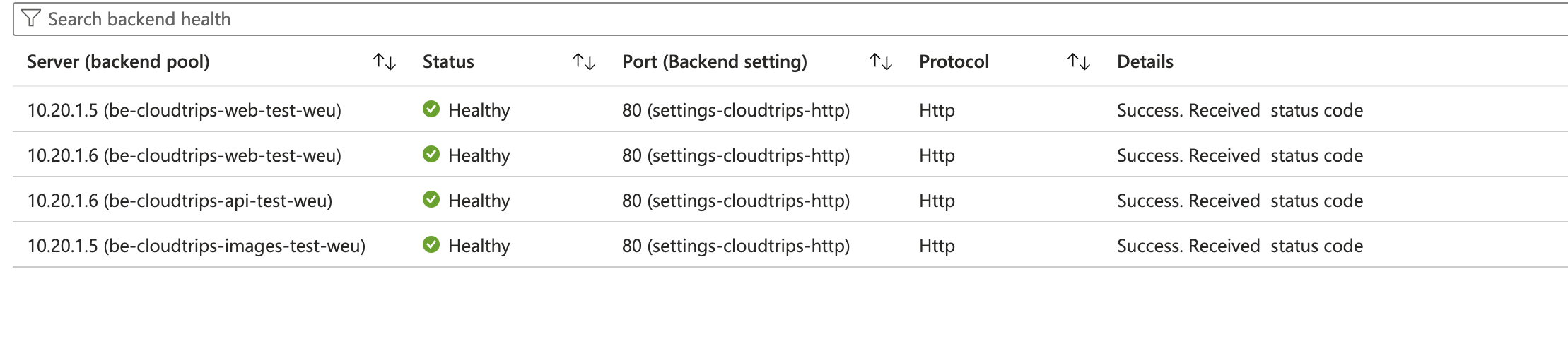
Application Gateway forwards the complete original path to the selected
backend. /images/test.txt therefore reaches WEB01 as
/images/test.txt, rather than /test.txt. The next trip uses a rewrite rule
when the backend needs a different path or when a request or response header
must change.
Keep the Application Gateway, the path-based listener and rule, all three backend pools, and both VMs for the rewrite-rule trip.