Rule Should Target App Servers Only? Create an Application Security Group
The existing Allow-HTTPS-Internet rule targets the complete
10.20.1.0/24 application subnet. Any future resource placed in snet-app
could therefore match the HTTPS rule, even when it is not an application
server.
Create an Application Security Group (ASG) for the application tier. An ASG is a logical group of network-interface IP configurations. An NSG rule can reference that group instead of hard-coded IP addresses, so new application servers can join the group without changing the rule.
An ASG does not filter traffic by itself and is not a Microsoft Entra group. The NSG still performs the filtering; the ASG only identifies which network interfaces the rule targets.
This trip builds on: Subnet Needs Traffic Filtering? Create an NSG.
Plan the Application Group
Use:
ASG name: asg-cloudtrips-app-test-weu
Member: nic-cloudtrips-vm-test-weu/Ipv4config
NSG rule: Allow-HTTPS-Internet
New destination: asg-cloudtrips-app-test-weu
The ASG must be in the same Azure region as its member NIC. All NICs added to one ASG must belong to the same VNet.
Create the ASG
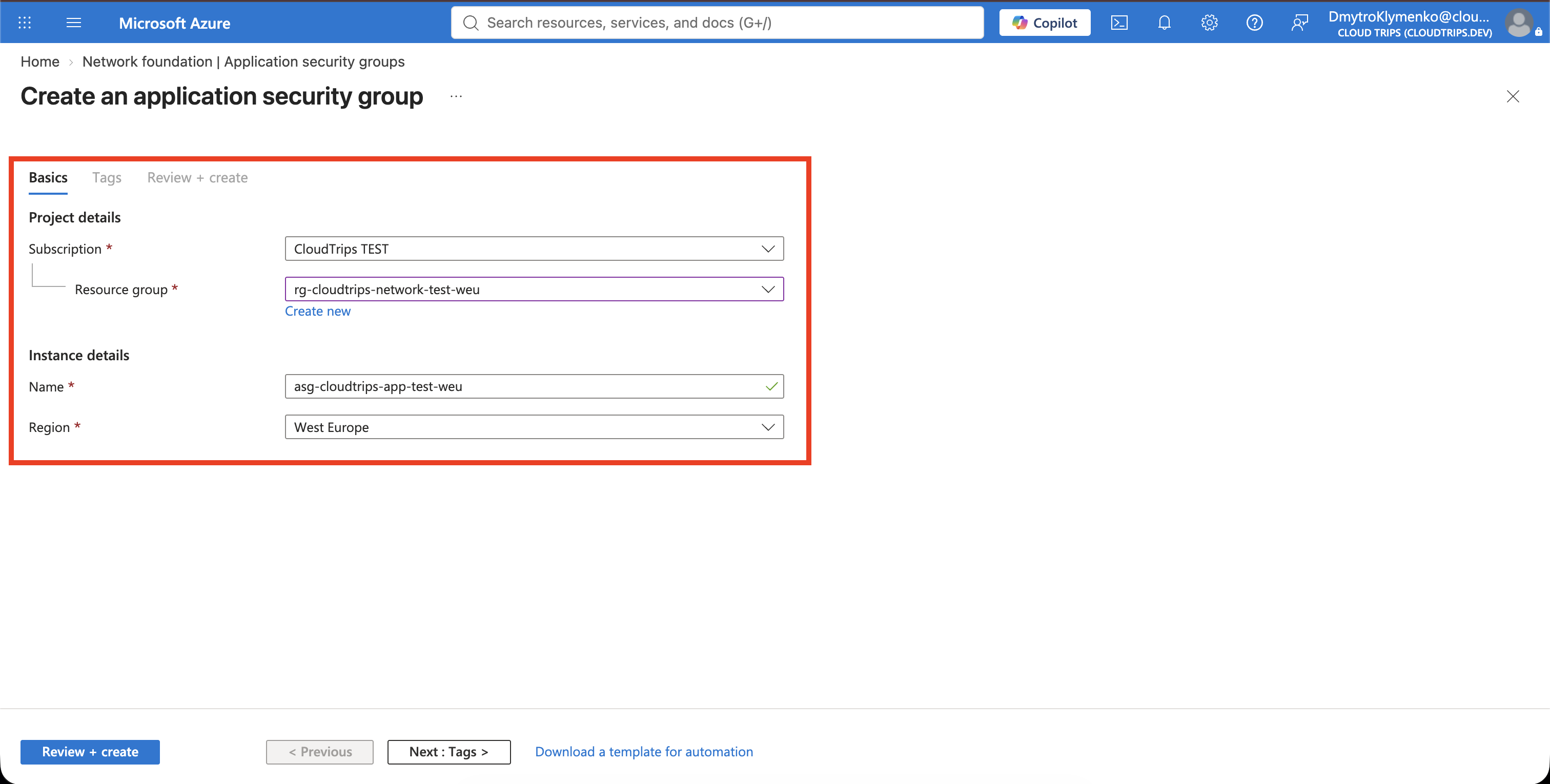
In the Azure portal, search for Application security groups, open the service, and select Create.
Configure:
Subscription: CloudTrips TEST
Resource group: rg-cloudtrips-network-test-weu
Name: asg-cloudtrips-app-test-weu
Region: West Europe
On Tags, add:
Application: CloudTrips
Environment: TEST
Purpose: AppServers
Select Review + create, and then select Create.
Add the Standalone NIC
The Azure portal can add a NIC to an ASG through a VM’s Networking page,
but nic-cloudtrips-vm-test-weu is not attached to a VM yet. Use Azure Cloud
Shell to add its Ipv4config IP configuration directly.
Open Cloud Shell, select Bash, and run:
az network nic ip-config update \
  --resource-group rg-cloudtrips-network-test-weu \
  --nic-name nic-cloudtrips-vm-test-weu \
  --name Ipv4config \
  --application-security-groups asg-cloudtrips-app-test-weu
Verify the membership:
az network nic ip-config show \
  --resource-group rg-cloudtrips-network-test-weu \
  --nic-name nic-cloudtrips-vm-test-weu \
  --name Ipv4config \
  --query "applicationSecurityGroups[].id" \
  --output tsv
The result should end with:
/applicationSecurityGroups/asg-cloudtrips-app-test-weu
The membership belongs to the NIC’s IP configuration. When the future VM uses this NIC, traffic to that IP configuration can match NSG rules that reference the ASG.
Retarget the HTTPS Rule
Open nsg-cloudtrips-app-test-weu, select Inbound security rules, and open
Allow-HTTPS-Internet.
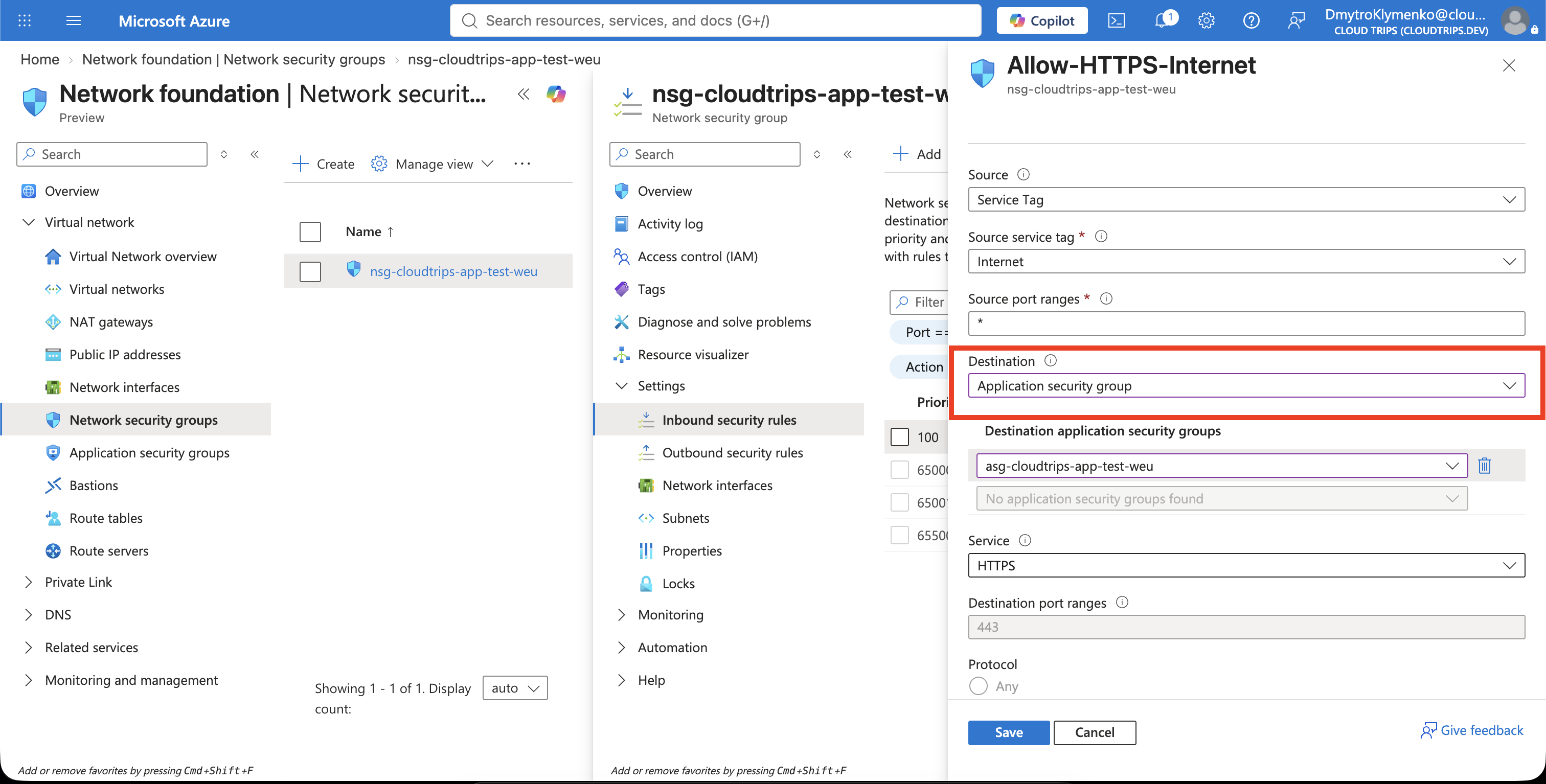
Keep the source, service, action, and priority unchanged. Replace only the destination:
Source: Service Tag
Source service tag: Internet
Destination: Application security group
Destination application security group: asg-cloudtrips-app-test-weu
Service: HTTPS
Action: Allow
Priority: 100
Name: Allow-HTTPS-Internet
Select Save.
Verify the Narrower Target
Return to Inbound security rules and confirm that the destination of
Allow-HTTPS-Internet is asg-cloudtrips-app-test-weu, not
10.20.1.0/24.
The rule now allows HTTPS only to NIC IP configurations that belong to the ASG.
Another resource can use snet-app without automatically receiving this HTTPS
permission. Adding another application-server NIC to the ASG extends the same
rule to it without editing the NSG.
Keep the ASG and its NIC membership for the following networking trips. Before deleting the ASG, remove it from the NSG rule and from every member NIC.