DNS Name Must Point to the App? Create an Azure DNS Zone
CloudTrips is reachable through a generated azurefd.net hostname. A branded
DNS name is easier to recognize, but the existing cloudtrips.dev parent
domain is already hosted by Vercel DNS. Replacing its name servers could
interrupt the current website and other records.
Delegate only azure.cloudtrips.dev to Azure DNS, then create this application
name inside the child zone:
www.azure.cloudtrips.dev.dev registry
|
`-- cloudtrips.dev -> Vercel DNS remains authoritative
|
`-- azure.cloudtrips.dev -> delegated to Azure DNS
|
`-- www CNAME -> CloudTrips Front Door endpointThis trip configures public DNS resolution and then completes the
application-layer setup by validating www.azure.cloudtrips.dev, associating
it with Front Door, and deploying a trusted Front Door-managed TLS
certificate.
This trip depends on A Global Web App Needs an Edge Entry? Create Azure Front Door. Keep
afd-cloudtrips-testand the generated endpoint created there. You also need access to the Vercel DNS settings forcloudtrips.dev.
To perform the public delegation exactly as written, you must be able to edit DNS for
cloudtrips.devin Vercel. If you do not control that domain, use an equivalent child zone below a domain you control and replace the parent, child-zone, and application hostnames consistently. Without access to a parent domain, you can create the Azure DNS zone but cannot complete public delegation, Front Door domain validation, or managed TLS.
The screenshots preserve the author’s example names, including generated Front Door endpoint and custom-domain resource names. Azure generates values for your subscription and deployment; use the variables and discovery commands below instead of copying names from a screenshot.
Understand Zone Delegation
A DNS zone stores records for one DNS namespace. A parent zone delegates a child zone by publishing NS records that name the child zone’s authoritative servers.
For this design:
Parent zone: cloudtrips.dev
Parent DNS provider: Vercel
Delegation record name: azure
Child zone: azure.cloudtrips.dev
Child DNS provider: Azure DNS
Application record: www.azure.cloudtrips.dev
The NS records in cloudtrips.dev tell recursive DNS resolvers to ask Azure
DNS about names below azure.cloudtrips.dev. Records outside that child zone
remain under Vercel’s control.
In plain language, Vercel tells the resolver where to look next:
Resolver asks Vercel:
"Who handles azure.cloudtrips.dev?"

Vercel answers:
"Ask these four Azure DNS servers."

Resolver asks Azure DNS:
"What is www.azure.cloudtrips.dev?"

Azure DNS answers:
"It is a CNAME pointing to the Front Door endpoint."
The ownership chain is therefore:
cloudtrips.dev             -> Vercel DNS
azure.cloudtrips.dev       -> Azure DNS through NS delegation
www.azure.cloudtrips.dev   -> Front Door through a CNAME in Azure DNS
Delegation does not copy the child records into Vercel. Vercel stores only the NS handoff, while Azure DNS stores and answers the records inside the child zone.
Do not replace the name servers for the entire cloudtrips.dev domain. This
trip adds a child-zone delegation; it does not migrate the parent zone.
Confirm the Existing Parent DNS
Check the authoritative name servers before changing anything:
dig +short NS cloudtrips.devThe current result should contain:
ns1.vercel-dns.com.
ns2.vercel-dns.com.
Also recover the generated Front Door endpoint name and hostname. These values are specific to the current subscription:
RG_NAME="rg-cloudtrips-network-test-weu"
AFD_PROFILE_NAME="afd-cloudtrips-test"
AFD_ROUTE_NAME="route-cloudtrips-all"

AFD_ENDPOINT_NAME=$(az afd endpoint list \
  --resource-group "$RG_NAME" \
  --profile-name "$AFD_PROFILE_NAME" \
  --query '[0].name' \
  --output tsv)

AFD_HOST=$(az afd endpoint show \
  --resource-group "$RG_NAME" \
  --profile-name "$AFD_PROFILE_NAME" \
  --endpoint-name "$AFD_ENDPOINT_NAME" \
  --query hostName \
  --output tsv)

printf 'Front Door endpoint name: %s\n' "$AFD_ENDPOINT_NAME"
printf 'Front Door hostname: %s\n' "$AFD_HOST"
The profile created in the prerequisite trip contains one endpoint, so the
first list result is the expected CloudTrips endpoint. If your profile contains
multiple endpoints, select the endpoint associated with route-cloudtrips-all
instead. AFD_HOST must contain a hostname such as
cloudtrips-edge-...z03.azurefd.net, without https:// or a path.
Create the Azure DNS Child Zone
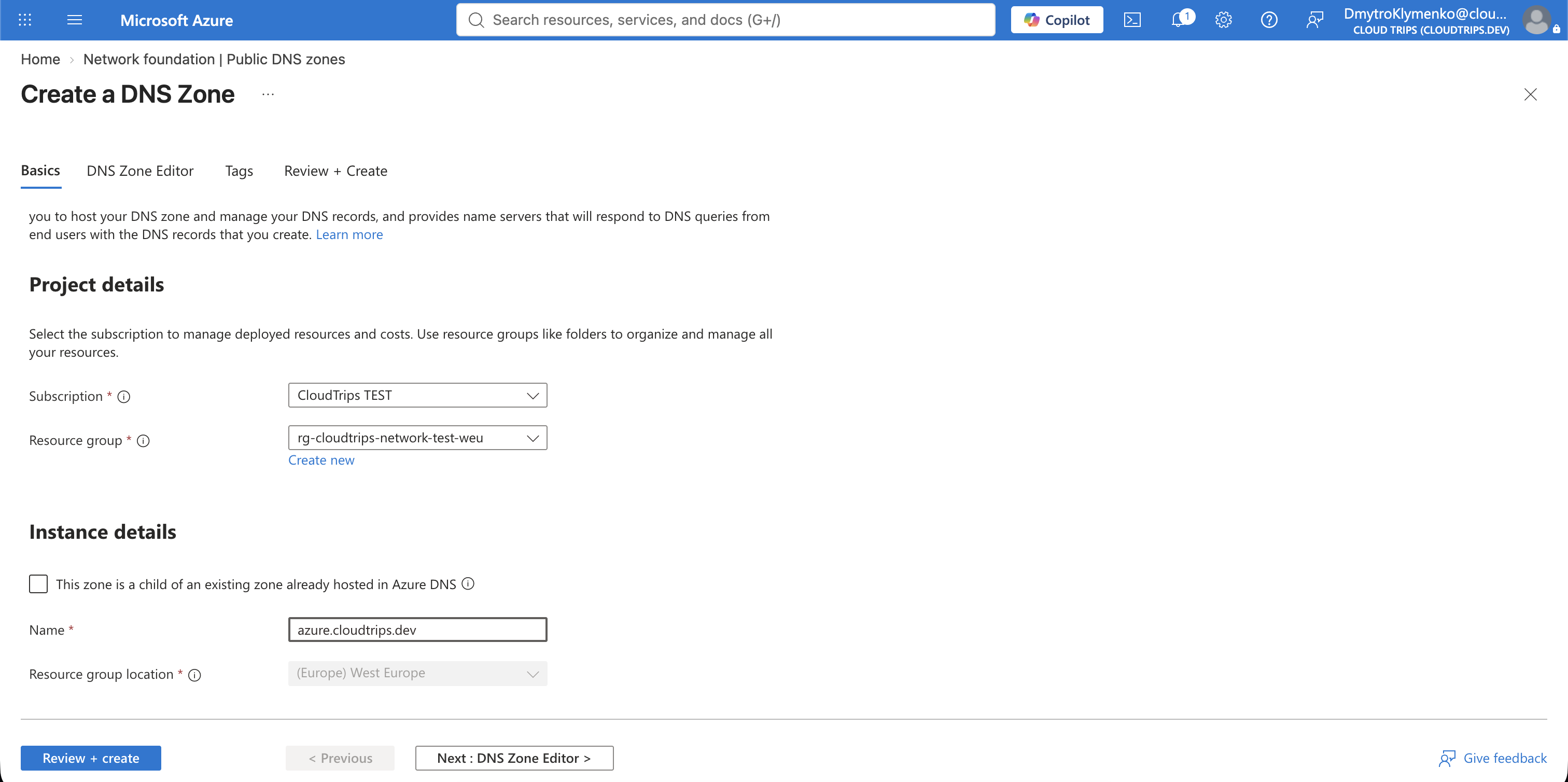
In the Azure portal, search for DNS zones, select + Create, and configure:
Subscription: CloudTrips TEST
Resource group: rg-cloudtrips-network-test-weu
This zone is a child of an existing zone already hosted in Azure DNS: Cleared
Name: azure.cloudtrips.dev
Leave the child-zone checkbox cleared because the parent zone is hosted by Vercel, not Azure DNS. DNS zones are global; the resource group’s region does not limit where Azure answers queries.
Select Review + create > Create, then open the new zone.
Azure automatically creates the zone’s SOA record and authoritative NS record set. Do not edit or delete them.
Copy the Azure Name Servers
On the azure.cloudtrips.dev overview page, copy all four values under Name
servers. Azure assigns a unique set to each zone; do not copy values from an
example or another subscription.
Retrieve the same values with Azure CLI:
az network dns zone show \
  --resource-group rg-cloudtrips-network-test-weu \
  --name azure.cloudtrips.dev \
  --query 'nameServers[]' \
  --output tsv
This command must print all four name servers. Copy all four into the parent zone when creating the delegation.
For later diagnostic queries, store just the first server in a clearly
singular variable. One authoritative server is sufficient for a direct
dig test; this does not replace the requirement to delegate all four:
AZURE_DNS_TEST_NS=$(az network dns zone show \
  --resource-group rg-cloudtrips-network-test-weu \
  --name azure.cloudtrips.dev \
  --query 'nameServers[0]' \
  --output tsv)

printf 'Azure DNS test server: %s\n' "$AZURE_DNS_TEST_NS"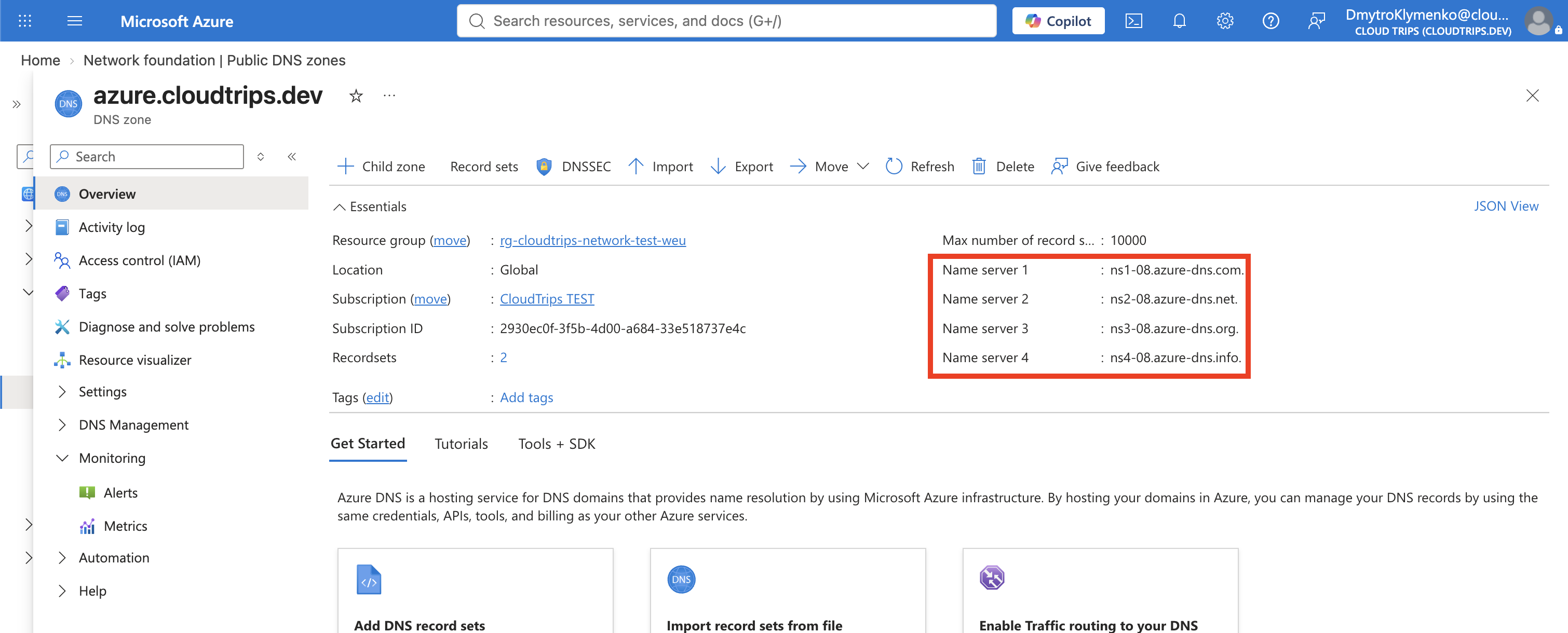
Delegate the Child Zone from Vercel
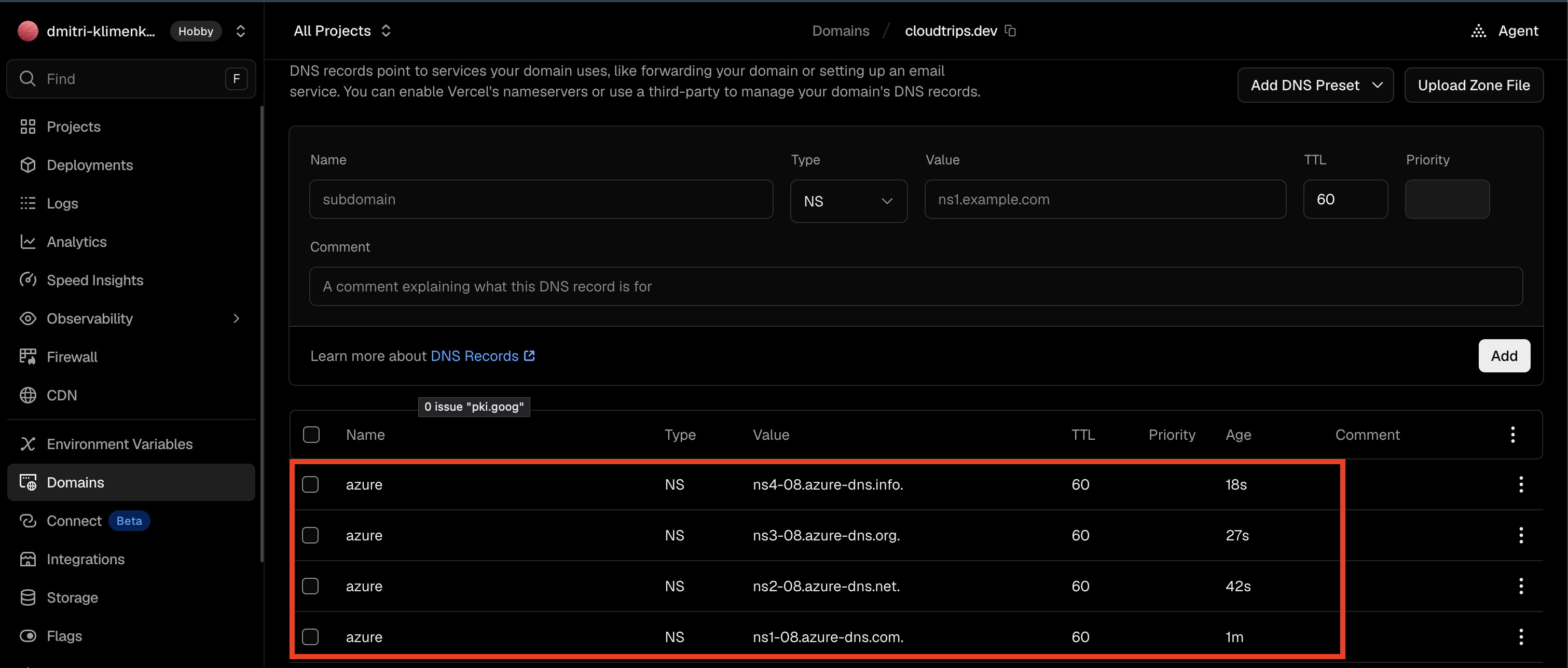
Open the Vercel team that manages cloudtrips.dev, select Domains, open
cloudtrips.dev, and open its DNS records. Add one NS record for each of the
four Azure name servers:
Type: NS
Name: azure
Value: Use one Azure DNS name-server value
TTL: Use the provider default
All four records use the same name, azure, but each has a different Azure
name-server value. Enter the values exactly. A trailing dot is valid if Vercel
preserves it.
Do not use @ as the record name and do not change the domain-level Vercel
name servers. Those operations would affect the entire parent domain instead
of delegating only azure.cloudtrips.dev.
DNS changes can take time to propagate because resolvers cache previous answers. Test the parent delegation directly against Vercel first:
dig @ns1.vercel-dns.com azure.cloudtrips.dev NS +shortThe response should list the same four Azure DNS servers.
Verify the Azure Child Zone
Shell variables are local to the terminal session. If you opened a new terminal since the earlier step, retrieve the test server again and confirm that it is not empty:
AZURE_DNS_TEST_NS=$(az network dns zone show \
  --resource-group rg-cloudtrips-network-test-weu \
  --name azure.cloudtrips.dev \
  --query 'nameServers[0]' \
  --output tsv)

printf 'Azure DNS test server: %s\n' "$AZURE_DNS_TEST_NS"
Do not run the next command unless the output contains a hostname such as
ns1-08.azure-dns.com.. An empty value makes dig report couldn't get address for '': not found.
Ask the assigned Azure server for the child zone’s SOA record:
dig @"$AZURE_DNS_TEST_NS" azure.cloudtrips.dev SOA +shortThis command bypasses the normal public DNS path and asks one assigned Azure DNS server directly:
@"$AZURE_DNS_TEST_NS"  Send the query to this specific Azure DNS server
azure.cloudtrips.dev   Query the child-zone apex
SOA                    Request the Start of Authority record
+short                 Display only the record value
An SOA record identifies the authority and operating parameters for a DNS zone. A successful answer resembles:
ns1-08.azure-dns.com. azuredns-hostmaster.microsoft.com. 1 3600 300 604800 300The first value identifies the zone’s primary Azure DNS server. The second
represents the administrative contact, with the first dot standing in for the
@ in an email-style address. The remaining numbers are the zone serial,
refresh, retry, expiry, and negative-cache timing values.
This direct response proves that the Azure DNS child zone exists and that the
selected Azure server is authoritative for it. It does not yet prove that
public resolvers know how to reach that server through cloudtrips.dev. The
next public dig commands test the separate Vercel NS delegation.
Then verify the public delegation path:
dig +short NS azure.cloudtrips.dev
dig +short SOA azure.cloudtrips.dev
If the direct queries work but the public query is empty, wait for DNS propagation and try again. Do not recreate the Azure zone because that would assign a different set of name servers and invalidate the parent delegation.
Create the Front Door CNAME
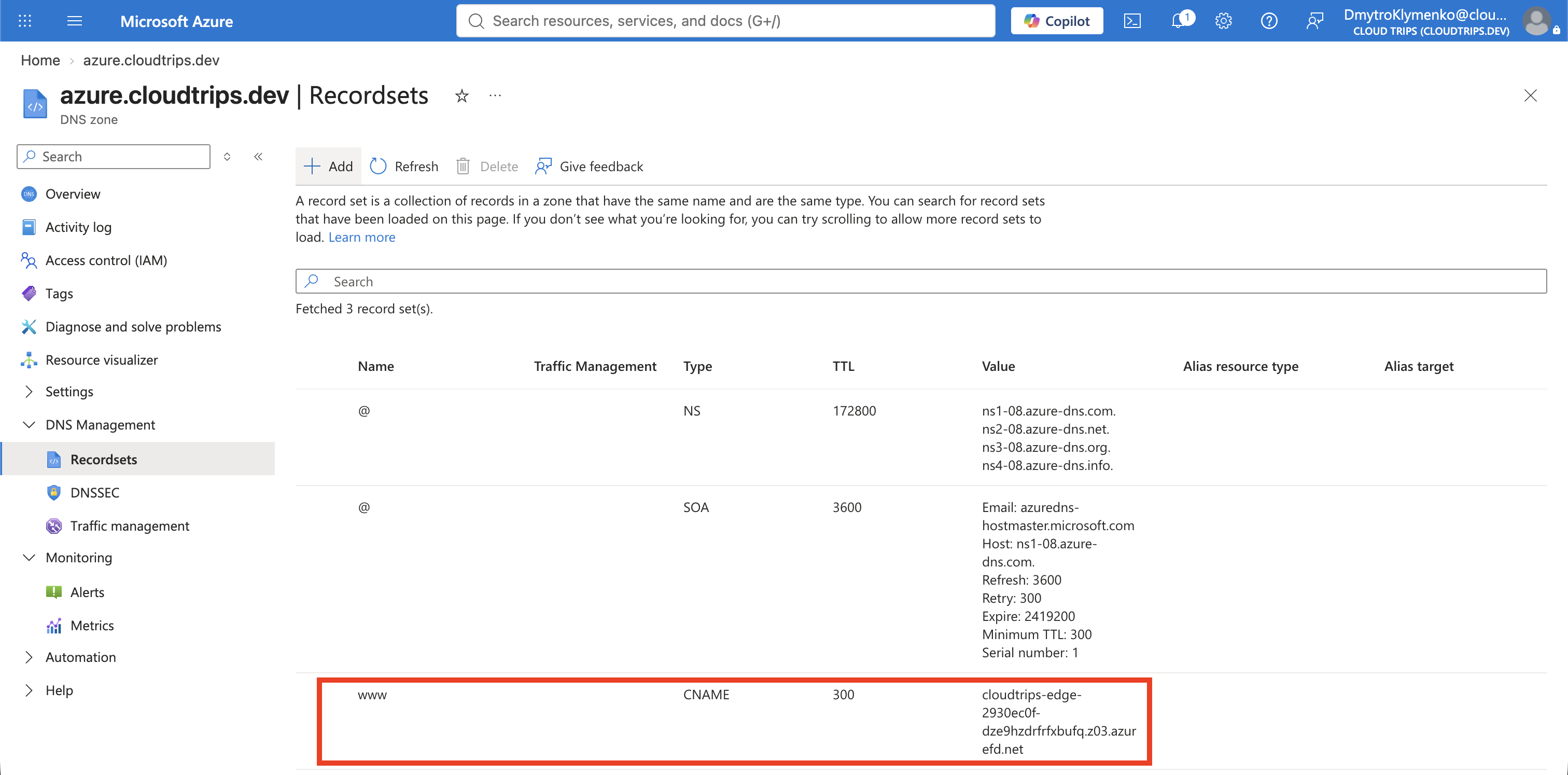
Return to the azure.cloudtrips.dev Azure DNS zone, select + Record set,
and configure:
Name: www
Type: CNAME
Alias record set: No
TTL: 300
TTL unit: Seconds
Alias: Use the AFD_HOST value
The completed record maps:
www.azure.cloudtrips.dev
    -> the hostname stored in AFD_HOST
Enter only the Front Door hostname as the CNAME value. Do not include
https://, /, or a URL path.
Test DNS Resolution
If this test runs in a new terminal, retrieve the test server again:
AZURE_DNS_TEST_NS=$(az network dns zone show \
  --resource-group rg-cloudtrips-network-test-weu \
  --name azure.cloudtrips.dev \
  --query 'nameServers[0]' \
  --output tsv)

dig @"$AZURE_DNS_TEST_NS" www.azure.cloudtrips.dev CNAME +short
It should return the generated Front Door hostname. Then test the complete public DNS chain:
dig www.azure.cloudtrips.dev CNAME +shortThe result should match $AFD_HOST, with a possible trailing dot in the DNS
answer:
<value-of-AFD_HOST>.
DNS resolution alone does not mean the application URL is ready. Until Front Door validates and associates the custom domain, this command can fail TLS validation or return an unexpected Front Door response:
curl --head https://www.azure.cloudtrips.dev/That behavior is expected at this stage. DNS answers where the hostname points; the Front Door domain configuration decides whether the service accepts that hostname and can present a matching certificate.
Understand the Two TLS Connections
Front Door terminates the client’s TLS connection at the edge and then creates a separate connection to the selected origin:
Browser -- HTTPS/TLS --> Front Door -- HTTP in this lab --> OriginThe managed certificate configured below protects the first connection and is
valid for www.azure.cloudtrips.dev. It does not change the route’s origin
forwarding protocol. The CloudTrips Application Gateway from the prerequisite
trip has an HTTP listener, so the route and health probes remain HTTP for this
lab. End-to-end TLS would require HTTPS support and trusted certificates on
every origin before changing the Front Door forwarding protocol.
The .dev top-level domain is HSTS-preloaded in major browsers, so browsers
expect HTTPS. A valid certificate is therefore required before using the new
name as a normal browser URL.
Authorize DigiCert with a CAA Record
A Certification Authority Authorization (CAA) record restricts which certificate authorities may issue certificates for a domain. When a hostname has no CAA record, a certificate authority searches upward through its parent domains until it finds a CAA policy.
Inspect the child and parent zones:
dig +short CAA azure.cloudtrips.dev
dig +short CAA cloudtrips.dev
azure.cloudtrips.dev currently has no CAA record, so it inherits the parent
policy from cloudtrips.dev. If the parent output authorizes other authorities
but does not include digicert.com, Front Door cannot obtain its managed
certificate because Azure Front Door uses DigiCert for this certificate.
Create a CAA record at the apex of the Azure child zone. Open
azure.cloudtrips.dev, select + Record set, and configure:
Name: @
Type: CAA
TTL: 300 seconds
Flags: 0
Tag: issue
Value: digicert.com
The @ name means the azure.cloudtrips.dev zone apex. Publishing the record
there creates a child-zone CAA policy and stops certificate-authority lookup
from inheriting the more restrictive parent policy. It does not modify the CAA
records for the Vercel-hosted cloudtrips.dev site.
The equivalent Azure CLI command is:
az network dns record-set caa add-record \
  --resource-group rg-cloudtrips-network-test-weu \
  --zone-name azure.cloudtrips.dev \
  --record-set-name @ \
  --flags 0 \
  --tag issue \
  --value digicert.com
Verify the authoritative and public answers:
dig @"$AZURE_DNS_TEST_NS" azure.cloudtrips.dev CAA +short
dig azure.cloudtrips.dev CAA +short
Both should eventually return:
0 issue "digicert.com"Adding only this record means DigiCert is the only authorized issuer for names
under the child zone. If another service later needs a different certificate
authority there, add another appropriate issue CAA record rather than
removing the DigiCert authorization.

Add the Custom Domain to Front Door
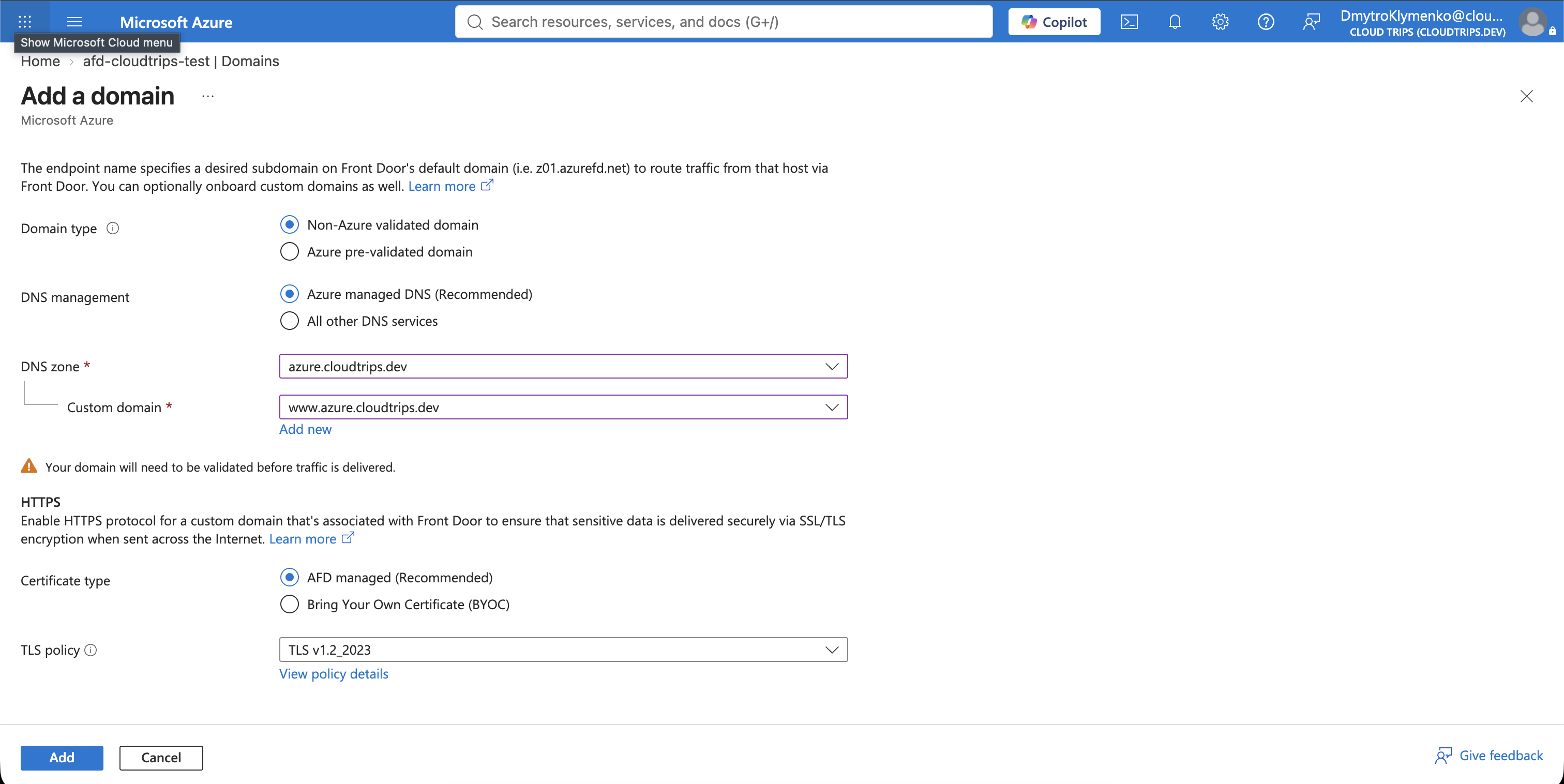
Open afd-cloudtrips-test, select Settings > Domains, and select
+ Add. Configure:
Domain type: Non-Azure pre-validated domain
DNS management: Azure managed DNS (Recommended)
DNS zone: azure.cloudtrips.dev
Custom domain: www.azure.cloudtrips.dev
HTTPS: AFD managed (Recommended)
Minimum TLS version: TLS 1.2, if displayed
This is a non-Azure-prevalidated domain because no supported Azure application service has already validated it for Front Door. Hosting its DNS zone in Azure does not make it an Azure-prevalidated application domain.
Select Add. Front Door creates a custom-domain configuration and begins ownership validation and certificate provisioning.
Validate Domain Ownership
On the Front Door Domains page, inspect the validation state for
www.azure.cloudtrips.dev. When Azure can manage the selected DNS zone, the
portal can offer to add the required validation record automatically. Use that
option when it is available.
If the domain remains Pending, open its validation details and copy the TXT
token supplied by Front Door. In the azure.cloudtrips.dev DNS zone, create:
Name: _dnsauth.www
Type: TXT
TTL: 300 seconds
Value: Use the exact validation token supplied by Front Door
The record’s fully qualified name becomes:
_dnsauth.www.azure.cloudtrips.devDo not copy a token from this trip or another profile. Front Door generates a unique value for the custom-domain configuration.
Verify that the authoritative Azure server returns the token:
AZURE_DNS_TEST_NS=$(az network dns zone show \
  --resource-group rg-cloudtrips-network-test-weu \
  --name azure.cloudtrips.dev \
  --query 'nameServers[0]' \
  --output tsv)

dig @"$AZURE_DNS_TEST_NS" \
  _dnsauth.www.azure.cloudtrips.dev TXT +short
Then verify it through public DNS:
dig _dnsauth.www.azure.cloudtrips.dev TXT +shortReturn to Front Door and refresh the domain state. Wait until validation shows Approved. DNS and Front Door propagation can take several minutes.
Associate the Domain with the Endpoint and Route
Domain validation proves ownership, but it does not select which endpoint and route should serve requests. On the Front Door Domains page, select the domain’s Unassociated endpoint-association state. Configure:
Endpoint: Use the AFD_ENDPOINT_NAME value
Routes: Use the AFD_ROUTE_NAME value
The screenshot below shows the author’s generated endpoint name. Select the endpoint name returned by your own subscription, not the value visible in the screenshot.
Select Associate. This makes the existing /* route eligible for requests
whose host header is www.azure.cloudtrips.dev. It does not create a second
endpoint or duplicate the route.
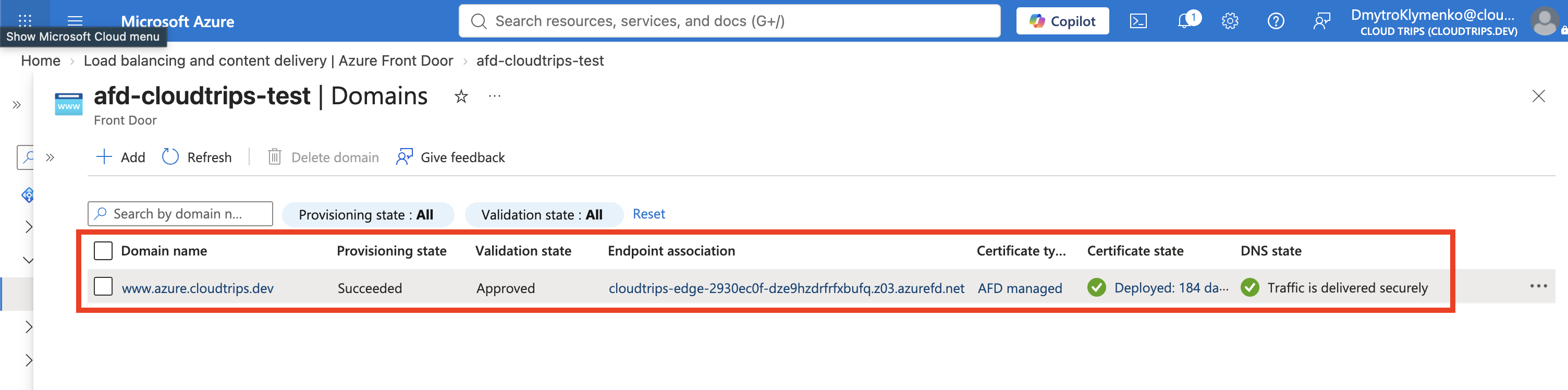
The AFD-managed certificate starts deploying after successful validation and association. Wait for these states on the Domains page:
Validation state: Approved
Endpoint association: Associated
Certificate state: Deployed
Certificate issuance and global edge deployment can take several minutes and,
in some cases, up to an hour. The existing azurefd.net endpoint remains
available while this process runs.
You can check the deployment from the CLI:
RG_NAME="rg-cloudtrips-network-test-weu"
AFD_PROFILE_NAME="afd-cloudtrips-test"
AFD_CUSTOM_HOST="www.azure.cloudtrips.dev"

AFD_CUSTOM_DOMAIN_NAME=$(az afd custom-domain list \
  --resource-group "$RG_NAME" \
  --profile-name "$AFD_PROFILE_NAME" \
  --query "[?hostName=='${AFD_CUSTOM_HOST}'].name | [0]" \
  --output tsv)

printf 'Front Door custom-domain resource: %s\n' "$AFD_CUSTOM_DOMAIN_NAME"

az afd custom-domain show \
  --resource-group "$RG_NAME" \
  --profile-name "$AFD_PROFILE_NAME" \
  --custom-domain-name "$AFD_CUSTOM_DOMAIN_NAME" \
  --query '{validation:domainValidationState, provisioning:provisioningState, deployment:deploymentStatus, certificate:tlsSettings.certificateType}' \
  --output table
The custom-domain resource name is generated separately from its hostname
and can therefore differ from the author’s screenshot. Do not run the show
command with an empty variable; if discovery returns nothing, confirm that the
custom domain exists under the selected profile and that its hostname is
exactly www.azure.cloudtrips.dev.
Do not test the custom hostname until deployment reports Succeeded and the
portal shows Certificate state: Deployed. If curl reports error 60 and
states that no alternative certificate subject name matches the hostname,
Front Door is still presenting a certificate for a different hostname. This
is expected while deploymentStatus is InProgress; wait and retry. Do not
use curl -k, because that disables the certificate verification this test is
intended to prove.
Verify HTTPS and the Certificate
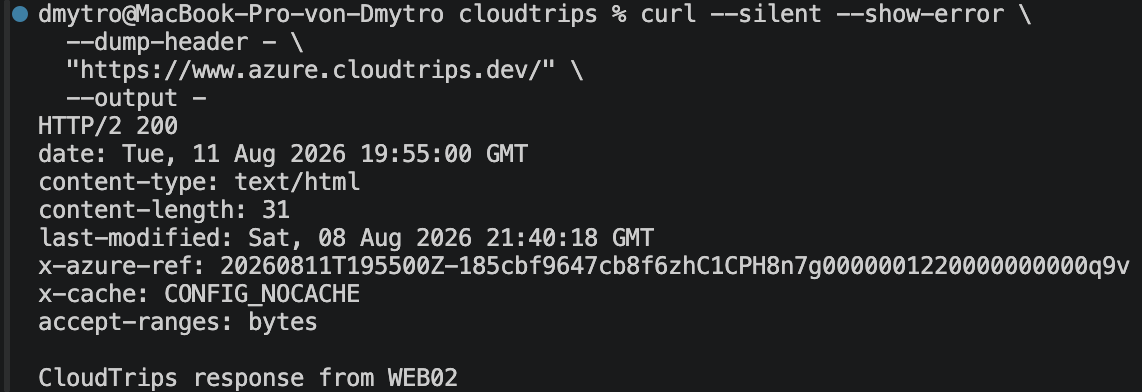
Request the application through the custom domain:
curl --silent --show-error \
  --dump-header - \
  "https://www.azure.cloudtrips.dev/" \
  --output -
The response should succeed over HTTPS and contain the normal CloudTrips body
from WEB01 or WEB02. It should also include an x-azure-ref header, proving
that Front Door handled the request.
Inspect the certificate presented for the hostname:
openssl s_client \
  -connect www.azure.cloudtrips.dev:443 \
  -servername www.azure.cloudtrips.dev \
  </dev/null 2>/dev/null \
  | openssl x509 \
      -noout \
      -subject \
      -issuer \
      -dates
Display the Subject Alternative Names with a command that also works with the LibreSSL version supplied by macOS:
openssl s_client \
  -connect www.azure.cloudtrips.dev:443 \
  -servername www.azure.cloudtrips.dev \
  </dev/null 2>/dev/null \
  | openssl x509 -noout -text \
  | sed -n '/Subject Alternative Name/{n;p;}'
The certificate must be within its validity period and list
www.azure.cloudtrips.dev in its subject alternative names. The -servername
argument sends TLS Server Name Indication so Front Door selects the certificate
for this custom domain.
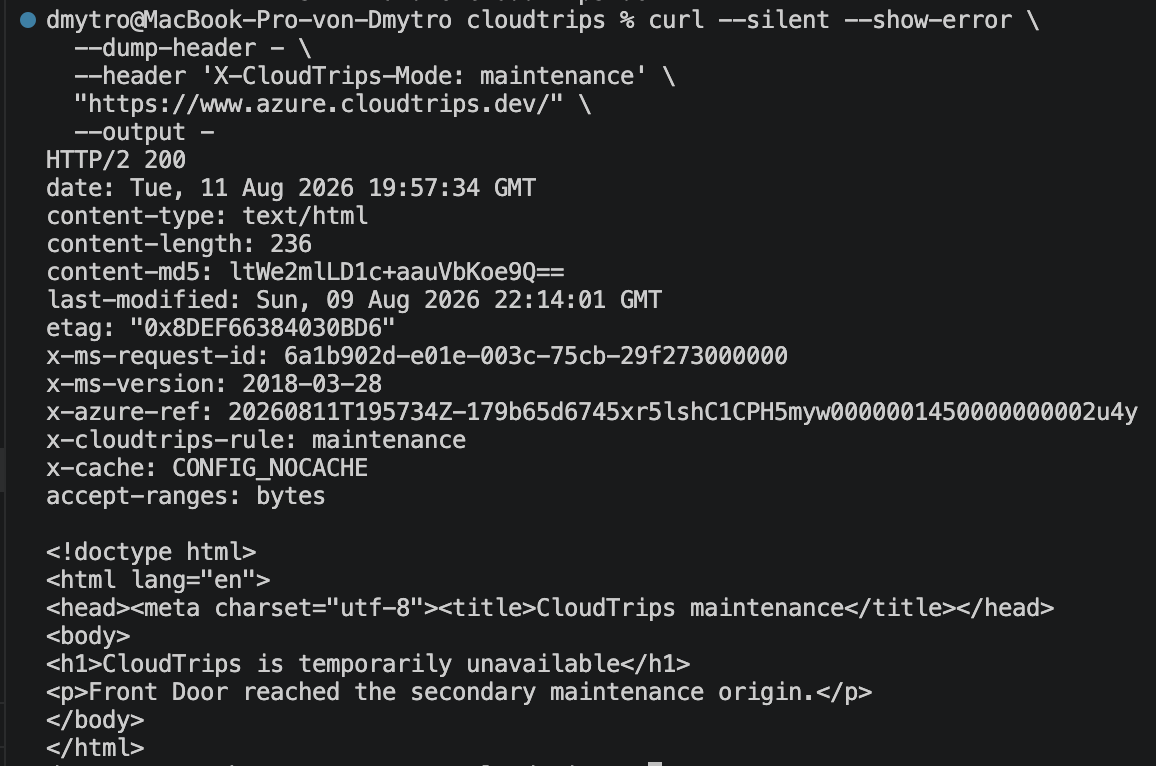
Finally, confirm that the existing Rules Engine logic also works through the new domain:
curl --silent --show-error \
  --dump-header - \
  --header 'X-CloudTrips-Mode: maintenance' \
  "https://www.azure.cloudtrips.dev/" \
  --output -
After the rule has propagated, the response should include
x-cloudtrips-rule: maintenance and the Storage maintenance page. The same
route and rule set process both the generated Front Door domain and the custom
domain.
Keep or Remove the DNS Lab
Keep the Azure DNS zone, its records, the four parent-zone NS records, and the Front Door custom domain for later Front Door and DNS trips.
If you stop here, first remove the custom domain’s endpoint-and-route
association, then delete the Front Door custom-domain configuration. Remove
the four azure NS records from Vercel next. Wait for the delegation to
disappear, then delete the azure.cloudtrips.dev Azure DNS zone. Deleting the
child zone first would leave a broken delegation in the parent zone.