Firewall Rules Need Central Management? Create a Firewall Policy
The CloudTrips firewall is already inspecting application egress, but its configuration still belongs directly to that one firewall. Repeating the same rules separately on every firewall would make changes slow and inconsistent.
Move the rules into Azure Firewall Policy, a separate resource that can be managed centrally and associated with one or more Azure Firewalls. The policy defines what traffic is allowed or denied; the firewall remains the service that processes the traffic.
This trip builds on Network Needs Firewall Inspection? Create Azure Firewall. Keep its Standard firewall, public IP,
AzureFirewallSubnet, default route, private test VM, and Bastion connection. If you deleted them, repeat that trip through Verify the Default Deny before continuing.
The previous test returned HTTP status 470 because no rule allowed
www.microsoft.com. That result is the baseline for this trip.
Move the Firewall to a Policy
Open afw-cloudtrips-test-weu. On Overview, select Migrate to firewall
policy.
The migration creates a Standard-tier Firewall Policy from the current classic configuration and associates it with the firewall. The existing firewall has no custom rules, so the new policy starts with the same default-deny behavior. The portal shows the generated policy name; record it because that is the resource you will edit next.
Select Review + create, and then select Create. Wait until the migration finishes and the firewall provisioning state returns to Succeeded.
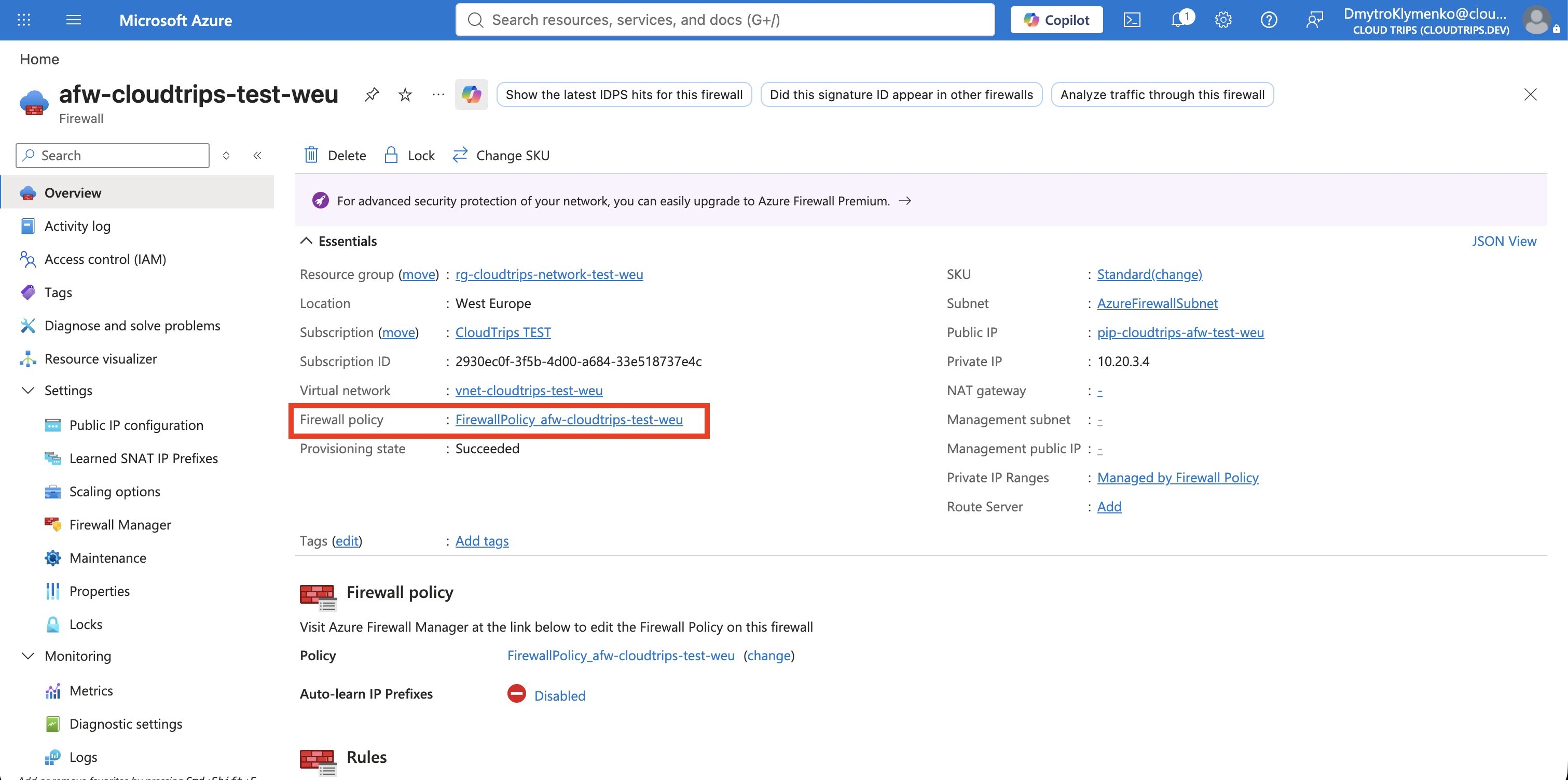
The rule model is:
Firewall Policy
└── Rule collection group
    └── Rule collection
        └── Rule
A collection group controls broad processing order. A collection groups rules with one priority and one action, such as Allow. An individual rule defines the source, protocol, port, and destination.
Allow One Approved Web Destination
From the firewall overview, open the linked Firewall Policy. Under Settings
Rules, select Application rules > Add a rule collection.
Application rules inspect HTTP and HTTPS destinations by fully qualified domain
name (FQDN), such as www.microsoft.com. Configure:
Rule collection name: Allow-Approved-Web
Priority: 200
Rule collection action: Allow
Rule collection type: Application
Rule collection group: DefaultApplicationRuleCollectionGroup

Rule name: Allow-Microsoft-Web
Source type: IP address
Source: 10.20.1.0/24
Protocol:port: HTTP:80, HTTPS:443
Destination type: FQDN
Destination: www.microsoft.com
If the portal has already selected the default application rule collection group, keep that selection. Select Add and wait until the policy update finishes.
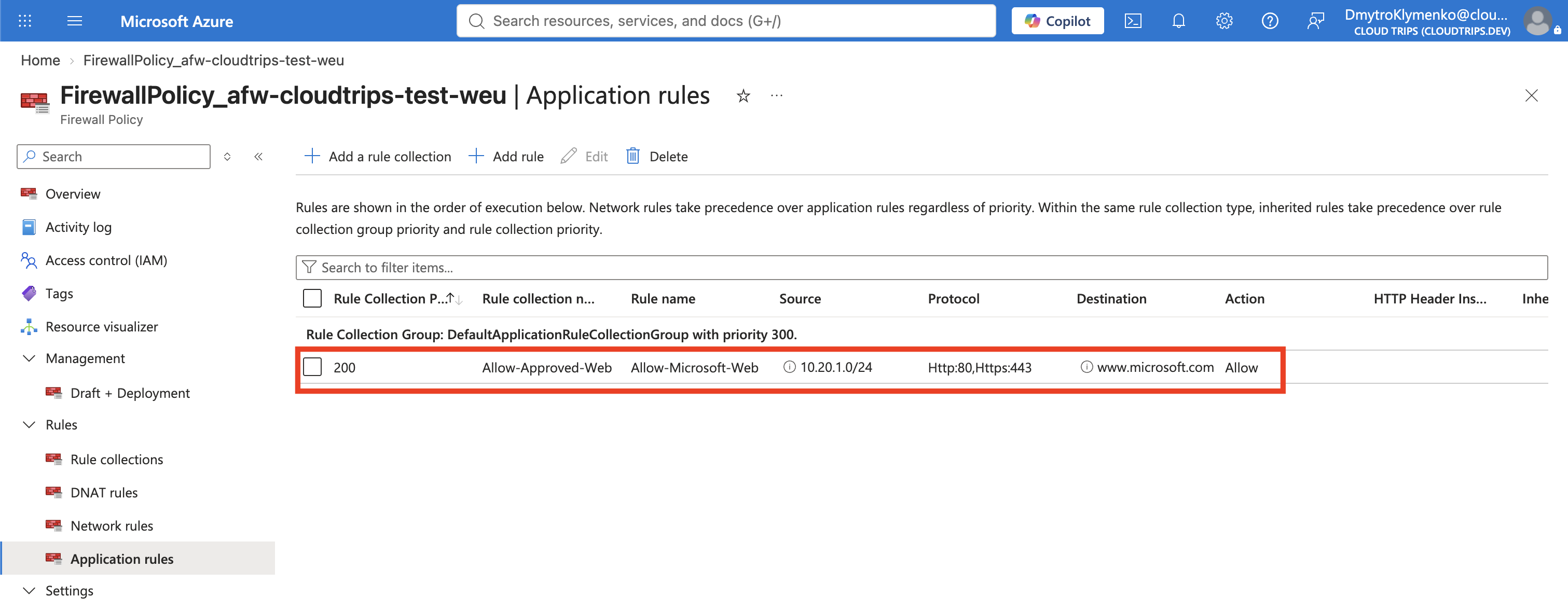
The source is the complete snet-app address range, not the current VM’s one
private IP. A replacement VM in the same subnet therefore receives the same
outbound rule. Traffic that matches no allow rule remains denied.
Prove Allow and Default Deny
Start vm-cloudtrips-bastion-test-weu if it is deallocated. Connect through
Connect > Bastion and run:
curl --connect-timeout 10 -I http://www.microsoft.com
curl --connect-timeout 10 -I http://www.google.com
The Microsoft request should now return a normal web response, commonly 200,
301, or 302, because the application rule allows its FQDN. The Google
request should return the firewall block response HTTP/1.1 470 status code 470 because no rule allows that destination.
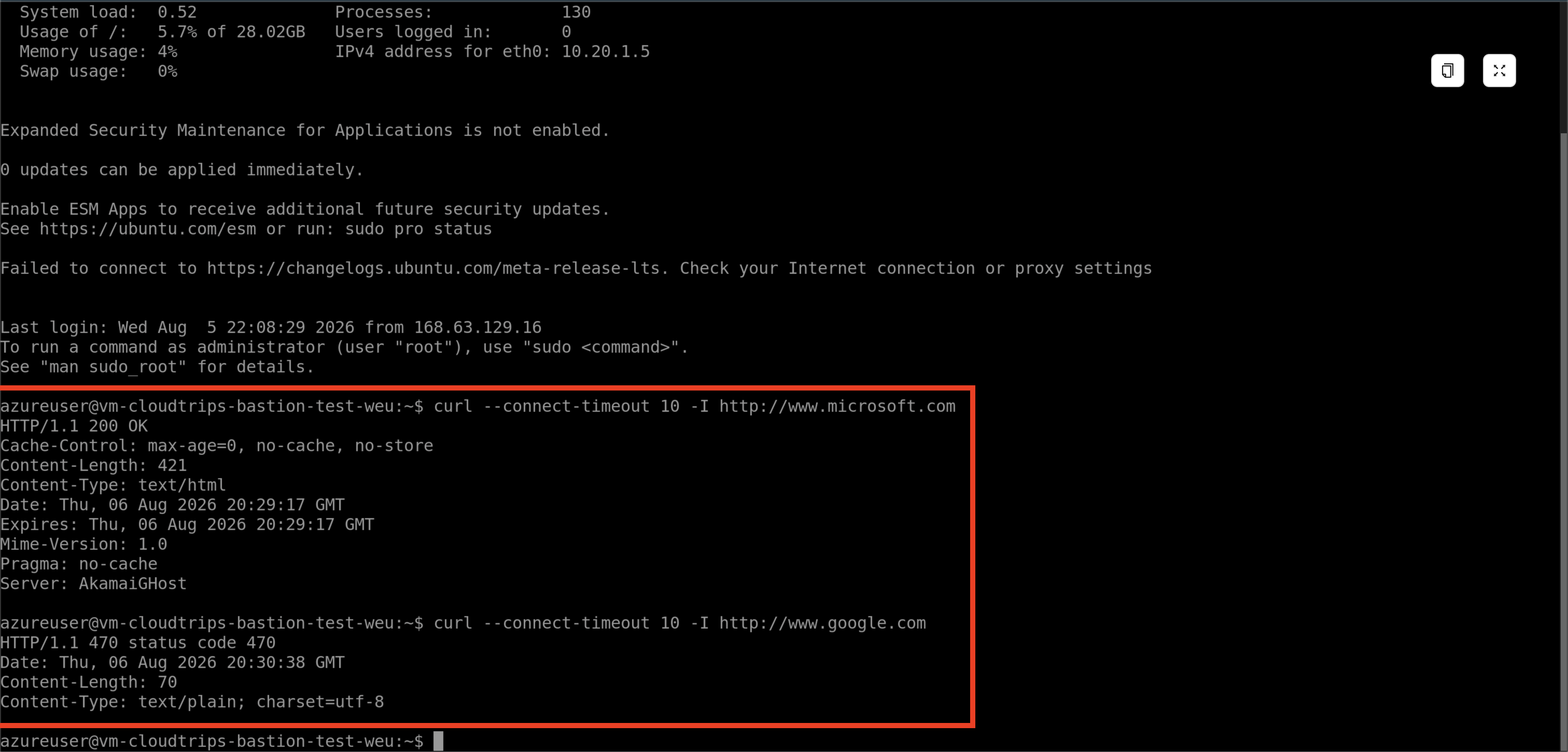
The route still determines where the traffic goes. The centrally managed Firewall Policy now determines what may pass. Editing this policy would update every associated firewall instead of requiring the same rule change on each firewall separately.
Continue or Clean Up
The next trips configure Firewall DNAT, upgrade the firewall for Premium TLS inspection, and enable IDPS. If you are continuing with them, do not delete the lab. Deallocate the VM between tests, but keep:
afw-cloudtrips-test-weu
The associated Firewall Policy
pip-cloudtrips-afw-test-weu
AzureFirewallSubnet
rt-cloudtrips-app-test-weu and Default-To-Azure-Firewall
vnet-cloudtrips-test-weu and snet-app
Bastion
The test VM, NIC, and disk
Start the VM again when a later trip needs it. Azure Firewall remains billable while deployed, so continue with the three firewall trips in the same lab session when possible.
If you are stopping the firewall labs, first delete
Default-To-Azure-Firewall from
rt-cloudtrips-app-test-weu. Then delete the following resources:
afw-cloudtrips-test-weu
The Firewall Policy shown on the firewall overview
pip-cloudtrips-afw-test-weu
AzureFirewallSubnet
vm-cloudtrips-bastion-test-weu and its disk/NIC
Deleting the default route first prevents snet-app from retaining a next hop
that no longer exists. Keep the VNet, application subnet, NSG, and route table
for later Networking trips.