Private Service Needs a Private Name? Create a Private DNS Zone
Private IP addresses are difficult to remember and can change when resources are replaced. Public DNS is also the wrong place to publish names that should only be used inside a private network.
Create an Azure Private DNS zone named internal.cloudtrips.dev, link it to
the CloudTrips VNet, and create this private application name:
web.internal.cloudtrips.devWEB02 in the linked VNet
|
| asks Azure-provided DNS
v
internal.cloudtrips.dev Private DNS zone
|
`-- web A record -> WEB01 private IPThis zone is private and does not require an Internet domain registration, NS
records at Vercel, or delegation from cloudtrips.dev.
This trip depends on App Needs a Private Network? Create a VNet and Multiple Servers Need One Address? Create a Load Balancer. Keep
vnet-cloudtrips-test-weuand the WEB01 and WEB02 virtual machines.
Understand Public and Private DNS
The public zone from the previous trip and this private zone solve different problems:
| Property | Public DNS zone | Private DNS zone |
|---|---|---|
| Resolver location | Internet | Linked Azure VNets |
| Typical answer | Public endpoint | Private IP address |
| Parent delegation | Required | Not required |
| VNet link | Not used | Required |
Creating the private zone alone is insufficient. A virtual network link makes the zone visible to clients in a selected VNet. Linking a VNet does not connect networks and does not permit traffic through an NSG; it only provides DNS resolution for that zone.
Read the Existing Private Addresses
Retrieve the current private IP addresses instead of assuming fixed values:
WEB01_IP=$(az vm list-ip-addresses \
  --resource-group rg-cloudtrips-network-test-weu \
  --name vm-cloudtrips-web01-test-weu \
  --query '[0].virtualMachine.network.privateIpAddresses[0]' \
  --output tsv)

WEB02_IP=$(az vm list-ip-addresses \
  --resource-group rg-cloudtrips-network-test-weu \
  --name vm-cloudtrips-web02-test-weu \
  --query '[0].virtualMachine.network.privateIpAddresses[0]' \
  --output tsv)

printf 'WEB01: %s\nWEB02: %s\n' "$WEB01_IP" "$WEB02_IP"
The values should be addresses from snet-app, such as 10.20.1.x.
Create the Private DNS Zone
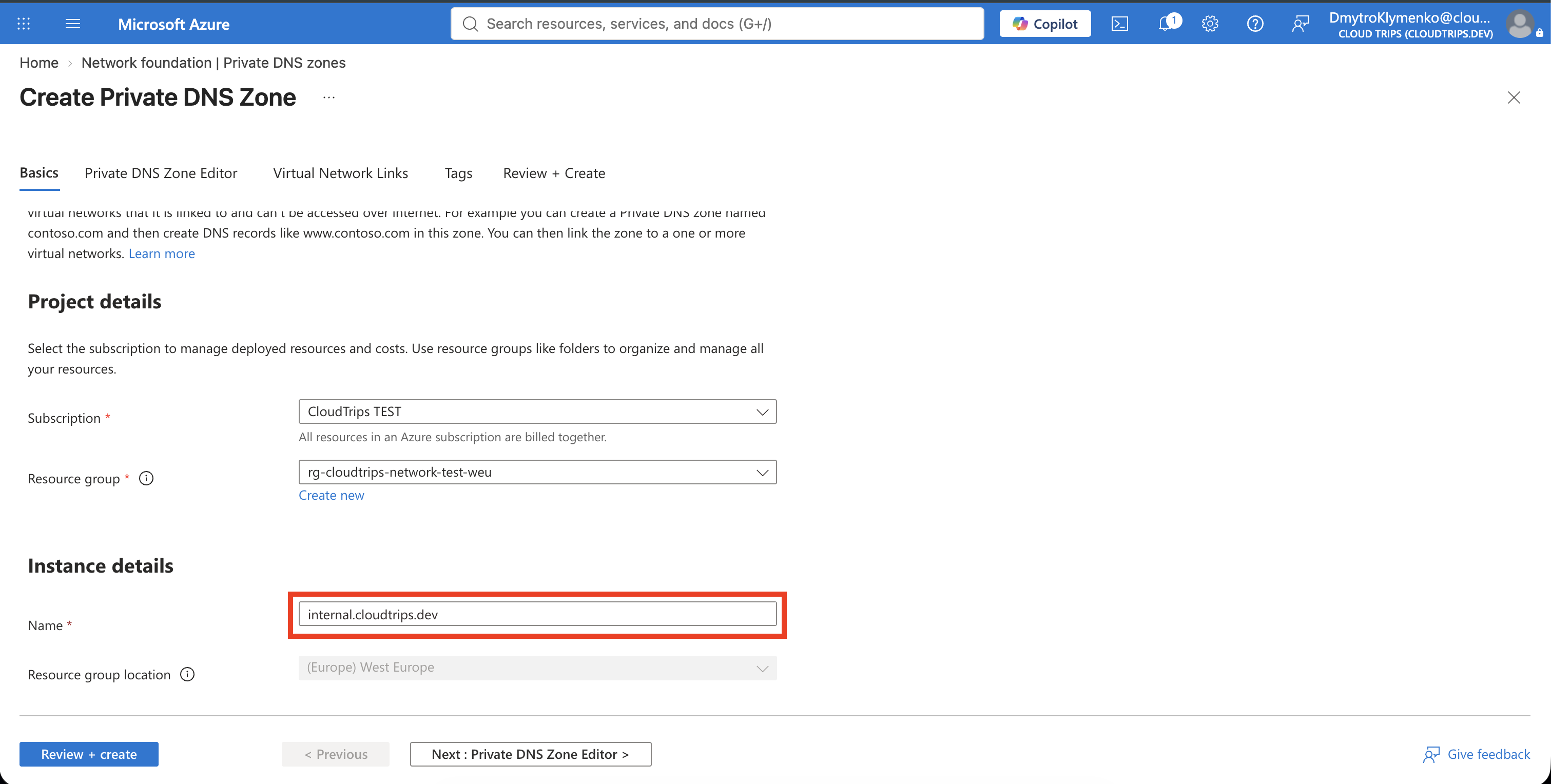
In the Azure portal, search for Private DNS zones, select + Create, and configure:
Subscription: CloudTrips TEST
Resource group: rg-cloudtrips-network-test-weu
Name: internal.cloudtrips.dev
Select Review + create > Create, then open the zone. Azure creates an SOA record automatically. Unlike a public DNS zone, its name-server values do not need to be copied to a public DNS provider.
The equivalent CLI command is:
az network private-dns zone create \
  --resource-group rg-cloudtrips-network-test-weu \
  --name internal.cloudtrips.dev
Link the Zone to the VNet
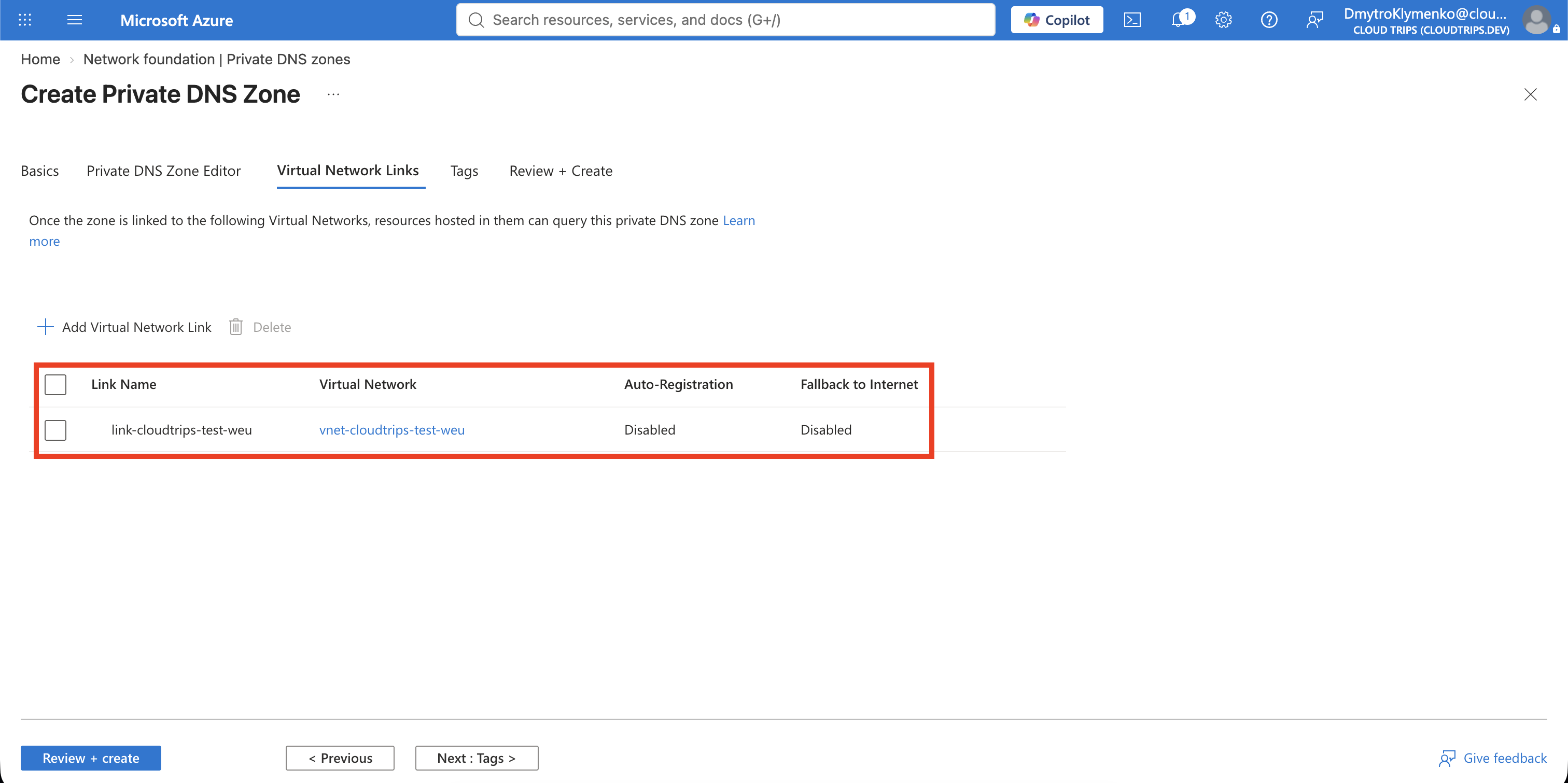
Inside internal.cloudtrips.dev, open Settings > Virtual network links
and select + Add. Configure:
Link name: link-cloudtrips-test-weu
Subscription: CloudTrips TEST
Virtual network: vnet-cloudtrips-test-weu
Enable auto registration: Cleared
Keep auto-registration disabled. This trip creates an intentional application record. Auto-registration is useful when Azure should create and remove VM records automatically, but it can add names for every supported VM in the linked VNet and is not required for Private Endpoint zones.
Select OK and wait until the link status is Completed.
The equivalent CLI command first reads the VNet resource ID and then creates the link:
VNET_ID=$(az network vnet show \
  --resource-group rg-cloudtrips-network-test-weu \
  --name vnet-cloudtrips-test-weu \
  --query id \
  --output tsv)

az network private-dns link vnet create \
  --resource-group rg-cloudtrips-network-test-weu \
  --zone-name internal.cloudtrips.dev \
  --name link-cloudtrips-test-weu \
  --virtual-network "$VNET_ID" \
  --registration-enabled false
Create the Private A Record
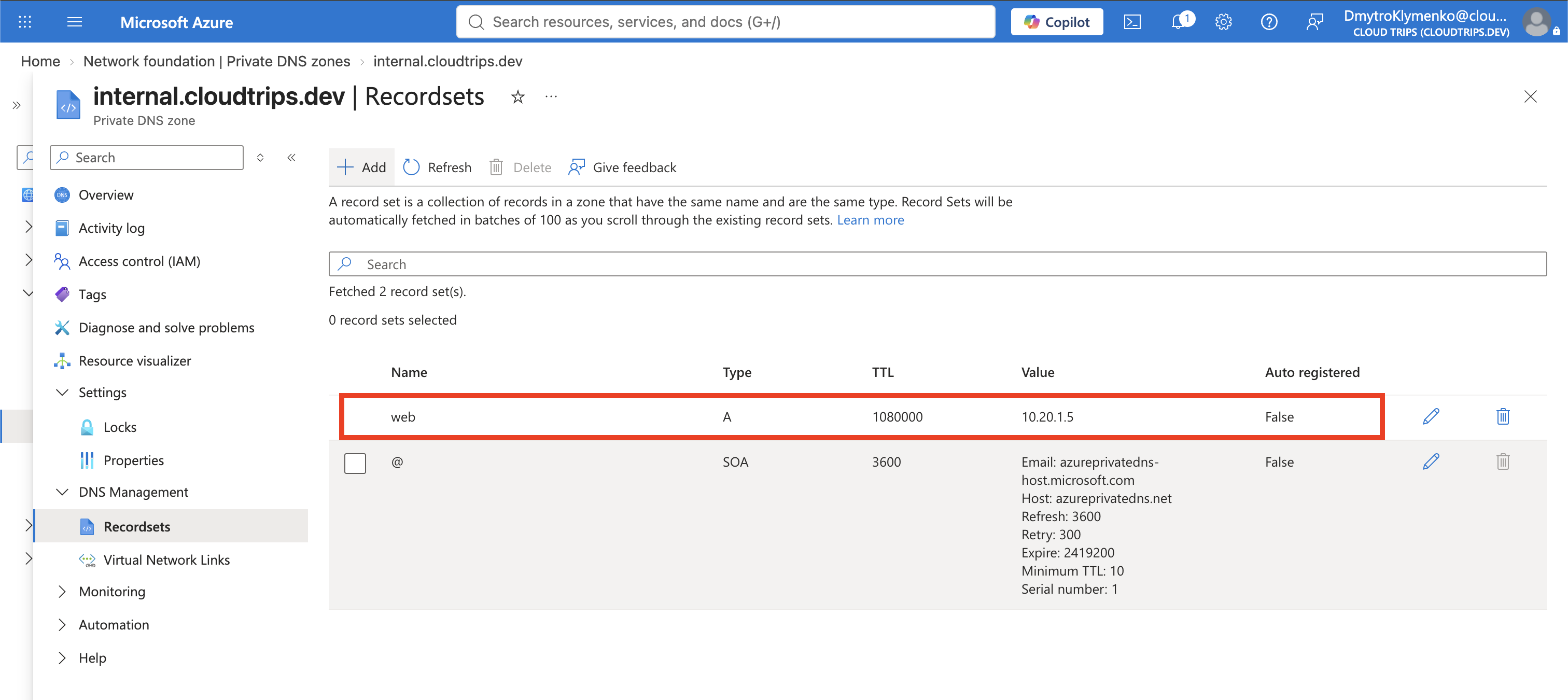
Return to the zone overview and select + Record set. Configure:
Name: web
Type: A
TTL: 300
IP address: the WEB01_IP value retrieved earlier
Select OK. The complete name is
web.internal.cloudtrips.dev; the answer is WEB01’s private IP.
Create the same record with CLI:
az network private-dns record-set a create \
  --resource-group rg-cloudtrips-network-test-weu \
  --zone-name internal.cloudtrips.dev \
  --name web \
  --ttl 300

az network private-dns record-set a add-record \
  --resource-group rg-cloudtrips-network-test-weu \
  --zone-name internal.cloudtrips.dev \
  --record-set-name web \
  --ipv4-address "$WEB01_IP"
Use either the portal steps or the CLI commands, not both, to avoid trying to create the same resources twice.
Verify Resolution from the Linked VNet
Your Mac is outside the linked VNet, so running dig locally is not a valid
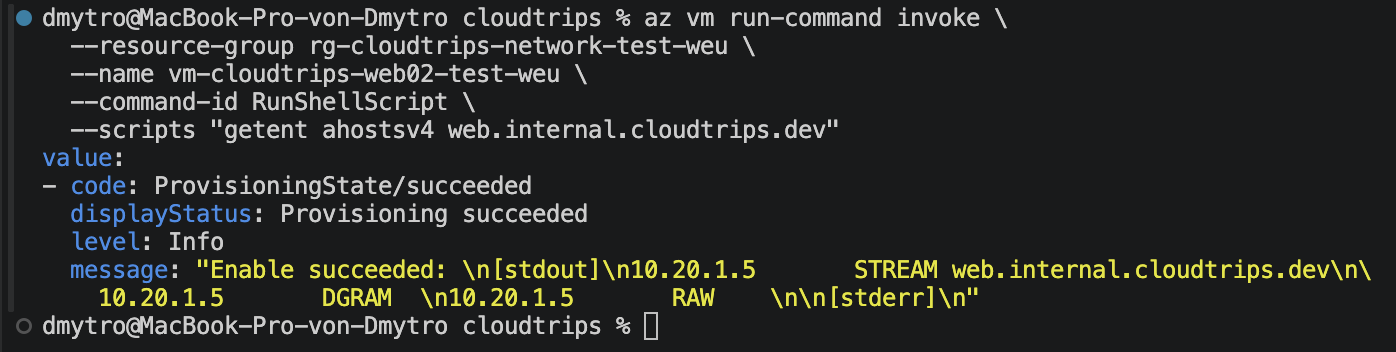
test. Run the lookup on WEB02 with Azure VM Run Command:
az vm run-command invoke \
  --resource-group rg-cloudtrips-network-test-weu \
  --name vm-cloudtrips-web02-test-weu \
  --command-id RunShellScript \
  --scripts "getent ahostsv4 web.internal.cloudtrips.dev"
The output should contain the value stored in WEB01_IP.
Now prove that the name is useful for the application, not only DNS:
az vm run-command invoke \
  --resource-group rg-cloudtrips-network-test-weu \
  --name vm-cloudtrips-web02-test-weu \
  --command-id RunShellScript \
  --scripts "curl --silent --show-error http://web.internal.cloudtrips.dev/"
The response should contain:
CloudTrips response from WEB01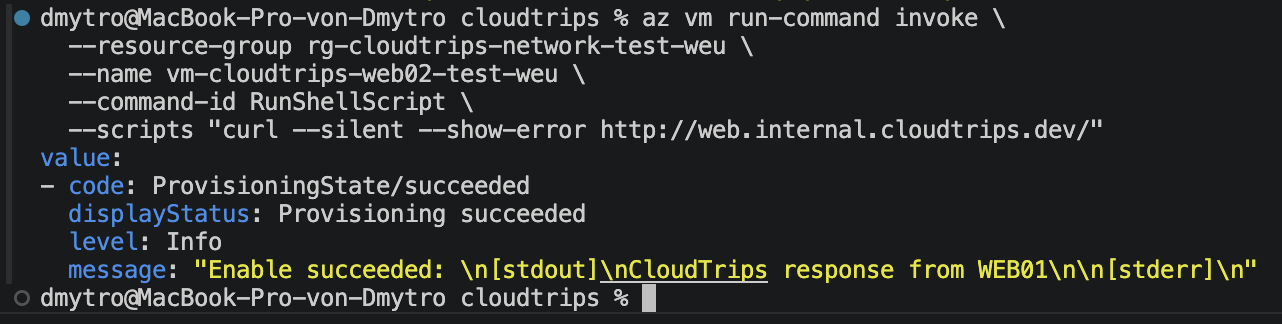
This result proves three separate things: WEB02 can see the linked private
zone, the web record resolves to WEB01, and network policy permits HTTP from
WEB02 to WEB01. DNS resolution alone does not guarantee that the connection is
allowed.
Confirm That the Name Is Private
From your Mac, run:
dig web.internal.cloudtrips.dev A +shortNo public answer is expected. That is the intended security boundary, not an error: the Private DNS zone is available through Azure-provided DNS only to linked VNets and connected networks with an appropriate DNS forwarding design.

Keep or Remove the Private DNS Lab
Keep the zone, VNet link, and record for later Private Endpoint and hybrid DNS trips. The zone itself does not expose WEB01 publicly.
If you want to remove only this lab, delete the VNet link first and then delete
internal.cloudtrips.dev. Do not delete the VNet or the virtual machines,
because other networking trips use them.
az network private-dns link vnet delete \
  --resource-group rg-cloudtrips-network-test-weu \
  --zone-name internal.cloudtrips.dev \
  --name link-cloudtrips-test-weu \
  --yes

az network private-dns zone delete \
  --resource-group rg-cloudtrips-network-test-weu \
  --name internal.cloudtrips.dev \
  --yes