Global Branch Network Needs a Hub? Create Virtual WAN
CloudTrips has built a hub VNet manually, but operating gateways, peerings, routes, and hubs separately becomes difficult when an enterprise adds many branches and Azure regions.
WAN stands for Wide Area Network: a network that connects locations across cities, countries, or regions. Azure Virtual WAN is a managed networking service for connecting Azure VNets, branch networks, remote users, and ExpressRoute circuits through Microsoft-managed hubs. A virtual hub is a regional managed VNet with a built-in router. Unlike the normal CloudTrips hub VNet, its router can provide transitive connectivity between connected spokes.
This trip creates a temporary Standard Virtual WAN, one virtual hub, and two test VNets in different regions. It verifies that the hub learns both VNet prefixes. It does not require a physical branch, VPN device, ExpressRoute provider, Azure Firewall, or VM.
This trip builds on: Spoke Networks Need a Central Hub? Configure a Hub-Spoke Network.
Compare the Two Hub Models
The existing CloudTrips hub is customer-managed:
Normal hub VNet
  -> you create the VNet, peerings, gateway, routes, and shared services
  -> spoke-to-spoke routing is not automatic
The new lab uses a Microsoft-managed hub:
Standard Virtual WAN
  -> Microsoft manages the virtual hub and router
  -> connected VNets propagate routes through the hub
  -> multiple regional hubs can form a managed global transit network
The Virtual WAN resource is the global container. Each virtual hub still belongs to one Azure region. A global design normally creates hubs in the regions where branches and workloads need connectivity.
Plan the Temporary Lab
Use a dedicated resource group so every billable lab resource can be removed together:
Resource group: rg-cloudtrips-vwan-test-weu
Virtual WAN: vwan-cloudtrips-test
Virtual WAN type: Standard

Virtual hub: vhub-cloudtrips-test-weu
Hub region: West Europe
Hub private address space: 10.70.0.0/23

West Europe VNet: vnet-cloudtrips-vwan-app-test-weu
Address space: 10.71.0.0/16
Subnet: snet-workload (10.71.1.0/24)

North Europe VNet: vnet-cloudtrips-vwan-services-test-neu
Address space: 10.72.0.0/16
Subnet: snet-workload (10.72.1.0/24)
None of these ranges overlaps the existing CloudTrips networks. The /23 hub
range reserves 512 addresses for Microsoft-managed hub infrastructure and
future gateway or security services. You do not create subnets inside a
Virtual WAN hub yourself.
A virtual hub is billed after it is created, even when it contains no VPN or ExpressRoute gateway. Complete the verification and cleanup in the same lab session.
Create the Standard Virtual WAN
Search the Azure portal for Virtual WANs, open the service, and select Create.
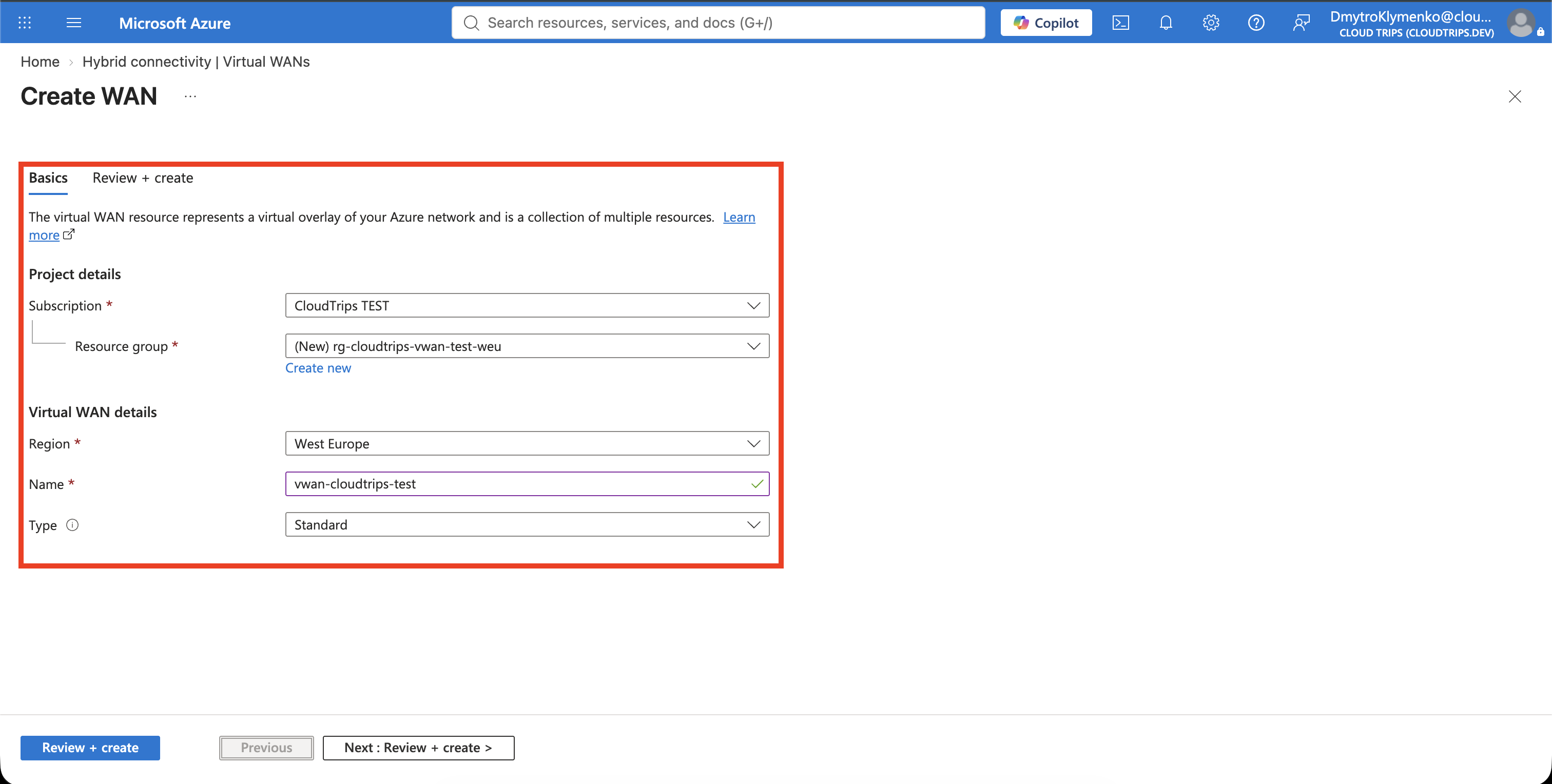
On Basics, configure:
Subscription: CloudTrips TEST
Resource group: Create new - rg-cloudtrips-vwan-test-weu
Resource group location: West Europe
Name: vwan-cloudtrips-test
Type: Standard
Use Standard because Basic supports only site-to-site VPN scenarios. Standard provides VNet-to-VNet transit and the managed routing required by this exercise. A Standard Virtual WAN can be upgraded with more connectivity services later, but it cannot be downgraded to Basic.
Select Review + create, and then select Create.
Create the Managed Virtual Hub
Open vwan-cloudtrips-test, select Connectivity > Hubs, and select
New Hub.
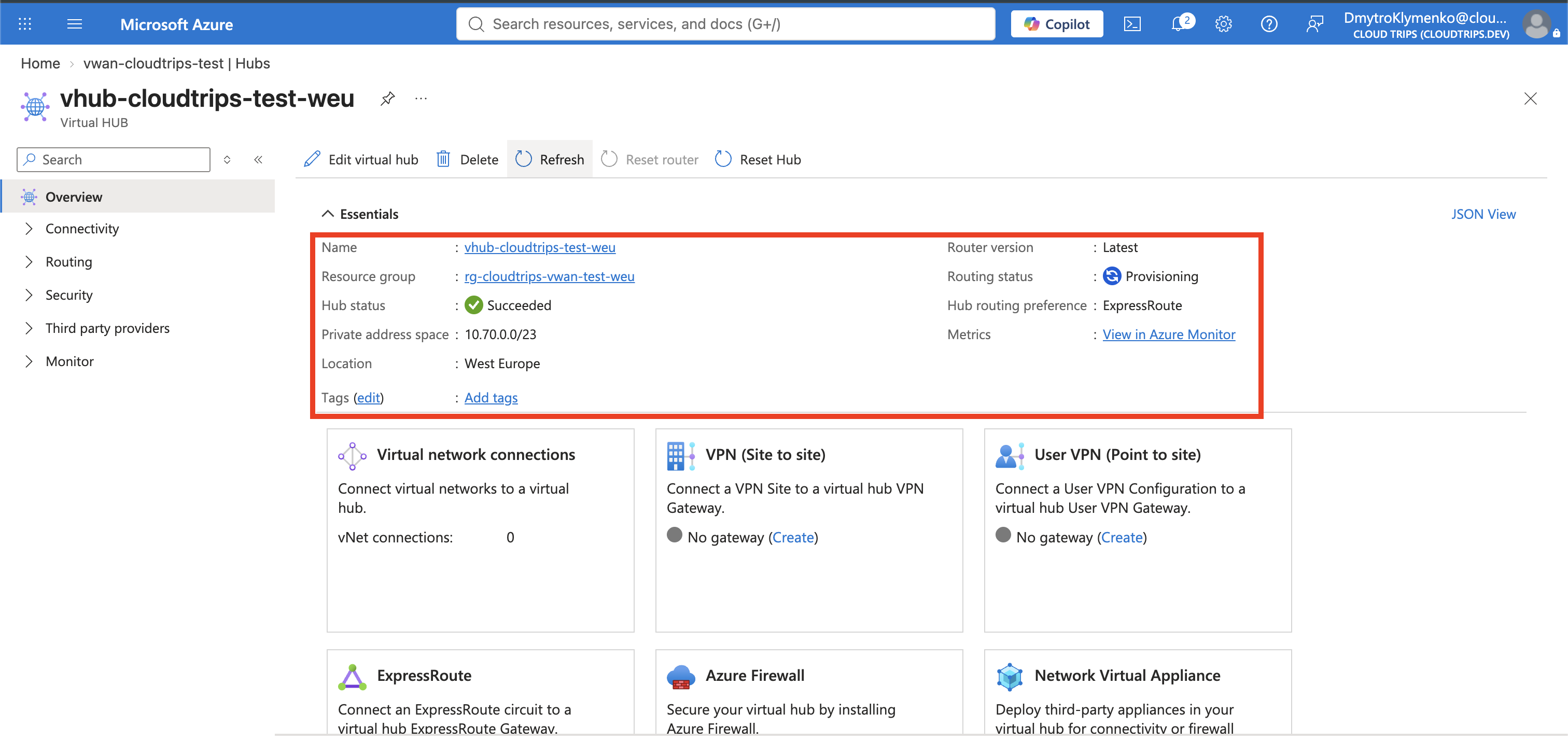
On Basics, configure:
Region: West Europe
Name: vhub-cloudtrips-test-weu
Hub private address space: 10.70.0.0/23
Virtual hub capacity: Keep the smallest available capacity
Hub routing preference: ExpressRoute
Leave Hub routing preference set to ExpressRoute. This setting is only a route-selection rule: if the hub later learns the same company-network prefix through both ExpressRoute and VPN, it prefers the ExpressRoute path. It does not create or require an ExpressRoute connection in this trip.
Do not configure site-to-site VPN, point-to-site VPN, ExpressRoute, Azure Firewall, or a partner network appliance. Create the empty hub and wait until its provisioning and routing states are ready. Hub provisioning can take several minutes.
Create Two Temporary Spoke VNets
Use Cloud Shell to create two VNets without gateways, Route Server, peerings, or workloads:
az network vnet create \
  --resource-group rg-cloudtrips-vwan-test-weu \
  --name vnet-cloudtrips-vwan-app-test-weu \
  --location westeurope \
  --address-prefixes 10.71.0.0/16 \
  --subnet-name snet-workload \
  --subnet-prefixes 10.71.1.0/24

az network vnet create \
  --resource-group rg-cloudtrips-vwan-test-weu \
  --name vnet-cloudtrips-vwan-services-test-neu \
  --location northeurope \
  --address-prefixes 10.72.0.0/16 \
  --subnet-name snet-workload \
  --subnet-prefixes 10.72.1.0/24
A VNet can connect to only one Virtual WAN hub, and a connected VNet cannot contain its own VPN gateway, ExpressRoute gateway, or Route Server. This lab therefore uses two new, empty VNets instead of changing the peerings, routes, or workloads in the existing CloudTrips networks. The test VNets can be safely deleted afterward.
Connect Both VNets to the Hub
Open vwan-cloudtrips-test and select Connectivity > Virtual network
connections > Add connection.
Create the first connection:
Connection name: conn-vhub-to-vwan-app-test-weu
Hubs: vhub-cloudtrips-test-weu
Subscription: CloudTrips TEST
Resource group: rg-cloudtrips-vwan-test-weu
Virtual network: vnet-cloudtrips-vwan-app-test-weu
Propagate to none: No
Associate Route Table: defaultRouteTable
Propagate to labels: Default
Bypass Next Hop IP for workloads within this VNet: No
Do not add static routes. Add the connection, then repeat with:
Connection name: conn-vhub-to-vwan-services-test-neu
Virtual network: vnet-cloudtrips-vwan-services-test-neu
Keep the same default routing configuration. Wait until both connections show successful provisioning.
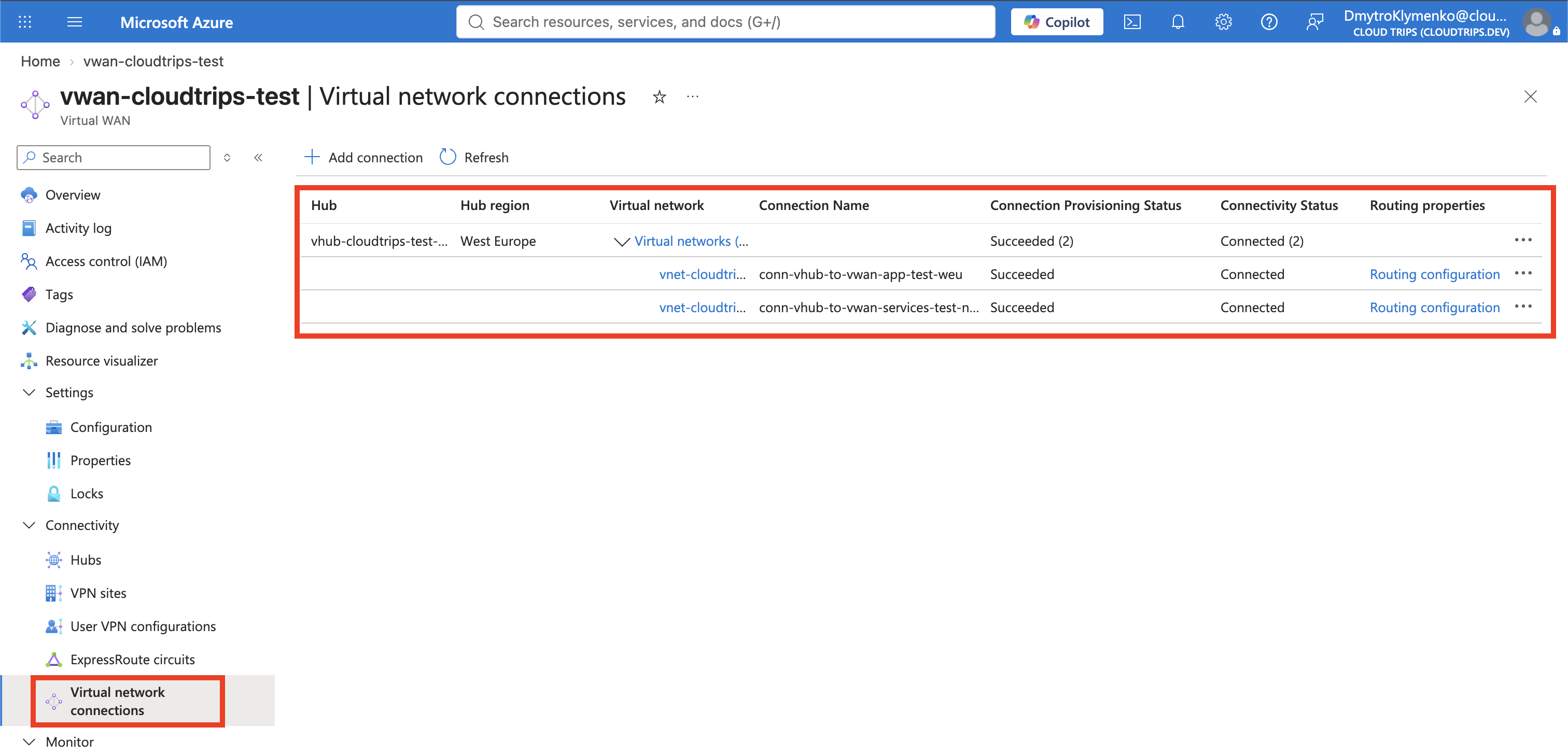
These connections are similar to peering, but the virtual hub router also provides transit. Each VNet advertises its prefix to the default hub route table and learns the other connected prefixes from that table.
Verify the Managed Routes
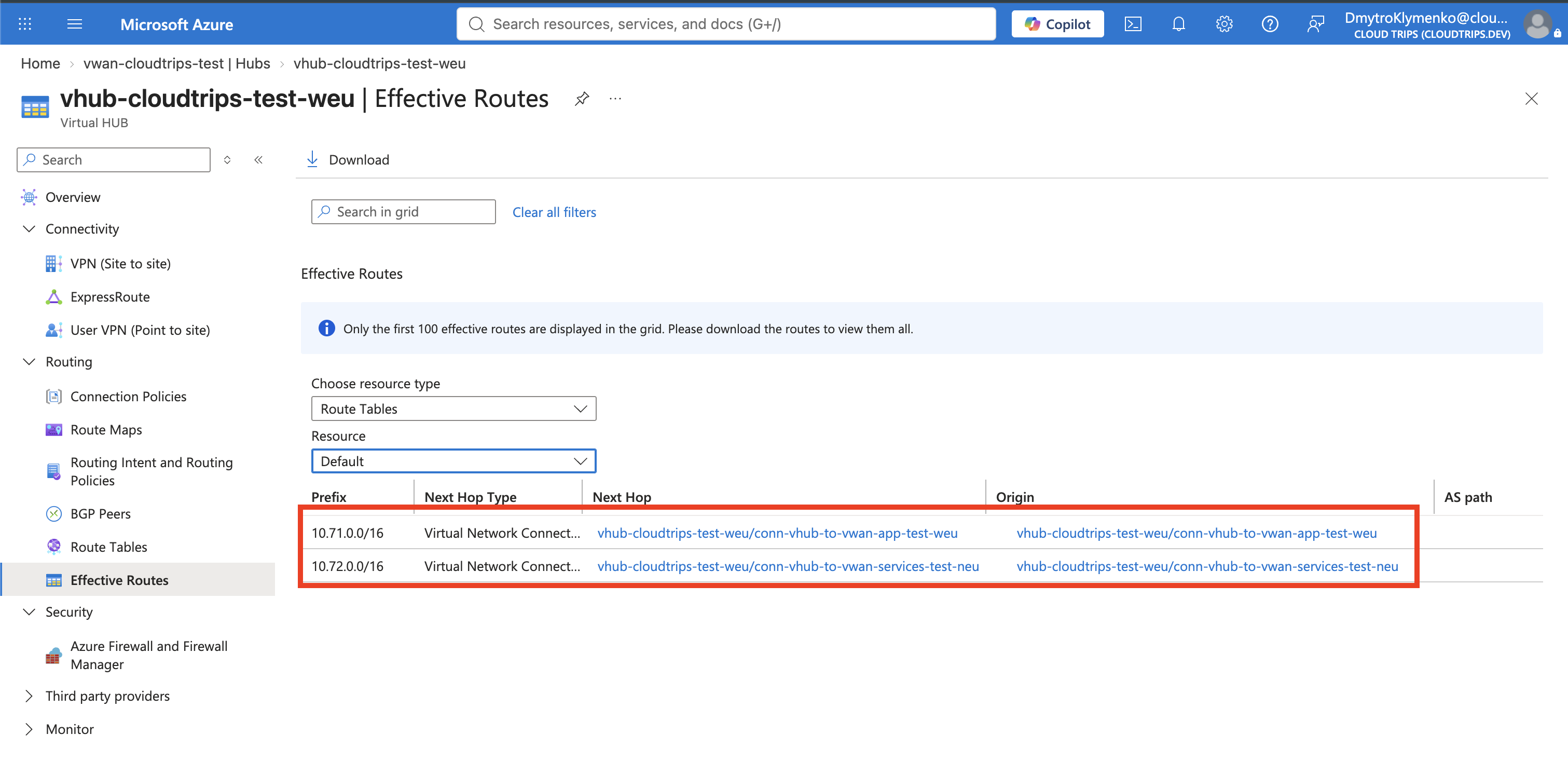
Open vhub-cloudtrips-test-weu, select Routing > Effective Routes, and
choose defaultRouteTable.
Confirm that the hub knows both prefixes:
10.71.0.0/16 -> Virtual Network Connection
10.72.0.0/16 -> Virtual Network Connection
The next-hop resources should identify the corresponding VNet connections. This proves that the managed hub router learned both spokes without a custom route table or direct peering between the VNets.
No VMs were deployed, so the trip verifies route propagation rather than an application connection. A real deployment must still test traffic and account for NSGs, firewalls, DNS, and application listeners.
Remove the Billable Lab
In vwan-cloudtrips-test, open Virtual network connections and delete both
connections. Remove connections from the Virtual WAN page rather than from the
individual VNet pages.
After both connections are gone, delete vhub-cloudtrips-test-weu, then delete
vwan-cloudtrips-test. Finally, open
rg-cloudtrips-vwan-test-weu, select Delete resource group, enter the exact
resource-group name, and confirm the deletion.
Deleting the dedicated resource group also removes the two temporary VNets.
It does not affect the existing CloudTrips hub-spoke or VPN Gateway resources,
which live in rg-cloudtrips-network-test-weu.