A Web App Needs OWASP Protection? Enable WAF
The CloudTrips Application Gateway can route and rewrite HTTP requests, but the Standard_v2 tier does not inspect them for common web attacks. A malicious request can therefore reach the application unless the application detects it itself.
Enable Azure Web Application Firewall (WAF) so Application Gateway inspects Layer 7 requests before forwarding them to the private web VMs. Use Azure’s managed Default Rule Set to detect common patterns such as SQL injection and cross-site scripting.
OWASP stands for Open Worldwide Application Security Project. It is the community behind widely used guidance about web-application risks. Azure’s managed rules cover OWASP Top 10 attack types and add Microsoft threat intelligence. WAF reduces exposure to common attacks; it does not replace secure application code, authentication, patching, or testing.
This trip depends on Headers and URLs Need Modification? Configure Application Gateway Rewrite Rules. Keep
agw-cloudtrips-web-test-weu, its public IP, both private web VMs, and the working routing and rewrite configuration.
WAF_v2 is more expensive than Standard_v2 and remains billable while the Application Gateway is provisioned. Complete the Application Gateway labs together and remove the gateway when the sequence is finished.
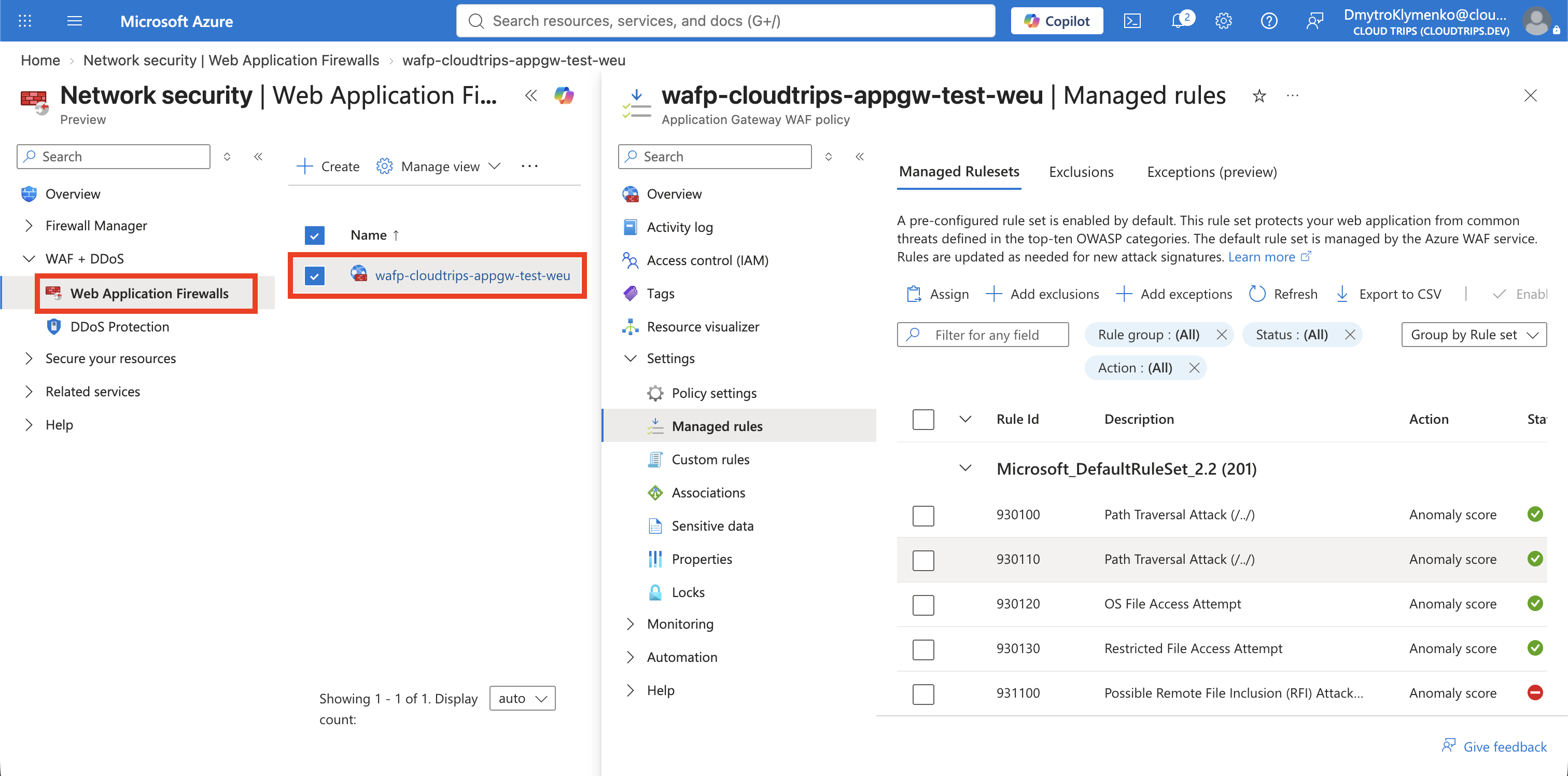
Create a WAF Policy
Search for Web Application Firewall policies and select Create. On Basics, configure:
Policy for: Regional WAF (Application Gateway and Application Gateway for Containers)
Subscription: CloudTrips TEST
Resource group: rg-cloudtrips-network-test-weu
Policy name: wafp-cloudtrips-appgw-test-weu
Region: West Europe
The current portal uses one Regional WAF option for both classic Application
Gateway and Application Gateway for Containers. Select that combined option.
If the portal warns that OWASP rulesets and
Microsoft_DefaultRuleSet_2.2 are unavailable for Application Gateway for
Containers, continue: this lab associates the policy with the classic
agw-cloudtrips-web-test-weu WAF_v2 resource, where DRS 2.2 is supported.
On Policy settings, set:
Policy state: Enabled
Policy mode: Prevention
Request body inspection: Enabled
In Detection mode, matching requests are logged but continue to the
backend. Prevention mode is required for this trip because a request that
reaches the blocking threshold must be stopped with HTTP 403 Forbidden.
Select the Managed Rules
Open Managed rules. Use the newest supported Azure-managed rule set:
Rule set type: Microsoft Default Rule Set
Rule set version: 2.2
The portal may display this as DRS 2.2. DRS means Default Rule Set. It contains managed protections for SQL injection, cross-site scripting, protocol violations, remote file inclusion, and other common web threats.
Leave the managed rule groups enabled and do not create exclusions for this lab. Exclusions should be added only after logs prove that a specific safe application value causes a false positive.
On Association, do not add an association yet. Create the policy first. In the next step, select this policy directly from the Application Gateway’s Web application firewall page while changing the tier to WAF_v2.
Select Review + create > Create.
Upgrade the Gateway and Select the Policy
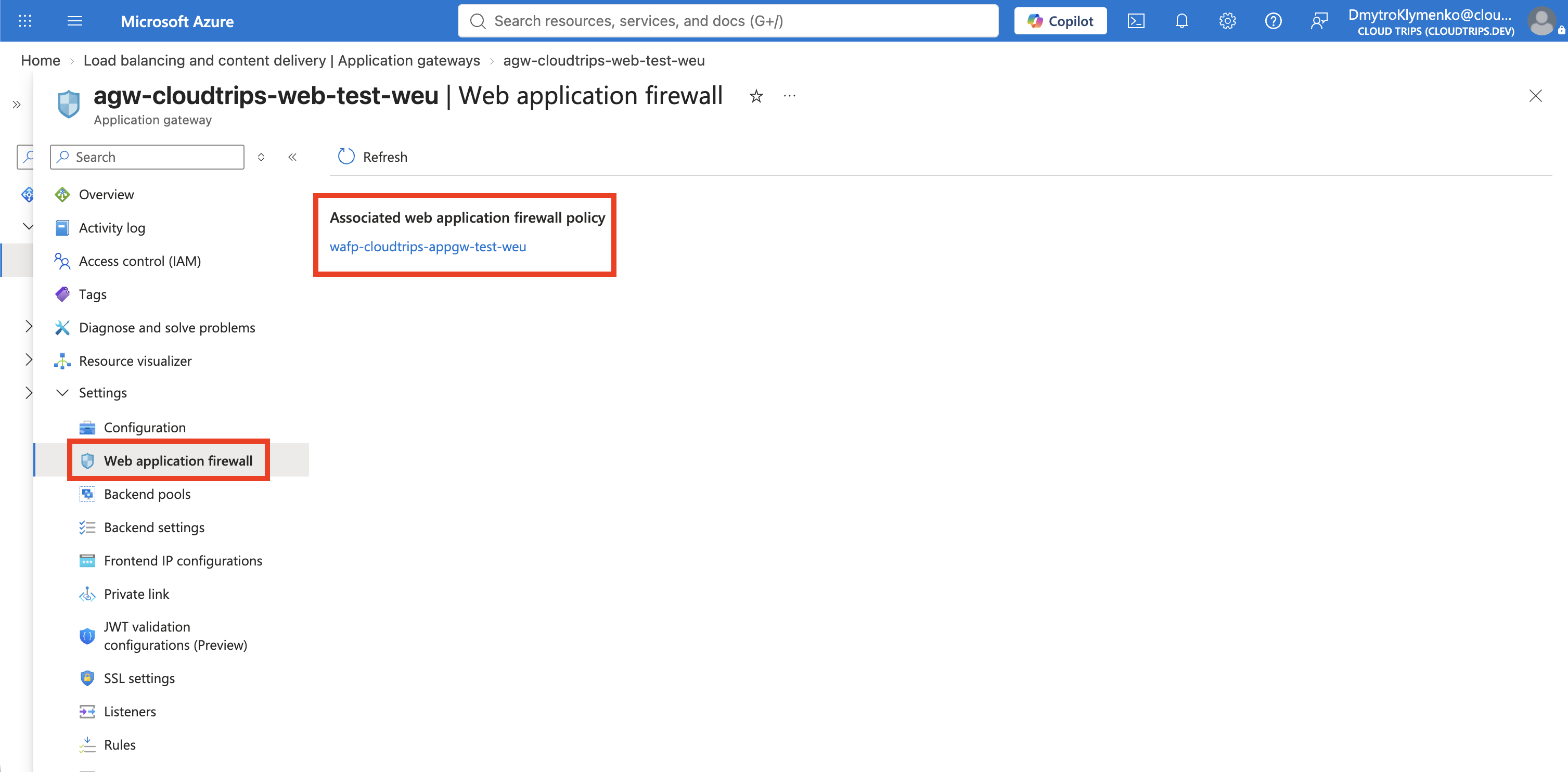
Open agw-cloudtrips-web-test-weu and select Settings > Web application
firewall. Under Configure, set:
Tier: WAF V2
WAF policy: wafp-cloudtrips-appgw-test-weu
Select the existing policy before selecting Save. Azure must change the tier and associate the WAF policy in the same update. Changing only the tier under Configuration fails with Direct WAF configuration on Application Gateway has been retired, because new WAF_v2 deployments can no longer use the legacy inline WAF configuration.
Select Save and wait until the provisioning state returns to
Succeeded. The policy is associated globally and protects every active
listener and path rule on the gateway, including /, /images/*, and
/api/*.
This update does not replace the public IP, listeners, routing rules, rewrite set, backend pools, or backend settings.
Confirm Normal Traffic Still Works
Retrieve the existing public IP if it is no longer stored in your shell:
APPGW_IP=$(az network public-ip show \
  --resource-group rg-cloudtrips-network-test-weu \
  --name pip-cloudtrips-appgw-test-weu \
  --query ipAddress \
  --output tsv)
Send a normal request through the gateway:
curl --include "http://${APPGW_IP}/api/health"The request should still return HTTP 200, the CloudTrips health JSON, and
the response header created in the previous trip:
HTTP/1.1 200 OK
X-CloudTrips-Gateway: ApplicationGateway

{"service":"CloudTrips API","status":"healthy","backend":"WEB02"}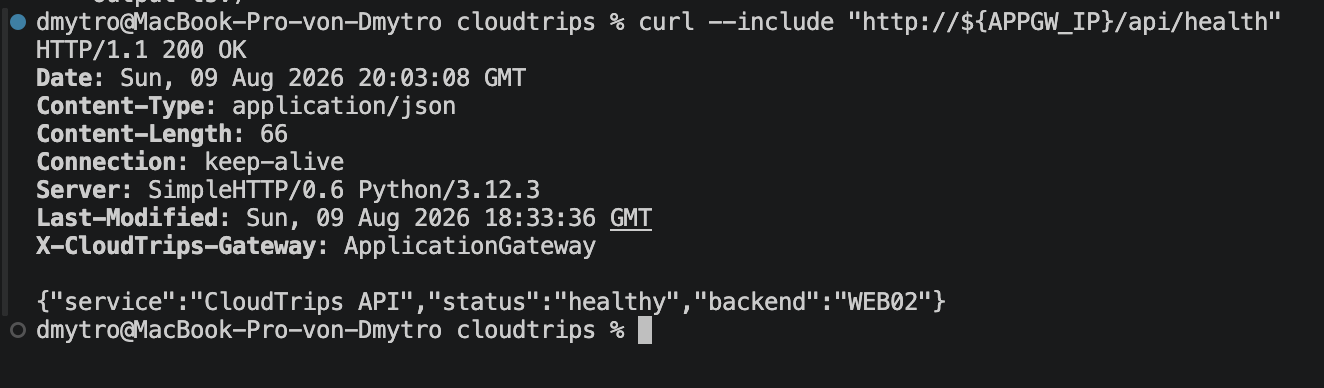
Send a Harmless SQL-Injection Test Pattern
Now send text that resembles a classic SQL-injection attempt in a query parameter. The string is only test input; it does not execute SQL on the static Python backend:
curl --include \
  "http://${APPGW_IP}/?search=%27%20OR%201%3D1--"
The decoded query value is ' OR 1=1--. Managed SQL-injection rules recognize
this pattern. In Prevention mode, the response should be:
HTTP/1.1 403 ForbiddenThe request stops at Application Gateway and is not sent to either VM. If the policy was just associated, allow a minute for the configuration to propagate and test again.
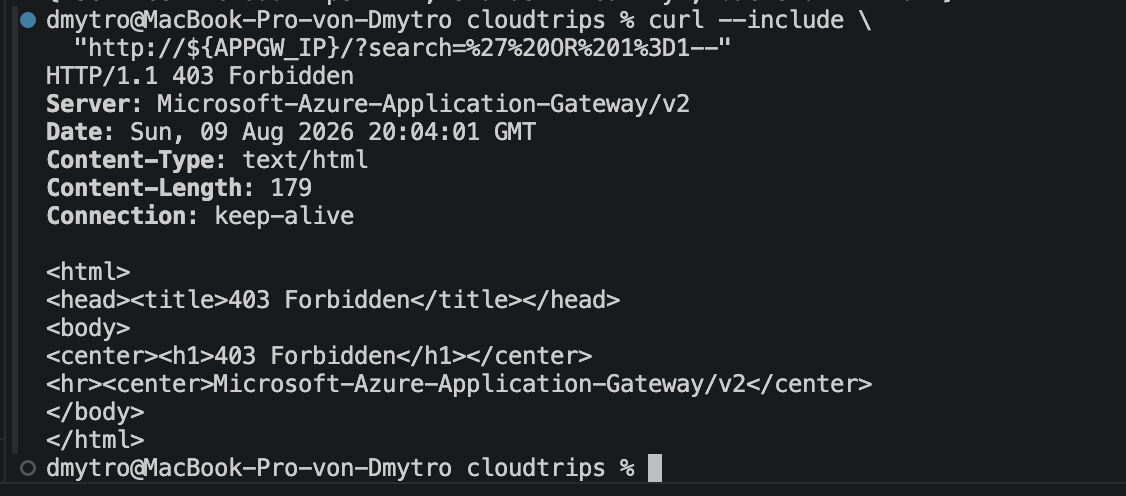
The two tests separate availability from protection: normal API traffic still reaches the correct backend, while a request matching a managed attack pattern is rejected before the backend connection is opened.
Keep the WAF-enabled Application Gateway and its backends when continuing with the following web traffic-management trips. If the lab sequence is finished, delete the Application Gateway and then its public IP to stop their charges. The WAF policy itself does not process or bill for traffic after it is no longer associated with a gateway.