Static Website Needs Cheap Browser Hosting? Enable Static Website and Configure CORS
CloudTrips needs inexpensive hosting for HTML, CSS, and browser JavaScript
without a web server. Azure Storage can serve files from a special $web
container and charges only for stored data, operations, and network transfer.
This trip also demonstrates CORS (Cross-Origin Resource Sharing). A browser normally prevents JavaScript loaded from one origin from reading a response from another origin. The server’s CORS response headers can explicitly permit that access.
Azure Storage CORS does not apply to the static-website endpoint itself.
Here, the page is served by the website endpoint and its JavaScript requests
data.json from the separate Blob service endpoint. The CORS rule belongs to
that Blob service:
Static website origin (.web.*)
  └─ browser fetch
       └─ Blob service origin (.blob.core.windows.net)
            └─ CORS rule permits the website origin
Create the Storage Account
Search for Storage accounts, select Create, and enter:
Subscription: CloudTrips TEST
Resource group: Create new → rg-cloudtrips-staticweb-test-weu
Storage account name: stctstaticdmytrotestweu
Region: West Europe
Primary service: Azure Blob Storage or Azure Data Lake Storage Gen2
Performance: Standard
Redundancy: Locally-redundant storage (LRS)
Keep Hierarchical namespace: Disabled. On Security, enable Allow enabling anonymous access on individual containers because the browser must read the small demonstration JSON blob without credentials. Create the account.
Enable Static Website Hosting
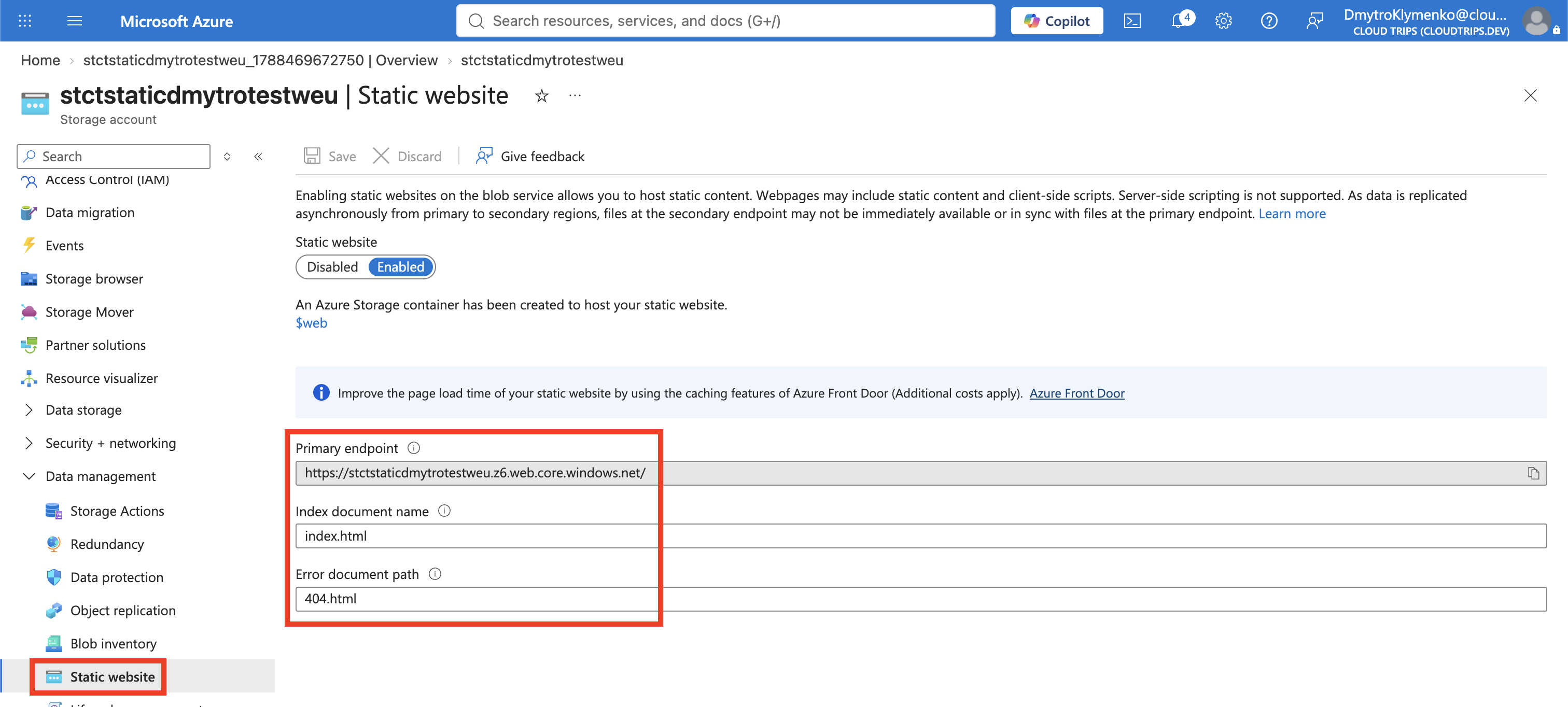
Open the account and select Data management > Static website. Choose:
Static website: Enabled
Index document name: index.html
Error document path: 404.html
Save the configuration. Azure creates the special $web container and displays
a Primary endpoint. Copy the complete HTTPS endpoint; it is the public URL
and the origin needed by the CORS rule.
Static website files are anonymously readable through this website endpoint
even if the $web container appears private in the Blob interface. Static
hosting has no server-side code, authentication, or custom response-header
configuration.
Upload the Website
The ready-to-use files are in:
examples/static-website-cors/Open Data storage > Containers > $web and upload:
index.html
404.html
File names and paths are case-sensitive. If a different storage-account name is
used, replace stctstaticdmytrotestweu in index.html before uploading it.
Create the Browser Data Container
Under Containers, create:
Name: browser-data
Anonymous access level: Blob (anonymous read access for blobs only)
Upload examples/static-website-cors/data.json to this container. Only the
blobs are public; anonymous users cannot list the container. Public access is
used solely to keep this CORS lab small—production data should use an
appropriate authorization design.
Configure Blob Service CORS
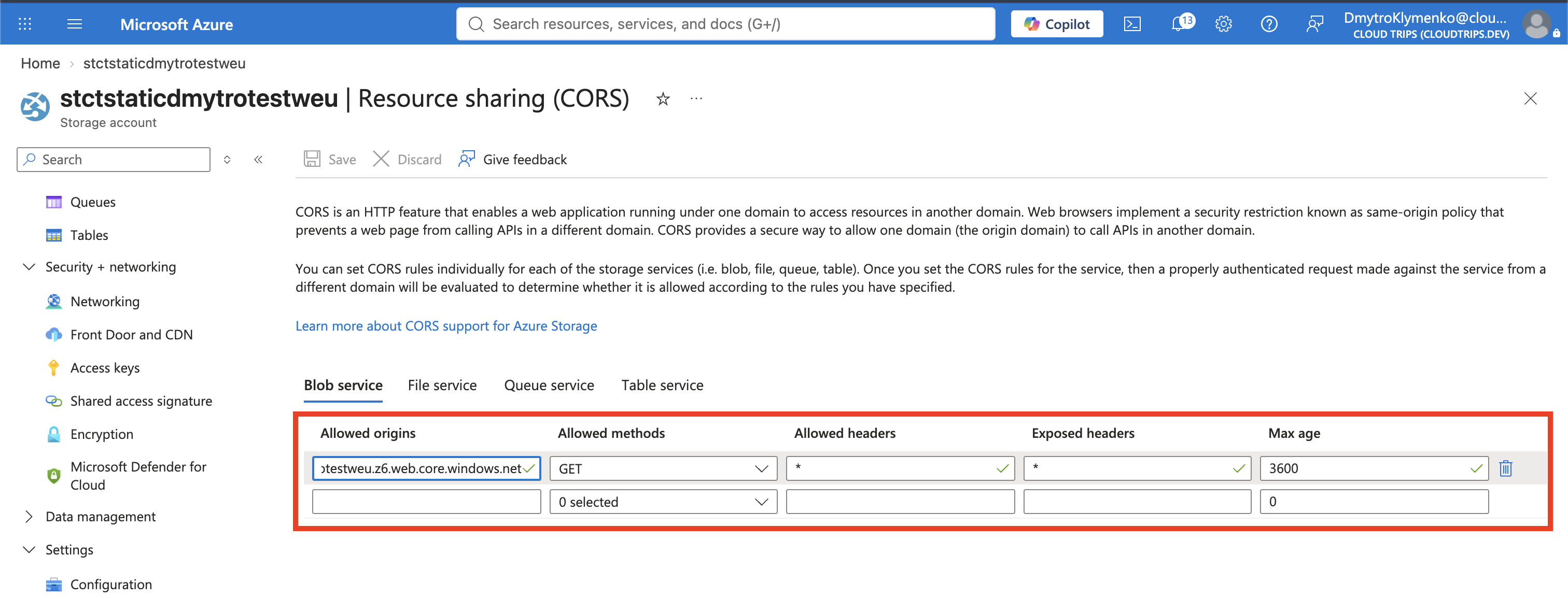
Open Settings > Resource sharing (CORS). In the Blob service section, add one rule:
Allowed origins: <STATIC_WEBSITE_PRIMARY_ENDPOINT_WITHOUT_TRAILING_SLASH>
Allowed methods: GET, HEAD, OPTIONS
Allowed headers: *
Exposed headers: Content-Type
Max age: 3600
For example, if the primary endpoint is
https://stctstaticdmytrotestweu.z6.web.core.windows.net/, enter the origin as:
https://stctstaticdmytrotestweu.z6.web.core.windows.netUse the exact endpoint shown in the portal because its zone identifier can
differ. Do not use * for Allowed origins: naming one origin prevents every
unrelated website from receiving permission through this rule. Save.
Test the Website and CORS Request
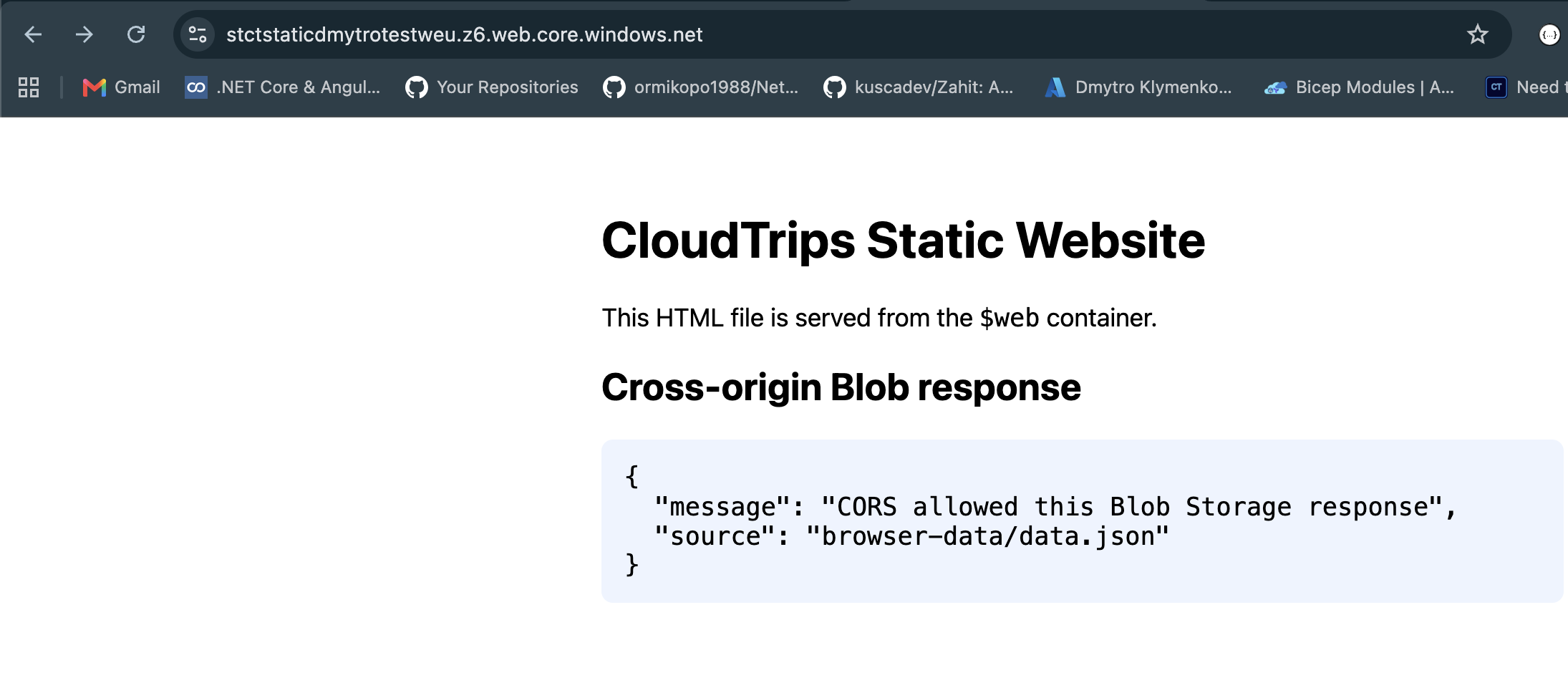
Open the static website’s Primary endpoint in a new browser tab. The page should show:
{
  "message": "CORS allowed this Blob Storage response",
  "source": "browser-data/data.json"
}
This proves two separate operations succeeded: Azure served index.html from
$web, and the browser was allowed to expose the cross-origin Blob response to
the page’s JavaScript.
Optionally confirm the CORS response header in the local terminal. Substitute the exact website origin copied from the portal:
curl --silent --dump-header - --output /dev/null \
  --header 'Origin: <STATIC_WEBSITE_ORIGIN>' \
  'https://stctstaticdmytrotestweu.blob.core.windows.net/browser-data/data.json'
The response should include Access-Control-Allow-Origin with the same website
origin. CORS is enforced by browsers; it is not authentication, encryption, or
a firewall, and tools such as curl do not block a response merely because a
CORS header is absent.
Clean Up
Disable Static website if the account is retained; the website endpoint remains publicly readable while the feature is enabled. For this standalone lab, delete the resource group:
az group delete \
  --name rg-cloudtrips-staticweb-test-weu \
  --yes
Confirm that it is gone:
az group exists --name rg-cloudtrips-staticweb-test-weuExpected result: false.