Remote Worker Needs Private Azure Access? Configure a Point-to-Site VPN
A remote CloudTrips worker needs access to private Azure resources but is not connected to a company office network. A site-to-site VPN cannot solve this scenario without an office router or another VPN device.
A point-to-site (P2S) VPN creates an encrypted connection from one client computer—the point—to an Azure VNet—the site. The worker starts the connection in Azure VPN Client and authenticates with a Microsoft Entra account. No datacenter or company VPN appliance is required.
This trip builds on: Private Azure Access Needs a VPN Endpoint? Create a VPN Gateway.
Plan the Client Connection
Use:
VPN gateway: vng-cloudtrips-hub-test-weu
Client address pool: 172.30.0.0/24
Tunnel type: OpenVPN (SSL)
Authentication type: Microsoft Entra ID
Azure VPN Client audience: c632b3df-fb67-4d84-bdcf-b95ad541b5c8
The client address pool is not an Azure subnet. Azure assigns one address from
this range to each connected VPN client. It must not overlap any CloudTrips
VNet or the local network from which the laptop connects. If your current
network already uses 172.30.0.0/24, select another unused private range.
Before continuing, confirm that vng-cloudtrips-hub-test-weu shows
Provisioning state: Succeeded and that peer-app-to-hub is configured to
use the hub’s remote gateway.
Find the Tenant ID
In the Azure portal, open Microsoft Entra ID > Overview and copy the Tenant ID. The tenant ID identifies the CloudTrips Microsoft Entra directory; it is not a client secret.
Use it to construct:
Tenant: https://login.microsoftonline.com/<your-tenant-id>
Issuer: https://sts.windows.net/<your-tenant-id>/
The trailing / on the Issuer value is required.
Configure Point-to-Site Access
Open vng-cloudtrips-hub-test-weu and select Settings > Point-to-site
configuration > Configure now.
Configure:
Address pool: 172.30.0.0/24
Tunnel type: OpenVPN (SSL)
Authentication type: Microsoft Entra ID
Tenant: https://login.microsoftonline.com/<your-tenant-id>
Audience: c632b3df-fb67-4d84-bdcf-b95ad541b5c8
Issuer: https://sts.windows.net/<your-tenant-id>/
The Audience value identifies Microsoft’s registered Azure VPN Client. It is the same for Azure Public tenants and does not need an app registration created in the CloudTrips tenant.
The portal might still display Azure Active Directory instead of Microsoft Entra ID. They refer to the same authentication option here.
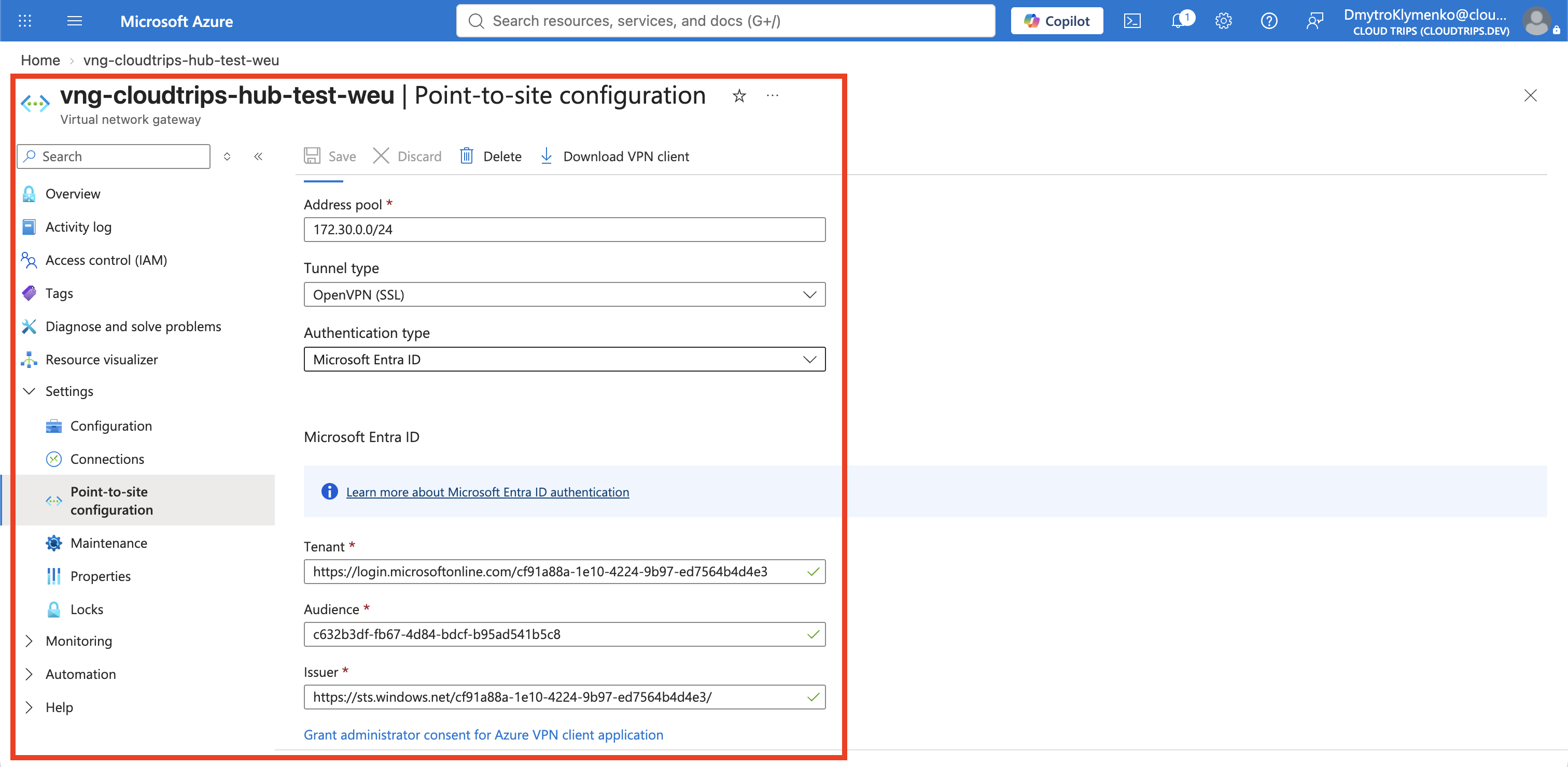
Select Save and wait for the update to complete.
Download the Client Profile
At the top of Point-to-site configuration, select Download VPN client. Azure can take several minutes to generate the package.
Extract the downloaded ZIP file and open its AzureVPN folder. It contains
azurevpnconfig.xml or azurevpnconfig_aad.xml. The file contains the gateway
and authentication settings that Azure VPN Client needs; it does not contain
your Microsoft Entra password.
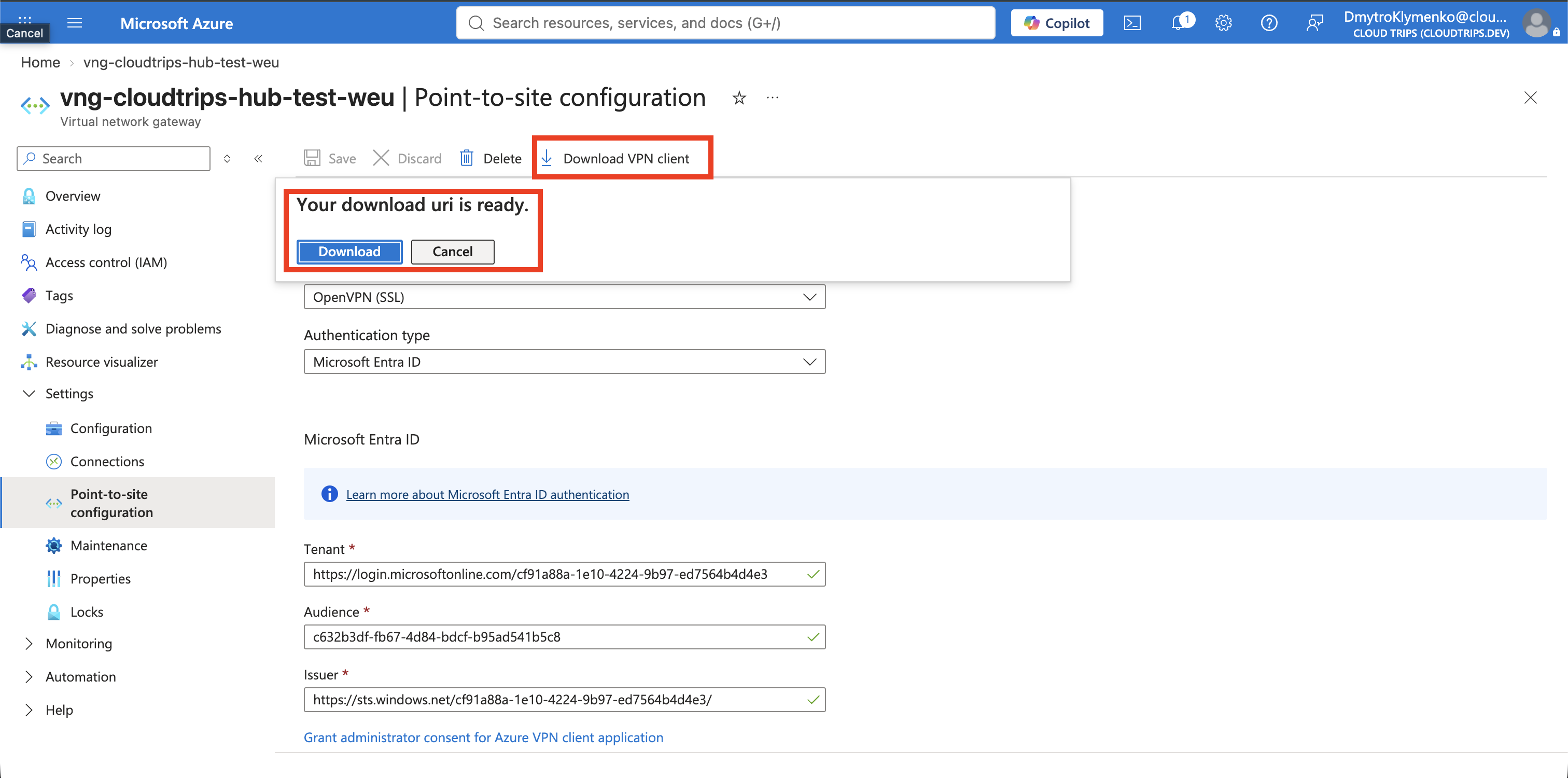
If the profile does not contain the routes to the CloudTrips spoke VNets, confirm gateway transit on the hub peerings and remote-gateway use on the spoke peerings, then download a new client package.
Install and Connect Azure VPN Client
Install Azure VPN Client from the Microsoft Store on Windows or the App Store on macOS. Cisco Secure Client is not used for this Microsoft Entra ID configuration.
Open Azure VPN Client and select + > Import. Select the XML file from
the extracted AzureVPN folder, keep the imported settings, and select
Save.
Select the new CloudTrips profile and then select Connect. Sign in with your CloudTrips Microsoft Entra account and complete MFA if requested.
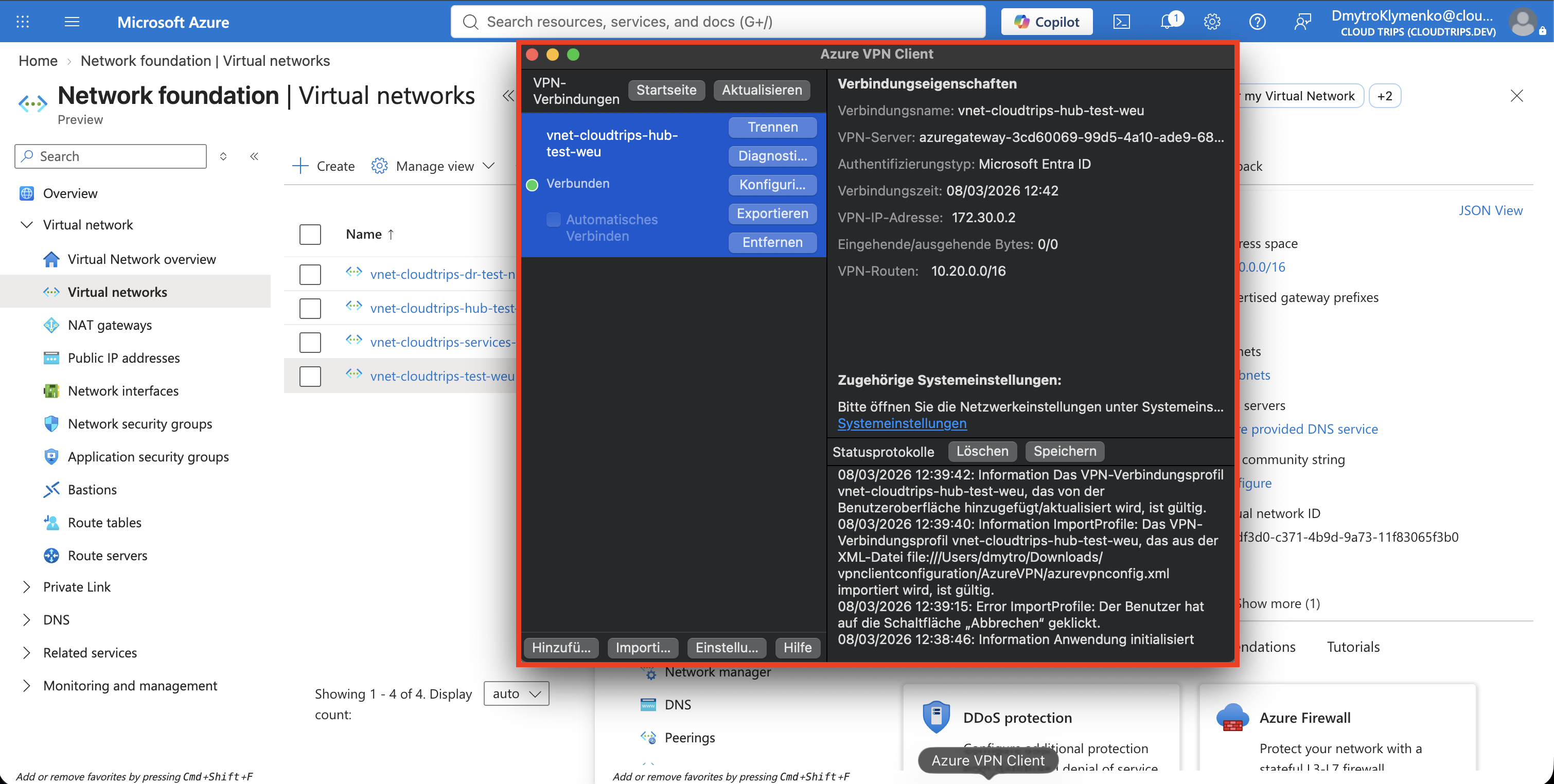
The client should show Connected and receive an address from
172.30.0.0/24. This proves that the laptop authenticated and established the
OpenVPN tunnel. The next step verifies access to a private workload.
Prepare a Temporary Private Test Service
The earlier NSG diagnostic trip deleted its temporary VM but preserved
nic-cloudtrips-vm-test-weu. That NIC is still a member of the application ASG
and still has an instance-level public IP. The earlier
Allow-HTTPS-Internet rule would therefore also permit Internet traffic to
TCP 443 and invalidate a VPN-only test.
Temporarily remove that rule before recreating or starting the service:
az network nsg rule delete \
  --resource-group rg-cloudtrips-network-test-weu \
  --nsg-name nsg-cloudtrips-app-test-weu \
  --name Allow-HTTPS-Internet

az network nsg rule list \
  --resource-group rg-cloudtrips-network-test-weu \
  --nsg-name nsg-cloudtrips-app-test-weu \
  --query "[?name=='Allow-HTTPS-Internet'].name" \
  --output tsv
The verification command must return no output. Do not start the temporary service until it does. Now recreate the VM briefly with the preserved NIC:
az vm create \
  --resource-group rg-cloudtrips-network-test-weu \
  --name vm-cloudtrips-nsg-test-weu \
  --location westeurope \
  --zone 3 \
  --nics nic-cloudtrips-vm-test-weu \
  --image Canonical:0001-com-ubuntu-server-jammy:22_04-lts-gen2:latest \
  --size Standard_D2s_v3 \
  --admin-username azureuser \
  --generate-ssh-keys \
  --os-disk-name osdisk-cloudtrips-nsg-test-weu \
  --os-disk-size-gb 30 \
  --storage-sku Standard_LRS \
  --os-disk-delete-option Delete \
  --nic-delete-option Detach
Allow the VPN client pool, then explicitly deny every other source on TCP 443 before the NSG’s default inbound rules are evaluated:
az network nsg rule create \
  --resource-group rg-cloudtrips-network-test-weu \
  --nsg-name nsg-cloudtrips-app-test-weu \
  --name Allow-HTTPS-P2S \
  --priority 110 \
  --direction Inbound \
  --access Allow \
  --protocol Tcp \
  --source-address-prefixes 172.30.0.0/24 \
  --source-port-ranges '*' \
  --destination-asgs asg-cloudtrips-app-test-weu \
  --destination-port-ranges 443

az network nsg rule create \
  --resource-group rg-cloudtrips-network-test-weu \
  --nsg-name nsg-cloudtrips-app-test-weu \
  --name Deny-HTTPS-NonP2S \
  --priority 120 \
  --direction Inbound \
  --access Deny \
  --protocol Tcp \
  --source-address-prefixes '*' \
  --source-port-ranges '*' \
  --destination-asgs asg-cloudtrips-app-test-weu \
  --destination-port-ranges 443
Because priority 110 is evaluated before priority 120, connected P2S clients can reach the service and all other sources are denied during this test window.
Start a temporary HTTP service on port 443 through Azure Run Command:
az vm run-command invoke \
  --resource-group rg-cloudtrips-network-test-weu \
  --name vm-cloudtrips-nsg-test-weu \
  --command-id RunShellScript \
  --scripts "systemd-run --unit=cloudtrips-p2s-test --property=Restart=always /usr/bin/python3 -m http.server 443 --directory /tmp"
This is a temporary plain-HTTP connectivity test on TCP 443, not a production HTTPS service.
Test the Private Connection
While Azure VPN Client shows Connected, run this command on the laptop—not in Cloud Shell:
VM_PRIVATE_IP=$(az vm list-ip-addresses \
  --resource-group rg-cloudtrips-network-test-weu \
  --name vm-cloudtrips-nsg-test-weu \
  --query '[0].virtualMachine.network.privateIpAddresses[0]' \
  --output tsv)

printf 'Private test address: %s\n' "$VM_PRIVATE_IP"
curl "http://${VM_PRIVATE_IP}:443"
The returned directory listing comes from the VM’s private IP. The request travels from the laptop through the point-to-site tunnel, the hub VPN gateway, and the hub-to-application peering. It does not use the VM’s public IP.
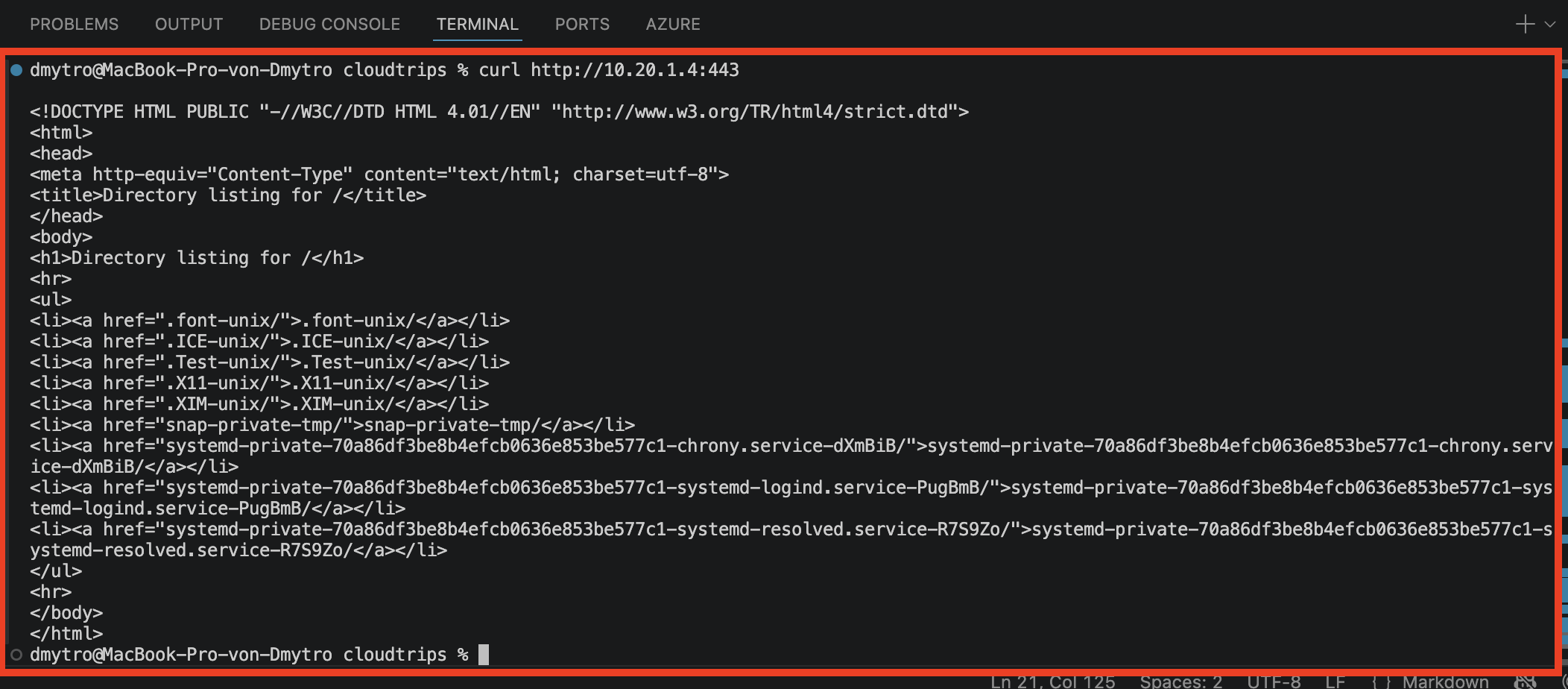
The retained screenshot shows 10.20.1.4, the address assigned during the
original capture. Use the queried value rather than assuming Azure assigned
the same dynamic private IP. If the VPN connects but the request fails,
confirm that the VM is running, VM_PRIVATE_IP is not empty, the test service
is active, the P2S NSG rule exists, and the laptop received the spoke routes
from the downloaded profile.
Remove the Temporary Compute
Disconnect Azure VPN Client, then delete the temporary VM before changing any NSG rule. Remove both test rules and recreate the earlier Internet rule that the later Load Balancer trip expects:
az vm delete \
  --resource-group rg-cloudtrips-network-test-weu \
  --name vm-cloudtrips-nsg-test-weu \
  --yes

az network nsg rule delete \
  --resource-group rg-cloudtrips-network-test-weu \
  --nsg-name nsg-cloudtrips-app-test-weu \
  --name Allow-HTTPS-P2S

az network nsg rule delete \
  --resource-group rg-cloudtrips-network-test-weu \
  --nsg-name nsg-cloudtrips-app-test-weu \
  --name Deny-HTTPS-NonP2S

az network nsg rule create \
  --resource-group rg-cloudtrips-network-test-weu \
  --nsg-name nsg-cloudtrips-app-test-weu \
  --name Allow-HTTPS-Internet \
  --priority 100 \
  --direction Inbound \
  --access Allow \
  --protocol Tcp \
  --source-address-prefixes Internet \
  --source-port-ranges '*' \
  --destination-asgs asg-cloudtrips-app-test-weu \
  --destination-port-ranges 443
The OS disk is deleted and the existing NIC is detached and preserved. The VPN
Gateway continues to incur charges until it is deleted, even when no client is
connected. TCP 443 was VPN-only only while the temporary service and the two
test rules existed; restoring Allow-HTTPS-Internet after deleting the VM
returns the sequential lab to the baseline required by the later trip.